Anil Salvi
 Contents
- 1 LinkedIn Prospecting– TOC
- 2 What is LinkedIn Prospecting?
- 3 How to Use LinkedIn For Sales Prospecting?
- 4 7 Proven LinkedIn Prospecting Strategies (+ Customizable Templates)
- 4.1 1. Combine LinkedIn Outreach with Cold Emailing
- 4.2 2. Set up a LinkedIn Outreach Sequence
- 4.3 3. Use Your Competitor’s Network & Activity
- 4.4 4. Use Intent Signals to Segment Your Target Audience
- 4.5 5. Use LinkedIn Referrals
- 4.6 6. Send Blank Connection Request
- 4.7 7. Leave Valuable Comments On LinkedIn Posts
- 5 Start LinkedIn Prospecting in 5 Minutes
- 6 FAQs on LinkedIn Prospecting
Be honest. How many times have you said this: “I haven’t had luck with LinkedIn?”
Well, I’ll go first… I’ve said that more times than I can count.
(Obviously, until I cracked the right LinkedIn prospecting approach that 2x my leads)
LinkedIn has a network of 1B+ professionals, which includes a huge number of CEOs, C-level executives, industry leaders, and decision-makers.
So, my question is: If LinkedIn isn’t the best platform for prospecting, then which is?
Well, I’ve been sitting on these LinkedIn prospect strategies for too long.
And now I think it’s time to reveal the secret!
In this guide, I’ll cover the following in detail:
- What is LinkedIn prospecting, and why does it matter?
- How to use LinkedIn for prospecting?
- LinkedIn prospecting templates and strategies that will help you bring in results
Let’s get started!
LinkedIn Prospecting– TOC
What is LinkedIn Prospecting?
LinkedIn prospecting is the process of identifying, connecting with, and engaging potential clients or leads on LinkedIn directly.
It’s not just about cold messages — it’s about building genuine relationships and positioning yourself as a trusted expert.
It involves →
- Creating high-value content to attract your ideal audience
- Engaging with prospects through comments and meaningful conversations
- Sending personalized connection requests and follow-ups
- Building targeted lead lists based on roles, industries, or intent
Who Should Use LinkedIn for Prospecting?
LinkedIn is a gold mine for landing high-ticket clients and decision-makers
Therefore, anyone looking to build a professional network or generate leads can use LinkedIn for prospecting.
But, if you really want me to specify, then LinkedIn is useful for:
- Sales professionals
- Outreach specialists
- Marketers
- Entrepreneurs
- Consultant
- Freelancers
- HR Professionals
- Students
How to Use LinkedIn For Sales Prospecting?
With over 900M professionals and decision-makers, LinkedIn isn’t just a social platform; in fact, it’s a goldmine for B2B sales.
But to convert connections into clients, you need more than just a profile.
Follow these 5 steps to successfully use LinkedIn for Sales Prospecting.
- Optimize Your LinkedIn Profile
- Post Value First Content on LinkedIn
- Choose the Methods for Identifying Prospects on LinkedIn
- Send Hyper-Personalized Messages
- Get Contact Data From LinkedIn
Let’s get into it!
1. Optimize Your LinkedIn Profile
LinkedIn is crowded. Period.
When I first started using LinkedIn for lead generation, many people told me it wouldn’t work.
They said the platform was already too crowded, and it would be impossible to stand out.
They weren’t wrong — it’s tough to stand out on LinkedIn.
But it’s definitely not impossible.
The first way in which you can actually use LinkedIn for prospecting is by turning your LinkedIn profile into a landing page.
Think about it: when your potential leads visit your profile, you have only got about 3 seconds to grab their attention.
So, you need to make every second count.
Below, I’ll break down how to optimize each section of your LinkedIn profile to turn it into a lead-generation machine.
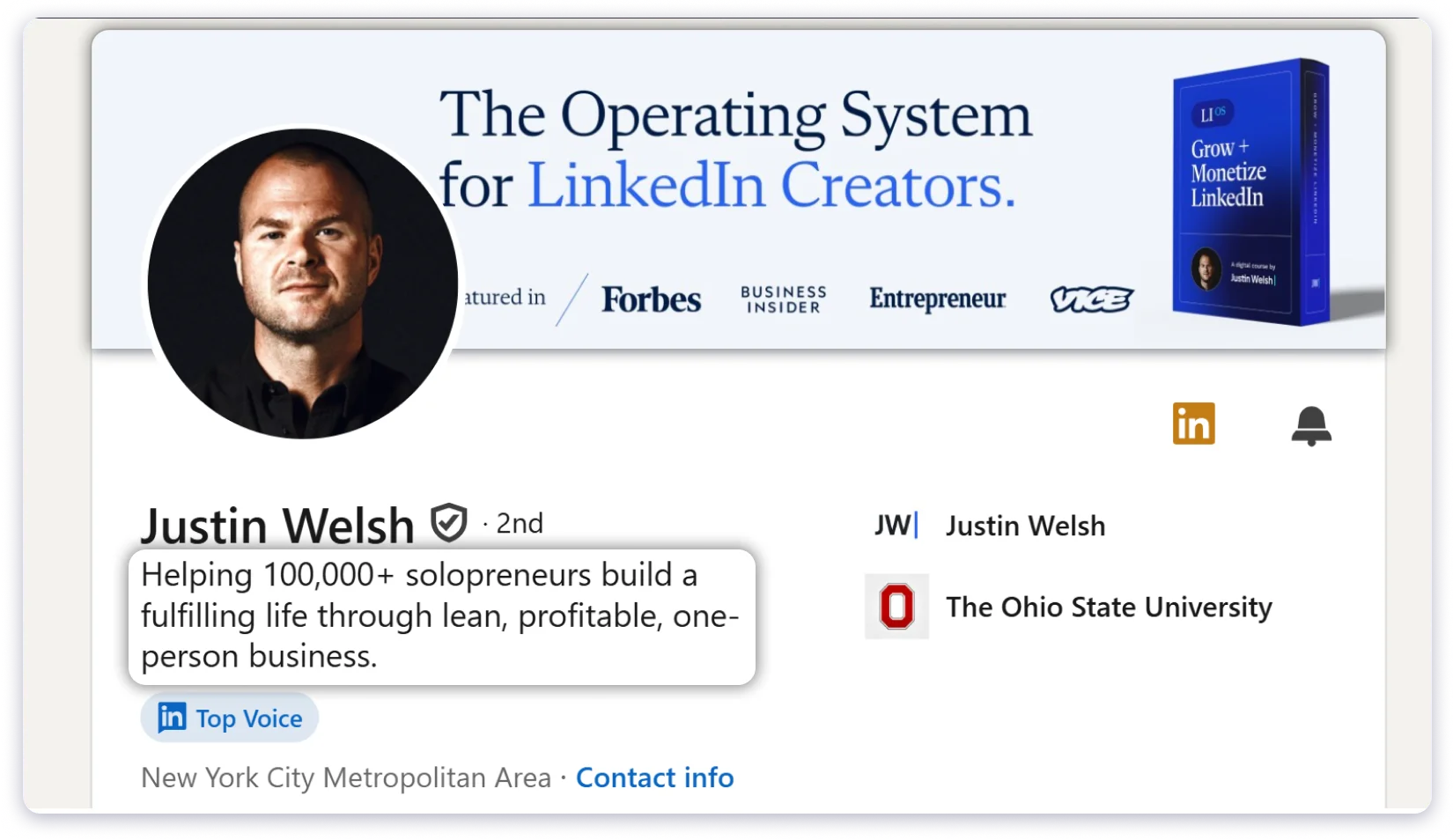
Banner Section
(i) Image
Your banner image is more than just a matter of aesthetics.
It’s the first thing that catches the attention of your prospects, and you can use it to leave a lasting impression.
Hence, it should convey a strong value statement.
Instead of just writing “Outbound Outreach” or “B2B Lead Generation,” use the “problem + solution + proof” framework to craft a one-liner that will make an impact at a glance.
For instance:
“Land Your B2B Client With Targeted Outbound Strategies”
(ii) Headline
Next up is your headline!
When writing your LinkedIn headline, focus on the specific pain point you solve for your clients and what results you can deliver to them.
For example, instead of simply writing “Outbound Outreach Consultant,” try:
“Sending 4M+ cold outreach messages monthly. Signing up 500+ users per week and generating $ 200K+ in closed revenue for my clients.”
This approach directly addresses the pain points of your target audience, increasing your connection request acceptance and page view rates.
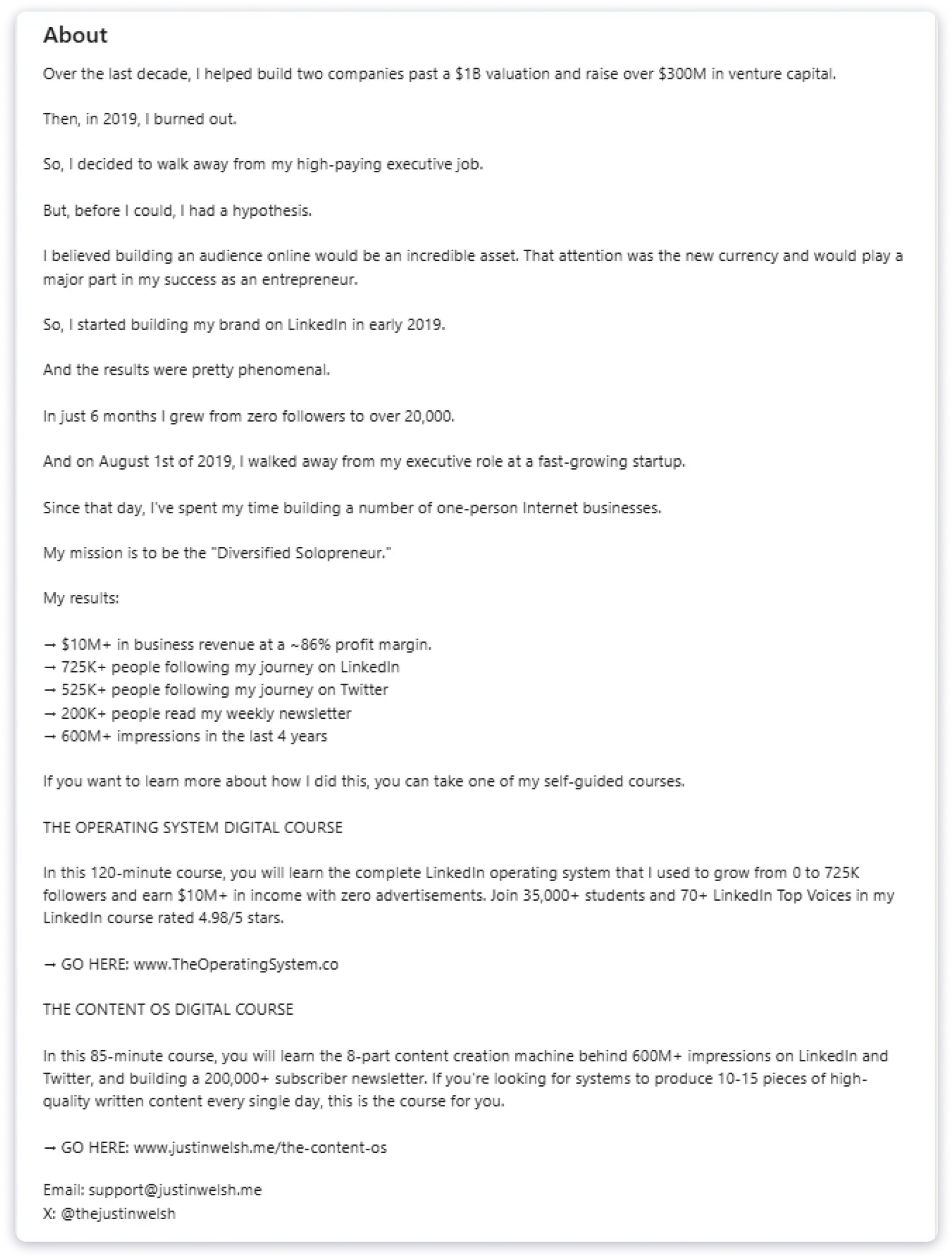
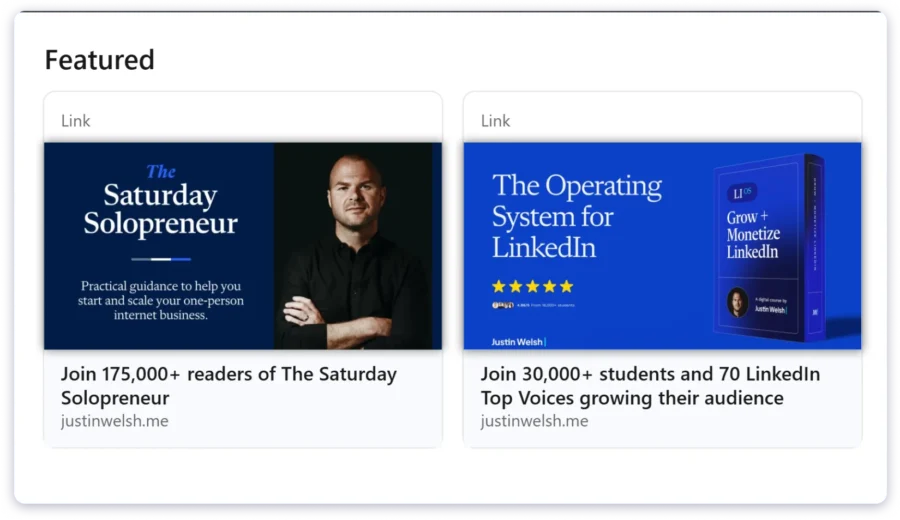
P.S. I’m a big fan of Justin Welsh’s LinkedIn profile. I’ll be sharing a few sections from it so you can get some inspiration too!
About Section
After going through your banner section, your prospects will scroll towards your “About Section”.
So let’s talk about optimizing it as well!
Most people will use it to list their achievements, but that’s not the correct thing to do!
I mean, do write about it as well, but don’t exceed more than 2-3 lines.
Then, clearly write what you do, how you can help, what sets you apart, and the results you have delivered.
💡PS: Don’t forget to include your social links, portfolio, and a link to a recent case study where you delivered high-quality results.
Feature section
One of the most common trends I’ve noticed on LinkedIn is that people put their most viral posts in the “Featured” section.
This is a mistake because you’re missing an opportunity to present a strong lead magnet.
Instead, you should be showcasing case studies to attract more prospects.
It’s great to show social proof, but don’t just randomly place testimonials in this section.
Here’s a simple formula to create impactful case study posts for LinkedIn:
- Start with the problem your prospects face. For example, low response rates.
- Show them the solution: We used hyper-personalized icebreakers to engage prospects.
- Back it up with results with proper timeframes: After implementing this strategy, their response rates increased by 30% in 20 days.
Here is how it will look →
This Lead Generation Agency was struggling with response rates as low as 5%.”
We implemented hyper-personalized icebreakers and targeted outreach to engage prospects more effectively.
In just 30 days, response rates increased by 30%, leading to 150 calls booked, 10 deals closed, and $12,000 in new revenue.
Lastly, include a key insight — what was the one thing that drove these results?
When prospects see 2-4 case studies structured like this, they can’t help but reach out.
2. Post Value First Content on LinkedIn
Another way to use LinkedIn for prospecting is by creating high-quality content.
How?
Well, having the perfect profile means nothing if the right people aren’t seeing it. Plus, posting valuable content can help you build credibility and position yourself as a thought leader.
Now, you might be thinking, “I already post a lot about my journey, personal achievements, etc.”
These posts can get you views and engagement, but here’s the truth: your prospects don’t care about your journey.
Yes, I said it. And here’s another truth bomb:
Views & Engagement ≠ Leads
After analyzing over 3000 posts, I spotted a crazy pattern…
The posts that generated the most leads weren’t the ones with the highest likes and comments. They were the ones that psychologically triggered the audience. These posts made readers feel like they could achieve their goals or solve a pain point they were struggling with.
Still not sure what I mean? Let me show you an example:
Isn’t this post awesome?
💡Pro Tip: In your CTA, don’t just ask people to comment. Ask a specific question that sparks a conversation.
When potential clients see posts like this, with real numbers and results, they can picture the same success for themselves, and they won’t be able to resist reaching out to you.
One more thing: You don’t need to post 5 times a week. I know I’m probably offending some Digital Gurus here, but trust me – you can post 2-3 times a week and still get quality leads. The key is attracting the right prospects.
P.S.: Post on Tuesday, Wednesday, or Thursday between 9 AM – 11 AM (it’s the time when they start warming up for their day before they get into deep work)
PPS: Posting after 4 PM is a mere waste of time and effort.
3. Choose the Methods for Identifying Prospects on LinkedIn
You can also use LinkedIn to build a lead list with your best-fit prospects.
However, when it comes to building a lead list from LinkedIn or reaching out to prospects on LinkedIn, the first thing you need to do is identify your ICPs.
Here is how you can define your ICP →
- Will they benefit from your solution/offering
- What is their job role
- Do they have revenue or a budget to afford the product
Identifying your ICPs will help you know who to reach out to.
Recommended Read: How to Create ICP?
Once your ICP criteria are defined, it’s time to search for them on LinkedIn.
To find prospects, LinkedIn offers two types of searches: →
a.) Boolean Search
Boolean search is about creating search filters to exactly find what you need and avoid irrelevant results in the search bar.
Here are the connectors you can use to custom filter codes:
- AND – You use this when you want to find results that include both words. For example, if you’re looking for posts about “sales AND marketing,” you’ll get results that mention both words.
- OR – You use this when you want to find results that have either word. For example, “sales OR marketing” will show you results for either “sales” or “marketing” or both.
- NOT – You use this to exclude certain words. For example, “sales NOT marketing” will show you results that mention “sales” but exclude anything related to “marketing.”
- Quotation Marks – If you want to find an exact phrase, use quotation marks. For example, searching for “email marketing” will only give you results that contain that exact phrase, not just the two words separately.
- Parentheses () – You can combine these operators with parentheses to organize more complex searches. For example, (sales OR marketing) AND strategy will give you results about either sales or marketing, but only if the word “strategy” is also included.
Furthermore, you can narrow down the search results with other filters available on LinkedIn.
b.) LinkedIn Sales Navigator
Sales Navigator is a built-in tool provided by LinkedIn that gives you more advanced filters and search options to find more targeted leads.
With this, you can gain deeper insights into your prospects, such as company growth trends and who is active on LinkedIn.
Summary?
If you’re just starting out, Boolean Search might be enough to get the ball rolling. But as you grow and scale your outreach, LinkedIn Sales Navigator should be your best bet.
💡Pro Tip: Keep your ICP clear criteria and refine them based on the outreach metrics you collect. Move, iterate, and optimize your strategy accordingly. The more you learn about what works, the better you can target the right people.
4. Send Hyper-Personalized Messages
Another way to use LinkedIn for prospecting is by sending hyper-personalized messages.
You see, generic messages are easy to spot, and most people just ignore them. But when you personalize your message and make it about them, not just about you, you’re much more likely to get a response.
So, how do you send hyper-personalized messages on LinkedIn?
It’s all about showing that you know about your prospects.
Don’t just say, “Hey, I wanted to connect.”
I mean, get over this too generic opening line!
Instead, mention something specific that shows you know who they are, what they do, or what they care about.
Here are some of the messages that I usually send out:
a.) Mention their recent post or activity
If they’ve posted something or shared an article, use it as a reference in your message.
It shows you’re paying attention and not just reaching them out of the blue.
Example:
“Hey [Name], I saw your post on [topic] and totally agree with your point about [specific detail]. It really got me thinking about how we could tackle that challenge in a different way!”
PS: This message has worked 80% of the time for me.
b.) Talk about mutual connections or interests
If you have come across a shared interest or know a common connection, mention it in the message!
This will give them a sense of familiarity and prompt them to respond.
Example:
“Hey [Name], I noticed we both know [Mutual Connection]. I’ve worked with them in the past, and I’d love to connect with you and discuss [shared interest].”
c.) Customize based on their job or company
If you know something about their company or role, bring it into the conversation.
For instance, if they lead a sales team, you can appreciate them for achieving their revenue goals and then subtly highlight the pain points associated with their job role.
Example:
“Hey [Name], I saw that you’re leading [specific department] at [Company Name]. It’s exciting to see how you’re scaling operations there. I’d love to chat about how we’ve helped similar companies streamline their processes!”
d.) Add value from the start
Always try to add value in your messages. You share valuable resources, such as quick tips, PDFs, eBooks, or interesting ideas.
Example:
“Hey [Name], I noticed that [specific challenge or goal they have]. I’ve worked with companies facing similar issues and thought I’d share this resource that helped them overcome that challenge.”
💡Note: Keep your LinkedIn messages short, personalized, and highly relevant
5. Get Contact Data From LinkedIn
Do you know that LinkedIn prospecting can support your cold outreach efforts?
How?
You can use LinkedIn to gather contact information for your prospects.
But manually copying data from LinkedIn can be a hassle.
That’s where the LinkedIn Prospecting tools come in!
These LinkedIn prospecting extensions can help you quickly extract contact information, such as email addresses and phone numbers.
Along with other information, such as job titles and company details, you can use this to personalize your emails or calls.
However, another challenge you’ll face is choosing the right LinkedIn prospecting tool.
As the market is filled with them.
Well, I will recommend Saleshandy’s LinkedIn Chrome Extension.
Why is it my go-to tool for LinkedIn prospecting →
- It will display only accurate contact information
- Monthly credit rollovers are available
- Displays A-grade email addresses
💡Note: All the reputable LinkedIn prospecting tools adhere to the data privacy guidelines, which means they ONLY provide information that is available in the public domain.
Recommended Read: How to Find Someone’s Email On LinkedIn
7 Proven LinkedIn Prospecting Strategies (+ Customizable Templates)
With the right LinkedIn prospecting strategies, you can 2x your chances of getting leads!
Yes, you read that right!
In this post, I’m sharing the exact LinkedIn lead generation strategies that have personally helped me close deals and grow my business.
- Combine LinkedIn Outreach with Cold Emailing
- Set up a LinkedIn Outreach Sequence
- Use Your Competitor’s Network & Activity
- Use Intent Signals to Segment Your Target Audience
- Use LinkedIn Referrals
- Send Blank Connection Request
- Leave Valuable Comments On LinkedIn Posts
Let’s get started!
1. Combine LinkedIn Outreach with Cold Emailing
LinkedIn is a goldmine for getting prospects.
But here’s the thing: LinkedIn is just one part of the puzzle.
If you really want to scale your lead generation, you need to combine these LinkedIn prospecting strategies with cold emailing and cold calling.
2. Set up a LinkedIn Outreach Sequence
One of the LinkedIn prospecting strategies that has worked well for me is reaching out to best-fit leads.
It helped me build connections and close deals.
Here’s how you can do it:
- Post on LinkedIn focusing on a specific client problem.
- Take a look at the people who have engaged with your post. Check out their recent activity to see if they’ve interacted with similar posts addressing the same pain point.
- Send them a connection request, mentioning the specific comment or engagement they made, and tie it back to their business.
Here’s a LinkedIn outreach sequence you can follow:
LinkedIn Outreach Initial Message
Hey [Name], noticed you [commented/liked] my post about [specific topic].
Saw you're [something specific about their business] – would love to connect and share more insights about [relevant topic] in our space.
I think you'd find a lot of value in some results we're getting right now.
Or
LinkedIn Outreach Initial Message
Have you tried cold email for lead generation?

By the way, I noticed you're based in London. I’m planning to visit soon.
Can you recommend any good places to check out?
Wait for 48 hours before sending any follow-up messages.
Don’t send messages instantly.
Why?
Well, if you send the message too early, you’ll sound desperate or salesy, and if you wait too long, they’ll forget about you.
Hence, use this time to engage with 1-2 of their recent posts to warm up the relationship. Let them see your name and face, and then send your follow-up.
LinkedIn Follow-up Message
Hey [Name], as promised, here's the exact framework we used to 10x our client's response rates [Insert specific resource].
I noticed you mentioned [something from their profile/posts] – this section specifically might help with that.
Let me know if you have any questions or if you'd like me to explain it.
Once they’ve engaged with your multi-threaded messages, you can subtly pitch your services.
3. Use Your Competitor’s Network & Activity
In this section, I’ll explain to you how to use LinkedIn to benefit from competitors’ networks and activity.
- Company Page Followers
If someone is following your competitor’s LinkedIn page, they’re already aware of the problem your product solves. It’s the initial start.
I usually check out the list of people following a competitor’s page, especially if they recently launched something or posted about a new feature.
These followers could be:
– Checking and evaluating multiple tools
– Keeping an eye on industry trends
– Just curious, but open to better solutions
Instead of going for a cold pitch, I try something connecting:
“Hey [First Name], I noticed you follow [Competitor]. I’m curious to know, are you exploring tools in this niche?”
Isn’t it simple? Right? No hard sell.
Just opening the door for a conversation. (Make it a light and easy approach)
It’s also a great way to prioritize outreach.
What if I’m low on time?
I always go after company page followers first; they’re more likely to engage. - Employee Connections (Especially from Their Sales & Marketing Profiles)
This one is gold.
Go to a competitor’s company page, click on ‘People’, and filter by departments like Sales, Marketing, or Business Development.
These people usually interact with potential buyers.
The process?
Here it is.
– Open a few salespeople’s profiles from the competitor
– Look at their “People also viewed” section
– Explore their likes, comments, and recent posts
– Check who’s interacting with them on product-related stuff
These profiles are a mini-goldmine.
Why?
You’ll find warm leads, decision-makers, or even companies currently in a buying cycle.
Also, if you’re targeting a similar ICP, chances are your competitor’s sales team is already doing the filtering for you.
You’re just making a smart move.
- Look at Mutual Connections
This is one of the easiest ways to build trust before you even send a message.
When I find a prospect who looks like a good fit, I always check to see who we both know.
Mutual connections help me answer two important questions:
– Can I use a warm intro instead of a cold pitch?
– Can I name-drop someone they trust?
Both options work really well if you know how to use them properly.
Here’s something I’ve actually used before:
“Hey [Name], I noticed we’re both connected to [Mutual Contact]. Are you currently exploring tools in the [category] category? I had a few ideas that might help you streamline things.”
It works better than going in cold because there’s already a thread of familiarity.
If you can’t get an intro, just mention the mutual contact in your message.
It adds instant context and works as an invisible layer of social proof. - Engage With Their Content
Before I message someone on LinkedIn, I first engage with their content and build familiarity, without asking for anything in return.
For example, here is what I do:
– Liking their posts
– Leaving thoughtful comments
– Reacting to polls or resharing something relevant
Why?
Because people notice.
Especially if you’re consistently adding value to their posts.
Once you’ve done that for a few days (or weeks), your name becomes familiar. Then, when you finally message them, it feels natural.
Here’s an example message I sent after engaging for a week:
“Hey [First Name], I’ve been following your posts lately, especially the one on [Topic]. I really liked your take on it. Thought I’d reach out and say hi!”
From there, it makes it easy for you to ask questions, offer value, or start a sales conversation. - Join the Same LinkedIn Groups
This one’s a hidden gem.
Most people don’t realize you can message someone for free if you’re in the same group on LinkedIn.
No need to connect or use InMail.
I usually search for groups that my ICP would hang out in.
For example, if you’re looking for a B2B business group, you might consider these:
– “B2B SaaS Growth”
-“Start up Marketing Leaders”
– “Sales Pros United”
Once I join, I do two things:
– Engage with recent discussions
– Check the member list for people who fit my ICP
Then, I send a message like this:
“Hey [Name], I saw we’re both part of the [Group Name] group. Thought I’d connect if you are actively exploring ways to [relevant outcome].”
It works because there’s already a shared context. You’re not just another random person in their inbox.
4. Use Intent Signals to Segment Your Target Audience
This LinkedIn prospecting technique helped me 3x my reply rates.
Not every decision maker is your buyer!
Just because someone is a sales head doesn’t mean they will take outbound lead generation services. Maybe they’re already using inbound marketing.
Always remember that.
To find leads who are more likely to buy your product or services, follow these targeting signals:
- Engagement Pattern: This indicates how active someone is on LinkedIn, or whether they are active at all. Look for people who have posted or commented in the last 30 days.
- Company Position: Look for decision-makers, but also consider their roles and the responsibilities they have. As we want people who directly feel the pain point we can solve.
- Recent Activity: Using these signals, you can find prospects who are interacting with or posting about their problems – the ones you can solve.
5. Use LinkedIn Referrals
“A happy client becomes a connection that links you to dozens of potential clients.”
You don’t realize how powerful referrals are until you start generating them for yourself.
But you don’t need to wait for referrals to come to you—take charge and generate them! Start by finding your top 5 client success stories.
And simply post an appreciation post.
Here is the template you can use →
LinkedIn Post Template
Huge shoutout to [Client] for [specific achievement].
When we first connected, they were [specific struggle].
Now they’re [specific result].
Really proud to be part of their [specific area] journey.
This way, you’re not only appreciating their journey but also highlighting your capabilities.
Now, the people who see your post are your potential clients and warm leads. Additionally, many companies in your client’s feed will see, like, and comment on it.
Here’s the template to send connection requests to people who have commented on your client’s post with their pain point:
LinkedIn Message Template
Hey [Name], I saw you’re connected with [Client].
We helped them [specific transformation] from [before state] to [after state].
Currently getting [key metric].
Would love to share [specific resource] we used to get these results.
The rule of the network effect matters a lot in this lead generation strategy. It works as a client acquisition strategy for your business, as it links you with clients and creates a snowball effect.
You’re creating content that attracts prospective clients, connecting with them through your network.
6. Send Blank Connection Request
I’ll be honest with you – I mostly ignore connection requests that come with messages like that.
But before you judge me, hear me out.
When you add a message to a connection request, it straightaway feels like a sales pitch, and that’s a huge turn-off for potential clients.
What really moved the needle for us in terms of accepting connection requests was sending them without a message.
Tell me honestly, when was the last time you accepted a connection request that was too lengthy and discussed how it would add value to your business or partnership?
A long time back or probably never, right?
I experimented with this approach on our team, and I was surprised by the results.
Even our best-performing sales pitch wasn’t as effective as just sending a blank connection request.
7. Leave Valuable Comments On LinkedIn Posts
Every comment is an opportunity to attract prospects and grow your brand.
Be relevant, add value, and engage strategically—you never know where a single comment might lead!
You can follow my go-to commenting strategy for LinkedIn:
- Spend 20–30 minutes daily commenting
- Add at least 3-5 meaningful comments weekly
- Focus on quality — 5 meaningful comments > 50 copy-paste ones
- If you are using AI to help you draft your comments, do humanize it before posting
Start LinkedIn Prospecting in 5 Minutes
Starting is more important than just thinking.
Once you start, you will keep improving.
Here’s what I suggest,
- Install Saleshandy Connect Extension (A LinkedIn Prospecting Tool)
- Go to the profiles of your ICPs and click on the extension
- Click on reveal contact details
That’s it; you now have the contact details of your potential client or user.
All you need to do is contact them. You can do this through cold calls, emails, or a simple message on LinkedIn.
Remember: You lose all the opportunities you don’t take.
FAQs on LinkedIn Prospecting
1. How to get started with LinkedIn prospecting?
It’s more about building real relationships that lead to opportunities.
So, the key to successful LinkedIn prospecting starts with your own profile. If a potential lead checks you out (and they will), you want to make a strong first impression.
Here’s how I recommend starting: Polish your profile, find the right people to connect with, personalize every connection request, and engage with prospects before pitching.
2. What are the benefits of LinkedIn prospecting?
LinkedIn prospecting helps you:
- To target decision-makers
- Generate high-quality leads
- Forge long-term relationships rather than one-time sales
- Make sure you take a non-intrusive approach
3. What are the dos and don’ts of LinkedIn prospecting?
Do:
- Personalize every connection request and message
- Focus on providing value before pitching
- Engage with prospects’ posts to stay on their radar
- Use LinkedIn Sales Navigator for advanced targeting
- Follow up politely without being pushy
Don’t:
- Send generic, spammy messages
- Overwhelm prospects with frequent, salesy pitches
- Neglect your profile’s professionalism
- Connect without a clear purpose or relevance
- Ignore compliance with LinkedIn’s outreach policies