 Anil Salvi
 Contents
- 1 Price Increase Email Template – TOC
- 2 TL;DR: Price Increase Email Template Overview
- 3 Why You Need to Send a Price Increase Email
- 4 What Every Price Increase Email Must Include & Commom Mistakes
- 5 10 Price Increase Email Templates Based on Different Scenarios
- 5.1 1. Standard Price Increase Email (General Use
- 5.2 2. Value-Based Increase (New Features or Improvements Added)
- 5.3 3. Cost-Driven Increase (Rising Operational Expenses)
- 5.4 4. SaaS Subscription Price Change
- 5.5 5. Freelancer or Consultant Rate Increase
- 5.6 6. Agency Retainer Price Adjustment
- 5.7 7. Service Business Rate Update
- 5.8 8. E-commerce or Product Price Change
- 5.9 9. Grandfathered Pricing Offer (Rewarding Loyal Customers)
- 5.10 10. Annual Renewal Price Adjustment
- 6 How to Send Price Increase Emails at Scale Without Losing the Personal Touch
- 7 Raise Your Prices Without Losing Your Customers
- 8 FAQs on Price Increase Email Template
- 8.1 1. How do I announce a large price increase?
- 8.2 2. Should I offer existing customers a grandfathered rate?
- 8.3 3. Can I send different price increases to different customer segments?
- 8.4 4. What if my competitor’s prices are lower than my new price?
- 8.5 5. Should the price increase email come from the founder or the support team?
You’ve decided to raise your prices. That part’s done.
Now you’re staring at a blank email draft, trying to figure out how to tell your customers without sounding like a corporate memo or an apology letter.
Here’s the Thing: Customers rarely leave over a reasonable price increase.
They leave when the communication feels lazy, vague, or disrespectful.
Get the email right, and most people won’t even flinch.
This blog has 10 copy-paste templates for every situation you might be in, whether you run a SaaS product, freelance practice, agency, service business, or e-commerce brand.
Find your scenario, swap in your details, and send it.
Price Increase Email Template – TOC
- TL;DR: Price Increase Email Template Overview
- Why You Need to Send a Price Increase Email
- What Every Price Increase Email Must Include & Common Mistakes
- 10 Price Increase Email Templates Based on Different Scenarios
- How to Send Price Increase Emails at Scale Without Losing the Personal Touch
- Raise Your Prices Without Losing Your Customers
- FAQs on Price Increase Email Template
TL;DR: Price Increase Email Template Overview
1. What it Means: A direct message to your customers informing them about an upcoming change in pricing before it reflects on their invoice.
2. When to Send It: At least 30 days before the new pricing takes effect, ideally on a Tuesday or Wednesday when open rates are highest.
3. What it Must Include: The exact old and new price, the effective date, a short reason for the change, and a way for customers to reach you with questions.
4. What Kills It: Being overly apologetic, hiding the actual numbers behind vague phrases like “updated pricing,” or burying the change inside a product newsletter.
5. What You’ll Find Below: 10 ready-to-use templates covering SaaS, freelancers, agencies, service businesses, e-commerce, grandfathered pricing, and annual renewals.
6. How to Send it At Scale: Segment your list, personalize each email with merge fields, and track who opened it so you can follow up with non-responders before they churn silently.
Why You Need to Send a Price Increase Email
The temptation is to update your pricing quietly and hope nobody notices.
That backfires nearly every time.
Customers who discover a price change through their invoice feel disrespected, and that’s when trust breaks.
A dedicated email gives you control over how the message lands.
When Is the Right Time to Raise Your Prices?
There’s no perfect moment, but there are clear signals:
- Your Margins are Shrinking: Costs for materials, software, labour, or operations have climbed, and you can’t absorb them anymore.
- Your Product Has Gotten Better: New features, improved support, or higher quality that didn’t exist when you set your current price.
- The Market Has Moved: Competitors charge more, or your positioning has outgrown your price point.
- It’s Been Over a Year: Annual price adjustments are standard practice across most industries. Setting this expectation early makes future increases smoother.
What Happens When You Don’t Communicate a Price Change Properly
A Rockefeller Corporation study found that 68% of customers leave because they feel the company doesn’t care about them.
A surprise line item on their next invoice sends exactly that signal.
What Follows is Predictable:
- Billing disputes and refund requests from customers who weren’t warned
- Silent churn from people who cancel without a word
- Negative reviews and social posts that outlast the price change itself
The upside of doing it right is just as real.
According to the Bain & Company customer retention report, a 5% improvement in retention can increase profits by 25% to 125%.
One well-written email can be the difference.
What Every Price Increase Email Must Include & Commom Mistakes
Here’s what separates emails that keep customers from those that push them away.
The 5 Non-Negotiable Elements
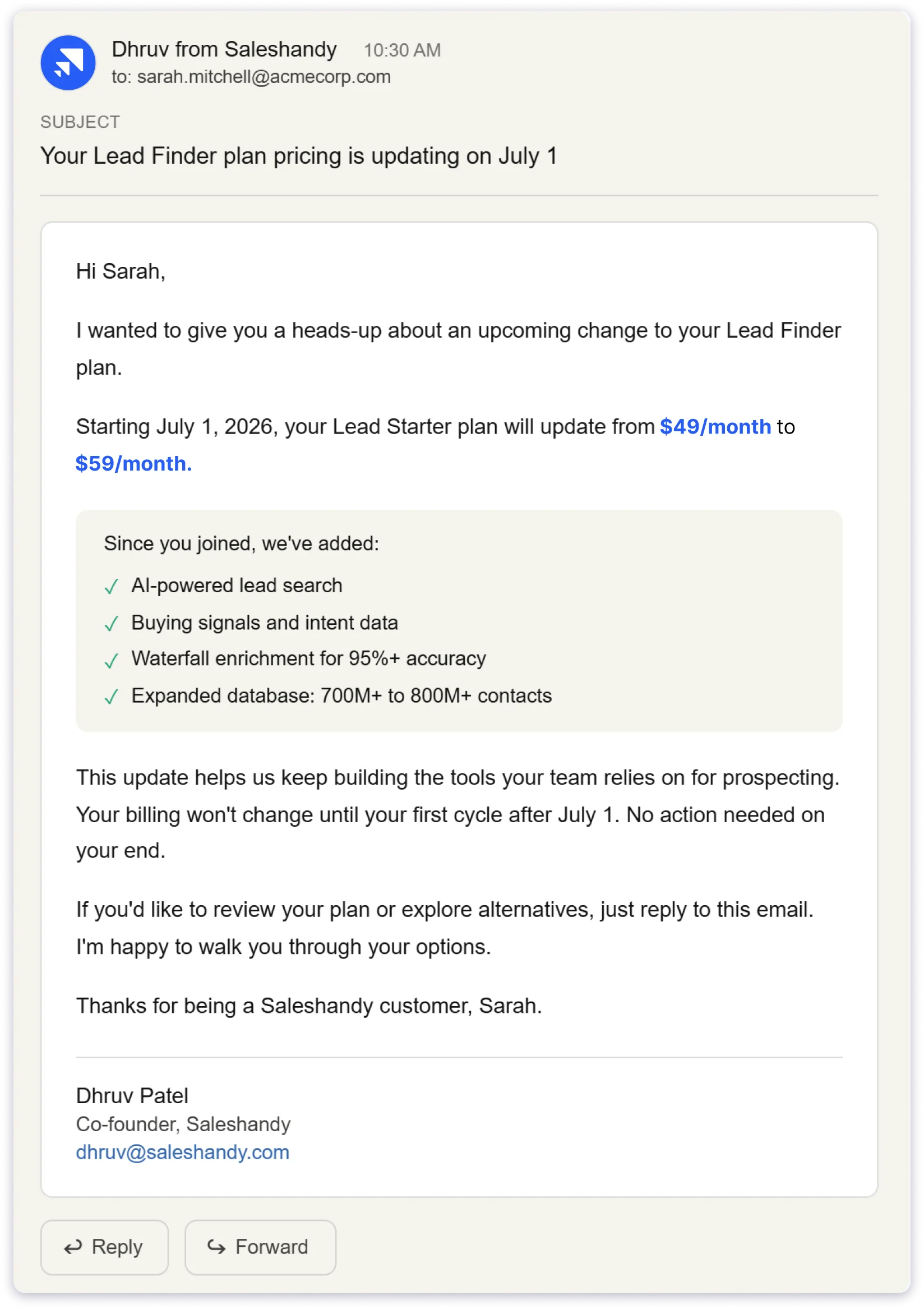
1. The Exact Price Change, With Numbers: “A small adjustment to your plan” tells the customer nothing. “$49/month to $59/month. Be specific, as vagueness creates anxiety.
2. The Effective Date. Customers need lead time to plan and budget. State the date clearly, not “soon” or “in the coming weeks.”
3. A Brief Reason for the Increase: Include one or two sentences for explaining factors like rising costs, added features, and improved service.
4. What Stays the Same or Gets Better: This is the line most businesses forget. Remind customers that the value they rely on isn’t going anywhere, or that it’s actually improving.
5. A Way to Respond or Ask Questions: A reply-to email or contact link. People accept change better when they know they can be heard.
3 Common Mistakes That Push Customers Away
1. Over Apologising: “We’re truly sorry, but unfortunately we must…” makes the increase sound like bad news you’re delivering reluctantly. Be confident. You’re making a business decision, not delivering a diagnosis.
2. Hiding the Numbers: Phrases like “updated pricing” or “revised rates” without actual figures feel deliberately evasive. Customers will assume the worst and go hunting for the real number.
3. Turning It Into a Newsletter: A price increase email has one job. Don’t bury the change inside product updates, company milestones, or a CEO letter. Say what’s changing, why, and when. That’s the whole email.
10 Price Increase Email Templates Based on Different Scenarios
Each template below includes a subject line and a full email body. Replace the bracketed placeholders with your details.
- Standard Price Increase Email (General Use)
- Value-Based Increase (New Features or Improvements Added)
- Cost-Driven Increase (Rising Operational Expenses)
- SaaS Subscription Price Change
- Freelancer or Consultant Rate Increase
- Agency Retainer Price Adjustment
- Service Business Rate Update
- E-commerce or Product Price Change
- Grandfathered Pricing Offer (Rewarding Loyal Customers)
- Annual Renewal Price Adjustment
1. Standard Price Increase Email (General Use
Best For: The all-purpose template. If none of the specific scenarios below fit, start here.
Subject: Pricing update for [Product/Service] starting [Date]
Hi [First Name],
I wanted to let you know that we’re updating our pricing for [Product/Service], effective [Effective Date].
Your current rate of [Old Price] will change to [New Price]. This adjustment helps us continue delivering the quality and reliability you’ve come to expect from [Company Name].
Nothing else changes. You’ll continue receiving [key benefit or feature] exactly as you do today.
If you have any questions, reply to this email. I’m happy to help.
Thanks for being a valued customer.
[Your Name]
[Company Name]
2. Value-Based Increase (New Features or Improvements Added)
Best For: Use this when your product or service is meaningfully better than it was when you set your current pricing.
Subject: What’s new at [Company Name] (and a pricing update)
Hi [First Name],
Over the past [time period], we’ve added a lot to [Product/Service]: [New Feature 1], [New Feature 2], and [New Feature 3].
To keep building at this pace, we’re updating our pricing starting [Effective Date]. Your [Plan Name] will move from [Old Price] to [New Price].
You already have access to everything we’ve shipped, and there’s more in the pipeline.
Want to talk through your options? Just reply here.
[Your Name]
[Company Name]
3. Cost-Driven Increase (Rising Operational Expenses)
Best For: When your own costs have gone up, and you need to pass some of that along. Works well for supply-chain-dependent businesses, manufacturers, and service providers.
Subject: An update on [Company Name] pricing, effective [Date]
Hi [First Name],
I want to be upfront with you. The cost of [specific factor: materials, shipping, labour, infrastructure] has gone up significantly this past year, and we’ve absorbed as much of it as we can.
Starting [Effective Date], your rate for [Product/Service] will adjust from [Old Price] to [New Price]. This allows us to keep delivering the same quality without cutting corners anywhere.
Everything about your service stays the same.
I appreciate your understanding. Reply here if you have any questions.
[Your Name]
[Company Name]
4. SaaS Subscription Price Change
Best For: Built for software companies updating subscription plans. Specific, structured, and easy to scan.
Subject: Your [Plan Name] pricing is updating on [Date]
Hi [First Name],
Starting [Effective Date], the price for your [Plan Name] plan will change from [Old Price]/month to [New Price]/month.
Since you signed up, we’ve shipped [Feature 1], [Feature 2], and [Feature 3] to your plan. This update helps us keep investing in the product your team relies on every day.
Your billing won’t change until your first cycle after [Effective Date]. No action needed on your end.
If you’d like to review your plan or explore alternatives, visit [billing link] or reply to this email.
[Your Name]
[Company Name]
5. Freelancer or Consultant Rate Increase
Best For: For independent professionals raising rates with existing clients. The tone here is personal because the relationship is personal.
Subject: A note about my rates for [Year/Quarter]
Hi [Client Name],
Working with you on [specific project or ongoing work] has been a highlight, and I’m looking forward to continuing.
I’m letting you know that my rates will increase starting [Effective Date]. My [hourly/project/retainer] rate will move from [Old Rate] to [New Rate].
This reflects [specific reason: new skills, expanded capabilities, increased demand, market alignment]. The quality of work you receive will only get better.
I’d love to keep this going. If you’d like to adjust the scope or discuss the change, I’m completely open to a conversation.
[Your Name]
6. Agency Retainer Price Adjustment
Best For: Marketing, lead generation, or service agencies, adjusting client retainer fees.
Subject: Update to your [Service Type] retainer, effective [Date]
Hi [Client Name],
As we head into [next quarter/year], I wanted to give you advance notice about an update to your retainer with [Agency Name].
Starting [Effective Date], your monthly retainer will adjust from [Old Price] to [New Price]. This reflects [specific reason: expanded scope, additional deliverables, increased resources, new channels].
Your deliverables, timelines, and team stay the same.
Want to hop on a quick call to talk it through? Just reply, and I’ll send a time.
[Your Name]
[Agency Name]
7. Service Business Rate Update
Best For: Contractors, maintenance providers, cleaning services, repair professionals, and other hands-on service businesses.
Subject: Service rate update from [Company Name]
Hi [Customer Name],
Thank you for trusting [Company Name] with your [service type] needs.
Our service rates will increase starting [Effective Date]. Your [specific service] will move from [Old Price] to [New Price].
This change reflects rising costs in [labour, materials, equipment, fuel] and keeps us delivering the same standard of work you expect. Over 65% of service businesses adjusted their rates this past year for similar reasons.
If you’d like to lock in current pricing for any work booked before [Date], just let me know.
[Your Name]
[Company Name]
8. E-commerce or Product Price Change
Best For: Product businesses, DTC brands, and retailers, updating product pricing.
Subject: Heads up: pricing update coming [Date]
Hi [First Name],
Starting [Effective Date], the price for [Product Name/Category] will update from [Old Price] to [New Price].
This reflects [reason: increased material costs, improved product quality, supply chain adjustments, updated sourcing].
If you’ve been thinking about a purchase, you can still get the current price by ordering before [Effective Date]. After that, the new pricing applies to all orders.
We appreciate your support.
[Your Name]
[Company Name]
9. Grandfathered Pricing Offer (Rewarding Loyal Customers)
Best For: When you’re raising prices for new customers but giving existing ones a grace period at their current rate. This builds serious loyalty.
Subject: You’re locked in: a pricing update from [Company Name]
Hi [First Name],
We’re updating our pricing for [Product/Service] starting [Effective Date]. New customers will pay [New Price] going forward.
Because you’ve been with us since [sign-up month/year], your current rate of [Old Price] stays locked until [Grandfathered End Date]. That’s [X months] at your current pricing before anything changes on your end.
After [Grandfathered End Date], your rate will move to [New Price]. If you’d like to explore other plan options before then, just reply, and I’ll walk you through them.
Thank you for being an early supporter.
[Your Name]
[Company Name]
10. Annual Renewal Price Adjustment
Best For: Subscription or contract-based businesses, updating pricing at renewal. This is a distinct moment from a mid-cycle increase, and the email should reflect that.
Subject: Your [Product/Service] renewal and updated pricing
Hi [First Name],
Your [Product/Service] subscription renews on [Renewal Date].
With this renewal, your pricing will update from [Old Price] to [New Price] per [billing period]. This applies across our plans and reflects the continued development we’re investing in [Product/Service].
Your renewal will process automatically on [Renewal Date] at the updated rate. If you’d like to switch plans or make changes, you can do so before [Date] by visiting [billing link] or replying here.
Thank you for another year with [Company Name].
[Your Name]
[Company Name]
How to Send Price Increase Emails at Scale Without Losing the Personal Touch
Sending a price increase email to 50 customers is manageable. Sending it to 5,000 while keeping it personal requires a system.
Here’s how to do it without sounding like a mass blast.
1. Segment Your Customer List First: Group customers by plan type, tenure, or value. Long-time customers might get the grandfathered template. Newer subscribers get the standard version.
2. Personalize Beyond Just the Name: Use merge fields for plan names, current pricing, new pricing, and renewal dates.
3. Use an outreach Tool Built for Personalized Sending: Saleshandy lets you send individualised emails at scale while tracking opens, replies, and engagement in real time.
4. Time Your Sends Strategically: Send the first announcement 30-60 days out. Follow up with a reminder in 7 days. Send a final heads-up the day before. Three touches are the sweet spot.
5. Follow Up With Non-openers Separately: If a chunk of your customers never opened the email, send a follow-up with a different subject line. The customers who don’t respond are the ones most likely to churn quietly.
Raise Your Prices Without Losing Your Customers
Price increases are a normal part of running a business.
The real risk isn’t the new number on the invoice. It’s how that number gets communicated.
Pick the template that fits your situation, fill in the details, and send it with enough notice for your customers to process the change.
And if you want to automate the entire process, try Saleshandy and leave your emails on autopilot.
That’s really all it takes to raise your prices without damaging the relationships you’ve built.
FAQs on Price Increase Email Template
1. How do I announce a large price increase?
Phase it if you can. Two 15% increases spread six months apart are much softer than one 30% jump.
If a single increase is unavoidable, pair it with a grandfathered rate for existing customers and lead with the value that justifies the change.
2. Should I offer existing customers a grandfathered rate?
In most cases, yes. Locking existing customers at their current rate for 3-6 months buys goodwill and reduces immediate cancellations.
New customers pay the updated price from day one. This is one of the strongest loyalty signals you can send.
3. Can I send different price increases to different customer segments?
You should. Enterprise customers have different expectations from self-serve users.
Segment by plan type, contract length, or customer lifetime value, and tailor both the amount and the messaging to each group.
4. What if my competitor’s prices are lower than my new price?
Don’t compete on price alone.
Your email should remind customers of the specific value they get from you that they won’t find elsewhere: better support, specific features, reliability, or results.
Customers who chose you for quality rarely leave over a small price gap.
5. Should the price increase email come from the founder or the support team?
From a real person with a name. For B2B and high-value customers, the founder or account lead carries more weight.
An email from “The Team” feels impersonal at exactly the moment you need to feel human.
Sign it with a name, a title, and a way to reply directly.