 Dhruv Patel
 Contents
- 1 Spintax – TOC
- 2 What is Spintax?
- 3 How Spintax Personalizes Your Cold Emails
- 4 How Spintax Improves Email Deliverability
- 5 How Many Email Variations Can You Create?
- 6 How to Use Spintax in Saleshandy
- 6.1 Step 1: Open Your Sequence and Go to the Email Editor
- 6.2 Step 2: Locate the Spintax Button in the Editor Toolbar
- 6.3 Step 3: Choose From the Pre-Built Dropdown
- 6.4 Step 4: Customize Pre-Built Options to Fit Your Voice
- 6.5 Step 5: Write Custom Spintax From Scratch
- 6.6 Step 6: Preview Before Activating
- 6.7 Important Syntax Rules to Follow
- 7 What to Spin: Examples for Every Part of Your Email
- 8 Best Practices for Using Spintax in Saleshandy
- 9 Try Spintax in Saleshandy
- 10 FAQs
- 10.1 Does Spintax work in email subject lines?
- 10.2 How many options should I include per spin tag?
- 10.3 Does using Spintax affect open rate or reply rate tracking?
- 10.4 Can I save my custom Spintax combinations for future use?
- 10.5 Does Spintax work alongside merge tags in the same email?
- 10.6 Is there a limit to how many Spintax tags I can use in one email?
- 10.7 What happens if I forget to close a Spintax tag?
- 10.8 Is Spintax more important now that AI-generated copy is common?
You wrote one cold email. Spent time on the subject line. Refined the CTA. Got the copy tight.
Then you uploaded a list of 1,000 prospects and hit send,
the same email, to every single person, word for word.
Here is what happened on the other side:
the ESP filters sitting in front of those inboxes detected a repeated content pattern across thousands of sends.
And they started routing your emails to spam, not because your copy was bad, but because it was identical.
That is the problem Spintax solves.
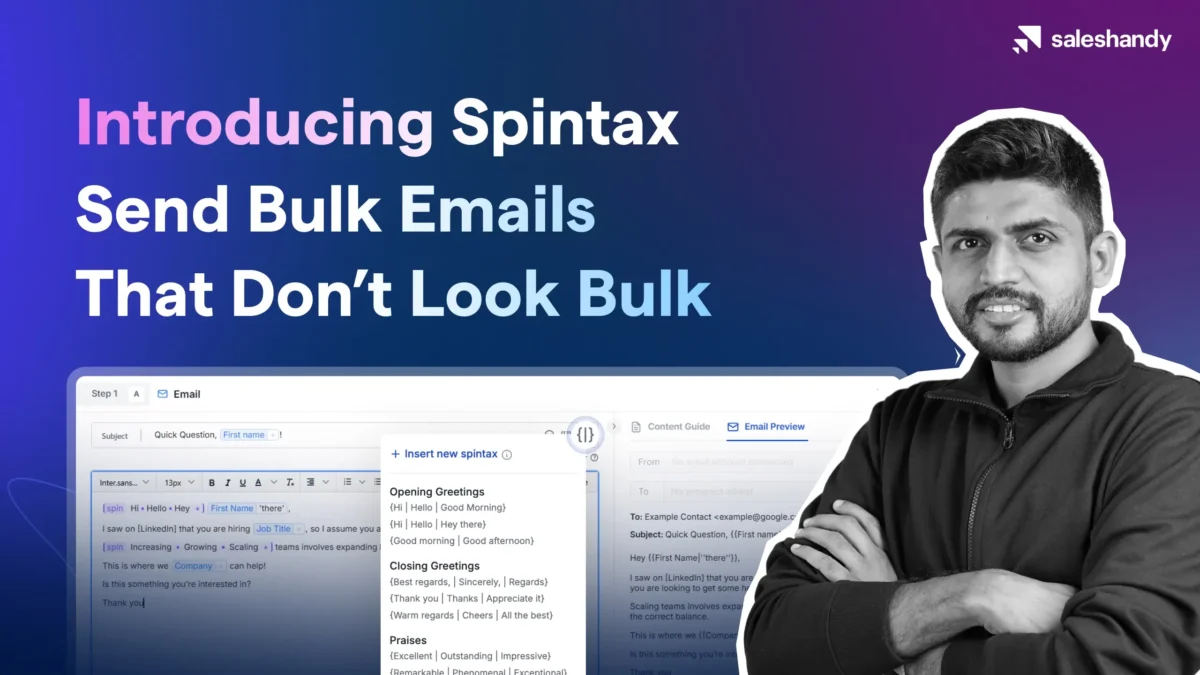
Spintax lets you write one email and automatically generate hundreds of unique variations from it.
Every prospect gets a slightly different version. No two emails share the exact same text.
Your outreach looks like individual sends because, structurally, each one is.
And in Saleshandy, using Spintax no longer requires manually typing syntax.
There is a dedicated Spintax button inside the email editor with pre-built options that drop in with one click.
This blog walks through everything, what Spintax is, how it helps personalization, how it protects deliverability, and how to activate it in your account today.
Spintax – TOC
What is Spintax?
Spintax, short for spin syntax, is a feature that lets you define multiple word or phrase options within a single email. When the email is sent, Saleshandy picks one option randomly for each recipient, so every prospect gets a slightly different version of the same message.
You define the options by placing them between two tags: {spin} at the start and {endspin} at the end, separated by a vertical pipe | symbol.
The Basic Syntax
{spin} option one | option two | option three {endspin}
When Saleshandy sends this, it randomly selects one of the three options for each email. Prospect A might get “option one.” Prospect B gets “option three.” Prospect C gets “option two.” None of them receive identical text.
A Simple Example
Here is what Spintax looks like applied to a greeting:
{spin} Hi | Hello | Hey {endspin}, {{First Name}}
Sarah gets “Hi, Sarah.” Marcus gets “Hey, Marcus.” Priya gets “Hello, Priya.”
How Spintax Personalizes Your Cold Emails
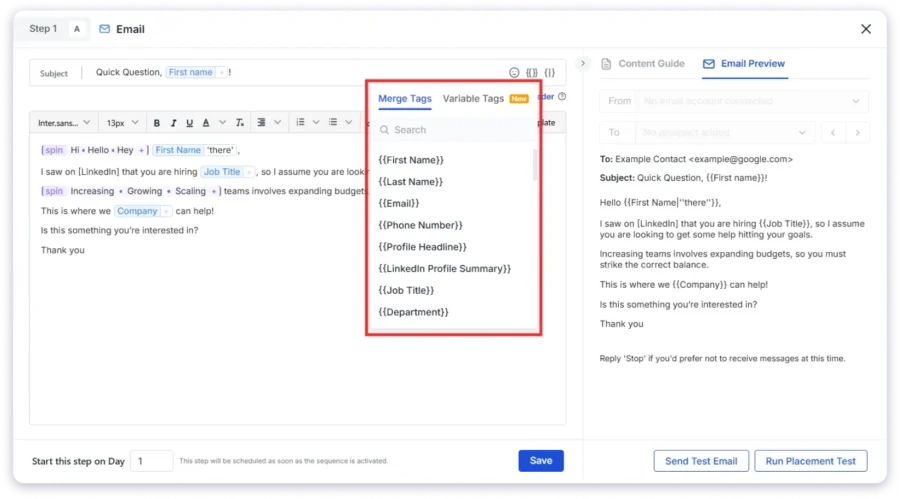
Most cold emailers think of personalization as adding a first name or company name to an email.
That is merge tag personalization. It is the baseline, and it matters.
But it does not make your email feel human.
When someone receives a cold email, they know within the first two lines whether it was written for them or mass-produced for thousands.
Generic phrasing, templated openers, and copy-paste CTAs give it away instantly. Spintax addresses this at the language level, by making every email sound like it was drafted slightly differently, even when sent at scale.
The Difference Between Generic and Personalized Phrasing
Here is the same cold email, one without Spintax, one with three spin tags applied.
Without Spintax:
Hi Sarah, I wanted to reach out because we help SaaS companies like yours improve outbound reply rates. Would you be open to a quick call this week? Best, Dhruv
With Spintax:
Hey Sarah, Quick note — we work with SaaS teams like yours on outbound results. Up for a 15-minute chat this week? Thanks, Dhruv
The intent is identical, the delivery is completely different. The second version does not read like a template. It reads like someone typed it out specifically for Sarah. That is what Spintax creates, natural variation that removes the “bulk send” feel from your outreach.
What Parts of Your Email to Personalize with Spintax
Spintax works across every section of a cold email. Here is where variation creates the most impact:
Greetings
The opening word is the first thing a prospect reads. Varying it immediately removes the mass-send signal.
{spin} Hi, | Hello, | Hey {endspin} {{First Name}}
{spin} Good morning | Good afternoon {endspin}, {{First Name}}
Opening lines
The first sentence after the greeting sets the tone of the entire email. When this line is identical across thousands of sends, it is the clearest sign of bulk outreach.
{spin} Quick note — | I wanted to connect — | Reaching out because {endspin}
{spin} I came across {{Company}} and | I was looking at {{Company}} and | I noticed {{Company}} recently {endspin}
Transition phrases
The connective tissue between your hook and your pitch, these lines are often the most repeated and the easiest to vary.
{spin} We work with teams like yours | We help companies like {{Company}} | We partner with {endspin}
{spin} Most of our customers | Teams we work with | The companies we support {endspin}
CTAs
Your call to action carries the intent of the entire email. Varying how you ask creates a more natural feel and avoids the robotic “click here” pattern that ESP filters are designed to detect.
{spin} Would you be open to a quick call? | Up for a 15-minute chat? | Does it make sense to connect? {endspin}
{spin} Can we set up a time this week? | Tell me what time works | Would a quick call make sense? {endspin}
Sign-offs
A small change, but one that adds to the overall effect of variation across the full email.
{spin} Best, | Thanks, | Regards, {endspin}
{spin} Looking forward to hearing from you | Talk soon | Hope to connect {endspin}
How Spintax Improves Email Deliverability
Spintax is not just a personalization tool, but it is also a core component of your deliverability setup, sitting alongside DNS records, sender rotation, and email warm-up as a protective layer for your campaigns.
To understand why, you need to understand how spam filters actually work.
How ESP Filters Detect Bulk Outreach
Major email service providers, Gmail, Outlook, and others, use content fingerprinting to identify bulk sends.
When thousands of emails carry the same sentence structure, the same phrasing patterns, and the same copy, the filter creates a content hash and flags it as a bulk send.
An email that would land in the inbox if sent to one person starts routing to spam when sent identically to 1,000 people, because the pattern itself is the trigger.
How Spintax Breaks the Content Fingerprint
Spintax changes the actual text of each email at the phrase level.
Because no two emails carry the exact same string of words, the content fingerprint is different for every send.
Spam filters cannot match your emails to a bulk send pattern because there is no single pattern to match.
Your 1,000-prospect campaign looks like 1,000 individual sends, because the text actually is different in each one.
How Spintax Fits Into Your Full Deliverability Stack
Saleshandy’s own cold email best practices list Spintax explicitly alongside technical setup requirements.
| Layer | What it does | Where Spintax fits |
|---|---|---|
| Technical (SPF, DKIM, DMARC) | Authenticates your sending domain, tells ESPs your emails are legitimate | Foundation layer, must be set up first |
| Sender Rotation | Distributes send volume across multiple email accounts, avoids volume spikes | Spintax handles content variation, Sender Rotation handles volume distribution |
| Email Warm-up | Builds sender reputation on new accounts before full send volume | Pre-send requirement, Spintax protects you once campaigns are live |
| Spintax | Breaks content fingerprinting by creating unique text per email, no two sends are identical | Content-layer protection, the last line of defence against pattern detection |
Each layer addresses a different deliverability risk.
SPF and DKIM handle authentication. Sender Rotation handles volume. Warm-up handles reputation. Spintax handles content.
Running campaigns without Spintax means your technical setup is solid but your content is still triggering pattern-based filters. All four layers need to be active for maximum inbox placement.
When thousands of AI-generated emails hit inboxes with similar structures, ESP filters detect the pattern even faster than manually written copy.
Spintax is more important now, not less, it is the mechanism that breaks the AI-generated copy fingerprint and restores genuine variation to your outreach.
How Many Email Variations Can You Create?
Each spin tag you add to an email multiplies the total number of unique versions Saleshandy can generate. The math is simple, the impact is significant.
Every spin tag creates a branching factor. If a tag has 3 options, that tag triples the number of possible email versions. Add a second tag with 3 options, and the total multiplies again.
The formula is:
Total unique variants = (options in tag 1) × (options in tag 2) × (options in tag 3) × …
A Real Example
Here is a single email with four spin tags applied:
{spin} Hi, | Hello, | Hey {endspin} {{First Name}},
{spin} Quick note — | I wanted to connect — | Reaching out because {endspin} we work with {{Industry}} teams on outbound.
{spin} Most teams we help | Companies like {{Company}} | Teams at your stage {endspin} see a meaningful improvement in reply rates within the first two weeks.
{spin} Would you be open to a quick call? | Up for a 15-minute chat? | Does it make sense to connect? {endspin}
{spin} Best, | Thanks, | Regards, {endspin}
Dhruv
That is 5 spin tags. Three options each.
3 × 3 × 3 × 3 × 3 = 243 unique email variations from one sequence step.
243 different emails. Written once. No additional work.
For agencies running outreach for multiple clients on the same platform, this kind of variation is not optional. It is essential to keeping deliverability clean across all client campaigns simultaneously.
You do not need to add 10 options per tag to get meaningful variation. Two to three options per tag, applied across three to five points in your email, creates hundreds of combinations without making the copy difficult to manage.
How to Use Spintax in Saleshandy
You no longer need to write Spintax syntax manually from scratch.
Saleshandy has a dedicated Spintax button inside the sequence email editor, with a dropdown of pre-built options and a custom editing mode for when you want full control.
Step 1: Open Your Sequence and Go to the Email Editor
Navigate to your Sequences tab inside Saleshandy. Open an existing sequence or create a new one.
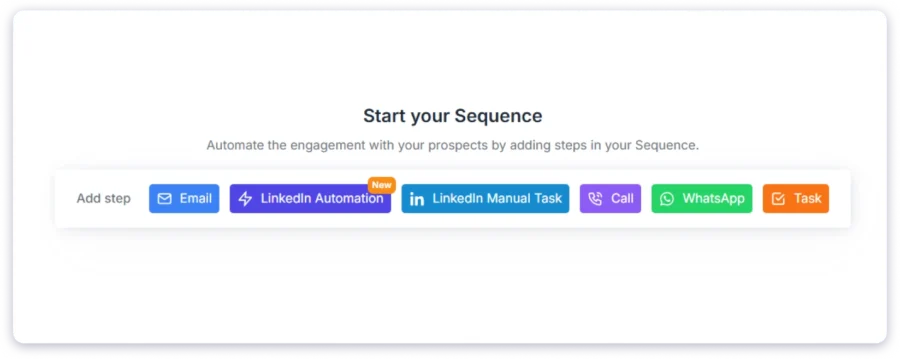
Select the step you want to add Spintax to, or click Add Step to create a new one.
This opens the email editor where you write your subject line, pre-header, and email body.
Step 2: Locate the Spintax Button in the Editor Toolbar
Look for the Spintax button in the email editor toolbar. Hovering over it shows a tooltip that explains the syntax format.
This is your entry point for all Spintax functionality, you can insert pre-built options or write custom variations from here.
Step 3: Choose From the Pre-Built Dropdown
Clicking the Spintax button opens a dropdown with pre-defined Spintax options organized into three categories:
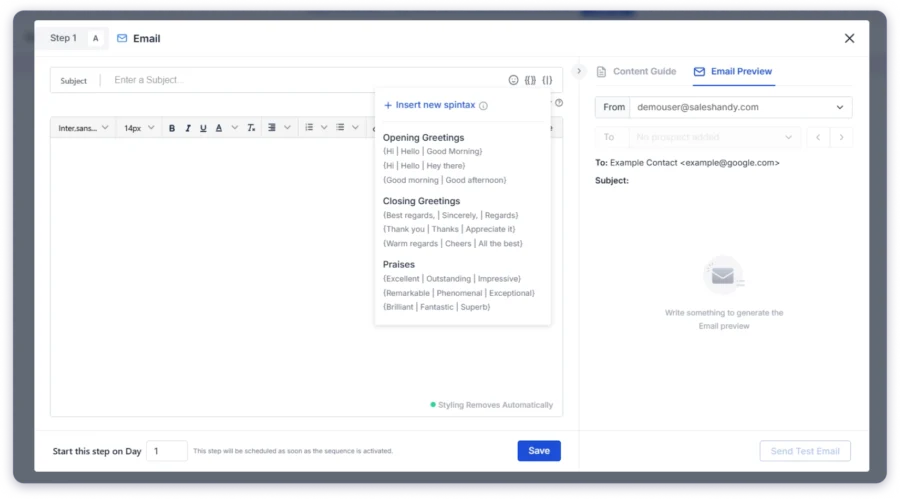
- Opening Greetings — variations for how you open the email
- Praises — variations for complimenting your prospect’s work or company
- Sign-off Charms — variations for how you close the email and present your CTA
Select any option from the dropdown and it inserts directly into your email at the cursor position, already formatted with the correct `{spin}` and `{endspin}` tags.
Step 4: Customize Pre-Built Options to Fit Your Voice
Every pre-built option is editable. After inserting a Spintax tag from the dropdown, you can modify the values inside it to match your tone, product language, or specific campaign context.
For example, the default greeting spin might insert:
{spin} Hi, | Hello, | Good day, {endspin} {{First Name}}
You can edit the values directly, replacing “Good day,” with “Hey” or any phrasing that fits your sequence:
{spin} Hi, | Hello, | Hey {endspin} {{First Name}}
Only update the values between the pipes. Do not modify the `{spin}` and `{endspin}` tags themselves or the pipe `|` separators, the syntax must stay intact.
Step 5: Write Custom Spintax From Scratch
For complete control over your variation, you can write Spintax tags directly in the email body without using the dropdown. The format is:
{spin} your first option | your second option | your third option {endspin}
You can use this anywhere in your email, greeting, opening paragraph, transition sentences, CTA lines, sign-off, wherever variation adds value.
Step 6: Preview Before Activating
Before you activate your sequence, use Saleshandy’s email preview to see how your Spintax renders for specific prospects.
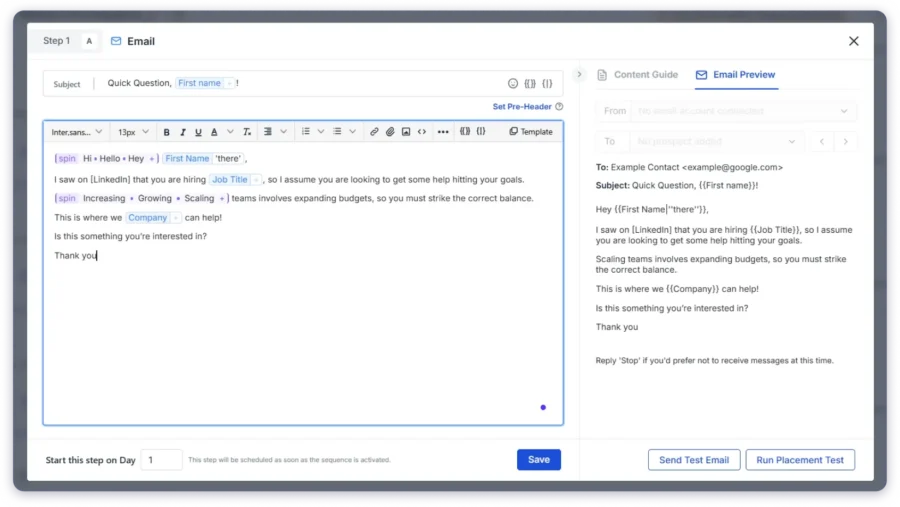
The preview shows you the exact variation that will be selected for each prospect, letting you catch any awkward combinations before they go out.
This step is essential. Three things to check in preview:
- Every spin variant reads naturally as a complete sentence
- No variant changes the meaning or intent of the email
- Formatting (bold, italics) has been applied to each value separately, not to the entire tag
Important Syntax Rules to Follow
A few things that can break Spintax if missed:
- Always close every {spin} tag with {endspin}, an unclosed tag breaks the email
- Use the pipe | symbol between each option, not a comma, not a slash
- If applying text formatting to spin values, apply it to each value individually, not to the full {spin}…{endspin} block
- Spintax works in both email subject lines and email body, both support the same syntax
- Always send a test email to yourself before activating a sequence with new Spintax tags
What to Spin: Examples for Every Part of Your Email
Here is a ready-to-use reference organized by email section. These are drawn directly from Saleshandy’s pre-built Spintax library and expanded with additional options for different tones and use cases.
Greetings
The first word sets the tone. Vary it to avoid the identical opener that flags bulk sends.
{spin} Hi, | Hello, | Hey {endspin} {{First Name}}
{spin} Good morning | Good afternoon {endspin}, {{First Name}}
{spin} Hi | Hello | Hey {endspin}!
Introduction and Opening Lines
The first sentence after your greeting is where most bulk emails sound identical. Spin this line to create meaningful differentiation from the first word.
{spin} Quick note — | I wanted to connect — | Reaching out because {endspin}
{spin} How are you | How have you been {endspin}?
{spin} I hope this email finds you well | I hope you are having a good week {endspin}
{spin} I came across {{Company}} and | I was looking at {{Company}} recently and {endspin}
Praises and Icebreakers
If your sequence includes a line acknowledging the prospect’s work or company, this is one of the most high-impact places to apply Spintax. It makes the praise feel less scripted.
{spin} Excellent | Outstanding | Impressive {endspin} work on your latest project!
{spin} I noticed | I saw | I came across {endspin} {{Company}}’s recent {{Trigger}} — impressive stuff.
{spin} Great | Really good | Solid {endspin} move with {{Recent Company Update}}.
Value Proposition Lines
The core message of your email, how you describe what you do, is often the most repeated line across a campaign.
Spin this to vary the phrasing of your core pitch without changing what you are saying.
{spin} We help teams like yours | We work with companies like {{Company}} | We partner with {endspin}
{spin} Most of the teams we support | Companies at your stage | Sales teams like yours {endspin} see results within the first two weeks.
CTAs
Your call to action is the most direct signal of intent. Varying how you ask for the meeting makes the email feel less like a funnel and more like a genuine ask.
{spin} Would you be open to a quick call? | Up for a 15-minute chat? | Does it make sense to connect? {endspin}
{spin} Can we set up a time this week? | Tell me what time works | Would a quick call make sense? {endspin}
{spin} What do you think? | How does that sound? | Are you interested in discussing this further? {endspin}
{spin} Can we connect for this? | Up for a 15-minute call? | Tell me the best time for a quick chat {endspin}
Sign-offs
A small change, but it contributes to the overall pattern-break across the full email.
{spin} Best, | Thanks, | Regards, {endspin}
{spin} Best regards | Sincerely | Warm regards {endspin}
{spin} Looking forward to hearing from you | Talk soon | Hope to connect {endspin}
Best Practices for Using Spintax in Saleshandy
Below are some best practices you can follow when using Saleshandy Spintax:
Spin Phrases, Not Just Words
Single-word synonyms often produce stilted output. “Excellent | Outstanding | Impressive” are all synonyms, but in the context of a full sentence, the difference between them is minimal and can feel forced.
Phrase-level variation creates more natural results:
| Word-level (avoid) | Phrase-level (recommended) |
|---|---|
| {spin} great | good | excellent {endspin} news | {spin} something worth sharing | a quick update {endspin} |
| {spin} wanted | needed | had {endspin} to reach out | {spin} Quick note — | I wanted to connect — | Reaching out because {endspin} |
Keep the Meaning Consistent Across All Options
Every option within a spin tag should say the same thing, just differently.
If one option changes the tone drastically or shifts the meaning of the sentence, it will create confusing email variations at scale, some that land well, some that read awkwardly.
Before finalizing your spin tags, read each option as a complete sentence in context.
If any variant changes what you are communicating, replace it.
Three to Four Spin Tags Per Email Is the Right Range
More spin tags create more variation, but they also create more complexity. An email with 8 spin tags becomes difficult to read and maintain, and the writing can start to feel choppy.
Three to four spin tags placed at the highest-impact points, greeting, opening line, CTA, sign-off, creates hundreds of unique variations without overengineering the copy.
Always Send a Test Email Before Activating
Saleshandy’s preview function shows how Spintax renders for specific prospects, but a test email to yourself confirms the full delivery experience, how it looks in an actual inbox, whether formatting is preserved, and whether the spin variants read naturally end-to-end.
Make this a non-negotiable step before activating any new sequence with Spintax.
Use Spintax in Subject Lines Too
Most cold emailers apply Spintax only to the email body.
Subject lines support the same syntax and benefit just as much from variation, especially for campaigns running to large lists where identical subject lines compound the bulk-send signal.
{spin} Quick question | A thought | One thing {endspin} for {{First Name}}
{spin} {{Company}} + Saleshandy | Working with {{Company}} | {{First Name}} — quick note {endspin}
Do Not Over-Nest or Over-Complicate
Spintax is designed to be simple.
The power comes from applying it across multiple points in an email, not from making each individual tag complex.
Keep each spin tag to two to four options, keep the options short and readable, and let the multiplier effect do the rest.
Try Spintax in Saleshandy
Your outreach deserves to be seen.
Spintax is already built into your Saleshandy account. Open any email sequence, click the Spintax button in the editor, and add your first spin tag in under a minute.
Start with your greeting. Then your CTA. Then your sign-off.
Three tags. Dozens of variations. Better deliverability from your very next send. Try Saleshandy for free today!
FAQs
Does Spintax work in email subject lines?
Yes. You can add Spintax to your subject lines using the same `{spin}…{endspin}` syntax used in the email body. Varying subject lines across your campaign adds another layer of deliverability protection and ensures no two prospects see the same exact subject line.
How many options should I include per spin tag?
Two to four options per tag is the recommended range. Fewer than two defeats the purpose of the tag. More than four rarely adds meaningful variation and makes the tag harder to manage and review. Three options per tag across four to five spin tags creates hundreds of unique email versions.
Does using Spintax affect open rate or reply rate tracking?
No. Saleshandy tracks opens and replies at the prospect level, not at the text level. Regardless of which spin variant was sent to a prospect, their open and reply activity is tracked and attributed correctly in your sequence analytics.
Can I save my custom Spintax combinations for future use?
You can save your email steps as templates within Saleshandy and reuse them across sequences. Custom Spintax you have written is preserved as part of the template. Pre-built options from the Spintax dropdown are always available in every new sequence step.
Yes, and it should. Spintax and merge tags are designed to work together in the same line of copy. A line like `{spin} Hi, | Hello, | Hey {endspin} {{First Name}}` combines both in a single phrase. Merge tags pull specific prospect data; Spintax varies the surrounding language. Using both together creates stronger variation than either alone.
There is no hard technical limit. Practically, three to five spin tags per email creates more than enough variation without overcomplicating your copy. Adding more than five tags often makes the email harder to QA and can result in awkward combinations during preview. Start with the high-impact points, greeting, CTA, sign-off, and build from there.
What happens if I forget to close a Spintax tag?
An unclosed tag, for example, writing `{spin} Hi | Hello` without the `{endspin}`,will break the Spintax formatting for that line. Saleshandy’s editor will not format it as a spin tag and the raw syntax will appear in your email. Always check your email in preview mode before activating to catch any formatting issues.
Is Spintax more important now that AI-generated copy is common?
Yes. As more outreach teams use AI tools to generate cold email copy, the outputs often share structural and phrasing similarities, because they come from the same underlying models. ESP filters are detecting these patterns faster than manually written copy. Spintax breaks the AI-generated content fingerprint and restores genuine variation to your outreach, making it more important in 2025–2026 than it was when the feature was first introduced.