![B2B Buying Signals: 16 Buying Signals [+ How Strong They Are]](https://www.saleshandy.com/blog/wp-content/uploads/2026/07/What-Are-B2B-Buying-Signals_-Types-How-to-Act-on-Them-1.webp)

Sales teams are always looking for signs that a prospect is ready to buy.
The problem is, most teams either don’t know which buying signals to look for or aren’t sure how to track and act on them.
In this guide, I’ll break down:
- What B2B buying signals are
- 16 key buying signals and how strong each one is
- How to prioritize signals based on buying intent
- What actions to take when a prospect shows intent
Let’s get started.
Jump Ahead
- TL;DR: 16 Types of Buying Signals
- What Are Buying Signals?
- How to Classify Buying Signals
- 16 Buying Signals Every Outbound Team Should Track
- How to Prioritize Buying Signals: The Signal Strength Matrix
- How to Track B2B Buying Signals
- How Saleshandy Helps You Track and Act on Buying Signals
- How to Act on Buying Signals in Sales
- Turn Buying Signals Into Revenue Opportunity
- Frequently Asked Questions
TL;DR: 16 Types of Buying Signals
Knowing how to identify buying signals starts with understanding the four broad categories: company-level events, digital behavior, engagement signals, and conversational cues.
I mapped all 16 signal types in the table below. It shows their strength, what each one tells you, and how fast you should act.
| # | Signal | Category | Strength | What It Tells You | When to Act |
|---|---|---|---|---|---|
| 1 | Recently Funded | Company Event | Medium | New budget available, growth plans in motion | 7–14 days after announcement |
| 2 | New Executive Hire (GTM) | Company Event | Medium | New leader evaluating vendors, tech stack under review | 30–60 days after start date |
| 3 | Hiring Surge | Company Event | Medium | Team is scaling, needs tools to support growth | Within the week |
| 4 | M&A / Restructuring | Company Event | Medium | Vendor re-evaluation triggered, new leadership preferences | Post-announcement window |
| 5 | Company Expansion | Company Event | Medium | New geography or vertical needs new infrastructure | Within the week |
| 6 | Repeat Pricing Page Visits | Digital Behavior | Medium | Comparison shopping, building internal business case | Same day |
| 7 | Competitor Research Activity | Digital Behavior | Medium | Active vendor evaluation in progress | Same day |
| 8 | Feature Page Deep Dives | Digital Behavior | Medium | Evaluating product fit for specific use case | Same day |
| 9 | Content Consumption Spike | Digital Behavior | Low | Early-stage research, not ready to buy yet | Nurture sequence |
| 10 | Demo or Trial Request | Engagement | High | Moved from “interested” to “evaluating” | Within 1 hour |
| 11 | Email Engagement (opens, clicks, forwards) | Engagement | Medium | Internal discussion happening, committee expanding | Same day |
| 12 | Webinar / Event Registration | Engagement | Medium | Investing time to learn about your space | Post-event follow-up |
| 13 | Budget / Pricing Questions | Conversational | High | Product fit confirmed, evaluating affordability | Immediately on call |
| 14 | Timeline Questions | Conversational | High | Mentally planning for adoption | Immediately on call |
| 15 | Stakeholder Introductions | Conversational | High | Buying committee expanding, deal is moving | Immediately, multi-thread |
| 16 | Competitor Mentions | Conversational | High | Active vendor comparison, high-intent but competitive | Immediately, lead with differentiation |
What Are Buying Signals?
A buying signal is any action or event that tells you a prospect might be ready to purchase. In B2B sales, these signals show you when to reach out and how to frame your message.
They are different from lead scoring. Lead scoring assigns a number based on static fit criteria like company size or job title. Signals track real-time behavior and events that show active purchase intent.
Here is the simplest way I can put it. The difference between cold outreach and warm outreach is not copy. It is timing. Buying signals give you that timing.
How to Classify Buying Signals
Before jumping into specific signal types, it helps to understand how they break down. I classify them using two lenses.
1. Explicit vs. Implicit Signals
Explicit Signals
Explicit signals are direct, high-intent actions. The prospect is actively telling you they are interested. Demo requests, pricing inquiries, and questions about implementation timelines all fall here. When you see an explicit signal, respond immediately.
Implicit Signals
Implicit signals are behavioral patterns. The prospect is showing interest without directly saying it. Repeat website visits, content downloads, social media engagement, and hiring activity are implicit signals.
They appear earlier in the buying journey, which means you can reach prospects before they raise their hand.
And before competitors even know they are looking.
The distinction matters because it changes how you respond. Explicit signals get direct outreach.
Implicit signals get personalized nurture until they stack up enough to justify direct engagement.
2. First-Party vs. Third-Party Signals
First-Party Signals
First-party signals come from your own channels. Website visits, email engagement, content downloads, webinar registrations, and trial signups all happen on your properties.
Third-Party Signals
Third-party signals come from outside your ecosystem. Funding announcements, hiring activity, G2 review research, competitor comparison browsing, and industry content consumption all happen on external platforms.
I recommend tracking both. First-party signals tell you who is already aware of you. Third-party signals tell you who is in-market but has not found you yet. Combining both gives you the most complete picture of purchase intent.
16 Buying Signals Every Outbound Team Should Track
Not every buying signal means the same thing.
Some signals are a clear sign that you should reach out right away. Others are early indicators that tell you to keep watching the account and wait for more intent.
To make it easier, I’ve rated each buying signal as high, medium, or low strength so you know which ones deserve your attention and how quickly you should act.
1. Recently Funded
Signal strength: Medium
When a company raises a new funding round, it means fresh capital and aggressive growth plans. Leadership is under pressure to deploy that money quickly. New tools, new hires, and new infrastructure are usually the first things on the list.
Example: A SaaS startup just raised $12M in Series A. Within the next 90 days, they will likely invest in sales tools, hire SDRs, and build out their outreach stack. If you sell prospecting or outreach software, this is your window.
What to do: Reach out within 7 to 14 days of the announcement. Reference the funding in your opening line. Connect your product to a problem that comes with scaling, like finding leads faster or ramping new reps.
2. New Executive Hire in GTM Roles
Signal strength: Medium
When a company brings in a new VP of Sales, CRO, CMO, or Head of Growth, that person will evaluate existing tools within their first 90 days. New leaders want to make an impact. Reviewing the tech stack is one of the first things they do.
Example: A mid-market company just hired a new Head of Revenue. They came from a company that used your competitor. They are now looking at all options with fresh eyes and no loyalty to the current stack.
What to do: Reach out 30 to 60 days after they start. Too early and they are still getting oriented. Too late and they have already locked in their preferred vendors.
3. Hiring Surge
Signal strength: Medium
A company posting five or more roles in sales, marketing, or customer success within a short window is scaling fast. Growing teams need tools to support that growth. More reps means more outreach volume, more data, and more infrastructure.
Example: A B2B company posts 10 SDR roles in two weeks. They are clearly building an outbound team. That team will need a prospecting tool, an email platform, and a CRM.
What to do: Reach out and reference the hiring activity directly. Position your product as something that supports the team they are building, not something that adds to their setup workload.
4. M&A Activity or Restructuring
Signal strength: Medium
Mergers, acquisitions, and leadership reshuffles trigger vendor re-evaluation across the entire organization. New leadership brings new tool preferences. Existing contracts come up for review. Budgets get reallocated.
Example: Company A acquires Company B. Both were using different CRMs and outreach tools. The combined entity now needs to consolidate its stack. That decision creates a window for new vendors to enter the conversation.
What to do: Time your outreach to the post-announcement window. Reference the organizational change. Keep the message relevant to what the restructuring means for their day-to-day workflow.
5. Company Expansion
Signal strength: Medium
When a company announces expansion into a new geography, vertical, or product line, they need new infrastructure to support the motion. New markets mean new prospect data, new outreach strategies, and often new tools.
Example: A US-based company announces plans to expand into the European market. They will need GDPR-compliant data, localized outreach sequences, and contacts in a region they have never prospected before.
What to do: Reach out with a message specific to their expansion. Show how your product solves a problem tied directly to the new market or vertical. A generic pitch will not land here.
With Saleshandy Lead Finder, you can filter accounts by 10 signal categories like “Recently Funded,” “New Executive Hires in GTM,” “Rapid Growth,” “Active M&A & Org Reshuffle,” and more.
These filters surface company-level buying signals directly inside your prospecting workflow, so you do not have to monitor news feeds manually.
The next set of signals comes from digital behavior. These happen on your website, inside your product, or across channels you can track.
6. Repeat Pricing Page Visits
Signal strength: Medium
One visit to your pricing page is curiosity. Two or three visits in a week is comparison shopping. When someone keeps coming back to pricing, they are building a business case internally. They are comparing you against alternatives and trying to figure out if the budget works.
Example: A marketing director from a target account visited your pricing page on Monday, again on Wednesday, and then checked your integrations page on Thursday. They are actively evaluating whether your tool fits their stack and their budget.
What to do: Follow up the same day. Do not say “I saw you on our pricing page” because that feels intrusive. Instead, send a case study showing ROI for a similar company, or share a pricing comparison that adds value to their decision.
7. Competitor Research Activity
Signal strength: Medium
When a prospect reads comparison content, checks G2 or Capterra reviews in your category, or visits competitor alternative pages, they are in active vendor evaluation. They are building a shortlist.
Example: Someone from a target account reads your “Saleshandy vs Apollo” blog, then visits G2 to compare ratings. They are narrowing down their options. If you do not reach them now, a competitor will get the first conversation.
What to do: Send outreach that leads with what makes you different for their specific use case. Do not send a generic pitch. Address the exact comparison they are researching.
8. Product or Feature Page Deep Dives
Signal strength: Medium
When a prospect spends significant time on specific feature pages or integration pages, they are not just browsing. They are checking whether your tool fits into their existing workflow. They want to know if it works with their CRM, their email provider, or their data stack.
Example: A prospect spends eight minutes on your Salesforce integration page and then navigates to your API documentation. They are evaluating technical fit, not just general interest.
What to do: Reference the specific feature they explored. Offer a walkthrough of that capability, not a generic demo. Show them exactly how it works with their setup.
9. Content Consumption Spike
Signal strength: Low
A prospect who downloads multiple resources, reads several blog posts, or watches a webinar is in early-stage research mode. They are educating themselves on the problem and exploring potential solutions. They are not ready to talk to sales yet.
Example: A prospect downloads your cold email playbook on Monday, reads three blog posts on deliverability by Wednesday, and watches a webinar recording on Friday. They are learning, not buying. But they are worth tracking.
What to do: This is a nurture signal, not a hard-sell signal. Add them to a relevant email sequence that provides value. Do not push for a meeting. Let them come to you when they are ready for the next step.
Now for engagement signals. These are direct interactions with your brand where the prospect has moved from passive research to active engagement.
10. Demo or Trial Request
Signal strength: High
This is the strongest first-party signal. When someone requests a demo or starts a free trial, they have moved from “interested” to “evaluating.” They are ready to see your product in action. They have likely shortlisted you among two or three vendors and are making final comparisons.
Example: A sales manager at a 200-person company signs up for your 7-day free trial. They create an account, import a list, and send their first test sequence within the first hour. That is not casual browsing. That is active evaluation.
What to do: Respond within one hour. I cannot stress this enough. Research shows that responding within five minutes makes you 21x more likely to qualify the lead compared to waiting 30 minutes. Every hour you wait, the probability of that meeting happening drops.
11. Email Engagement
Signal strength: Medium
A prospect who opens your email three or more times, clicks a link, or forwards it to a colleague is showing real interest. Repeat opens mean they are re-reading your message. Clicks mean they want more information. Forwarding is the strongest sub-signal here because it means they are bringing other people into the conversation. The buying committee is expanding.
Example: You send a cold email to a VP of Sales. They open it four times over two days. Then they forward it to their Head of RevOps. That forward is not casual. They are saying “take a look at this” to someone who influences the buying decision.
What to do: Follow up quickly. Reference the specific topic of the email they engaged with. If you can see that it was forwarded, mention that you would be happy to include their team in the next conversation.
12. Webinar or Event Registration
Signal strength: Medium
When a prospect registers for your webinar or attends a live event, they are investing time. Time is a bigger commitment than a click. It means they see enough value in your topic to block 30 to 60 minutes on their calendar.
Example: A prospect registers for your webinar titled “How to Scale Cold Email Without Killing Deliverability.” They show up live, stay for the full session, and ask a question during the Q&A. That is strong engagement.
What to do: Follow up post-event with a personalized message. Reference something specific from the session. Offer a clear next step. Do not just send a generic “thanks for attending” email that sounds like it was sent to 500 people.
Finally, conversational signals. I consider these the highest-reliability signals because the prospect is telling you directly where they stand.
13. Budget and Pricing Questions
Signal strength: High
When a prospect asks about pricing, payment terms, or contract structure during a call or email, they have already decided your product could work for them. They are past the “does this solve my problem?” stage. Now they are figuring out “can I afford this?”
Example: On a discovery call, the prospect says “What does the annual plan look like?” or “Do you offer discounts for startups?” These are not casual questions. They are doing math in their head.
What to do: Do not just answer with a number. Tie pricing to outcomes. Show them what the cost looks like compared to what they gain. And respond fast. 78% of buyers purchase from the first vendor to respond to a pricing inquiry.
14. Timeline Questions
Signal strength: High
“When can we go live?” or “How long is implementation?” or “What does onboarding look like?” When a prospect asks about timelines, they are mentally planning for adoption. They have already decided they want to move forward. Now they are figuring out when and how.
Example: A prospect asks “If we sign this week, can we have the team onboarded before the end of the month?” That is not curiosity. That is a buying decision waiting for a timeline.
What to do: Present a clear timeline. Offer to start the onboarding plan right now. Remove any friction between their interest and the next action. The faster you make it easy, the faster the deal closes.
15. Stakeholder Introductions
Signal strength: High
When a prospect loops in their manager, procurement team, or IT lead, the buying committee is forming. This deal is real and it is moving. Research shows that typical B2B purchases involve six to ten decision-makers. Each new person joining the conversation is a sign of internal momentum.
Example: Your main contact says “I want to bring my director into the next call” or “Can you send the security docs to our IT team?” That means the deal has moved beyond one person’s interest. Multiple people are now evaluating your solution.
What to do: Prepare materials tailored to each stakeholder’s priorities. A CFO cares about ROI and payback period. An IT lead cares about security certifications and integrations. A director cares about team adoption. Multi-thread immediately and build separate relationships with each person.
16. Competitor Mentions
Signal strength: High
“We are also looking at [competitor]” or “How are you different from [competitor]?” When a prospect brings up a competitor by name, they are in active vendor comparison. This is a high-intent signal, but it also means you are competing for the deal right now.
Example: On a demo call, the prospect says, “We are also evaluating two other tools this week. What can you do that they cannot?” That question is an invitation to differentiate. They want you to give them a reason to choose you.
What to do: Lead with your differentiation. Do not talk negatively about the competitor. Instead, show why you are a better fit for their specific situation, their team size, their budget, their workflow. Make it about them, not about tearing down someone else.
How to Prioritize Buying Signals: The Signal Strength Matrix
Not all signals carry the same weight. A social media follow is not the same as a demo request. Treating every signal equally leads to wasted time on low-probability accounts.
I use a two-axis framework to prioritize signals. One axis is urgency (how fast you need to act). The other is reliability (how confident you can be that this signal actually indicates buying intent).
| 🟢 High Reliability | 🟡 Medium Reliability | 🔴 Low Reliability | |
|---|---|---|---|
| 🔥 Act Now (same day) |
Demo request, champion job change, inbound RFP | Pricing page visited 3x, competitor research spike, multiple stakeholders on site | Content download, social media follow, single form fill |
| ⚡ Act This Week | Recently funded, new exec hire (GTM), tech stack change | Hiring surge in your category, industry event signup | Blog repeat visits, webinar attendance, newsletter signup |
| 👀 Monitor (nurture) |
Company expansion, M&A activity, restructuring | General topic research, quarterly earnings shift, cost-cutting news | Single page visit, single email open, social post like |
Here is how to read it. If a signal sits in the top-left corner (high reliability, act now), drop everything and reach out.
If it sits in the bottom-right (low reliability, monitor), add the account to a nurture list and track for additional signals.
The mistake I see most often is reps spending too much time acting on bottom-right signals and not enough time on top-left ones. Flip that ratio, and your reply rates improve.
How to Track B2B Buying Signals
Knowing which signals matter is one thing. Tracking them across hundreds of accounts is a completely different challenge.
Manual Tracking
You can start by setting up Google Alerts for target accounts, checking LinkedIn daily, scanning news sites for funding announcements, and following company blogs for hiring updates.
This works when your target list has five or ten accounts. But at 200 or more, it breaks down fast. You miss the funding round from Tuesday because you were writing emails. You find out about the new VP of Sales three weeks after they started. By then, a competitor already had the first conversation.
The core problem: buying signals are only valuable when you catch them while they are fresh. A signal spotted two weeks late is not a signal. It is old news.
Tool-Based Tracking
Tools like Saleshandy automate signal tracking so you do not have to do it manually.
Instead of scanning news feeds every morning, you search a database of 852M+ contacts using 23 built-in buying signal filters.
Set the filter for “Recently Funded” or “New Executive Hires in GTM” or “Rapid Growth” and the platform shows you which accounts match right now. Find verified contacts at those accounts and move straight to outreach from the same platform.
Manual vs.Tool-Based Tracking
| Manual Tracking | Tool-Based Tracking | |
|---|---|---|
| How It Works | Google Alerts, LinkedIn, news sites, spreadsheets | Built-in signal filters across a live database |
| Time Required | 1 to 2 hours daily | Minutes per search |
| Scalable to 200+ Accounts | ❌ No | ✅ Yes |
| Signal Freshness | Delayed by days or weeks | Real-time |
| Contact Discovery | Separate step, separate tool | Built into the same platform |
| Best For | Solo reps with a small target list | Teams scaling signal-based prospecting |
Manual tracking is a fine starting point. But the moment your target list grows beyond a handful of accounts, you need a system that does the tracking for you.
How Saleshandy Helps You Track and Act on Buying Signals
Most signal-tracking tools only solve half the problem. They show you the signal but leave you to figure out the rest on your own. You still need to find the right contact, switch to another tool to write the email, and hope the window has not closed by the time you hit send.
Saleshandy works differently. It brings signal detection, contact discovery, and outreach into one workflow. Here is how it works, step by step.
Step 1: Search by buying signals
Open Lead Finder and select the signal filter that matches what you are looking for.
Choose from 23 categories like “Recently Funded,” “New Executive Hires in GTM,” “Rapid Growth,” “Active M&A & Org Reshuffle,” “Cost Optimization Mode,” and more.
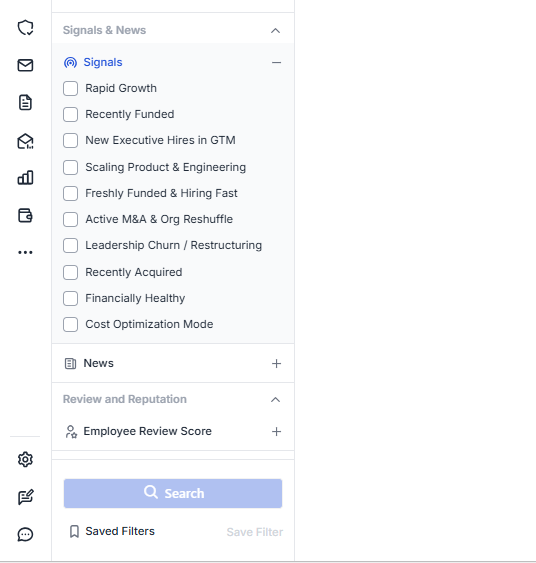
You can also layer multiple filters to find accounts showing more than one signal at the same time.
Step 2: Find verified contacts at those accounts
Once you have your signal-filtered list, Lead Finder shows you decision-makers at those companies with verified email addresses and phone numbers.
Every contact goes through waterfall enrichment across 9 data providers with 92% accuracy. You only pay for results that are actually verified.
Step 3: Launch outreach from the same platform
No need to export a CSV or switch to a separate email tool.
Push contacts directly into a cold email sequence, personalize with AI, set sending schedules, and track replies inside a unified inbox.
Everything happens in one tab.
What Makes It Different From Enterprise Tools:
| Saleshandy Lead Finder | Enterprise Tools (ZoomInfo, 6sense) | |
|---|---|---|
| Signal Filters | 23 buying signal categories | Intent data + technographics |
| Contact Database | 852M+ verified contacts | Varies by plan |
| Starting Price | $49/month | Custom |
| Free Trial | ✅ 7 days + 50 free credits | ❌ No free trial |
If you want to track buying signals and act on them from the same place without stitching together three or four different tools, Saleshandy is built for that.
How to Act on Buying Signals in Sales
Tracking buying signals tells you who to reach. Acting on them correctly tells you how and when.
Here is how to structure your response based on signal type.
Build a Signal-First Daily Workflow
Most reps start their day in the inbox. Signal-based reps start with signal alerts.
Before opening email or CRM, check which target accounts triggered a buying signal overnight or in the past 24 hours. Then triage them into three buckets:
- Act Now: High-strength signals like demo requests, pricing inquiries, or champion job changes. These get priority outreach today.
- Act This Week: Medium-strength signals like new funding, exec hires, or hiring surges. These get a personalized sequence this week.
- Monitor: Low-strength signals like content downloads or single-page visits. Add to a watch list and wait for additional signals.
Spend 70% of your outreach time on signal-qualified accounts. Spend 30% on cold prospecting. Most teams do the opposite. Flipping that ratio alone can double reply rates.
Match the Signal to the Right Channel
Different buying signals require different responses. Using the right channel helps you respond faster and make the most of high-intent opportunities.
| Signal Type | Best Channel | How to Respond | Why It Works |
|---|---|---|---|
| Company Event Funding, hiring, M&A |
📧 Cold email | Use the event as your opening line. Keep the message short and relevant. | Shows you understand their current priorities. |
| Digital Behavior Pricing page, competitor research |
✉️ Personalized email or LinkedIn DM | Share a relevant case study, comparison, or resource. | Adds value when interest is already high. |
| Engagement Demo request, trial signup |
📞 Phone call or calendar link | Respond within the hour and make scheduling easy. | Fast responses increase the chances of starting the conversation. |
| Conversational Budget questions, timeline asks |
🗣️ Same-call response | Discuss next steps before the conversation ends. | Keeps momentum when buying intent is strongest. |
The value of a buying signal depends on how quickly and accurately you act on it. Matching the right signal with the right channel helps you start relevant conversations before the opportunity loses momentum.
Tools like Saleshandy help shorten the gap between identifying intent and taking action. You can find the right contact, understand the signal, and launch personalized outreach from one platform without switching tools, doing manual research, or losing valuable time.
Turn Buying Signals Into Revenue Opportunity
Cold outreach isn’t broken. But cold outreach without a signal behind it is.
Prospects can tell when they are just another name on a list. They can also tell when you are reaching out because there is a real reason your solution might be relevant to them right now.
Tools like Saleshandy help you find accounts that are showing buying signals before you send an email. You can identify opportunities based on signals like recent funding, new GTM hires, and company growth.
Once you find the right accounts, you can discover verified contacts and reach out with personalized sequences from one place.
When you focus on signal-qualified accounts instead of random lists, your outreach becomes more timely and relevant.
Better timing leads to better conversations, and better conversations lead to more deals.
Frequently Asked Questions
1. What Are Buying Signals in Sales?
Buying signals are actions, behaviors, or events that show a prospect is interested in purchasing a product or service. In B2B sales, common examples include funding announcements, executive hiring, pricing page visits, demo requests, and competitor research activity. Sales teams use these indicators to prioritize outreach and time their messaging to when prospects are most likely to respond.
2. What Is the Difference Between Buying Signals and Intent Data?
Buying signals is the broad category covering any indicator of purchase readiness. This includes company events like funding and hiring, direct engagement like demo requests, and conversational cues like budget questions on calls. Intent data is one specific type of signal that tracks content consumption across third-party publisher networks to identify which companies are actively researching a particular category.
3. How Do You Identify Buying Signals in B2B?
You can spot them through multiple channels. Track website visitor behavior for pricing page visits and feature page engagement. Monitor company news for funding rounds, leadership changes, and hiring surges. Analyze email engagement for repeated opens, link clicks, and forwards. And listen for conversational cues on sales calls, like budget discussions and timeline questions. Tools like Saleshandy Lead Finder let you filter 852M+ contacts by 23 signal categories to find accounts showing purchase readiness right now.
4. What Are the Strongest Buying Signals?
The strongest ones are high-reliability, high-urgency actions. Demo and trial requests, pricing inquiries, budget and timeline questions on calls, and champion job changes to new companies all rank at the top. These indicate the prospect has already moved past awareness and is actively evaluating solutions. Company-level events like recent funding combined with executive hiring (signal stacking) also rank high because they show both budget availability and organizational readiness to adopt new tools.
5. What Is Signal-Based Selling?
Signal-based selling is a sales strategy that prioritizes outreach based on real-time buying signals instead of static lead lists. Rather than sending the same sequence to every prospect, signal-based sellers focus their time on accounts that are actively showing purchase readiness. This could be through company events, digital behavior, or direct engagement. The goal is to reach the right accounts at the right time with the right message.
6. What Tools Help Detect Buying Signals?
Enterprise platforms like ZoomInfo and Cognism provide intent data and company event tracking, typically at $15,000+ per year. For teams that want signal detection combined with contact data and outreach in one platform, Saleshandy Lead Finder offers 23 signal filters across an 852M+ contact database starting at $49 per month with a 7-day free trial. LinkedIn Sales Navigator provides relationship-level signals like job changes and engagement activity.

 Dhruv Patel