
Most of the templates you found online are written to rank on Google, not to get replies.
They sound polished.
They have the right structure.
But the moment you send one to a real prospect, nothing happens.
I know because I have tested dozens of them. The ones that actually work in 2026 look nothing like what you would expect.
They are shorter, less polished, and way more specific than the templates you find in most listicles.
These 40 are the ones that survived real campaigns. Cold outreach, follow-ups, introductions, and re-engagement.
Each one includes a subject line, the full body, and a personalization tip that tells you what to change before sending.
Sales Email Templates – TOC
- TL;DR: Quick Verdict
- What Makes a Sales Email Actually Work in 2026
- Cold Outreach Email Templates
- Sales Introduction Email Templates
- Sales Follow-Up Email Templates
- Warm Lead and Inbound Sales Email Templates
- Partnership and Collaboration Email Templates
- Sales Email Templates for Existing Customers
- Breakup and Re-Engagement Email Templates
- How to Send Sales Emails at Scale (Without Landing in Spam)
- 5 Sales Email Mistakes That Kill Reply Rates
- Key Takeaways
- FAQs on Sales Email Templates
TL;DR: Quick Verdict
If you are short on time, here is what matters most:
1. Sales email templates still work in 2026, but results come from execution, not copy alone.
2. Emails that get replies are usually 50–125 words, lead with the prospect’s problem, and include one clear CTA.
3. Subject lines perform best at 3–7 words, signaling curiosity or direct value rather than clickbait.
4. {{First Name}} personalization is not enough. Reference company context, real pain points, or trigger events.
5. Most replies come after the 3rd to 5th follow-up, not the first email. Sequences matter.
6. Different goals require different templates, including cold outreach, warm introductions, follow-ups, inbound leads, partnerships, and re-engagement.
7. Deliverability must be protected as you scale by warming inboxes, rotating senders, and avoiding spam-heavy language.
8. Track reply rates, not just opens. Keep what works and replace what does not.
What Makes a Sales Email Actually Work in 2026
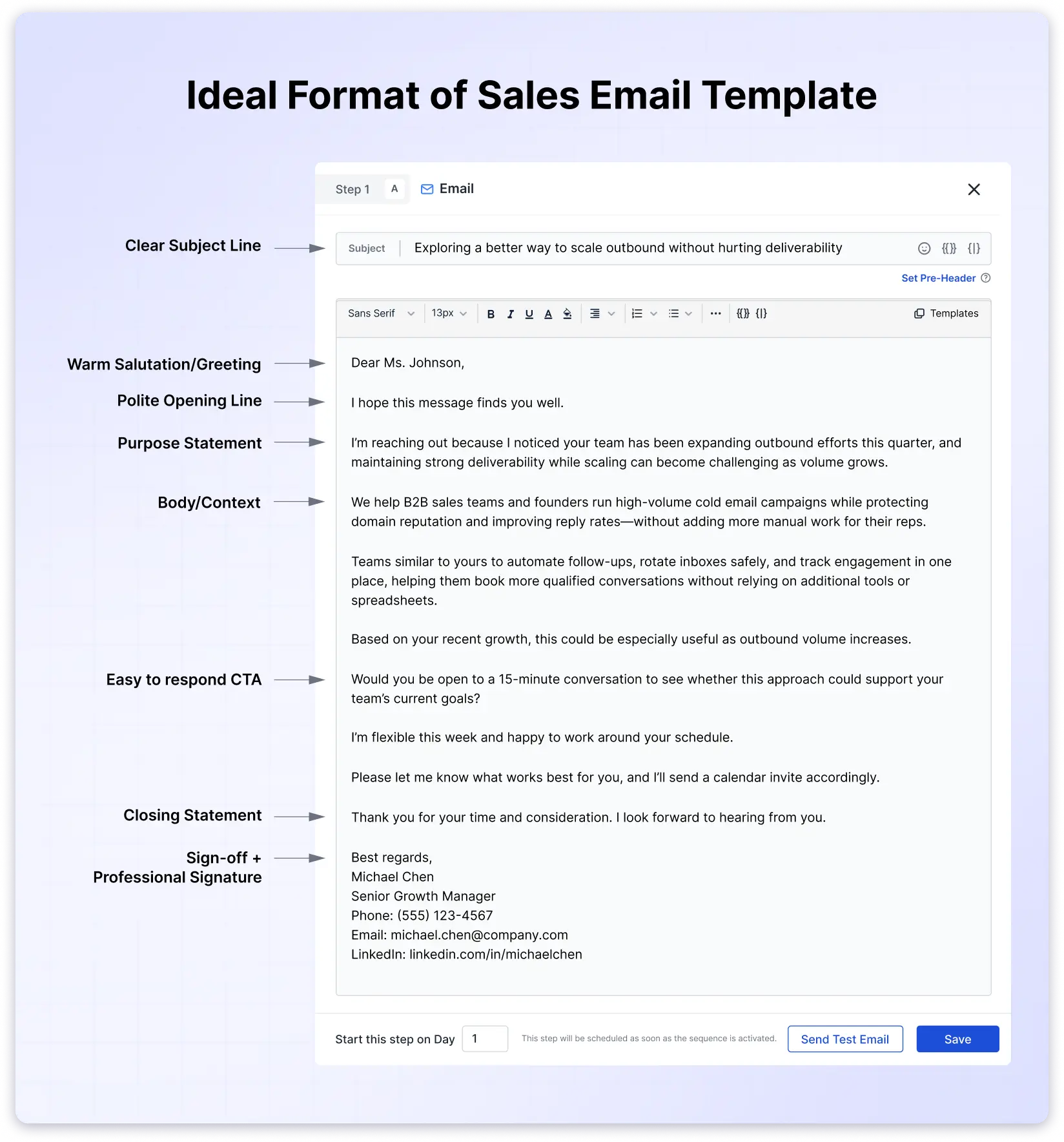
Before jumping into the templates, here is what I have learned about how to write a sales email that gets opened and replied to in 2026.
1. Subject Lines
Keep them between 3 and 7 words.
Anything over 30 characters starts dropping in open rates.
Curiosity and direct value signals work best. Clickbait does not.
2. Email Length
The sweet spot for cold emails is 50 to 125 words.
On mobile, anything longer means scrolling, and scrolling means losing them.
Senior leaders skim in 3 seconds. If they cannot find your ask in that window, they move on.
3. Personalization
{{First Name}} alone is not enough anymore.
Prospects expect you to reference their company, a recent event, or a specific problem.
Generic personalization gets treated like no personalization.
4. The 30/30/50 Rule
This is the simplest framework I have found: 30% is a baseline open rate for a healthy cold campaign.
Subject lines over 30 words kill opens.
And 50 to 125 words in the body is the sweet spot to be in.
5. Follow-Up Frequency
One email is never enough.
80% of sales happen after the 5th touchpoint.
Build a sequence before you send the first email.
If you are curious about how to write a sales email, you should check out this guide.
Cold Outreach Email Templates
These are for prospects who have never heard from you.
The goal is not to sell in the first email. It is to start a conversation.
The cold emails with the highest reply rates lead with the prospect’s problem, not the product.
3. The Mutual Connection Email
4. The Value-First Email (For Selling a Product or Service)
6. The SaaS/Software Product Email
7. The Competitor Insight Email
1. The Pain-Point Opener
Best For: SDRs targeting mid-market companies with a known operational challenge.
Subject: {{pain point}} at {{Company}}?
Hi {{First Name}},
I have been talking to a lot of {{job title}}s lately, and one thing keeps coming up: {{specific pain point}}.
At {{Your Company}}, we helped {{similar company}} fix that by {{specific outcome, e.g., cutting their lead response time from 12 hours to under 30 minutes}}.
Not sure if that is on your radar, but would it be worth a 15-minute call to compare notes?
{{Your Name}}
2. The Trigger Event Email
Best For: Reps tracking company signals like funding rounds, leadership changes, or product launches.
Subject: Congrats on the {{event}}
Hi {{First Name}},
Saw that {{Company}} just {{trigger event, e.g., closed a Series B, launched a new product line, expanded into EMEA}}.
That usually means {{relevant challenge, e.g., scaling the sales team fast, building a pipeline in new markets}}.
We helped {{similar company}} navigate that exact transition and {{specific result}}.
Would it make sense to chat about how we could help {{Company}} do the same?
{{Your Name}}
3. The Mutual Connection Email
Best For: Anyone with a shared contact, LinkedIn group, community membership, or event.
Subject: {{Mutual connection}} suggested I reach out
Hi {{First Name}},
{{Mutual connection’s name}} mentioned you might be the right person to talk to about {{specific topic}}.
I work with {{type of companies}} to help them {{outcome}}, and {{mutual connection}} thought there could be a fit given {{reason}}.
Would you be open to a quick call this week?
{{Your Name}}
4. The Value-First Email (For Selling a Product or Service)
Best For: Founders, consultants, and AEs who want to show value before asking for anything.
Subject: Quick thought on {{Company}}’s {{area}}
Hi {{First Name}},
I spent 10 minutes looking at {{Company}}’s {{specific area, e.g., outbound process, landing page, pricing structure}} and noticed {{specific observation}}.
For context, I have worked with {{type of companies}} on this exact issue, and {{what typically happens when it is fixed, e.g., “most teams see a 15–25% bump in conversion within the first month”}}.
I put together a quick note on what I would change. Happy to share it if you are interested. No pitch attached.
{{Your Name}}
5. The Short and Direct Email
Best For: C-suite outreach. VPs, Directors, and founders who delete anything longer than a paragraph.
Subject: Quick question, {{First Name}}
Hi {{First Name}},
{{One sentence: who you are + what you help companies do}}.
I think there is a good fit with {{Company}} based on {{one specific reason}}.
Worth a 10-minute call?
{{Your Name}}
6. The SaaS/Software Product Email
Best For: SDRs selling software or SaaS products to technical or business buyers.
Subject: {{Company}} + {{Your Product}} = {{outcome}}
Hi {{First Name}},
I noticed {{Company}} is using {{current tool or process}} for {{workflow}}.
A lot of teams running a similar setup have told us the biggest bottleneck is {{specific bottleneck}}.
{{Your Product}} fixes that by {{how it works, one sentence}}, and teams like {{reference customer}} are seeing {{specific result}}.
Would it be worth a quick demo to see if the same applies at {{Company}}?
{{Your Name}}
7. The Competitor Insight Email
Best For: SDRs in competitive markets targeting prospects actively using a rival product.
Subject: Alternative to {{Competitor}}?
Hi {{First Name}},
I noticed {{Company}} is using {{Competitor}} for {{use case}}.
A lot of teams that were on {{Competitor}} switched to us because of {{specific gap or limitation in competitor}}.
The biggest difference they mention is {{one clear differentiator, e.g., “they can now run unlimited accounts without paying per seat”}}.
Not sure if that is a pain point for you, but happy to show you the difference in a quick call.
{{Your Name}}
8. The Data-Led Cold Email
Best For: B2B reps selling to analytical buyers (finance, operations, RevOps) who respond to numbers.
Subject: {{X%}} improvement for {{Company}}?
Hi {{First Name}},
Teams like {{reference customer}} are seeing a {{specific metric improvement}} after switching to {{Your Product}}.
For context, their setup before was similar to what I see at {{Company}}: {{one sentence describing their likely current situation}}.
I can walk you through the exact playbook they used. Would 15 minutes work next week?
{{Your Name}}
Want more cold email ideas? Browse our Cold Email Template Hub with 27+ templates organized by goal, role, and industry.
Sales Introduction Email Templates
If you need a sales introduction email template for a situation where you already have a warm reason to reach out, these six cover the most common ones.
Introductions are different from cold outreach. You have context already.
Maybe you met at an event, got a referral, or connected on LinkedIn.
The bar for a reply is lower, but the personalization bar is higher.
9. The Post-Event Introduction
11. The “We Share a Connection” Email
12. The LinkedIn-to-Email Bridge
13. The “I Saw Your Content” Email
14. The New Role Congratulations Email
9. The Post-Event Introduction
Best For: Following up within 48 hours of a conference, webinar, or networking event.
Subject: Good to meet you at {{event name}}
Hi {{First Name}},
Really enjoyed our conversation at {{event name}}, especially the part about {{specific topic you discussed}}.
I have been thinking about what you mentioned regarding {{their challenge or goal}}, and I think there is something I could help with.
Would you be up for a quick call this week to continue the conversation?
{{Your Name}}
10. The Referral Introduction
Best For: When a mutual contact actively referred you, and the prospect expects your email.
Subject: {{Referrer’s name}} said we should connect
Hi {{First Name}},
{{Referrer’s name}} mentioned that {{Company}} is {{working on / dealing with / exploring}} {{specific initiative or challenge}}.
I help {{type of companies}} with exactly that. We recently worked with {{reference customer}} and {{specific result}}.
{{Referrer’s name}} thought it would make sense for us to chat. Do you have 15 minutes this week?
{{Your Name}}
Best for: LinkedIn-based prospecting where you share mutual connections but no direct referral.
Subject: We both know {{mutual connection}}
Hi {{First Name}},
I noticed we are both connected with {{mutual connection}} and it looks like you are working on {{something relevant from their profile or recent posts}}.
I work with {{type of companies}} to {{outcome}}, and I thought there might be a fit.
Open to a quick chat?
{{Your Name}}
13. The "I Saw Your Content" Email
Best For: Prospects who post on LinkedIn, appear on podcasts, write articles, or speak at events.
Subject: Loved your take on {{topic}}
Hi {{First Name}},
I came across your {{post/podcast/article}} about {{topic}} and {{specific takeaway or opinion you agreed with}}.
It actually connects with something we have been working on: {{brief tie-in to your product or service}}.
Would you be open to comparing notes? I have a few ideas that might build on what you shared.
{{Your Name}}
14. The New Role Congratulations Email
Best For: Reaching decision-makers within 90 days of a new role. One of the highest-reply sales email templates for new clients.
Subject: Congrats on the new role at {{Company}}
Hi {{First Name}},
Congratulations on stepping into the {{role}} at {{Company}}.
New leaders in {{their function}} usually prioritize key initiatives in the first 90 days, and that is exactly where we have helped teams like {{reference customer}} achieve {{specific result}}.
No pressure at all. But if you are exploring options, I would love to share what we have seen work.
{{Your Name}}
Sales Follow-Up Email Templates
This is where most deals are actually won, or silently lost.
80% of sales need five or more follow-ups, but 44% of reps stop after one email.
The reps who build a structured follow-up sequence consistently outperform the ones who send one email and move on.
16. The Social Proof Follow-Up
17. The "Quick Question" Follow-Up
18. The Voicemail + Email Combo
19. The "New Information" Follow-Up
20. The "Saw Your Team Is Growing" Follow-Up
21. The Meeting Recap Follow-Up
22. The "Timing Better Now?" Follow-Up
15. The Value-Add Follow-Up
Best For: First follow-up after a cold email with no reply. Share something new, not a reminder.
Subject: (keep blank to stay in the same thread)
Hi {{First Name}},
I wanted to share something I thought you would find useful: {{resource, article, short insight relevant to their challenge}}.
It ties directly to {{the problem you mentioned in your first email}}.
Let me know if this is on your radar. Happy to walk through it.
{{Your Name}}
16. The Social Proof Follow-Up
Best For: Prospects who opened your email but did not reply. They are interested but not convinced.
Subject: (keep blank to stay in the same thread)
Hi {{First Name}},
Since my last email, I thought this might be relevant: {{reference customer}} was dealing with {{same challenge}} and saw {{specific result}} within {{timeframe}}.
I think {{Company}} could see similar results given {{one specific reason}}.
Worth 10 minutes to explore?
{{Your Name}}
17. The "Quick Question" Follow-Up
Best For: Second or third follow-up. Drops the ask to a single yes/no question.
Subject: (keep blank to stay in the same thread)
Hi {{First Name}},
Not trying to fill your inbox, just one question:
Is {{specific problem}} something your team is actively working on right now?
If so, I have a few ideas. If not, no worries at all.
{{Your Name}}
18. The Voicemail + Email Combo
Best For: Multi-channel sellers who pair phone calls with email. Send right after leaving a voicemail.
Subject: Just left you a voicemail
Hi {{First Name}},
Just tried reaching you by phone. Here is the short version:
{{One to two sentences summarizing your reason for reaching out}}.
I will try again {{specific day}}, but if email works better for you, happy to continue here.
{{Your Name}}
19. The "New Information" Follow-Up
Best For: Re-engaging when you have a real new reason (new feature, case study, pricing change).
Subject: Something new on our end
Hi {{First Name}},
Since we last spoke, we have {{new development, e.g., launched a feature that does X, published a case study with a company in your space, updated our pricing}}.
Given what you mentioned about {{their situation}}, I thought this might be relevant.
Want me to send over the details?
{{Your Name}}
20. The "Saw Your Team Is Growing" Follow-Up
Best For: Timing a follow-up around a hiring signal or team expansion.
Subject: Noticed {{Company}} is growing
Hi {{First Name}},
I saw {{Company}} is hiring for {{roles}} right now. That usually means {{relevant challenge, e.g., scaling outbound, onboarding new reps, building pipeline in new territories}}.
We have been helping teams go through similar growth phases and achieve {{specific outcome}}.
Want to see if we could help {{Company}} move faster on this?
{{Your Name}}
21. The Meeting Recap Follow-Up
Best For: After a demo or discovery call. Send within 2 hours.
Subject: Recap: our call today
Hi {{First Name}},
Thanks for the time today. Quick recap:
• {{Key point 1}}
• {{Key point 2}}
• {{Key point 3}}
Next step: {{clear next action, e.g., "I will send the proposal by Friday" or "We agreed to loop in your VP of Sales next week"}}.
Let me know if I missed anything.
{{Your Name}}
22. The "Timing Better Now?" Follow-Up
Best For: Re-engaging a prospect who said "not right now" 30 to 60 days ago.
Subject: Is now a better time?
Hi {{First Name}},
When we last connected, you mentioned the timing was not right for {{what you discussed}}.
I wanted to check in since it has been about {{timeframe}}. Has anything changed on your end?
If so, I would love to pick up where we left off. If not, I will check back in a few months.
{{Your Name}}
Need a complete follow-up strategy? Read our step-by-step guide on writing follow-up emails with timing tips and more examples.
Warm Lead and Inbound Sales Email Templates
These prospects already raised their hand. They downloaded something, visited your pricing page, or signed up for a trial.
The biggest mistake with inbound follow-ups is treating warm leads like cold ones.
If someone signed up for your free trial, they do not need an educational email about the product category.
They need help getting started.
24. The Free Trial Check-In (Day 2-3)
25. The Content Download Follow-Up
26. The Pricing Page Visitor Email
27. The Webinar Attendee Follow-Up
23. The Demo Request Response
Best For: Inbound demo requests. Speed matters. Respond within 5 minutes if you can.
Subject: Your demo with {{Your Company}}
Hi {{First Name}},
Thanks for requesting a demo. I have a few slots open this week:
• {{Day/Time option 1}}
• {{Day/Time option 2}}
• {{Day/Time option 3}}
The call takes about 20 minutes. I will walk you through {{most relevant feature based on their signup info}} and answer any questions.
Which time works best?
{{Your Name}}
24. The Free Trial Check-In (Day 2-3)
Best For: Users who signed up but have not activated a key feature yet.
Subject: How is your trial going?
Hi {{First Name}},
I saw you signed up for {{product}} a couple of days ago.
Most teams that get the most out of their trial start by {{specific first action, e.g., "importing their prospect list and setting up their first sequence"}}.
Want me to walk you through it? I can do a quick 10-minute call or just send you a guide.
{{Your Name}}
25. The Content Download Follow-Up
Best For: Prospects who downloaded a guide, ebook, or checklist.
Subject: Quick note about the {{resource name}}
Hi {{First Name}},
Thanks for downloading {{resource name}}.
One thing that did not make it into the guide but comes up a lot: {{related insight that connects to your product}}.
If that resonates, I think you would get a lot out of a quick look at how {{Your Product}} handles it.
Open to a 10-minute call?
{{Your Name}}
26. The Pricing Page Visitor Email
Best For: Prospects who visited the pricing page but did not take action.
Subject: Had a pricing question?
Hi {{First Name}},
I noticed you were checking out our pricing page.
A lot of people at this stage have questions about {{common pricing question, e.g., "which plan fits their team size" or "what is included in the free trial"}}.
Happy to help you figure out the right fit. Want me to send a quick comparison based on your setup?
{{Your Name}}
27. The Webinar Attendee Follow-Up
Best For: Following up with attendees who watched most of the session.
Subject: Thanks for joining {{webinar name}}
Hi {{First Name}},
Thanks for attending {{webinar name}}.
One topic that got a lot of questions was {{specific topic}}. Here is a quick summary: {{link to recap or resource}}.
If you want to dig deeper into how this applies to {{Company}}, happy to jump on a quick call.
{{Your Name}}
28. The Sales Proposal Email
Best For: Sending a formal proposal after a discovery call or demo.
Subject: Proposal for {{Company}}
Hi {{First Name}},
Thanks for the time on {{day}}. Based on what you shared about {{their main goal}}, here is what I am proposing:
What is included: {{Brief 2–3 line summary}}
Investment: {{Pricing or link to proposal document}}
Timeline: {{Expected start date or implementation time}}
Full proposal attached. Let me know if anything needs adjusting.
What is the best next step on your end?
{{Your Name}}
Partnership and Collaboration Email Templates
Not every sales email is about selling a product.
Some of the highest-value emails I have sent were partnership inquiries: co-marketing deals, integrations, reseller arrangements.
These need a different tone. You are proposing something that benefits both sides. Peer-to-peer, not seller-to-buyer.
31. The Reseller/Affiliate Inquiry
32. The Integration Request Email
29. The Partnership Pitch
Best For: Founders and BD reps proposing a co-marketing, referral, or integration partnership.
Subject: Partnership idea: {{Your Company}} + {{Their Company}}
Hi {{First Name}},
I have been following {{Their Company}} for a while, and I think there is a strong overlap between our audiences.
{{Your Company}} works with {{your audience}}, and you work with {{their audience}}. I think we could {{specific idea, e.g., "co-host a webinar," "create a joint resource," "build a native integration"}}.
Here is what I am thinking: {{1-2 sentences on the structure}}.
Would you be open to exploring this?
{{Your Name}}
30. The Co-Marketing Proposal
Best For: Marketing teams reaching out to complementary brands for a joint campaign.
Subject: Joint campaign idea
Hi {{First Name}},
Our content team has been planning a {{type of content, e.g., "research report on outbound trends" or "virtual summit for SDR leaders"}}, and I think {{Their Company}} would be a perfect co-sponsor.
Here is why: your audience of {{their audience}} aligns directly with the topic, and we would promote it to our {{your audience size}}.
Happy to share the full concept if you are interested.
{{Your Name}}
31. The Reseller/Affiliate Inquiry
Best For: Agencies or partners looking to resell or refer a product.
Subject: Reseller/affiliate opportunity?
Hi {{First Name}},
I run {{Your Agency/Company}}, and we work with {{type of clients}} who regularly need {{their product or service}}.
I am interested in either a reseller arrangement or an affiliate partnership. We currently work with {{number of clients}} and see a strong fit.
Do you have a partner program, or would it make sense to set something up?
{{Your Name}}
32. The Integration Request Email
Best For: Product or BD teams proposing a technical integration between tools.
Subject: Integration idea: {{Your Tool}} + {{Their Tool}}
Hi {{First Name}},
Our users keep asking if {{Your Tool}} integrates with {{Their Tool}}, and I think there is real demand for it.
We have {{number of users/customers}} on our platform, and a native integration could drive adoption for both sides.
I would love to explore this. Do you have someone on the BD or partnerships team I should connect with?
{{Your Name}}
Sales Email Templates for Existing Customers
The deal does not end at the close. Upsells, renewals, and referrals are some of the highest-ROI emails you can send because trust already exists.
The key is keeping these helpful. When the email sounds like it is about your revenue instead of their results, the relationship shifts.
33. The Upsell/Cross-Sell Email
35. The Referral Ask
36. The Customer Success Check-In
33. The Upsell/Cross-Sell Email
Best For: Introducing a higher-tier plan or related feature to an existing customer.
Subject: Something that might help with {{their current goal}}
Hi {{First Name}},
I have been looking at how {{Company}} is using {{your product}}, and I think you could get more out of it with {{specific feature or plan}}.
It would help with {{specific connection to their usage, e.g., "automating the follow-up sequences your team is building manually right now"}}.
Want me to walk you through it? No pressure to upgrade, just think it is worth seeing.
{{Your Name}}
34. The Renewal Reminder
Best For: 30 to 60 days before contract renewal. Results-focused.
Subject: Your renewal is coming up
Hi {{First Name}},
Just a heads-up that your {{product}} subscription renews on {{date}}.
Since you started, your team has {{specific result, e.g., "sent 15,000 emails and booked 120 meetings through the platform"}}.
If you want to chat about your plan or explore any changes before renewal, I am here.
{{Your Name}}
35. The Referral Ask
Best For: Asking happy customers for a specific, targeted introduction.
Subject: Quick favor
Hi {{First Name}},
Really glad to hear that {{specific positive result}}.
I am looking to connect with more {{their type: SDR managers, founders running outbound, agency owners}} who have a similar challenge.
Is there anyone in your network who comes to mind? Happy to make it a warm intro from your end or just a friendly email from mine.
{{Your Name}}
36. The Customer Success Check-In
Best for: Quarterly or monthly touchpoints to surface expansion opportunities.
Subject: Quick check-in on {{product/account}}
Hi {{First Name}},
Just checking in to see how things are going with {{product}}.
A few questions:
• Are there any features your team has not explored yet?
• Has anything changed in your workflow that we should know about?
• Is there anything we could be doing better?
Happy to hop on a quick call or handle this over email.
{{Your Name}}
Breakup and Re-Engagement Email Templates
Sometimes the best move is knowing when to stop. Or when to try one last time with a different angle.
I have found that breakup emails often get the highest reply rate in a sequence because the prospect finally feels like the pressure is off.
38. The "Should I Close Your File?" Email
39. The "Something Changed" Re-Engagement Email
40. The "No Hard Feelings" Email
37. The Clean Breakup Email
Best For: Final email in a sequence. No guilt trips, no passive aggression.
Subject: Should I stop reaching out?
Hi {{First Name}},
I have sent a few emails about {{topic}} and have not heard back.
Totally get it if the timing is off or if this is not a priority. I will stop following up unless I hear otherwise.
If things change down the road, I am always here.
{{Your Name}}
38. The "Should I Close Your File?" Email
Best For: Creating a sense of closure that often nudges a response.
Subject: Closing the loop
Hi {{First Name}},
I wanted to check in one last time regarding {{topic}}.
If you have decided to go a different direction or if this is not on the table right now, no hard feelings at all. I will close things out on my end.
But if there is still interest, I am happy to pick things back up whenever timing is better.
Either way, just let me know.
{{Your Name}}
39. The "Something Changed" Re-Engagement Email
Best For: Re-engaging cold prospects 60 to 90 days after your last sequence ended.
Subject: Things have changed since we last talked
Hi {{First Name}},
It has been a few months since we were in touch, and a few things have changed on our end:
{{One specific update, e.g., "We launched a feature that helps teams do X" or "We published a case study with a company in your space"}}.
Given what you were working on at the time, I think this could be worth a fresh look.
Open to reconnecting?
{{Your Name}}
40. The "No Hard Feelings" Email
Best For: Leaving the door permanently open after a lost deal or long-silent prospect.
Subject: No hard feelings
Hi {{First Name}},
I know things did not work out with {{Your Product}} this time around, and that is totally fine.
If anything changes, or if you just want to bounce ideas off someone, I am always happy to chat.
Wishing you and {{Company}} all the best.
{{Your Name}}
How to Send Sales Emails at Scale (Without Landing in Spam)
Templates get attention. Execution gets replies.
To scale sales emails without hurting deliverability or wasting good copy, you need a workflow that keeps relevance, volume, and inbox placement in balance.
Here’s what that looks like in practice:
- Start With the Right Leads
- Build Your Sequences
- Personalize With Merge Tags
- Protect Your Deliverability
- Track and Manage Replies
1. Start With the Right Leads
- Prioritize fit over volume. Scaling bad data only scales bad results.
- Filter contacts by role, industry, company size, and location before sending.
- Use verified business emails to avoid bounces and domain damage.
- Align the list with the problem your template is solving and not just your ICP on paper.
A tight list improves open rates, reply rates, and deliverability at the same time.
I’ll suggest trying Saleshandy's Lead Finder as it gives you access to 800M+ verified contacts.
2. Build Your Sequences
- Cold email works because of follow-ups, not one perfect message.
- Write all follow-ups before launching the campaign.
- Keep each step focused on one idea or angle.
- Space touches intentionally (not daily spam, not long gaps either).
Most positive replies come after the third or fourth touch, so sequencing is not optional.
3. Personalize With Merge Tags
- {{First Name}} alone is baseline, not personalization.
- Reference the company context, a relevant pain, or a trigger event.
- Use personalization to show why this email exists, not just who it’s sent to.
- If the personalization doesn’t change the message meaningfully, it’s probably unnecessary.
Good personalization makes the email feel chosen, not generated.
4. Protect Your Deliverability
None of this matters if your emails land in spam.
Key things that help and should be taken care of before each campaign are:
- Email warmup: Saleshandy includes it free through TrulyInbox
- Sender rotation: Spread sends across multiple accounts
- Spam word detection: Get flagged before you hit send
- Inbox placement testing: Check where your emails land before scaling
5. Track and Manage Replies
- Every reply should have a clear next action.
- Know which prospects are active, stalled, or closed.
- Avoid managing conversations across disconnected inboxes.
- Follow-ups should feel timely and intentional, not random.
Scaling outbound is really about scaling conversations, not emails.
5 Sales Email Mistakes That Kill Reply Rates
These are the five mistakes I see most often, and each one can tank an otherwise solid template.
- Leading With Yourself Instead of the Prospect
- Using Generic or Overused Openers
- Asking for Too Much in One Email
- Writing Emails That Are Too Long
- Having No Follow-Up Plan
1. Leading With Yourself Instead of the Prospect
When someone sees your email for the first time opening line is the one that grabs their attention.
When you write who you are and what you do, it instantly disassociates them.
Prospects care about their problems before your solution.
How to Avoid It:
Start with their company, role, or a relevant situation or problem they are facing, and then introduce yourself briefly.
2. Using Generic or Overused Openers
Asking for Too Much in One Email opener decides whether your emails will be read or ignored.
“I hope this finds you well.” “Just checking in,” “I wanted to reach out.”
These lines are invisible. Readers skip them without thinking.
How to Avoid It:
Open with context, relevance, or a short insight that gives the email a reason to exist.
3. Asking for Too Much in One Email
An email that has multiple links, requests, and outcomes creates too much friction.
And that friction kills replies because the reader gets confused as to what to do next.
How to Avoid It:
One email. One goal. One clear CTA is what you should follow to get replies.
4. Writing Emails That Are Too Long
Always avoid explaining everything upfront.
Most sales emails are read on mobile, and long messages feel like work, which people want to ignore.
How to Avoid It:
Keep it under ~125 words, use short paragraphs, and make the CTA easy to spot.
5. Having No Follow-Up Plan
Sending one email and waiting won’t take you anywhere.
Most replies come from follow-ups, not first touches.
How to Avoid It:
Build a 5-step sequence before sending the first email. Follow-ups should already be written and scheduled.
Key Takeaways
You have 40 templates now, but templates don’t close deals. Execution does.
The reps who book meetings consistently don’t chase perfect copy.
They pick 3–5 templates, personalize every send, and follow up five times or more before moving on.
So don’t save this and come back later. Choose one template, customize it for a real prospect, and send it today.
Build a simple 5-step follow-up sequence around it, test subject lines on a small batch, and track replies and not just opens.
What separates quota-hitters from everyone else is not talent.
It’s consistency.
Send, follow up, adjust, repeat.
Start small. Start today.
FAQs on Sales Email Templates
1. How many sales emails should I send before giving up?
Research shows that 80% of sales require five or more follow-ups, but nearly half of all reps stop after just one email.
Use the follow-up timing framework in this guide: 2-3 days, then 4-5 days, then weekly, then every 2 weeks, and finish with a breakup email.
2. What is the best length for a sales email?
For cold outreach, keep it between 50 and 125 words.
Shorter emails consistently outperform longer ones, especially on mobile, where most decision-makers first check their inbox.
For warm leads and proposals, you can go longer since the prospect already knows who you are.
3. Should I use the same sales email template for everyone?
No. The reason most templates fail is that reps send them without changing anything.
At a minimum, customize the prospect's name, company, specific pain point, and the reason you are reaching out.
The personalization tip under each template tells you exactly what to change.
4. How do I stop my sales emails from going to spam?
Three things matter most: warm up your email account before sending at scale, avoid spam trigger words in your subject lines and body, and do not send more than your daily sending limit allows.
Using a tool like Saleshandy helps with all three. It includes free email warmup, spam word detection, and sender rotation across multiple accounts.
5. Can I automate sales email follow-ups?
Yes, and you should. Manually tracking follow-ups across dozens of prospects is not realistic.
Set up a sequence with your templates, define the timing between each step, and let the tool handle scheduling.
Saleshandy lets you build multi-step sequences with automated follow-ups and test up to 26 subject line variants to find the best performer.


 Dhruv Patel