
 Piyush Patel
 Contents
- 1 Email Sequence Software – TOC
- 2 TL;DR Quick Verdict of Email Sequence Software
- 3 10 Email Sequence Software Platforms Compared (Table Comparison)
- 4 What to Look for in Email Sequence Software
- 5 10 Best Email Sequence Software in 2026
- 6 Pick the Best Email Sequence Software for Your Requirements
- 7 FAQs About Email Sequence Software
If you are here, you already know you need email sequence software.
The real question is which one will not waste your time or money.
I have tested more email sequence tools than I would like to admit.
Some are built for sending volume, some focus on personalization, and others try to do everything but fail to do anything well.
The difference between the right and wrong tool usually comes down to one question.
Can it handle your sending volume, does it protect deliverability, and will the pricing still make sense six months later (after the trial gets over)?
I narrowed this list to 10 email sequence software tools purpose-built for cold outreach.
There are no marketing platforms pretending to be outbound tools, and no CRMs that add email as an afterthought.
Every tool here is designed for sending cold email sequences, managing follow-ups, and reaching the inbox.
Each tool is explained with features, pricing, honest pros and cons, and the type of team it fits best in 2026.
Email Sequence Software – TOC
TL;DR Quick Verdict of Email Sequence Software
Here’s where each tool fits best:
- Best overall for cold email outreach: Saleshandy is an end-to-end cold email + lead finder + outbound CRM, affordable, scales from solo to agency
- Best for high-volume scaling: Instantly offers unlimited accounts, AI-optimized sending
- Best for multichannel cold outreach: Lemlist provides image/video personalization + LinkedIn steps
- Best for agencies: Smartlead is best because of its features, such as white-label, unlimited accounts, and an agency dashboard
- Best for simplicity: Woodpecker offers simple and quick UI, conditional sequences, and beginner-friendly
10 Email Sequence Software Platforms Compared (Table Comparison)
| Tool | Best For | Price | Email Accounts | Lead Finder | G2 Rating |
|---|---|---|---|---|---|
| 1Saleshandy | Scalable cold email + built-in lead finder | $25/mo | Unlimited | 830M+ | 4.6★★★★★700+ reviews |
| 2Instantly | AI-powered warm-up & deliverability | $30/mo | Unlimited | Yes | 4.8★★★★★3,400+ reviews |
| 3Lemlist | Multi-channel outreach + personalization | $55/mo | Limited | Yes | 4.6★★★★★1,200+ reviews |
| 4Woodpecker | Simple cold email for small teams | $20/mo | Limited | No | 4.5★★★★★100+ reviews |
| 5Smartlead | High-volume sending for agencies | $39/mo | Unlimited | Yes | 4.6★★★★★200+ reviews |
| 6Reply.io | AI SDR + multi-channel sequences | $49/mo | Unlimited | Yes | 4.6★★★★★1,300+ reviews |
| 7Snov.io | Lead generation + email outreach combo | $30/mo | Limited | Yes | 4.5★★★★★470+ reviews |
| 8Mailshake | Simple outreach for beginners | $29/mo | Limited | Add-on | 4.7★★★★★260+ reviews |
| 9Klenty | Sales engagement + CRM-first teams | $50/mo | Limited | Yes | 4.6★★★★★380+ reviews |
| 10QuickMail | Deliverability-focused cold email | $49/mo | Unlimited | No | 4.6★★★★★80+ reviews |
← Scroll to see full table →
What to Look for in Email Sequence Software
From my experience testing these tools, these are the factors that actually affect cold email results.
- Automation and follow-up logic: Can the tool adjust follow-ups based on opens, clicks, and replies instead of sending the same sequence to everyone? Does it support conditional steps and time-zone-aware sending so outreach feels timely?
- Deliverability support: Does it include sender rotation, email warm-up, and sending limits to protect inbox placement as volume grows? Will it help you avoid spam issues once campaigns scale beyond testing?
- Personalization capabilities: Does it go beyond basic merge tags with spintax, AI variants, or dynamic content? Can you send at scale without making emails look repetitive?
- Scalability: Can it handle multiple email accounts, team members, or client campaigns without forcing a tool change later? Will pricing and limits still work as outreach increases?
- Pricing transparency: Do you clearly understand which features are included at each tier before paying? Are there hidden limits, credits, or locked features that can inflate costs over time?
10 Best Email Sequence Software in 2026
Let’s understand each of the email sequence software in detail.
1. Saleshandy
- G2: 4.6⭐/5 (750+ reviews)
- Best for: B2B teams, agencies, and solopreneurs who want complete cold outreach in one place, from finding prospects to closing deals.
Saleshandy is the tool I recommend most when someone asks what to use for cold email.
Not because it tries to do everything, but because it brings the key parts of outreach into one system. Prospecting, sequencing, personalization, follow-ups, and pipeline tracking work together without per-seat pricing.

That pricing model makes a real difference as teams grow.
Tools like Lemlist start at $55 per user, Klenty at $50 per user, and Saleshandy at $25 per month as a flat fee. This difference matters for agencies and scaling teams.
What stood out in testing – AI capabilities. Let me explain!
- AI Sequence Copilot builds full multi-step sequences using your website, audience, and offer.
- AI Variants generate different phrasing for each email, which helps protect the sender’s reputation at scale.
Sequence Score adds a useful pre-send check.
It reviews your sequence setup, including copy, subject lines, timing, number of steps, and personalization, then highlights what to improve before launch.
This helps catch weak points early instead of discovering them after poor results.
Subsequences add behavior-based follow-ups.
Opens, clicks, or no engagement can each trigger a different next step, giving campaigns more control and flexibility.
The built-in CRM is another strong advantage.
You get a visual Kanban pipeline with activity timelines for each contact, so outreach and deal tracking stay in the same place.
Core supporting capabilities
- B2B Lead Finder with 830M+ verified contacts and 60M+ companies
- Unlimited email accounts with sender rotation
- Built-in warm-up through TrulyInbox
- Unified inbox for managing replies across accounts
Why it ranks #1
Saleshandy combines a large lead database, AI-driven sequencing with behavior-based branching, a working CRM, and full deliverability support at $25 per month without per-seat pricing.
Other tools match individual strengths, but none bring this full range together at the same cost.
Key Features
- AI Sequence Copilot that generates full sequences from your business context (saves serious setup time)
- AI Variants that create unique email copy for every prospect (keeps deliverability safe)
- AI Prospect Enrichment that fills missing contact data like title, company, and industry
- B2B Lead Finder with 830M+ contacts and 60M+ companies
- Subsequences with behavior-based branching on opens, clicks, and replies
- Built-in CRM with Kanban pipeline and full prospect activity timeline
- Sender rotation, unlimited email accounts, and warm-up via TrulyInbox
Advantages of Saleshandy
- Starts at $25 per month with no per-seat pricing, suitable for solo users and agencies
- AI Copilot, Variants, and Enrichment reduce manual work and save real time
- Built-in outbound CRM adds clarity to daily follow-ups, so you always know the next action
- Strong deliverability setup included from the start
Limitations of Saleshandy
- Only a 7-day free trial with no permanent free plan
Pricing (Annual Billing)
- Outreach Starter: $25 per month
- Outreach Pro: $69 per month
- Outreach Scale: $139 per month
- Outreach Scale Plus 100K: $209 per month
Try it free for 7 days and get your first 50 leads at no cost (no credit card, no friction, just experience pure testing).
2. Instantly
- G2: 4.8⭐/5 (4,000+ reviews)
- Best for: Teams focused on scaling cold email volume with AI-optimized sending.
Instantly has built a strong reputation in the cold email space, and its G2 rating supports that.
A 4.8 out of 5 is the highest score on this list, and after testing it, the reason is clear.
The setup is quick, and the interface is clean and easy to use (which saves time at the start).
The main strength of Instantly is scale.
You get unlimited email accounts and unlimited warm-up on every plan, which high-volume senders need.

The AI sends optimization adjusts sending time based on engagement, and the campaign builder allows unlimited A/B testing.
As a result, you can test and improve campaigns without hitting plan limits. Although Instantly is strong for sending volume, it is lighter in other areas.
The CRM is basic compared to tools like Saleshandy or Reply.io, and the lead database is not very deep.
Pricing also increases quickly after the entry plan. Hence, moving to higher tiers like Hypergrowth can become expensive if you need more scale.
If your priority is simple setup and high-volume sending, Instantly works very well. However, if you need deeper CRM features or richer data, you may feel those limits over time.
Key Features of Instantly
- Unlimited email accounts + warm-up on all plans
- AI sends optimization (adjusts send times automatically)
- Unlimited A/B testing
- B2B lead database
- Unibox (unified reply management across accounts)
- Campaign analytics dashboard
Advantages of Instantly
- Great for high-volume cold email at scale
- Simple and clean UI with a minimal learning curve
- Unlimited warm-up included on every plan
- AI Sequence Generator builds campaigns fast
- Subsequences enable smart conditional logic
Limitations of Instantly
- Lead database is not as large as some competitors
- Higher-tier features get expensive fast
- Basic CRM for prospect management
Pricing (Annual Billing):
Instantly comes with three plans. You can check its monthly pricing for annual plans below. For more details about each plan, you can check its pricing page.
- Growth: $37.6/mo
- Hypergrowth: $77.6/mo
- Light Speed: $286.3/mo
3. Lemlist
- G2: 4.6⭐/5 (1,200+ reviews)
- Best for: Teams that want multichannel cold outreach with creative personalization at scale.
Lemlist is the tool I use when email alone is not enough and multichannel outreach matters.
It lets you combine email, LinkedIn steps, and call tasks in a single sequence, and the builder is easy to use (I set up a full flow in under ten minutes).
What really stands out is image and video personalization.
You can add prospect names, company logos, and custom text directly into images inside emails.
As a result, messages feel made for one person rather than sent in bulk (and that often leads to replies).

The AI campaign builder also helps save time by generating a full multichannel sequence from a short prompt.
Although Lemlist is expensive, it is the main drawback.
Plans start at $55 per user per month, so costs add up quickly for teams. Some important features, like LinkedIn steps and multichannel sequences, are available on higher tiers.
If you need multichannel sequences with strong personalization, Lemlist does a fair job.
Key Features of Lemlist
- Image/video personalization (dynamic variables in visuals)
- Multichannel sequences (email + LinkedIn + calls)
- AI campaign builder (generates full sequences from prompts)
- Lemwarm (built-in email warm-up, included free)
- Conditional branching based on prospect behavior
- B2B lead database (600M+ contacts)
Advantages of Lemlist
- Dynamic image and video personalization that drives higher reply rates
- Seamless native multichannel support (email, LinkedIn, calls, and WhatsApp) in one workflow
- Intuitive visual builder for fast campaign setup, often under 10 minutes
- Free Lemwarm email warm-up included on every plan
- AI campaign generator creates full sequences from simple prompts
Advantages of Lemlist
- Dynamic image and video personalization that drives higher reply rates
- Seamless native multichannel support (email, LinkedIn, calls, and WhatsApp) in one workflow
- Intuitive visual builder for fast campaign setup, often under 10 minutes
- Free Lemwarm email warm-up included on every plan
- AI campaign generator creates full sequences from simple prompts
Pricing (Annual Billing):
Lemlist comes with three plans. You can check its monthly pricing for annual plans below. For more details, you can check its pricing page.
- Email Pro: $55/mo
- Multichannel Expert: $79/mo
- Enterprise: Custom
4. Woodpecker
- G2: 4.5⭐/5 (100+ reviews)
- Best for: SMBs wanting simple, reliable cold email automation with strong safety features.
Woodpecker is the tool I would give to someone new to cold email and say, start here.
The interface is simple, the setup is quick, and you are not overloaded with features you do not need early on (which makes it easier to get started).
What sets Woodpecker apart is its conditional sequence logic.
You can build if-then paths based on prospect behavior. For example, if someone opens but does not reply, you can send a different follow-up.
If they click a link, you can move them into another sequence. At this price point, that level of control is uncommon.

The AI reply detection and bounce shield also stood out.
These features pause sending automatically when something looks off, helping protect the sender’s reputation without constant oversight.
The trade-off is that Woodpecker is focused only on email.
There is no built-in lead finder, no LinkedIn automation, and limited multichannel options.
If you need a focused cold email tool, it works well. If you want an all-in-one outbound platform, you may outgrow it.
Key Features of Woodpecker
- Conditional sequences with if/then logic
- AI reply detection (auto-pauses on replies)
- Bounce shield + deliverability safety net
- Unlimited email accounts across all plans
- Agency panel for managing client campaigns
- Deliverability monitor dashboard
Advantages of Woodpecker
- Intuitive interface and easy campaign setup
- Advanced if/then personalization conditions
- Built-in email validation and bounce handling
- Excellent real-time tracking of opens and replies
- Responsive customer support with quick onboarding
Limitations of Woodpecker
- Warm-up features are basic or require add-ons
- Pricing gets expensive with higher contact volumes
- Limited native integrations with some CRMs
Pricing (Annual Billing):
Woodpecker offers five plans. You can check its monthly pricing for annual plans below. For more details, you can check its pricing page.
- Starter: $24/mo
- Growth: $126/mo
- Scale: $903/mo
- Max: $6,666/mo
5. Smartlead
- G2: 4.6⭐/5 (250+ reviews)
- Best for: Agencies and teams needing white-label cold email infrastructure at scale.
Smartlead is the tool I would choose if I were running a cold email agency.
The white-label setup is the main reason.
You can run campaigns under your own branding, manage clients from one dashboard, and scale without building extra infrastructure (which saves both time and effort).
On the technical side, Smartlead is strong.
You get unlimited email accounts, unlimited warm-up, AI-driven warm-up sequences that follow natural email patterns, and dynamic IP rotation as standard features.
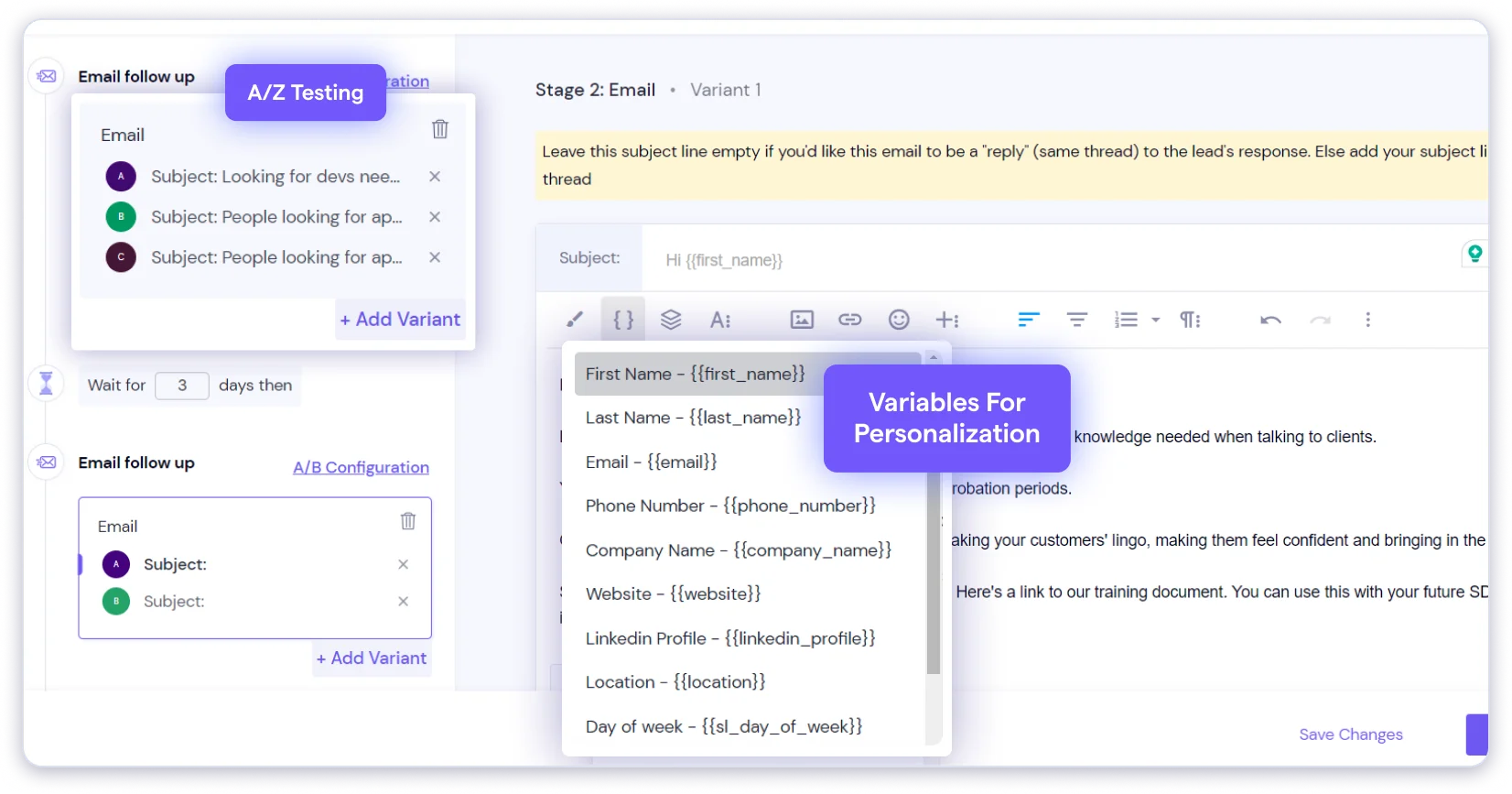
The master inbox brings replies from all connected accounts into one place, which helps when handling many inboxes across different clients.
Where friction appears is at the interface.
It works, but it is not as polished as tools like Saleshandy or Instantly, and there is a learning curve around API connections and webhook setup.
Key Features of Smartlead
- Unlimited email accounts + unlimited warm-up
- White-label solution for agencies
- AI warm-up with natural email patterns
- Dynamic IP rotation for deliverability
- Unified master inbox across all clients
- Behavior-based sub-sequences
Advantages of Smartlead
- Agency-first features including white-label and multi-client management
- Competitive pricing for unlimited accounts
- Strong deliverability infrastructure with IP rotation and AI warm-up
- Good for managing high volume across multiple clients
- Easy inbox setup and multi-sender rotation
- Unified inbox with smart reply detection
Limitations of Smartlead
- UI has a learning curve and feels less polished than competitors
- Lead-based pricing tiers can force lead cleanup to control costs
- Occasional bugs and glitches reported
Pricing (Annual Billing):
Smartlead offers four plans. You can check its monthly pricing for annual plans below. For more details, you can check its pricing page.
- Base: $39/mo
- Pro: $94/mo
- Unlimited Smart: $174/mo
- Unlimited Prime: $379/mo
6. Reply.io
- G2: 4.6⭐/5 (1,500+ reviews)
- Best for: Sales teams wanting true multichannel cold outreach, including email, LinkedIn, SMS, calls, and WhatsApp.
Reply.io is the most complete multichannel tool on this list.
When I tested it, I built a sequence that started with an email, triggered a LinkedIn request on day three, sent a follow-up email on day five, and scheduled a call task on day seven, all inside one workflow.
No other tool here handles that range of channels as natively (without add-ons or workarounds).
The headline feature is Jason AI.

It acts like an AI SDR that can manage replies, suggest responses based on context, and book meetings.
It is not fully hands-off, but it does reduce a lot of manual work when pipelines get busy (especially at higher volume).
CRM integrations with HubSpot, Salesforce, and Pipedrive are also solid, and the two-way sync helps keep data aligned across tools.
Although Reply.io is powerful, complexity is the trade-off.
The platform does a lot, so pricing and plans can feel confusing across the Email Volume, Multichannel, and Agency tiers.
For smaller teams just starting with cold email, it may feel like more than they need. If you want true multichannel sequencing in one place, Reply.io stands out.
Key Features of Reply.io
- Jason AI (AI SDR agent that handles responses, books meetings)
- Unlimited mailboxes across plans
- Multichannel sequences (email, LinkedIn, calls, SMS, WhatsApp)
- Dynamic behavior-based sequences
- CRM integrations (HubSpot, Salesforce, Pipedrive)
- Built-in B2B data for prospecting
Advantages of Reply.io
- Native multichannel sequences including email, LinkedIn, calls, SMS, and WhatsApp
- Jason AI automates replies, responses, and meeting booking
- Dynamic sequences adapt based on opens, clicks, or replies
- Bidirectional CRM sync with HubSpot, Salesforce, and Pipedrive
- Unlimited mailboxes enable easy email sequence scaling
- Comprehensive analytics for sequence performance tracking
Limitations of Reply.io
- Warm-up requires a separate add-on purchase
- The complex platform can feel confusing for simple email needs
- Tiered pricing structure lacks transparency
Pricing (Annual Billing):
Reply.io offers two Sales Outreach plans. You can check its monthly pricing for annual plans below. They even have two more categories in plans, like AI SDR and Agencies. For more details, you can check its pricing page.
- Email Volume: $49/mo
- Multichannel: $89/mo
7. Snov.io
- G2: 4.5⭐/5 (470+ reviews)
- Best for: Small teams needing email finding, verification, and basic cold email drip campaigns in one tool.
Snov.io is a good cold email tool if you want the main outreach features in one place.
It combines email finding, verification, drip campaigns, and a lightweight CRM, which suits small teams or solopreneurs (especially if you want fewer tools to manage).
The email finder follows a seven-step verification process, and bounce rates stayed low in my testing.

The LinkedIn Chrome extension helps build prospect lists quickly, and the drip campaign builder is simple to use.
It works well for basic multi-step cold email sequences, even though the functionality is limited.
The limitations appear when compared with dedicated cold email platforms.
Sequence features are basic, there is no sender rotation or AI variants, and warm-up is only available as an add-on.
The credit-based pricing can also feel restrictive because multiple actions share the same credit pool.
If you need a simple all-in-one starting point, Snov.io is a reasonable choice. If cold email becomes a primary growth channel, you may outgrow it over time.
Key Features of Snov.io
- Email finder + 7-step verification (high accuracy)
- Drip campaigns for cold email sequences
- Built-in lightweight CRM (free with all plans)
- LinkedIn prospecting via Chrome extension
- Technology checker and company profiles
- Domain search for bulk email finding
Advantages of Snov.io
- All-in-one flow to find, verify, and launch personalized drip sequences without switching tools
- Drag-and-drop builder for quick multi-step email sequences with conditions
- Unlimited follow-ups per recipient monthly for extended nurturing
- Built-in lightweight CRM tracks sequence performance and prospect activity
- AI email builder generates personalized copy quickly
Limitations of Snov.io
- Basic sequence features with limited conditional branching
- Credit-based system limits scale across sending and verification
- Email warm-up is available only as an add-on
Pricing (Annual Billing):
Snov.io offers three plans. You can check its monthly pricing for annual plans below. For more details, you can check its pricing page.
- Starter: $29.25/mo
- Pro: $74.25/mo
- Custom Ultra: Contact Sales
8. Mailshake
- G2: 4.7⭐/5 (270+ reviews)
- Best for: Teams wanting a focused, no-frills cold email outreach platform.
Mailshake is a focused cold email outreach tool that keeps things simple.
Instead of trying to become an all-in-one platform, it stays centered on sending and managing cold email campaigns (which is exactly what many teams need).
The strong G2 rating of 4.7 reflects that clarity of purpose.
When I tested it, the setup was fast and easy.
The AI email writer, SHAKEspeare, creates sequences from a short prompt, and Lead Catcher highlights warm replies and routes them for follow-up.
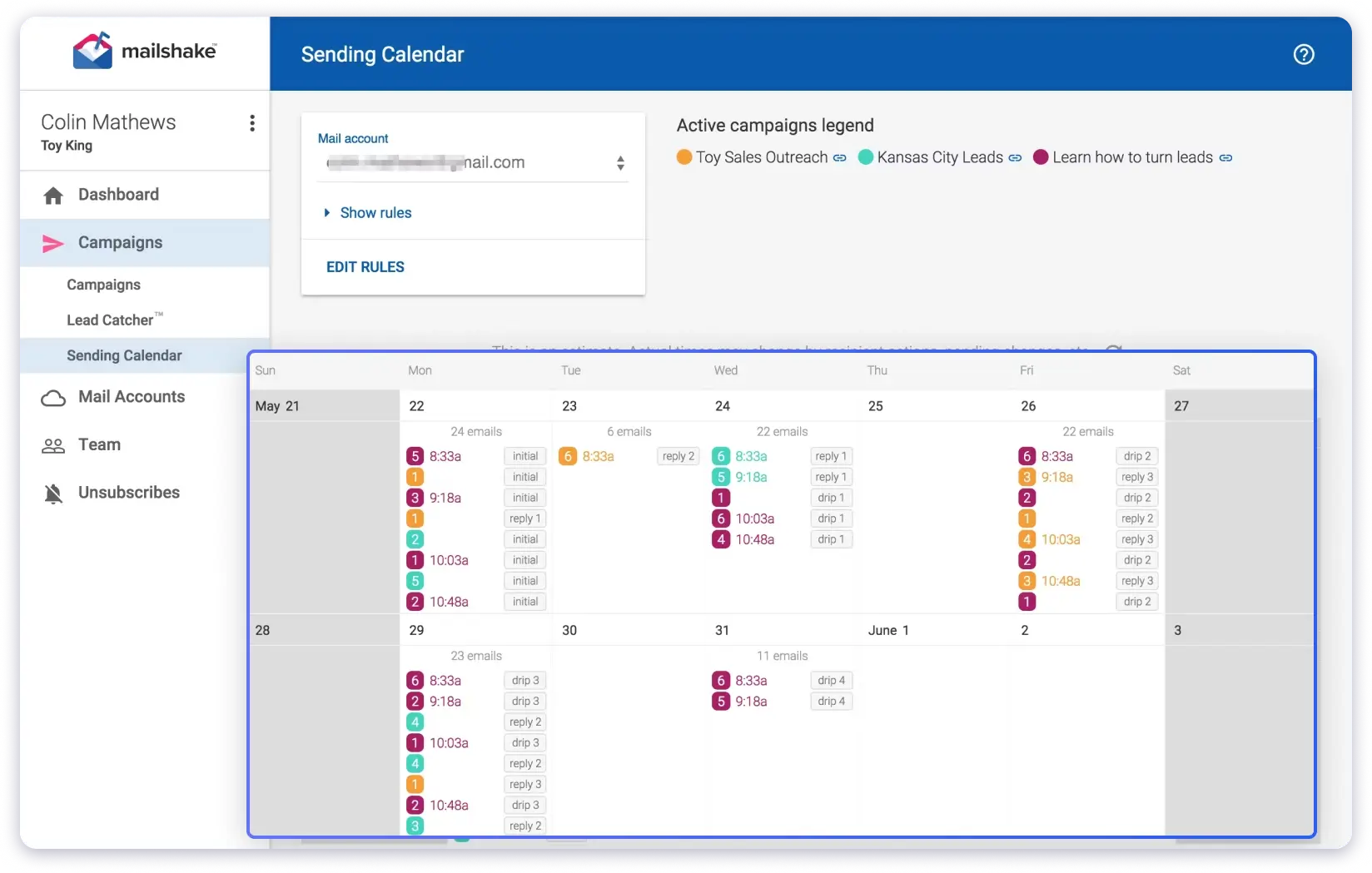
The dashboard is straightforward, analytics are reliable, and integrations with Salesforce and Pipedrive work well for teams already using a CRM.
Overall, the experience feels built around real cold email workflows rather than extra features.
The limits appear when you try to scale or expand capabilities. There is no built-in lead finder, so you need external prospect lists.
Email account access depends on user seats, which can restrict scaling without adding more users.
Some reviewers also mention annual-only billing and occasional deliverability concerns with bulk sending.
If you want a simple and reliable cold email tool, Mailshake fits well.
Key Features of Mailshake
- AI email writer (SHAKEspeare) for sequence generation
- Lead Catcher for managing warm replies
- A/B testing for subject lines and email copy
- LinkedIn automation integration
- Phone dialer (add-on for multichannel)
- Sending calendar optimization
Advantages of Mailshake
- Simple multi-step sequence builder with automatic pause on replies
- SHAKEspeare AI generates full email sequences and subject lines from short prompts
- Lead Catcher automatically highlights warm prospects from active sequences
- Built-in A/B testing and spintax to optimize every step of your sequences
- Sending calendar optimization and throttling for more natural delivery patterns
Limitations of Mailshake
- No built-in lead finder
- Email accounts are limited by user seats
- Sequence analytics are basic and lack deeper performance insights
Pricing (Annual Billing)
Mailshake offers three plans. You can check its monthly pricing for annual plans below. To know each plan in detail, you can check its pricing page.
- Starter: $25/mo
- Email Outreach: $45/mo
- Sales Engagement: $85/mo
9. Klenty
- G2: 4.6⭐/5 (380+ reviews)
- Best for: Sales teams that need cold email sequences tightly integrated with their CRM workflows.
Klenty started as an email sequencing tool and has grown into a broader sales engagement platform.
If I look at it purely as email sequence software, the core is still strong, especially for teams already using Salesforce, HubSpot, or Pipedrive and needing sequences synced with CRM stages.
The biggest strength is intent-based sequencing.
Instead of running the same follow-up flow for everyone, Klenty reacts to engagement signals like opens, clicks, and replies.
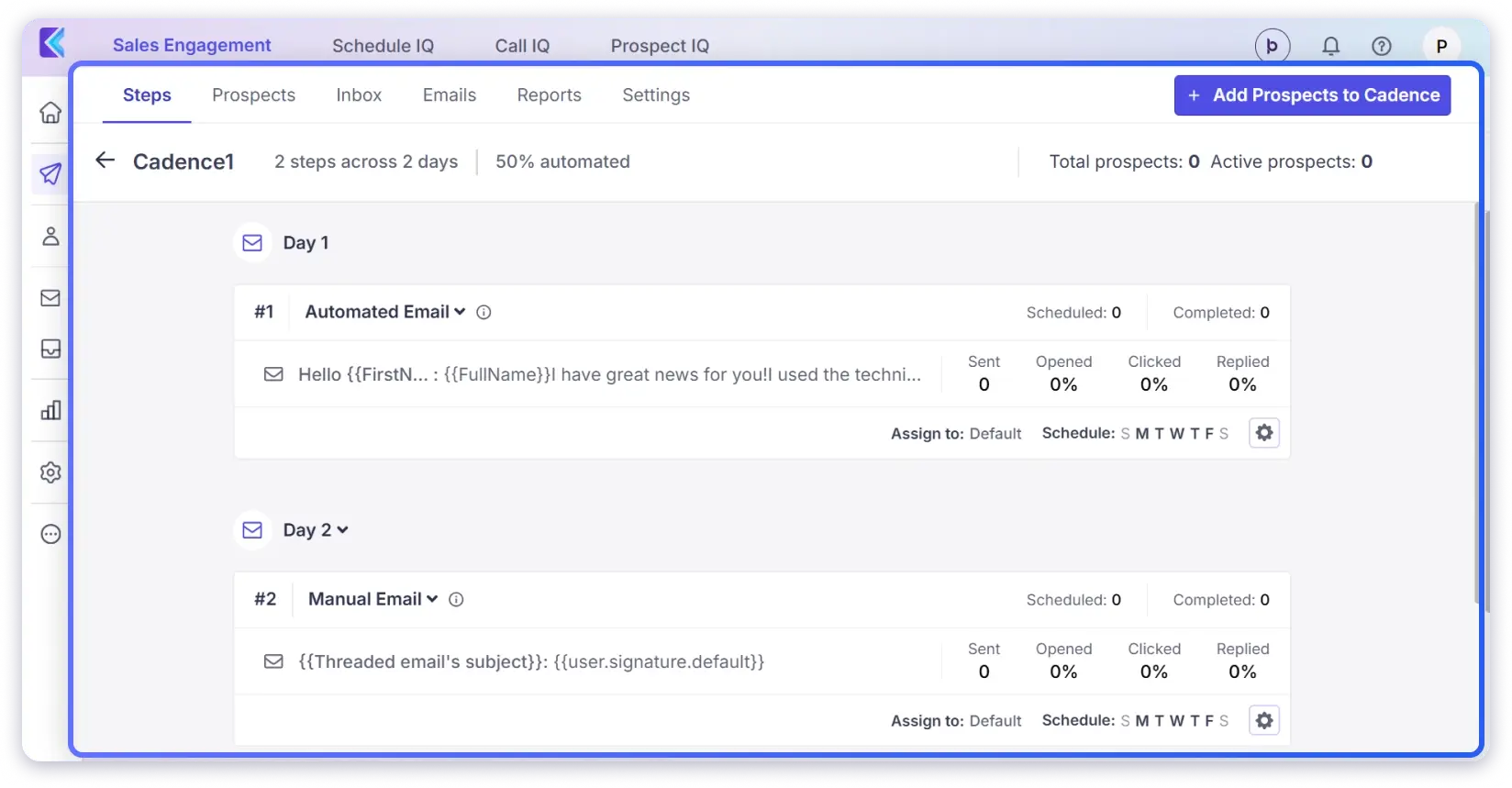
Prospects move into different cadences based on behavior, so follow-ups feel less repetitive and more relevant (which matters once volume increases).
Personalization is another strong area.
The AI Writer helps generate copy, and liquid templates let you change full sentences or sections based on prospect data.
For teams managing multiple ICPs, this saves time.
The “Approve Before Sending” option is also useful when managers want visibility before emails go out.
The main limitation is deliverability support.
There is no sender rotation, and inbox limits are strict, which makes high-volume cold email harder to manage.
Pricing is per user, so costs increase quickly as teams grow. Klenty earns its place here because it handles intent-based follow-ups better than most tools.
If CRM-driven sequencing is critical, it is worth considering.
Key Features of Klenty
- Cadence builder supports conditional branching logic
- Native CRM integrations (Salesforce, HubSpot, Pipedrive, Zoho) with bidirectional sync
- Built-in multi-mode sales dialer (no extra add-ons needed)
- Intent-based playbooks auto-adjust outreach timing
- Liquid templates enable sophisticated personalization
- Conversation intelligence analyzes calls for insights
Advantages of Klenty
- Intent-based follow-ups that adjust sequences based on opens, clicks, and replies
- Advanced cadence builder with conditional branching for behavior-driven outreach
- AI Writer and Agentic Cadences generate personalized multi-step sequences fast
- Liquid templates enable dynamic personalization in every sequence step
- Seamless bidirectional CRM sync aligns outreach with pipeline stages
Limitations of Klenty
- No built-in email warm-up, requires a separate tool for scaling
- Email account limits on lower tiers restrict higher-volume outreach
- Per-user pricing increases as team size and sequences expand
Pricing (Annual Billing):
Klenty offers three plans. You can check its monthly pricing for annual plans below. For more details, you can check its pricing page.
- Starter: $50/mo
- Growth: $70/mo
- Plus: $99/mo
10. QuickMail
- G2: 4.6⭐/5 (80+ reviews)
- Best for: Teams where deliverability is the top priority and who want cold email automation that stays simple.
QuickMail stands out for how directly it handles email sequencing.
You create a multi-step sequence, set custom delays, and let it run without much manual work.
Sequences pause automatically when someone replies, bounces, or sends an out-of-office message, so follow-ups stay accurate and timely.
A key sequencing feature is Deliverability AI.
It replaces weak email accounts during an active sequence to help maintain inbox placement.
Reword with AI can also adjust email wording to reduce spam triggers without changing the core message.
A/B/Z testing is built into the same flow, which allows testing subject lines, copy, and send timing without restarting campaigns (useful for steady optimization).
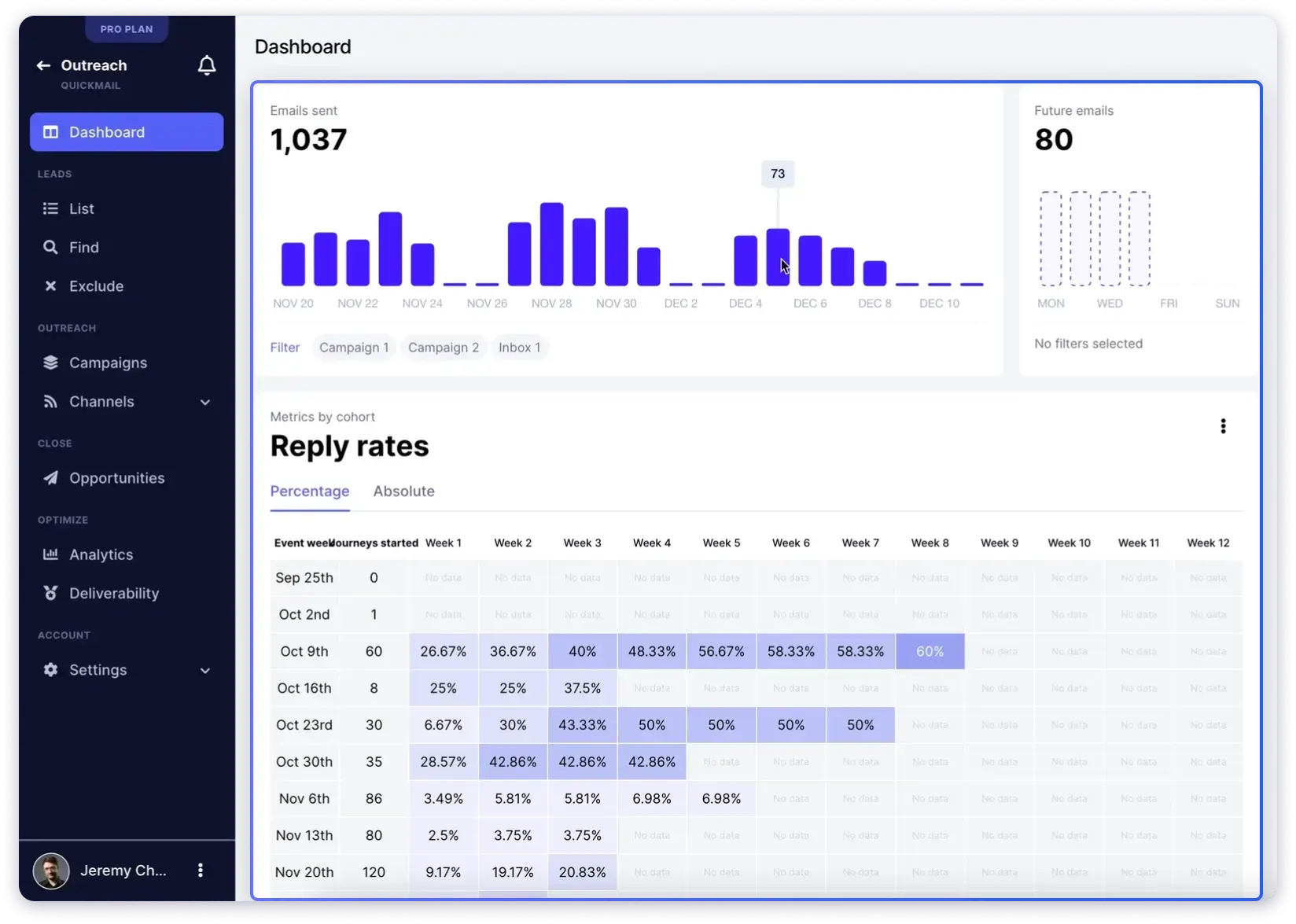
The limits appear in personalization depth and workflow feel.
Personalization relies on merge tags and dynamic text, without AI-generated copy that adapts to each prospect.
The bucket-based campaign setup also takes time to understand, and some reviewers describe it as unintuitive.
For teams that value simple sequences and reliable inbox placement, QuickMail is a practical choice.
Key Features of QuickMail
- AutoWarmer (built-in warm-up on all plans)
- Unlimited email accounts (called “inboxes”)
- Free built-in email verification
- Subcampaigns for branching sequences
- Deliverability scoring dashboard
- Agency multi-client management
Advantages of QuickMail
- Sequences auto-pause on replies, bounces, and OOO responses for clean follow-ups
- Deliverability AI swaps weak inboxes mid-sequence to maintain inbox placement
- Built-in AutoWarmer prepares email accounts before active outreach
- Subcampaigns allow smart branching based on prospect behavior
- AI rewording adjusts copy to reduce spam filter triggers
Limitations of QuickMail
- Personalization limited to merge tags and dynamic text fields
- Bucket-based setup can feel unclear for complex sequences
- No built-in lead finder and depends on external lead sources
Pricing (Annual Billing):
Quickmail offers three plans. You can check its monthly pricing for annual plans below. For more details, you can check its pricing page.
- Starter: $9/mo
- Growth: $99/mo
- Agency: $299/mo
Pick the Best Email Sequence Software for Your Requirements
Your choice usually comes down to three things.
Team size, budget, and how much you need beyond basic email sequences.
Instead of comparing every feature, focus on which tool fits your current workflow and can still support you as outreach grows.
Testing one or two options in real campaigns will give you the clearest answer.
If you want a simple way to run cold email sequences, manage follow-ups, and keep deliverability stable in one place, Saleshandy is a practical starting point.
It brings the core outreach pieces together without adding unnecessary complexity.
→ Try Saleshandy free for 7 days and get 5 leads at no cost (no credit card needed).
FAQs About Email Sequence Software
1. What is email sequence software?
Email sequence software lets you automate a series of cold emails sent to prospects on a scheduled timeline. Instead of manually tracking who opened, clicked, or replied, the software handles follow-ups based on prospect behavior. If someone replies, the sequence stops. If they do not, the next email goes out automatically. It is built for one-to-one outbound sales outreach, not bulk newsletters or marketing blasts.
2. How many emails should be in a cold email sequence?
I would say five to seven emails spread over two to three weeks is the sweet spot for most cold outreach campaigns. The exact number depends on your audience and industry, but from what I have seen, going beyond seven emails rarely adds meaningful conversions. In fact, it usually just increases unsubscribe rates and burns your sender reputation faster.
3. Can email sequence software hurt my deliverability?
It can, if you skip the basics. Sending high volume from a cold account without warm-up is the fastest way to land in spam. But most good tools on this list include safeguards like built-in email warm-up, sender rotation, and daily sending limits to keep your accounts healthy. As long as you use those features properly, sequence software actually helps deliverability by spacing out sends and mimicking natural sending behavior.
4. What is the difference between email sequence software and email marketing tools?
They solve completely different problems. Email sequence software is built for one-to-one outbound cold emails, personalized messages sent from your inbox to individual prospects who have not opted in. Email marketing tools like Mailchimp or ConvertKit are designed for one-to-many campaigns, such as newsletters, promotions, and broadcast emails sent to subscribers who signed up. Different use case, different sending infrastructure, different tools.
5. Is there free email sequence software?
A few tools offer limited free tiers. For example, Snov.io has a free plan with 50 credits. Most tools on this list offer free trials ranging from seven to fourteen days, so you can test before committing. For serious cold outreach at any real scale, expect to spend at least $25 to $49 per month. If you want to test without risk, Saleshandy offers a seven-day free trial with five free lead finder credits and no credit card required.