 Dhruv Patel
 Contents
- 1 Saleshandy MCP – TOC
- 2 Why Operating Outreach Feels Harder Than It Should
- 3 How AI Helped Outreach and Where it Stopped Short
- 4 What is Saleshandy MCP? (Explained in Simple Terms, I Swear)
- 5 Where Saleshandy MCP Works?
- 6 Saleshandy MCP Supports 40+ Commands, That’s Huge!
- 7 What You Can Control with Saleshandy MCP
- 8 Some Real Prompts Our Selected Users Already Tried and Got Amazing Results
- 9 How Saleshandy MCP Changes Your Daily Outreach Workflow?
- 10 Learn How to Get Started with Saleshandy MCP
- 11 Final Thoughts
- 12 FAQs
- 12.1 1: Who Will Benefit Most from the Saleshandy MCP Feature: Managing Outreach?
- 12.2 2: What Saleshandy MCP Won’t Support?
- 12.3 3: What kind of actions can I perform using Saleshandy MCP?
- 12.4 4: Can I try using MCP during the free trial?
- 12.5 5: Is it safe to give an AI tool access to my Saleshandy account?
Running cold email outreach today looks very different from how it did a few years ago.
Most teams are no longer struggling with writing emails or setting up basic follow-ups. Cold emailing tools have already solved that problem, Saleshandy included, of course. You can create sequences, rotate email accounts, track replies, manage tasks, and scale outreach without losing control.
But we are all well aware that as outreach scales, a different problem emerges called “control and execution.”
Executing outreach is more time-consuming than planning it.
You might already know exactly what needs to be done, but executing those decisions still takes time. Checking multiple dashboards. Opening different views. Clicking through sequences. Jumping between inboxes, tasks, and analytics.
This gap between knowing and doing is what slows teams down.
Saleshandy MCP is built to close that gap.
You wanted to connect, control, and command Saleshandy from your favorite AI or LLM tools, and we just made your wish come true by launching Saleshandy MCP.
Saleshandy MCP – TOC
- Why Operating Outreach Feels Harder Than It Should
- How AI Helped Outreach and Where it Stopped Short
- What is Saleshandy MCP? (Explained in Simple Terms, I Swear)
- Where Saleshandy MCP Works?
- Saleshandy MCP Supports 40+ Commands, That’s Huge!
- What You Can Control with Saleshandy MCP
- Some Real Prompts Our Selected Users Already Tried and Got Amazing Results
- How Saleshandy MCP Changes Your Daily Outreach Workflow?
- Learn How to Get Started with Saleshandy MCP
- Final Thoughts
- FAQs
Why Operating Outreach Feels Harder Than It Should
Outreach itself is no longer the problem. Most sales and GTM teams already understand the mechanics. They know how to create sequences, how many follow-ups to add, how to rotate email accounts, and why deliverability matters. They know tasks must be completed on time and replies must be addressed promptly.
The challenge begins after the strategy is clear.
Because running outreach is no longer one activity. It is a combination of many small operational decisions that happen throughout the day.
You are constantly asking questions like:
- Which sequences are underperforming right now?
- Are any email accounts at risk?
- Which tasks should I prioritize today?
- Are there replies I need to act on immediately?
- Did yesterday’s changes actually improve performance?
None of these questions is complex. But answering them takes work.
To get clarity, you often have to:
- Open the sequences dashboard to check performance
- Apply filters to find what is not working
- Open individual campaigns to understand context
- Switch to the tasks view to see what is due
- Open the inbox to check replies
- Jump to analytics to see overall trends
By the time you have a clear picture, you have already switched contexts multiple times.
This is where outreach starts to feel heavy.
Not because the tool is hard to use, but because execution is fragmented. This is the real bottleneck in modern outreach.
Teams do not struggle because they lack insight; I hope they realize sooner that they struggle because acting on insight takes too much effort.
How AI Helped Outreach and Where it Stopped Short
Since 2025, AI has brought real improvements to outreach. No doubts on that.
It has helped teams:
- In writing better emails
- Improving subject lines
- Generating great follow-ups
- Personalizing messages faster
However, AI mostly stayed limited to content and analysis. It could suggest areas for improvement, but it could not act within your outreach tool.
After every suggestion, you still had to:
- Open Saleshandy or your current cold outreach tool
- Find the right sequence
- Make changes manually
- Repeat the process across campaigns
This separation between thinking and execution is where time gets lost.
What is Saleshandy MCP? (Explained in Simple Terms, I Swear)
Saleshandy MCP allows LLMs (Large Language Models) to interact directly with your Saleshandy account.
In practical terms, it lets you:
- Ask questions about your outreach
- Get answers from live Saleshandy data
- Take actions inside Saleshandy by just giving simple prompts
- Add more sequences, verify the email address, and access analytics for your existing sequence without running the app.
This is not a reporting layer. This is not read-only access.
Saleshandy MCP enables your AI to operate your outreach system with your permission.
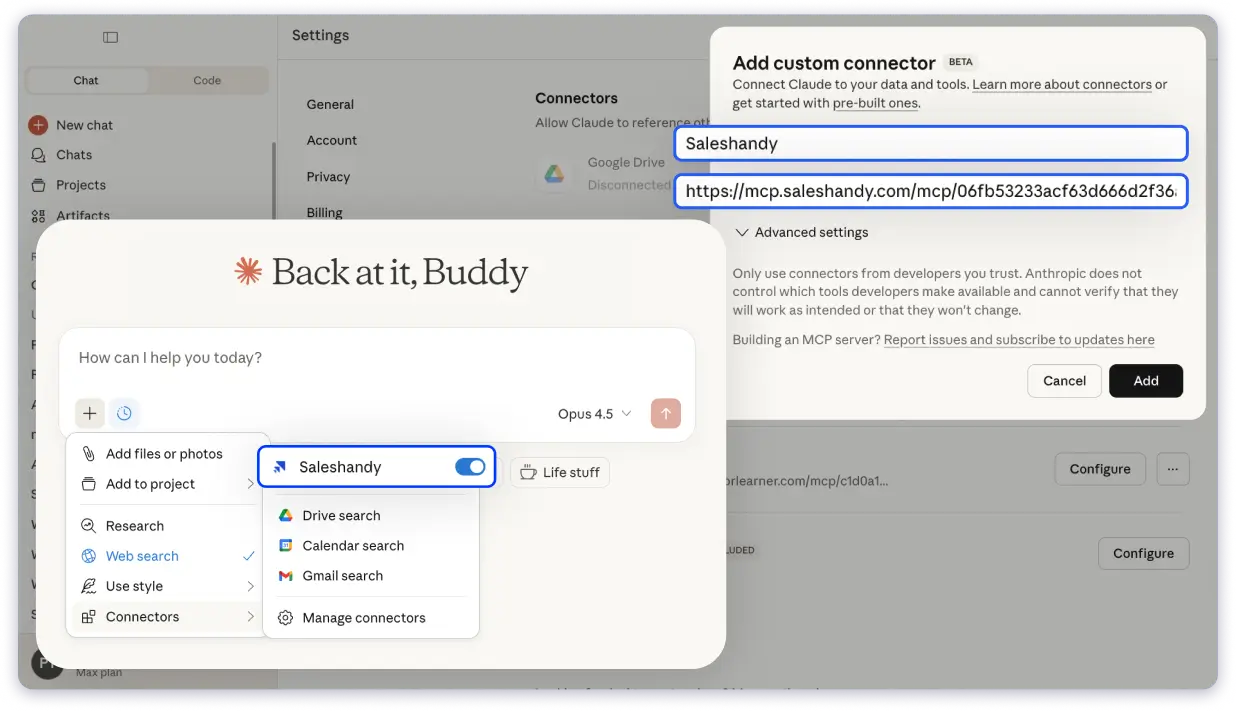
Where Saleshandy MCP Works?
Saleshandy MCP works inside tools where teams already plan, think, and automate.
This includes:
- ChatGPT
- Claude
- n8n, and any LLM tool or client application that supports MCP
Instead of switching between tools, your AI becomes a control layer for Saleshandy.
You describe what you want to do. Saleshandy executes it from the supported app as your real-time agent.
Saleshandy MCP Supports 40+ Commands, That’s Huge!
Saleshandy MCP is not built around one or two shortcuts.
It supports 40+ real activities that reflect how teams already use Saleshandy today. And let me tell you, this is the highest number of supported activities or commands compared to other cold emailing tools on the market.
These actions cover:
- Campaign creation and management
- Email account monitoring
- Prospect imports and data hygiene
- Task execution
- Inbox handling
- Performance analytics
What You Can Control with Saleshandy MCP
As a Saleshandy user, you can control 90% of your outreach with MCP. Let me help you with the actions and commands that you can do!
Sequences and Campaigns
You can:
- List all sequences
- Check sequence performance
- Create new sequences by describing them
- Update sequence status
- Add or remove email accounts
- Add or update sequence steps
- Delete steps or entire sequences (Only after confirmation)
Email Accounts and Deliverability
With MCP, you can:
- List all email accounts
- Check email account stats
- See how accounts perform across campaigns
- Identify accounts that need attention
Adding Prospects
Saleshandy MCP lets you:
- Import prospects into sequences
- Map fields correctly
- Check import status
- List available fields
- Create and manage DNC lists
- Search suppressed contacts
- Add new entries to DNC lists
Tasks and Daily Execution
Tasks are often where outreach slows down.
With MCP, you can:
- List tasks due today
- Snooze tasks
- Skip tasks
- Complete tasks
- Perform bulk task actions
- Track task status and workload
Inbox and Replies
Inbox handling often breaks the flow.
Saleshandy MCP allows you to:
- Check unread email threads
- Fetch full conversation history
- Read email content
- Reply directly to emails
Analytics and System Health
Analytics should answer questions quickly.
With MCP, you can:
- Fetch sequence-level stats
- View consolidated performance
- Track outcomes
- Check system metrics
Some Real Prompts Our Selected Users Already Tried and Got Amazing Results
Here are some of the real prompts tried by our selected users after connecting their LLM tool with Saleshandy MCP.
- Prompt for Checking performance
You can ask:
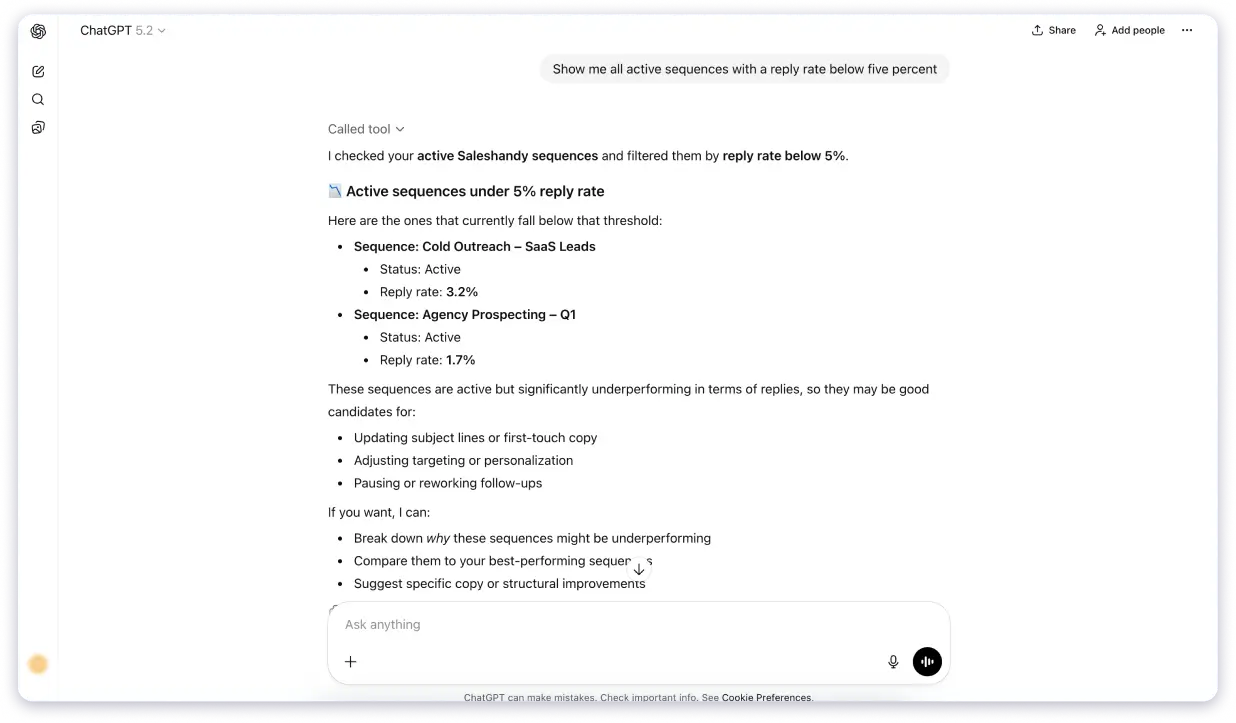
“Show me all active sequences with reply rate below five percent.”
Saleshandy will fetch sequence data and display key metrics.
- Prompt Command to Act on Underperforming Campaigns
You can say:
“Pause all sequences with low reply rates.”
Saleshandy will identify those sequences and pause them after confirmation.
- Simplest Prompt but Quite Time-Saving: Create a New Sequence
You can say:
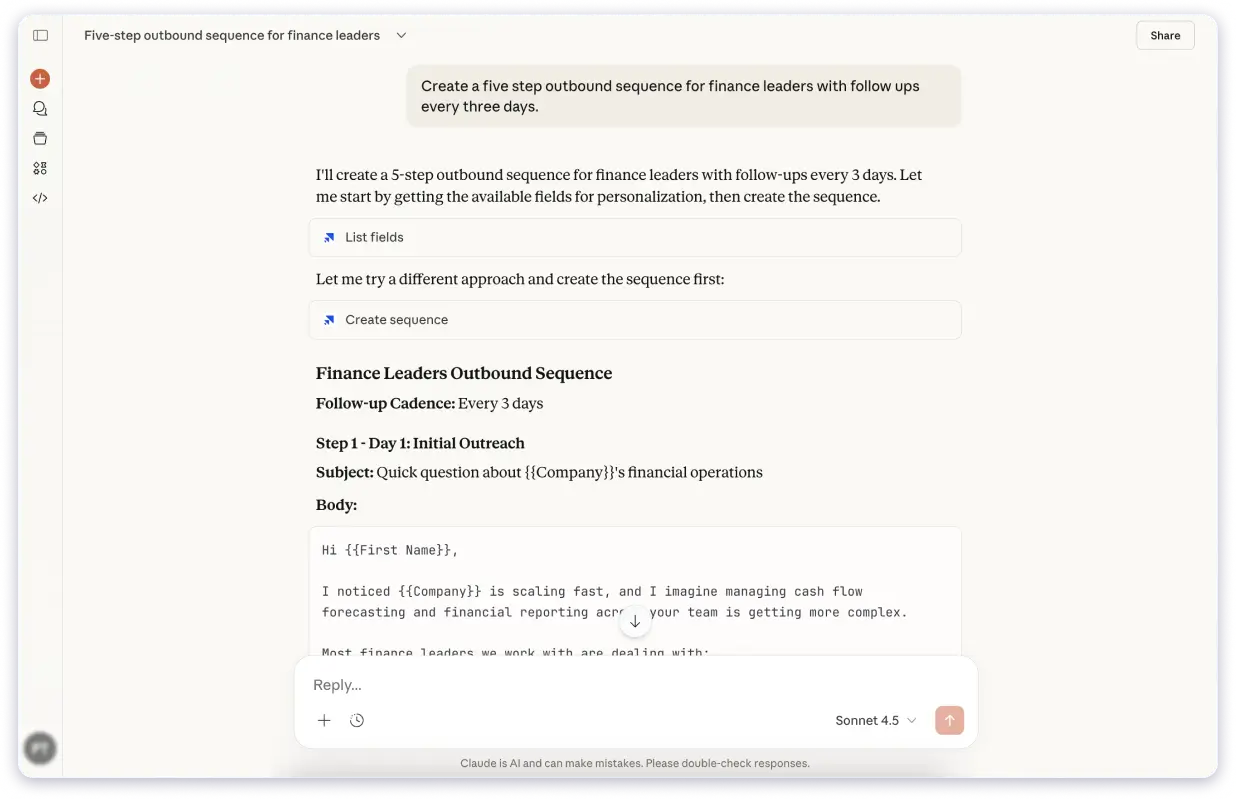
“Create a five-step outbound sequence for finance leaders with follow-ups every three days.”
Saleshandy will create the sequence and prepare it for activation.
- Prompt Used for Managing Tasks
You can say:
“Snooze all tasks assigned to me until tomorrow.”
Saleshandy will apply the update across tasks.
- Quick Prompt on Handling Inbox Replies
You can ask:
“Show me unread email threads with positive replies.”
Saleshandy will surface relevant conversations for response.
How Saleshandy MCP Changes Your Daily Outreach Workflow?
With MCP, outreach becomes continuous instead of fragmented. Here is how your day will look while managing single or multiple outreach workflows after connecting Saleshandy MCP to your most-used LLM or tool.
- In the morning, you ask what needs attention. You see tasks, weak campaigns, inbox replies, and account issues.
- During the day, you fix what is not working without opening dashboards.
- When a new idea comes up, you describe it and launch it within seconds. No more pauses, just a simple ongoing workflow throughout the day.
- By the end of the day, outreach runs smoothly without constant switching.
Also, check out a detailed guide on the email MCP server and how it works with email systems.
Learn How to Get Started with Saleshandy MCP
Getting started is simple:
- Connect your AI tool to Saleshandy
- Authorize access
- Start with a basic command
You learn naturally as you use it. Here is a detailed document outlining the required steps.
Connect Your AI Tool to Start Managing Outreach
Final Thoughts
Saleshandy MCP is not about adding another feature.
It is about removing friction between thinking and execution.
If you ever wished your outreach tool could simply do what you asked, that wish is now granted.
FAQs
1: Who Will Benefit Most from the Saleshandy MCP Feature: Managing Outreach?
- Founders who want visibility without micromanaging
- RevOps teams managing scale
- SDR managers running multiple campaigns
- GTM leaders tracking performance
- Automation-focused teams
- Users who want simpler workflows
2: What Saleshandy MCP Won’t Support?
Saleshandy MCP won’t support any actions that involve credit utilization, such as lead finding and AI prospect enrichment.
3: What kind of actions can I perform using Saleshandy MCP?
Saleshandy MCP supports more than 40 actions across Saleshandy.
You can:
- Create, pause, update, and delete sequences
- Check sequence and account performance
- Manage email accounts and deliverability
- Import prospects and manage custom fields
- Create and manage DNC lists
- View, snooze, skip, or complete tasks
- Read and reply to inbox conversations
- Fetch analytics and consolidated stats
4: Can I try using MCP during the free trial?
Yes, Saleshandy MCP support is available during the free trial.
5: Is it safe to give an AI tool access to my Saleshandy account?
Yes. Saleshandy MCP works using secure, permission-based access. You control which account is connected, and access can be revoked at any time.
Actions are performed only after authorization, and sensitive operations typically require confirmation before execution. Your data remains within your Saleshandy workspace.