

I spent a few days testing D7 Lead Finder to see if it actually delivers on what it promises — affordable B2B lead data for outbound teams.
Short answer? It does a few things okay, but falls short in most areas that matter for serious prospecting.
D7 is essentially a keyword-plus-location search tool with a database of about 65 million business contacts.
You type in something like “dentists in Chicago” and get a list of businesses with emails, phone numbers, and social profiles.
Sounds useful. But once you start digging into the data quality, filtering limitations, and pricing, the picture changes.
In this D7 Lead Finder review, I’ll walk you through:
- What D7 actually gives you (and what it doesn’t)
- Where the data quality breaks down
- How the pricing compares to what you actually get
- Who D7 works for, and who should skip it
- A direct comparison with a tool that gives you significantly more
If you’re evaluating D7 Lead Finder for your outreach workflow, this should save you the time I already spent figuring it out.
D7 Lead Finder Review – TOC
- TL;DR: Is D7 Lead Finder Worth the Price?
- Who Is D7 Lead Finder Actually Good For?
- Full Breakdown of D7 Lead Finder Features
- D7 Lead Finder Pros and Cons
- D7 Lead Finder Pricing Plans
- What are Users Saying About D7 Lead Finder?
- Is There a Better Alternative to D7?
- My Final Verdict on D7 Lead Finder: Worth it in 2026?
- D7 Lead Finder Review: FAQs
TL;DR: Is D7 Lead Finder Worth the Price?
No, D7 Lead Finder is not worth paying $44.99/month for what it offers.
- A small database of ~65M contacts.
- Only 2 filters: keyword and location.
- Mostly generic email IDs like “info@” and “sales@”.
- Slow and clunky UI.
There are better tools available that give 10X more data and advanced filters at much better prices.
I have compared D7 and one such tool, Saleshandy, in the table below:
| Comparison | D7 Lead Finder | Saleshandy | Winner |
|---|---|---|---|
| Entry Pricing | $44.99/month | $34/month (Billed Annually) | Saleshandy |
| Database Size | 65M+ Professional Contacts & Business Profiles | 852M+ Professional Contacts & 42M+ Business Profiles | Saleshandy |
| Number of filters | 2 | 75+ Filters + AI Lead Search | Saleshandy |
| Speed of Finding Leads | Slow, Takes 3 Minutes to Perform a Search | Lighting Quick, Instant Results for Your Searches | Saleshandy |
| Search Restrictions | Only 10 Searches/Day (Increases Based on Plan) | Unlimited Searches | Saleshandy |
| Integrations | ❌ | ✅ CRM, Zapier, TrulyInbox | Saleshandy |
| Built-in Outreach | ❌ | ✅ AI-Powered Cold Outreach Capabilities | Saleshandy |
Who Is D7 Lead Finder Actually Good For?
D7 isn’t completely useless. It has a narrow use case where it works reasonably well.
D7 makes sense if you:
- Target local businesses in a specific city (plumbers in Miami, restaurants in London, etc.)
- Only need basic contact info like business email, phone, and social links
- Don’t need to filter by job title, company size, revenue, or industry vertical
- Run a small operation and don’t need CRM integration or outreach automation
- Want a quick way to pull a list of businesses without complex setup
D7 is not the right fit if you:
- Need verified personal email addresses of decision-makers (not generic info@ addresses)
- Run B2B outbound at any real scale
- Need advanced filtering to match a specific ICP
- Want to connect your lead data to a CRM or outreach tool
- Care about data accuracy and email deliverability
- Need buying signals, intent data, or technographic filters
If you fall into the second category, you’ll outgrow D7 within a week. The tool just wasn’t built for modern B2B prospecting workflows.
Full Breakdown of D7 Lead Finder Features
This won’t take long: D7 offers very limited features to help you find leads.
In fact, speaking from personal experience, I found that D7 is more of a slow online business directory rather than a modern lead finder tool.
Let me show you what I’m talking about:
1. Database Size
D7 gives you access to a database with over 65 million leads.
Now, this might seem like a huge number, but when you consider that this is a global database, that number becomes a con rather than a pro.
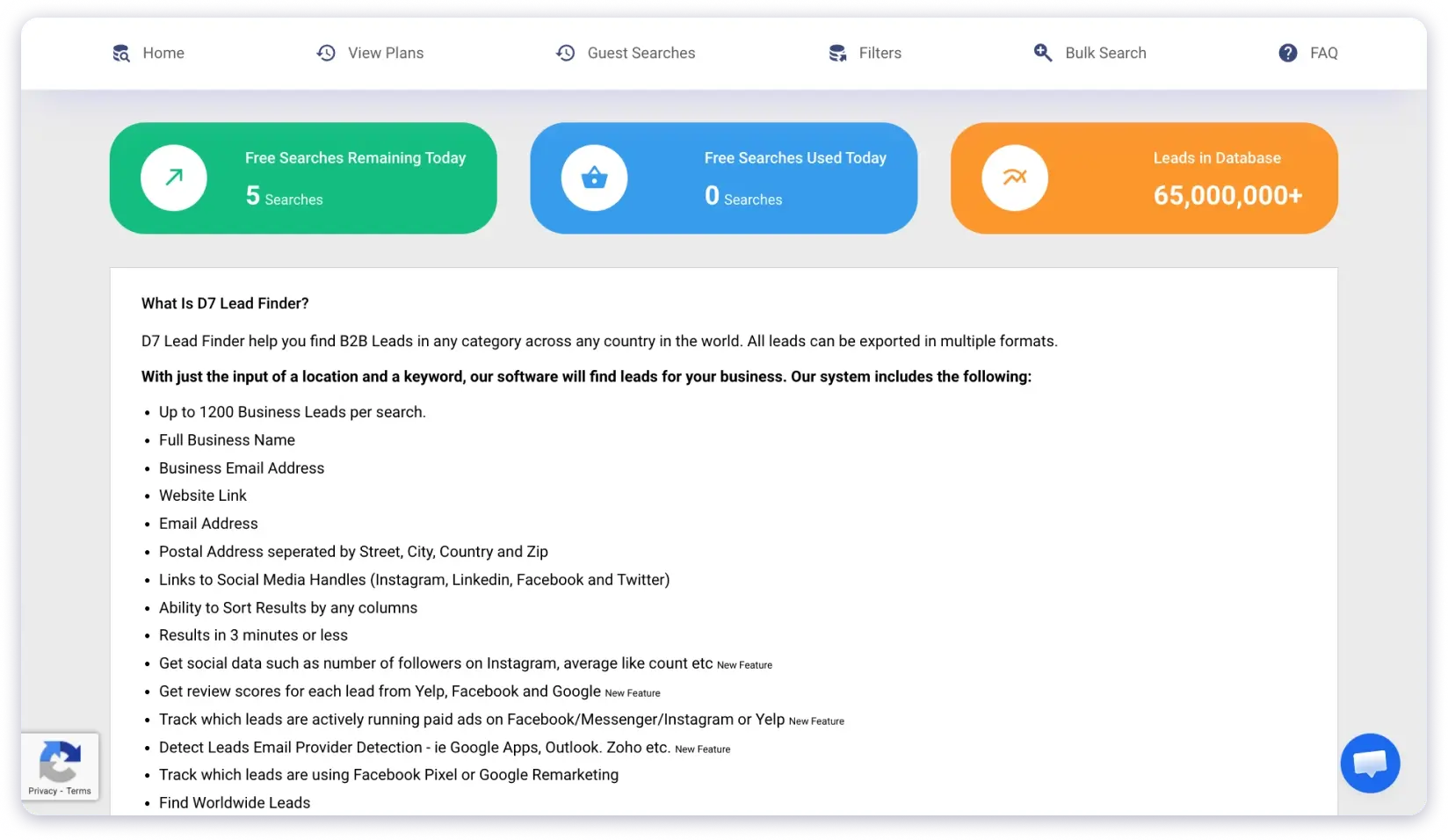
And the number becomes even smaller when you consider that all leading B2B data providers have databases ranging from 100M to 700M!
So, while D7 has good coverage for local businesses, its small database means you’ll always end up with fewer leads for your ICP.
And this can be a huge problem if your competitors are using lead finders with bigger databases!
2. Search Filters
Next, let’s talk about search filters.
Here’s the problem:
D7 has just two search filters you can use to find prospects.
The bare minimum you need to even use the term “filters” rather than “filter.”
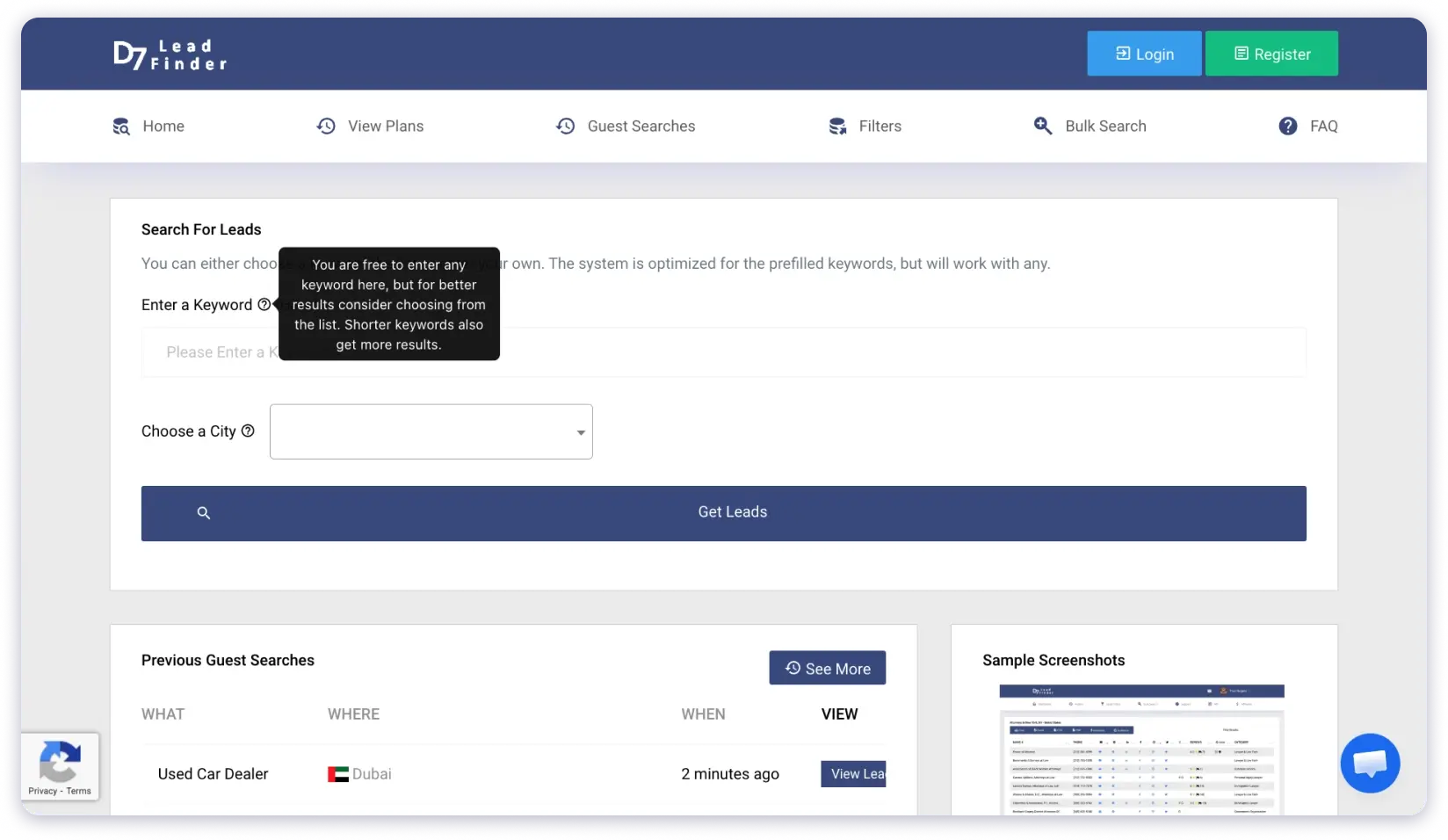
Here’s how they work:
- First is the keyword filter, where you can enter the type of business (car dealerships) or roles (doctors).
- Second, is the specific city where you want to find leads (LA, New York, or Paris).
That’s it!
The bottom line?
D7 is way too basic for serious prospecting!
3. Data Fields
D7 does offer some good information for every business in its database, such as:
- Business phone number (usually the same as listed on the business website).
- Email address (often generic IDs, like reach@company.com).
- Social links: Instagram, LinkedIn, Facebook & Messenger, and X.
- Google Business Profile reviews.
- An indication of whether the business is running ads on Yelp, Google, or Meta.
- Subcategory, for e.g., dealers, brokers, rental agencies, body shops, etc., if you search “Car Dealers”.
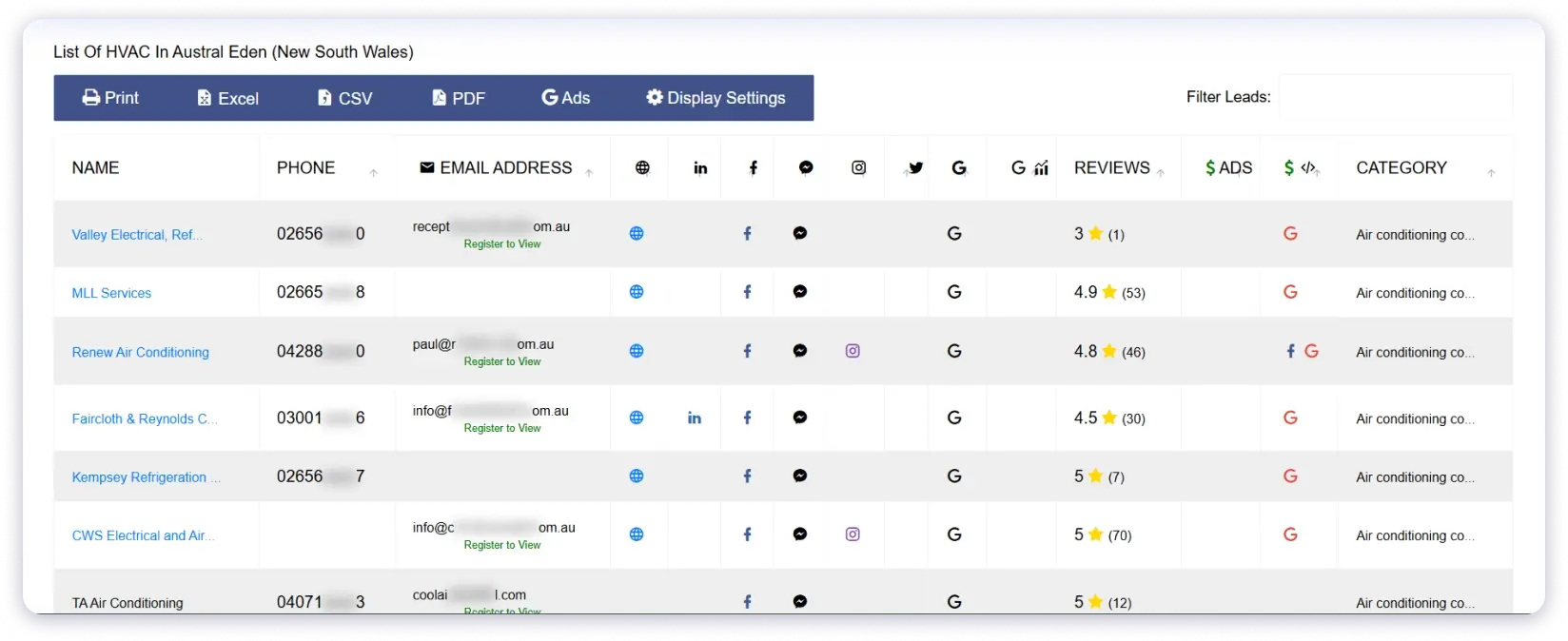
Now, this info might help if you’re targeting small local businesses.
But for building a targeted list for outreach?
It’s nowhere close to the granular and detailed data you need!
Plus, the accuracy of email addresses is quite poor.
This is mainly because of how D7 validates emails.
The emails are partially verified in that we check them for the right syntax, that they’re formatted correctly, that they aren’t any known honeypots or spamtraps, and then that the domain exists and has a server accepting email…
The only check we don’t perform is if the user exists at the domain as this would vastly increase the cost of these lists to you without giving much benefit.
If you wish to perform this last check and have a 100% valid list, you can use a variety of tools such as Debounce.
Read the article on D7 Help DocIf a lead database is publicly admitting that it doesn’t properly verify the email addresses it gives you, maybe it’s not worth your time or money at all!
4. Export Options
After you have built your lead list using D7 Lead Finder, you get 4 ways to export it.
- CSV
- Excel
And I’m being generous when I say four options, because CSV is essentially the same as Excel, and “Print” isn’t even an export option!
There is no CRM integration!
But D7 does have API support.
The catch… It is available only in the Professional Plan, which is $119.99 per month.
Totally not worth it.
D7 Lead Finder Pros and Cons
If you’re still not convinced that D7 isn’t a prospecting tool you should spend your valuable time or money on, let me show you whether its pros outweigh the cons:
Pros
- Good for finding local businesses
- Shows whether prospects are running ads on Meta, Google, or Yelp
Cons
- Very limited database
- No advanced search filters
- No CRM integration
- Takes up to three minutes to show search results
- Outdated, clunky UI
- Limited bulk search (200 to 700 leads per search)
As you can see, D7 Lead Finder’s cons heavily outweigh the pros!
D7 Lead Finder Pricing Plans – Value for Money?
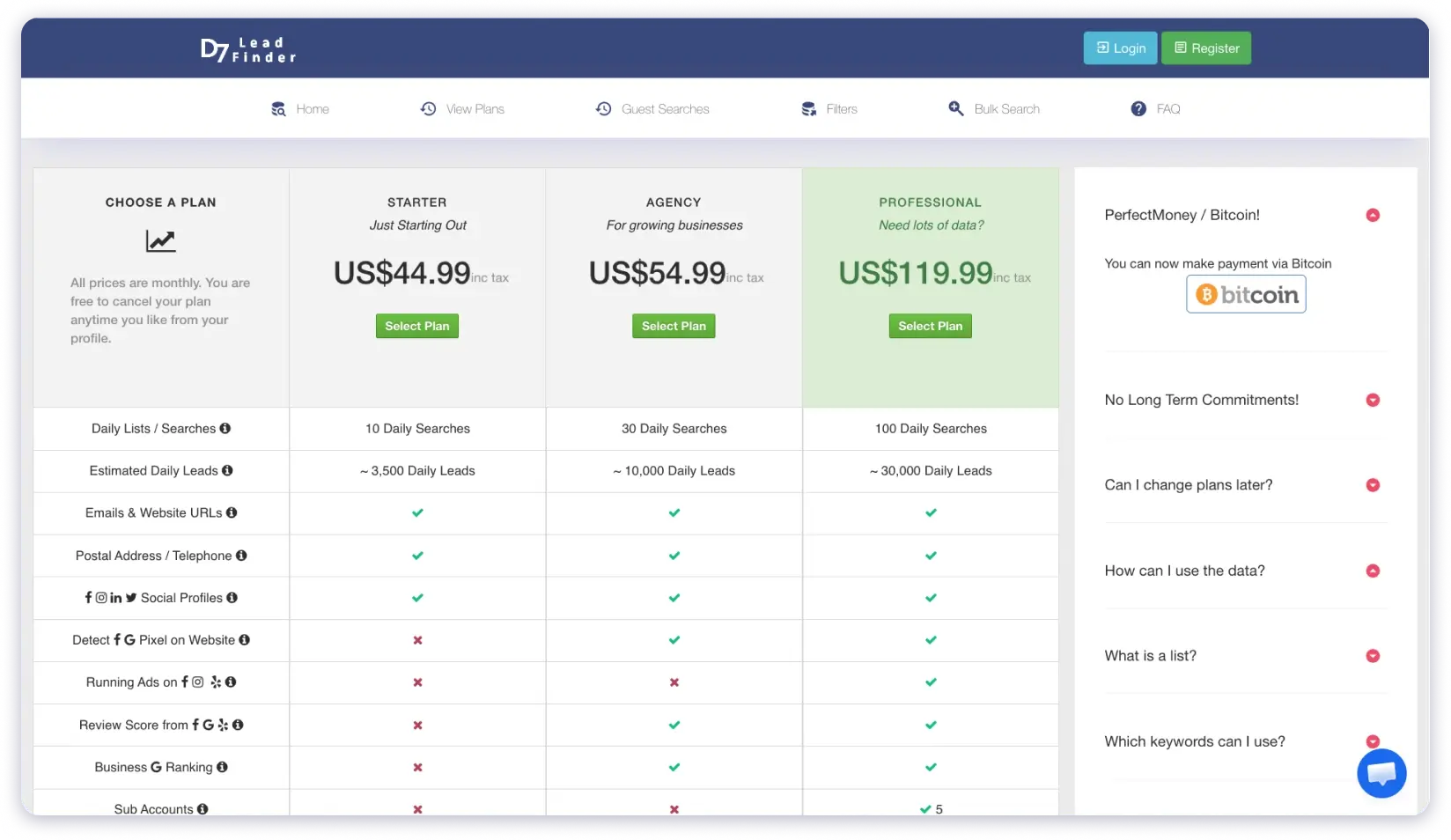
D7 Lead Finder offers three separate pricing plans, all of them billed monthly.
Let me show you what it offers for each plan:
1. Starter Plan – $44.99/month
With the starter plan, you get 10 daily searches and can find approximately 3,500 leads per day (on average).
For each lead, you get three data fields: business phone number, official email address, and links to social profiles.
2. Agency Plan – $54.99/month
With the Agency Plan, you get the basic contact data from the Starter Plan, plus:
- An average rating from Google, Meta, and Yelp reviews of the company.
- Google search ranking for their official website.
- Domain information.
- Instagram data: follows, likes, verification status, etc.
- Website data: mobile friendliness & the platform the website is using (like WordPress).
3. Professional Plan – $119.99/month
D7 Lead Finder’s most expensive plan gives you access to all of its limited features.
On top of everything you get with the Starter and Agency plans, you also get:
- 5 sub-accounts with separate logins for your team.
- API support for bulk search.
- Tells you which ESP your prospect is using (Outlook, Gmail, etc.).
- Detects whether the prospect is running ads on Meta, Google, or Yelp.
- Subcategory classification for prospects through categories “Italian Restaurant” when you search for “Restaurants” or “Bathroom Contractor” when you search for “Contractor.”
Frankly, if D7 Lead Finder offered such features with its basic plan, I would have recommended it to you if you were looking to grow your small business in a specific city.
But for $119.99/month? You deserve way more!
What Are Users Saying About D7 Lead Finder?
D7 Lead Finder has barely any user reviews online, with just 4 reviews on G2, averaging 3.6/5.
Worse? The most recent one was posted over a year ago.
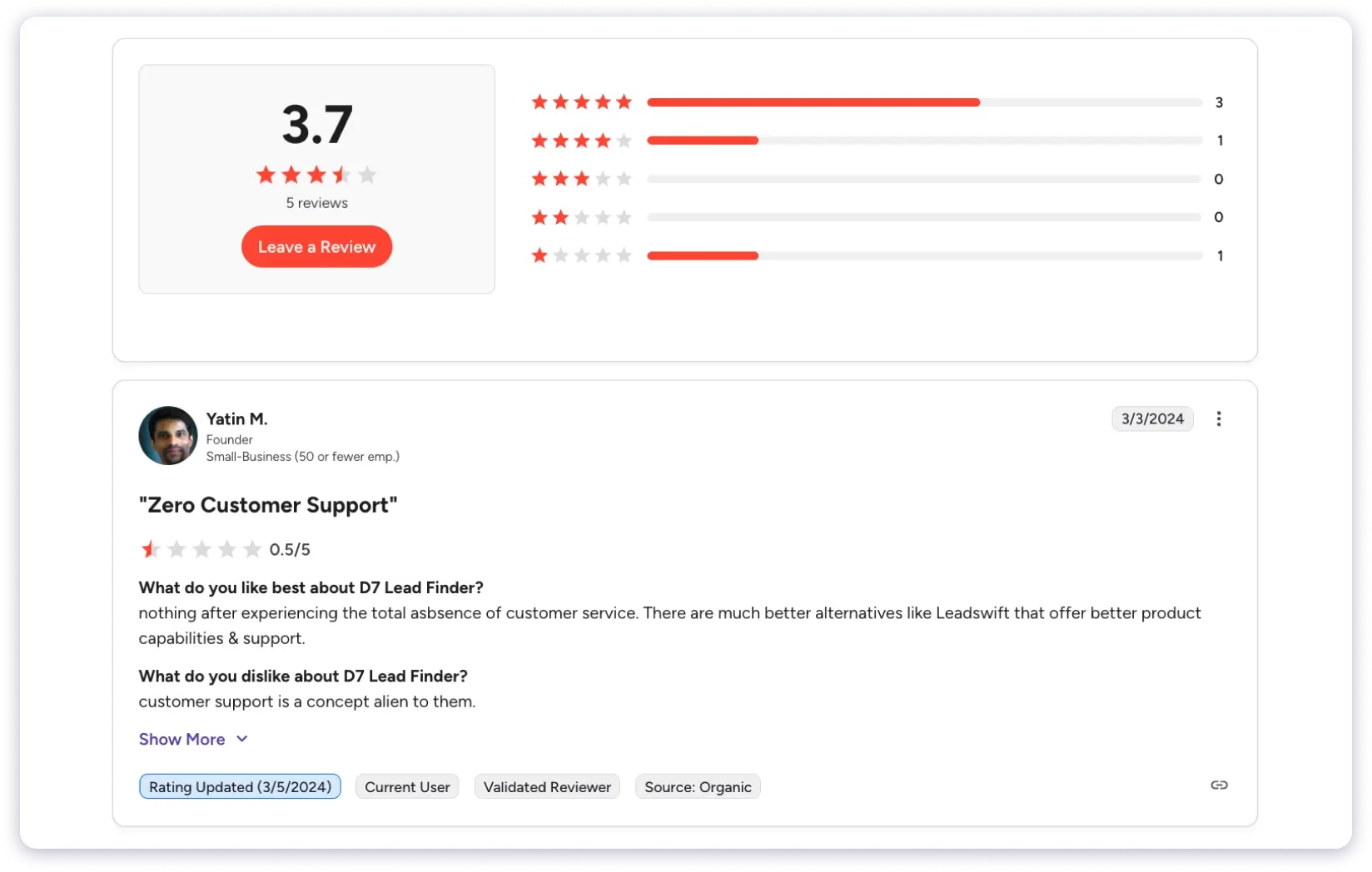
D7 hasn’t made any notable improvements since then.
Bottom line: The lack of fresh reviews and user trust says a lot.
Is There a Better Alternative to D7 Lead Finder?
If you need more than a basic business directory, there are better options out there.
I’ve tested several tools after using D7, and the one that stood out the most for outbound teams is Saleshandy Lead Finder. Here’s what it offers compared to D7:
Database and data quality:
- 852M+ verified professional contacts and 42M+ company profiles, roughly 13x the size of D7’s database.
- Real-time waterfall enrichment pulls contact data from multiple trusted providers, so you’re not stuck with one source.
- Emails are verified before you see them. If a contact turns out invalid, your credits get refunded automatically.
Search and filtering:
- 75+ advanced search filters including job title, company size, revenue, funding, tech stack, seniority level, and buying signals.
- AI-powered search, you can type something like “marketing directors at SaaS companies with 50-200 employees in Texas” and get results instantly.
- No daily search limits. You search as many times as you need.
Workflow and CRM:
- Saleshandy now includes a built-in outbound CRM with a Kanban pipeline view. You can track every prospect’s status, see their full activity timeline, and manage follow-ups without switching tools.
- You can add prospects directly to cold email sequences from the same platform.
- Native integrations with Salesforce, HubSpot, Pipedrive, and Zoho, something D7 doesn’t offer at any price point.
Pricing and credits:
- Plans start at $34/month (billed annually) with 18,000 credits per year, real-time verification included. That is below D7’s $44.99 entry plan.
- You can sign up for a 7-day free trial and get 50 free credits to test the data quality before committing.
Other things worth noting:
- Bulk export up to 10,000 leads in one click.
- Free Chrome extension (Saleshandy Connect) for finding contact data directly on LinkedIn.
- AI prospect enrichment to fill in missing data points across your lead lists.
- Buying signals that tell you which companies are actively hiring, raising funding, or expanding, so you can time your outreach better.
The gap between D7 and Saleshandy isn’t small. D7 gives you a basic directory lookup. Saleshandy gives you a full prospecting and outreach workflow in one place.
My Final Verdict on D7 Lead Finder: Worth it in 2026?
Through this review, I’ve shown you how D7 Lead Finder is basically an online directory with a slow interface and limited search capabilities.
So, is it worth paying even the starting price of $44.99/month for D7 in 2026?
No, you can get much more data with better features at a lower price.
And if you’re wondering which D7 alternative is the best, I recommend giving Saleshandy a shot.
Apart from a larger database, better filters, and a smooth experience, it also offers a free trial you can use to explore its features.
Take a free trial, see if it aligns with your needs, and decide if you want to upgrade!
D7 Lead Finder Review: FAQs
1. Is D7 Lead Finder Worth it?
No, D7 Lead Finder is not worth paying. It has a small database, just two filters, no CRM integration, and daily search limits, plus you receive a large number of generic email addresses.
2. How Much Does D7 Lead Finder Cost?
D7 Lead Finder’s entry plan costs $44.99/month and gives you access to three data types: business phone number, company email address, and links to the prospect’s social media profiles.
3. What Is D7 Lead Finder Best for?
D7 Lead Finder is best for finding prospects and businesses along with their basic information like email addresses, phone numbers, social media profiles, and more.
4. Are There Any Good Alternatives to D7 Lead Finder?
Yes, there are several good alternatives to D7 Lead Finder, such as Saleshandy, Apollo.io, and Lusha. They offer you more data and better filters for better pricing. Check out my detailed breakdown of the best D7 alternatives to find one that suits your needs.
5. Does D7 Lead Finder Offer a Free Trial?
D7 Lead Finder does not offer a traditional free trial. However, it does allow guest searches with limited results so you can see the kind of data it returns before signing up. If you want a full free trial with actual lead credits, Saleshandy offers a 7-day free trial with 50 free credits — no credit card required.
6. Does D7 Lead Finder Have a Chrome Extension?
No, D7 Lead Finder does not have a Chrome extension. It only works through its web interface. If you need a Chrome extension for finding contact data while browsing LinkedIn, Saleshandy Connect is a free alternative that reveals verified emails and phone numbers directly from LinkedIn profiles.
7. Is D7 Lead Finder Good for B2B Cold Email Outreach?
Not really. D7 mostly returns generic business email addresses (like info@ or contact@), which are not ideal for cold outreach. It also has no built-in email sending, sequencing, or CRM functionality. For cold email outreach, you’d need a separate tool for verification, sending, and follow-ups — which adds cost and complexity.
8. What Is the Best D7 Lead Finder Alternative in 2026?
Based on my testing, Saleshandy Lead Finder is the strongest alternative. It offers an 852M+ database with 75+ filters, real-time verified emails, AI-powered search, a built-in CRM, and cold email outreach — all in one platform. You can check my detailed breakdown of the best D7 Lead Finder alternatives for more options.