![Most Reputed Email Placement Tools [ With Email Testing ]](https://www.saleshandy.com/blog/wp-content/uploads/2025/07/Most-Reputed-Email-Placement-Tools-With-Email-Testing--1200x675.webp)
 Piyush Patel
 Contents
- 1 Inbox Placement Tools – TOC
- 2 What Are Inbox Placement Tools?
- 3 Non-negotiable Features for Inbox Placement Tools
- 4 TL;DR – Quick Overview of Top 9 Inbox Placement Tools
- 5 In-Depth Review of 9 Best Inbox Placement Tools
- 6 Precaution is Better Than Cure – Test Before You Send!!
- 7 FAQs
- 7.1 1. Isn’t deliverability the same as inbox placement?
- 7.2 2. How do inbox placement tools work?
- 7.3 3. When should I run an inbox placement test?
- 7.4 4. Are free inbox placement tools reliable?
- 7.5 5. Can inbox placement tools guarantee that my emails won’t go to spam?
- 7.6 6. What’s the difference between inbox placement tools and email warm-up tools?
I know that you know — there’s no point in cold emailing if your emails don’t land in the inbox.
But here’s a fun fact –
99% of cold emailers fail to realize that their domain reputation is tanking – before it’s too late.
At first, your emails might quietly slip into the “Other” or “Promotions” tab.
Soon after, they start landing in spam — and you already know what comes next.
To avoid this, you need a tool that gives you a heads-up when your inbox placement starts to drop — and helps you fix it before the damage snowballs.
That’s where inbox placement tools come in.
But it’s not as straightforward as it sounds. That’s why, in this blog, I’ll break down:
- What inbox placement tools actually do
- The key features that matter
- And the best tools you can use today to stop your emails from going to spam.
Inbox Placement Tools – TOC
What Are Inbox Placement Tools?
Inbox placement tools help you figure out where your emails are actually landing – inbox, spam, or the “promotions” tab.
These tools run test campaigns to simulate your actual cold emails.
They show you how different email providers (like Gmail, Outlook, Yahoo) are treating your emails — and why.
They are like a health check for your email deliverability. They alert you before things go wrong so that you can fix issues like:
- Low-quality content that triggers spam filters
- Poor domain reputation
- Missing mandatory technical setups like SPF, DKIM, or DMARC
In short: Inbox placement tools tell you if your emails are getting delivered where they should be — and what to do if they’re not.
Non-negotiable Features for Inbox Placement Tools
There are many inbox placement tools on the market, but not all of them are worth your money.
Why? Because most of them have rushed to the feature while compromising quality.
If you’re serious about staying out of spam, these are the features you can’t compromise on:
- Automated Inbox Placement Testing
- Actionable Deliverability Analytics
- Real-Time Reputation Monitoring
- Spam Trigger Detection in Content
- Technical Setup Health Checks (SPF, DKIM, DMARC)
1. Automated Inbox Placement Testing (That Mimics Real Sending)
The tool should run inbox tests using real seed inboxes across various providers, such as Gmail, Outlook, Yahoo, etc. And it should simulate actual sends (not just theoretical tests) so that you can see how your real emails behave across platforms.
2. Actionable Deliverability Analytics
It’s not enough to know where your emails land — you need to know “why”. The tool should break down key metrics like spam rate, inbox rate by provider, domain health, and content issues.
And more importantly, offer suggestions you can act on.
3. Real-Time Reputation Monitoring
Your sender reputation can tank overnight. The tool must constantly monitor your domain/IP reputation and alert you when it dips. Additionally, it should provide you with step-by-step instructions to fix the issue before it worsens.
4. Spam Trigger Detection in Content
Even a single wrong word or phrase can flag your email. Good inbox tools analyze your email content and point out spam-triggering words, formatting mistakes, and broken links — all before you hit send.
5. Technical Setup Health Checks (SPF, DKIM, DMARC)
No matter how good your content is, missing a technical setup means you’re going to spam. Your tool should check for SPF, DKIM, and DMARC authentication, and tell you exactly what’s missing or misconfigured — even better if it helps fix them.
TL;DR – Quick Overview of Top 9 Inbox Placement Tools
Here’s a quick rundown of the top inbox placement tools and what their best features are:
| Tool | Key Features | Starting Price |
|---|---|---|
| Inbox Radar by Saleshandy | Inbox placement testing, domain warm-up, email automation, spam checks | $23/mo |
| GlockApps | Seed tests, spam score, authentication checks, and reputation tracking | $59/mo |
| Mailtrap | Safe environment to test email deliverability, spam scores, and preview checks | $14.99/mo |
| MxToolbox | DNS checks, blacklist status, SPF/DKIM/DMARC testing | $129/mo |
| Folderly | AI-based spam fix, placement testing, and reputation monitoring | $64/mo |
| UnSpam | Spam words detection, inbox test, subject line grading | $9/mo |
| MailTester | SMTP verification, spam score, blacklist checks | $39/mo |
| MailGenius | Spam score, authentication, inbox check | Free |
| MailReach | Warm-up, inbox placement monitoring, sender score insights | $9.6/mo |
Here’s a quick video of the 3 best inbox placement tools
In-Depth Review of 9 Best Inbox Placement Tools
- Inbox Radar by Saleshandy: AI-powered tool for cold emailers who want better email deliverability + outreach in one platform
- GlockApps: Best for deliverability nerds who want deep inbox testing across ESPs
- Mailtrap: Built for devs and QA teams to test emails in a safe, pre-production environment
- MxToolbox: Perfect for technical teams who want fast DNS, blacklist, and authentication diagnostics
- Folderly: Great for businesses looking for a hands-off, AI-driven approach to fix spam issues
- UnSpam: A simplistic tool to check spam words and improve the overall inbox placement
- Mailtester: Go-to tool for quick inbox placement and spam checks without complex setups.
- MailGenius: Designed for marketers and copywriters to optimize email content and catch spam issues before sending.
- Mailreach: Best for sales teams warming up domains and monitoring inbox placement over time
To help you decide, I’ve distributed the review into four major parts: Functionality, Interface, User Sentiment, and Pricing.
1. Inbox Radar by Saleshandy
Most cold emailers are already familiar with Saleshandy as an AI-powered cold emailing platform.
But let me tell you, Saleshandy has recently launched “Inbox Radar”, which is a standalone inbox placement tool.
Inbox Radar Is Best for:
Cold emailers who want to test inbox placement + regulate their campaigns based on spam score.
Functionality
When it comes to functionality, Inbox Radar doesn’t just show you where your emails land – it gives you a clear plan to fix deliverability issues before they escalate.
You can run automated inbox placement tests that can simulate actual campaigns across seed inboxes with providers like Gmail, Outlook, Yahoo, and more.
The results tell you exactly where your email ends up – in your inbox, spam, or promotions/other folders.
Best part – The test reports are shareable with a custom link ✨
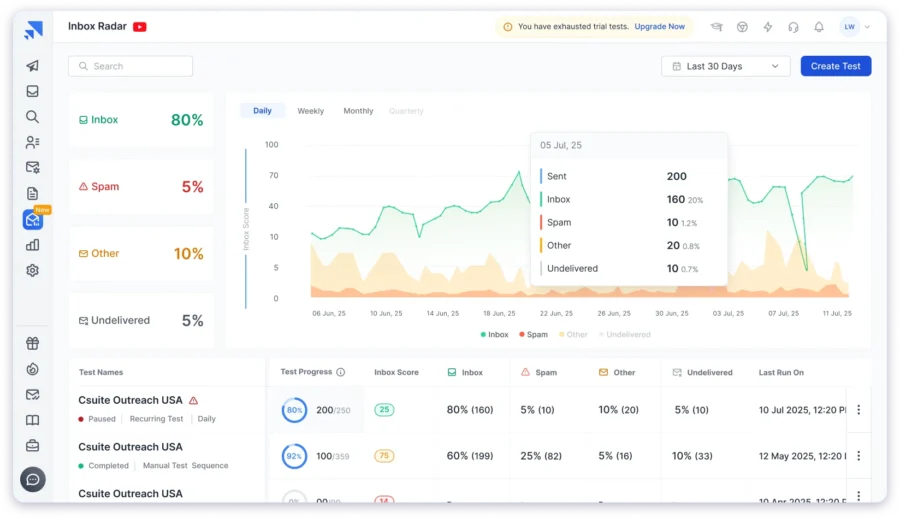
You also get a quick assessment of spamminess based on your email content. That means you can identify which words or elements might be triggering spam filters.
What makes it even more useful is that Inbox Radar is directly connected with your Saleshandy account. So instead of manually running tests in a separate tool, you can adjust your campaigns based on real-time inbox placement and spam health.
P.S. It also checks for DNS records and alerts you if there are any technical misconfigurations that could impact your email deliverability.
Interface
From the UI perspective, you won’t have any complaints. The Inbox Radar is built with a clean, intuitive interface, and you can run a test in under 30 seconds.
Once the test is done, you get a visually-rich report that shows where your emails landed across providers, your spam score, and setup issues, if any (like missing DKIM, SPF, etc).
It’s the kind of UX that lets you move fast, fix issues quickly, and get back to your campaign.
User Sentiment
- G2 – 4.6⭐/5 based on 740+ reviews
- Capterra – 4.5⭐/5 based on 125+ reviews
Since it’s a newer feature, you won’t find hundreds of reviews on G2 yet.
But early users (especially Saleshandy customers) are already calling it a “game-changer for cold outreach.”
In fact, there’s a huge adoption rate for Inbox Radar.
Psst (Inside information): Inbox Radar has already done more than 130 inbox placement tests within the first 15 days of its launch.
Price
Since it’s a new launch, Saleshandy has provided separate pricing for Inbox Radar, allowing users to purchase it according to their needs.
Its Inbox Starter plan starts at $23 per month, which gives 15 inbox placement tests every month.
(Which is way more affordable than any other inbox placement tool.)
2. GlockApps
If you’re looking for cold email deliverability insights that go beyond surface-level spam checks, GlockApps is built for that.
It’s a go-to tool for anyone who wants to audit their email sending performance.
GlockApps Is Best for:
Deliverability specialists who want deep inbox testing and sender reputation insights across mailbox providers.
Functionality
GlockApps runs automated seed list tests — meaning it sends your actual email to a predefined list of inboxes across different providers and geographies.
Once the test is complete, it shows inbox vs. spam vs. missing percentages, broken down by provider.

Additionally, it evaluates your email against popular spam filters, including SpamAssassin, Barracuda, and Symantec.
This provides detailed diagnostics on content, HTML structure, and even domain-related issues.
The best part – It also keeps a track of your sender reputation.
GlockApps integrates with Postmaster Tools and SNDS to track your IP/domain reputation, bounce rates, and spam complaints over time.
It doesn’t just tell you what went wrong. It helps you understand the why, with enough technical depth so that you can fix issues.
Interface
GlockApps leans more towards utility than aesthetics.
The dashboard is data-rich but may feel slightly outdated or even overwhelming to new users.
However, once you get the hang of it, it’s packed with high-utility graphs, ESP-specific placement results, spam filter responses, and a lot more.
User Sentiment
- G2 – 3.7⭐/5 based on 15+ reviews
- Capterra – 4.8⭐/5 based on 35+ reviews
Users on platforms like G2 and email marketing forums often refer to GlockApps as the “go-to tool for technical inbox testing.” It’s especially popular with email marketers who manage multiple domains – either for themselves or their clients.
Many users appreciate its transparency – the reports are data-heavy but credible, and unlike some tools, GlockApps doesn’t just label something “bad” without showing you the proof.
The only issue users had was with pricing. Because GlockApps is a bit costly.
Price
GlockApps offers a fixed pay-as-you-go credit model, so pricing depends on the frequency of your test runs.
- Free Plan: Yes (includes two tests)
- Essential Plan: $59/month for 1 sending account
- Growth Plan: $99/month for 10 sending accounts
- Enterprise: $129/month for 20 sending accounts
Read our full GlockApps reviews.
3. Mailtrap
If you’re dealing with a high volume of emails and want to catch deliverability issues beforehand, then Mailtrap is one of the most reliable tools out there.
Though it needs tech involvement, it’s worth the choice.
Actually, its use case is more like a pre-flight checklist. It simulates how your emails behave across environments and gives you clear insights into email structure, spam potential, and authentication issues – all before hitting send.
Mailtrap Is Best for:
Dev and QA teams who want a safe environment to test email deliverability before going live.
Functionality
Mailtrap works like a virtual inbox, where you can test emails from staging or production without actually delivering them.

This means that your team can test subject lines, headers, content layout, and authentication records in a safe sandbox.
It flags:
- Spam triggers based on industry filters
- Missing or misconfigured SPF, DKIM, and DMARC
- Broken HTML or formatting issues
- Blacklisted sending IPs or domains
Mailtrap also offers Email API testing, so you can test triggered emails from your app or CRM workflows, making it extremely useful for dev-heavy setups or transactional email testing.
While it’s not a traditional inbox placement tool like Folderly or GlockApps, it helps ensure that once you start sending, nothing breaks or bounces unnecessarily.
Interface
Clean, developer-focused, and highly task-specific. Mailtrap’s UI isn’t flashy – but it’s built for speed and functionality.
You can easily switch between environments (staging, QA, production), view rendered email previews, and even check spam score reports.
The setup can look scary at first, but it’s pretty straightforward, and the documentation is developer-grade.
User Sentiment
- G2 – 4.8⭐/5 based on 75+ reviews
- Capterra – 4.8⭐/5 based on 30+ reviews
Mailtrap gets amazing feedback from engineering teams and QA specialists who deal with email infrastructure.
On G2, users often mention how easy it is to set up testing workflows, validate API triggers, and troubleshoot deliverability before the first user ever receives an email.
Note: It’s not built for outreach teams or marketers.
So if you’re looking for inbox testing in the context of cold email campaigns, you’ll likely need to pair it with something else like Inbox Radar or Mailreach.
Price
Mailtrap offers usage-based pricing depending on volume and environment needs.
- Free Plan: Yes (limited testing for dev teams)
- Paid Plans: Start at $14.99/month
As you move towards higher pricing tiers, you will get more email credits, API features, and advanced diagnostics.
4. MxToolbox
MxToolbox is traditionally known for SMTP, DNS, and blacklist checks – but now, with Inbox Placement built into its Delivery Center, it’s also a strong choice for testing.
MxToolbox Is Best for:
Technical teams and marketers who want structured inbox placement testing + domain health diagnostics in one platform.
Functionality
MxToolbox’s inbox placement tool works similarly to every other seed testing method.
It gives your usual ESP-specific inboxing rates, spam folder behavior, and missing delivery issues.
It also includes DNS authentication checks + sender reputation insights.

The best part: It creates a visual render preview for content issues, such as excessive links or spammy phrasing. This helps you fix issues quickly.
Note: There’s no standout feature that makes MxToolbox unique as an inbox placement tool.
But it’s a solid addition for teams who already rely on MxToolbox for domain health and want to bring deliverability diagnostics under one roof.
Interface
I’ll be honest here – MxToolbox has a very poor interface. But there’s a brighter side.
The thing is, its tools are well-labeled, responsive, and the reports are easy to understand even if you’re not super technical.
You’ll also find tons of help docs and recommendations if something flags up during a scan.
User Sentiment
- G2 – 4.1⭐/5 based on 25+ reviews
- Capterra – 4,5⭐/5 based on 5+ reviews
MxToolbox is widely loved by system admins, email consultants, and tech-savvy marketers.
When it comes to inbox placement tests, it’s a good idea since their users don’t have to switch platforms. But there are very few users who exclusively use MxToolbox for running inbox placement tests.
Price
For Inbox Placement access, you need to subscribe to a $129 per month plan. This is because it comes under the “Deliver Center,” which itself is not available for free usage.
Check out these MXToolBox Alternatives for smarter email tools.
5. Folderly
Folderly is an email deliverability software that has an Inbox Insights tool that comes with all the necessary features of an inbox placement tool.
Folderly Is Best for:
Teams that are looking for a done-for-you solution to fix spam issues and improve deliverability with minimal effort.
Functionality
Folderly has automated inbox placement testing across major inbox providers. But more importantly, it continuously monitors the performance of your emails over time.
This includes the percentage that goes to spam, land in promotions, or hit the primary inbox.
The platform runs AI-based diagnostics to detect issues with your content, domain reputation, and sending patterns.

And unlike most tools, Folderly doesn’t just give you a report – it proactively suggests (and in some cases, applies) technical fixes like updating DNS records, tweaking sending volumes, or adjusting copy to avoid filters.
Of course, all this is done with your prior permission. But isn’t that cool?
For teams struggling with persistent spam placement or blacklists, Folderly acts like a long-term deliverability partner.
Interface
Folderly’s interface is modern, visual, and built for clarity.
You get a simple dashboard that shows your inbox performance over time, with spam percentage trends, sender reputation metrics, and warm-up progress.
It avoids technical clutter and focuses on showing you just what matters: your domain health and how to fix what’s broken.
For non-technical users, the learning curve is minimal, and that’s a big part of its appeal.
User Sentiment
- G2 – 4.8⭐/5 based on 95+ reviews
- Capterra – 4.8⭐/5 based on 40+ reviews
On G2, users describe Folderly as a “lifesaver” for campaigns that were stuck in spam and couldn’t figure out why.
It’s especially popular among B2B teams that are outbound at scale or agencies managing deliverability for clients.
Also, one notable positive trait – Folderly has a helpful support team!
Price
Folderly has all the good features, and that’s why it comes with a heavy price. It’s a paid plan that costs $64/month (for annual billing) and gives you unlimited tests.
If you want a light version, then you can test its free version.
6. UnSpam
UnSpam is built for speed. If you’re about to launch a campaign and want to check your content for spam triggers, blacklists, or poor inbox placement, this tool gets you answers fast.
It’s a lightweight email deliverability checker that doesn’t overcomplicate things. All you need to do is paste your email, run a test, and get back a visual report that shows how your email account performed across major inbox providers and spam filters.
UnSpam Is Best for:
Solo founders and marketers who want a fast way to check spam triggers, subject line quality, and inbox placement.
Functionality
UnSpam runs your email through a seed inbox network across Gmail, Outlook, Yahoo, and others — and shows you where it lands: Inbox, Promotions, or Spam.
It also provides:
- A Spam Assassin–based spam score
- Subject line grading based on engagement best practices
- Blacklist checks for your IP/domain
- Basic DNS validation for SPF, DKIM, and DMARC

What stands out is the real-time, visual feedback — the tool highlights risky keywords, excessive punctuation, or formatting issues that could tank deliverability.
It won’t fix deep infrastructure problems, but for content-related checks, it’s fast and focused.
Interface
UnSpam’s UI is beginner-friendly and visual. The report card format makes it easy to understand what passed, what failed, and what needs improvement.
There’s no learning curve here. You get immediate feedback on your subject line, HTML content, authentication records, and inbox placement… all in a single scroll.
User Sentiment
- ProductHunt – 4.8⭐/5 based on 10+ reviews
Users love UnSpam for its simplicity and speed. On Reddit and other communities, it’s often mentioned as a handy tool for validating emails before launch.
Some reviewers do mention that it lacks depth for diagnosing more technical issues like DNS misconfigurations or sender score dips, but that’s not really the job UnSpam claims to do.
Price
Unlike other tools in this list, UnSpam gives a generous free version and flat-rate pricing for heavy users:
- Free Plan: Includes basic tests with limited monthly runs
- Basic Plan: Starts at $9/month for 50 spam tests
- Agency: Starts at $29/month
It’s great for those who want to validate emails regularly without committing to complex software.
7. MailTester
MailTester is a reliable tool that instantly analyzes your email content, headers, and authentication setup.
Along with that, it has an inbox testing feature that allows you to see if your email would land in the spam folders of Gmail, Outlook, or iCloud.
MailTester Is Best for:
Marketers who want quick inbox placement and spam checks.
Functionality
Here’s what MailTester does well:
- Tests inbox placement across Gmail, Outlook, and iCloud
- Gives you a SpamAssassin-style spam score, with insights into risky words, formatting, and content issues
- Checks your SPF, DKIM, and DMARC records
- Flags if your domain or IP is on any major blacklists
- Accepts email body or uploaded contact files to run full deliverability checks
It’s not as deep as Folderly or GlockApps, but for basic inbox visibility and hygiene checks, it covers the essentials.
Interface
Mail tester is dead simple. You simply get to test email addresses.
It won’t show you graphs or detailed analytics to interpret — just a score and pass/fail indicators with suggestions.
User Sentiment
- G2 – 4.2⭐/5 based on 10+ reviews
- Capterra – 3.3⭐/5 based on 10+ reviews
MailTester is often mentioned on cold email groups and by solo marketers who need a quick pre-send check.
Of course, it’s not designed for advanced analytics or campaign tracking — but for spot-checking deliverability, it’s a solid pick.
Price
Honestly, MailTester’s pricing is a little confusing. But if you want to keep things clear, I suggest you go with subscription-based pricing.
There you will be able to get 10 tests for $39 per month (billed monthly).
8. MailGenius
MailGenius is a free tool that helps you figure out why your emails might end up in spam and how to fix it.
It’s designed to catch content issues, missing records, blacklists, and deliverability flaws before you hit send.
MailGenius Is Best for:
Cold emailers and marketers who want a free, fast breakdown of email issues before sending.
Functionality
MailGenius works like this: You send a test email → It analyzes the message → You get a report with the following:
- Spam filter triggers (based on common email filtering algorithms)
- SPF, DKIM, and DMARC validation
- Checks whether your IP or domain is blacklisted
- Flags missing or misconfigured headers
- Highlights risky content, overuse of links, or formatting issues

While it doesn’t give ISP-wise inbox placement stats (like Mailreach or GlockApps), it tells you how deliverable your email is likely to be – and that’s often more than enough for lean teams.
So, if you’re looking for a quick but actionable report, MailGenius gives it to you with zero friction.
Interface
MailGenius’ interface is a little old-school, but it’s simple and readable.
After sending your test, you get a one-page scorecard showing what passed, what failed, and why, with red/yellow/green indicators and suggestions on what to fix.
You won’t find campaign dashboards or analytics here, but that’s the point. It’s minimal, fast, and focused on clarity.
User Sentiment
- G2 – 4.5⭐/5 based on 5+ reviews
People love MailGenius because it is a free, no-login tool to test if their emails are set up correctly.
It’s especially popular among cold emailers, small founders, and marketers doing quick QA.
On Reddit and cold outreach Slack groups, users often mention they use it as a first line of defense before running placement tests on heavier tools.
A few power users wish it had seed-based inbox placement testing, but for a tool that costs nothing, the value is surprisingly high.
Price
MailGenius is completely free to use. No account needed. No upsell. Just visit the site, send your email, and get your deliverability report.
9. MailReach
Mailreach is built for cold emailers who want to keep their emails landing in the inbox consistently. It’s not just an inbox placement tool — it’s an all-in-one email warm-up + deliverability monitoring platform.
MailReach Is Best for:
Cold email teams who want automated warm-up + inbox placement monitoring to maintain long-term deliverability.
Functionality
Mailreach has automated seed-based tests that show where your emails land across Gmail, Outlook, Yahoo, and others
It also checks:
- Spam scores, DNS records, and blacklist status
- Inbox placement trend graphs to detect if you’re slipping toward spam folders
- Daily health reports to show progress and highlight issues
- Multiple inbox support for agencies or outreach teams managing several senders
Best part: It has an ongoing warm-up feature also. That means – your emails are sent and received by a trusted network of inboxes to gradually build sender reputation.
Unlike tools that give one-time results, Mailreach focuses on maintaining long-term inbox health through active intervention.
Interface
Mailreach’s UI is polished, modern, and extremely easy to use — even for non-technical teams.
The dashboard shows a real-time placement rate, domain health status, warm-up progress, and spam placement history over time.
You can connect multiple inboxes, set warm-up schedules, and download detailed reports in just a few clicks.
User Sentiment
- G2 – 4.7⭐/5 based on 40+ reviews
- Capterra – 5.0⭐/5 based on 20+ reviews
Cold emailers, SDR managers, and agencies love Mailreach for its automation, reliability, and ease of use.
On platforms like G2, Reddit, and cold outreach communities, users often mention that it rescued their campaigns after inboxing issues or helped new domains ramp up safely without hitting spam folders.
Price
The pricing is the best part of MailReach. It has a pay-as-you-go type of pricing model and costs around $9.6 for 25 spam tests.
If you prefer a subscription model, then you can opt for the Email Warmer + Spam Tester plan, which starts from $25 per month.
Before you try it, see our MailReach Reviews.
Precaution is Better Than Cure – Test Before You Send!!
Since you are here, you know the importance of testing inbox placement. So, here’s a suggestion.
Try the newly launched Inbox Radar (by Saleshandy) and see how your emails perform.
It comes with:
- Advanced reports (with SpamAssassin Score Analysis)
- Actionable insights to improve inbox placement
- Shareable reports
What’s holding up? Start your Inbox Placement Test Now!!
FAQs
1. Isn’t deliverability the same as inbox placement?
Not quite. Deliverability tells you whether your email was delivered. Inbox placement tells you where your emails have landed (example: inbox or spam).
There are chances where your emails can be delivered but still end up in spam. This is the reason why inbox placement tools are needed.
2. How do inbox placement tools work?
Most inbox placement tools work by sending your email to a network of seed inboxes (which are hosted across different ESPs like Gmail, Outlook, Yahoo, etc).
Then they monitor where your email lands (Inbox, Spam, or Promotions) and generate a report. They also analyze your content, DNS authentication, and blacklist status to give you actionable fixes.
3. When should I run an inbox placement test?
- Before launching a new cold email campaign
- After warming up a new domain
- If your open rates suddenly drop
- When changing email copy or using sending tools
- Before increasing the sending volume
Basically, anytime your inbox health might change, test it. Think of it like a deliverability health check-up.
4. Are free inbox placement tools reliable?
Yes, to an extent. Tools like MailTester, MailGenius, and UnSpam allow you to run free tests.
But if you need ongoing monitoring or domain-level fixes, you will need a paid tool like Inbox Radar (by Saleshandy), GlockApps, or Mailreach.
5. Can inbox placement tools guarantee that my emails won’t go to spam?
No tool can guarantee inbox delivery, but they drastically reduce the chances of ending up in spam by flagging red flags early.
Think of them as your email quality control layer — they tell you what’s wrong, but you still have to follow best practices.
6. What’s the difference between inbox placement tools and email warm-up tools?
Inbox placement tools show you where your emails are landing. Warm-up tools help you build a sender reputation gradually by simulating real conversations.
Platforms like Mailreach and Inbox Radar combine both, so you get insights and protection in one place.