

 Pritesh
Contents
- 1 Wiza Vs Lusha – TOC
- 2 Quick Overview of Wiza vs Lusha
- 3 Wiza vs Lusha: Honest Comparison of Features & Pricing
- 3.1 1. Wiza vs Lusha: Database Size and Data Accuracy
- 3.2 2. Wiza vs Lusha: Email Finder and Verification
- 3.3 3. Wiza vs Lusha: Phone Number Coverage
- 3.4 4. Wiza vs Lusha: Chrome Extension and LinkedIn Workflow
- 3.5 5. Wiza vs Lusha: CRM Integrations and Outreach
- 3.6 6. Wiza vs Lusha: Intent Data and Buying Signals
- 3.7 7. Wiza vs Lusha: Compliance and Data Sourcing
- 3.8 8. Wiza vs Lusha: Pricing Plans
- 4 Pros and Cons of Wiza and Lusha
- 5 Wiza vs Lusha vs Saleshandy: Is There a Better Option?
- 6 Final Verdict: Which One Should You Pick?
- 7 FAQs on Wiza vs Lusha
Choosing between Wiza and Lusha isn’t just about who has the bigger contact database.
It’s about which tool gives your sales team accurate emails, usable phone numbers, and enough credits to prospect without overspending.
Wiza offers access to 850M+ B2B contacts with real-time email verification. Lusha combines B2B contact data with buying signals, intent data, and compliance features.
But which one actually delivers better value for your sales workflow?
That depends on three things:
- Email vs. Calling: Does your team rely more on cold emails or direct dials?
- Team Size: Are you buying for 3 SDRs or scaling to 30?
- Outreach Needs: Do you only need contact data, or do you also want to run outreach campaigns?
To find out, I signed up for both platforms, reviewed feedback from verified G2 users, and compared pricing at realistic SDR prospecting volumes.
I’ll break down their data coverage, accuracy, email and phone finding capabilities, LinkedIn workflows, integrations, buying signals, compliance, and pricing.
By the end, you’ll know which tool makes more sense for your team and budget.
Wiza Vs Lusha – TOC
- Quick Overview of Wiza vs Lusha
- Wiza vs Lusha: Honest Comparison of Features & Pricing
- Database Size and Data Accuracy
- Email Finder and Verification
- Phone Number Coverage
- Chrome Extension and LinkedIn Workflow
- CRM Integrations and Outreach
- Intent Data and Buying Signals
- Compliance and Data Sourcing
- Pricing Plans
- Pros and Cons of Wiza and Lusha
- Wiza vs Lusha vs Saleshandy: Is There a Better Option?
- Final Verdict: Which One Should You Pick?
- FAQs on Wiza vs Lusha
Quick Overview of Wiza vs Lusha
Here is a side-by-side comparison of both tools for a quick overview.
Wiza vs Lusha: Honest Comparison of Features & Pricing
Now let me break down Wiza and Lusha feature by feature. You will see how each one performs, what real users say on G2, and which tool wins each round.
1. Wiza vs Lusha: Database Size and Data Accuracy
First up is the thing every blog obsesses over which is database size.
Wiza
Wiza covers 850M+ B2B professionals. The twist is in how it serves the data.
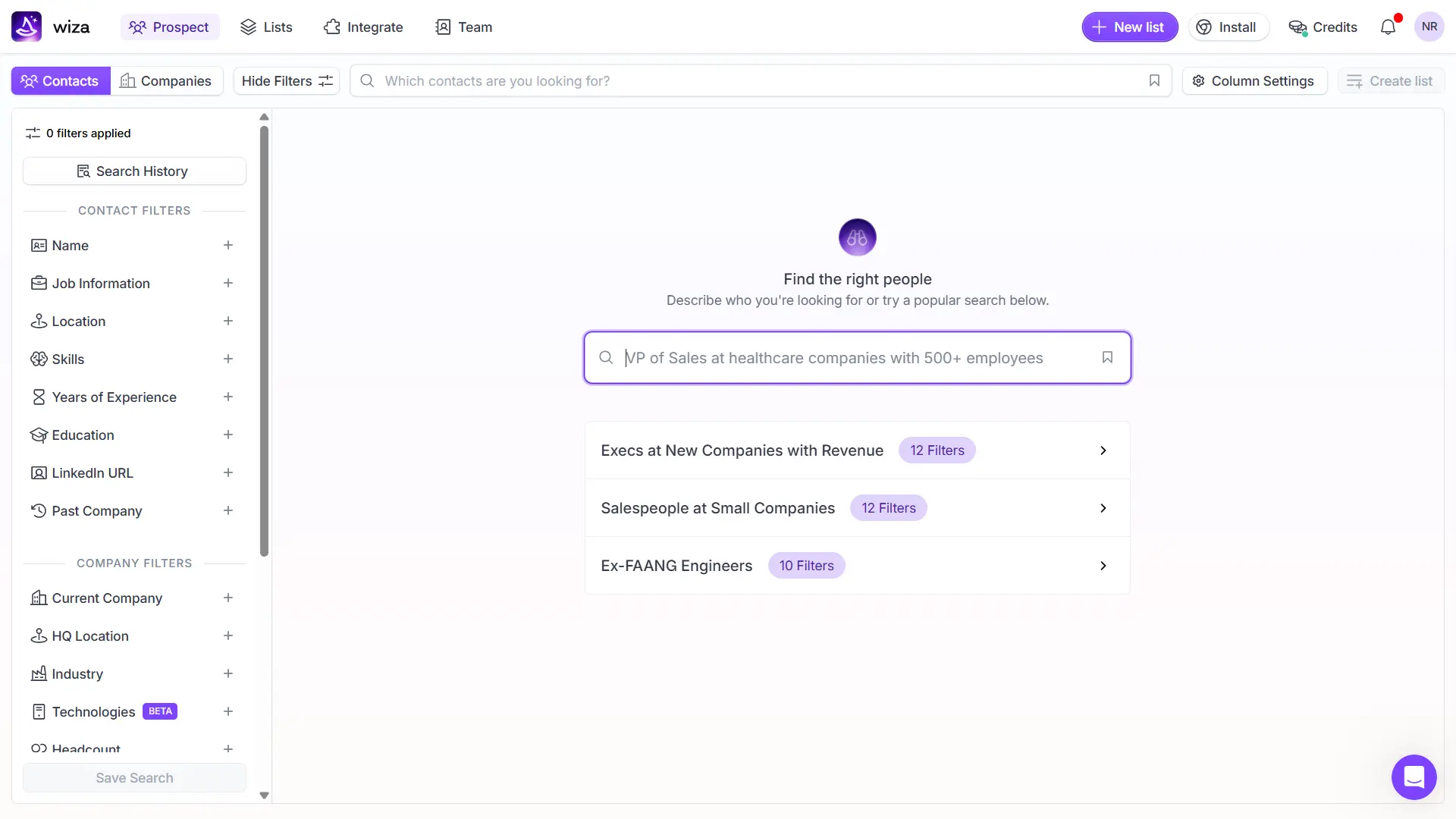
Instead of pulling from a cached database, Wiza verifies every email in real time using live SMTP checks at the moment of reveal. Nothing is stale.
This real-time model is why Tyler S. (Head of Data & Analytics, Small-Business) said on G2: “The email verification is genuinely reliable, so my bounce rates have dropped significantly.“
Lusha
Lusha has a smaller database of 515M+ contacts across 29M+ companies. It publishes a 98% email accuracy claim and refreshes records weekly.
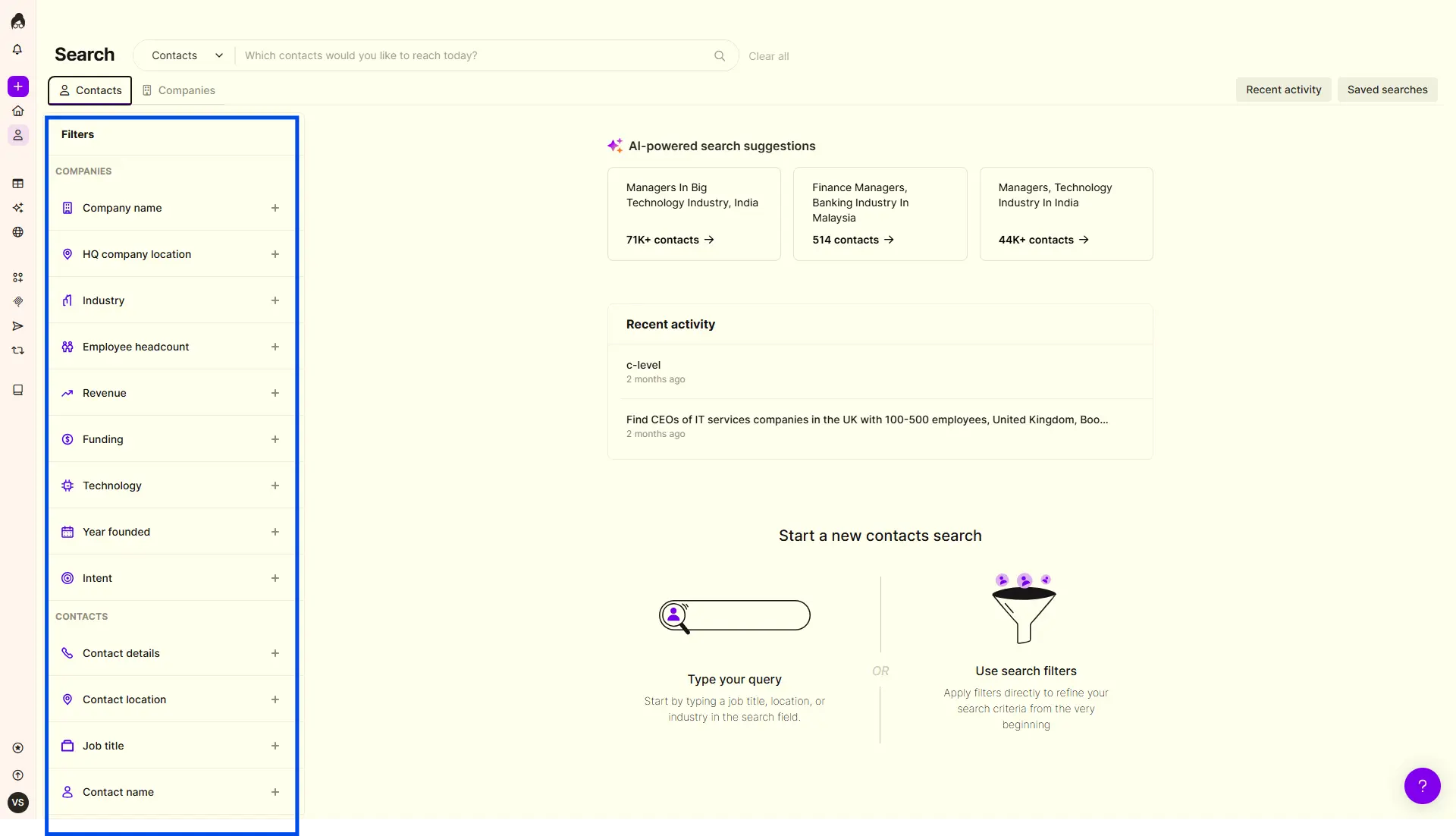
Lusha pulls contacts from its own proprietary database. That means faster searches and bulk enrichment, but older data between refresh cycles.
Jordan J. (Strategic Partnerships Manager, Mid-Market) flagged this on G2: “There are times when email addresses or job titles are outdated, requiring manual verification.”
Which Tool Offers Better Data Accuracy?
Wiza wins this round.
On G2’s verified reviewer scores, Wiza beats Lusha on Contact Data Accuracy (8.3 vs 7.6) and Contact Data Availability (8.6 vs 7.9).
The real-time verification model prevents stale leads from eating your credits.
2. Wiza vs Lusha: Email Finder and Verification
Finding verified emails is the whole point. Here is how they stack up.
Wiza
Wiza’s credit model is simple and fair. You only spend a credit when the email is valid. Risky and unverifiable emails cost you nothing.
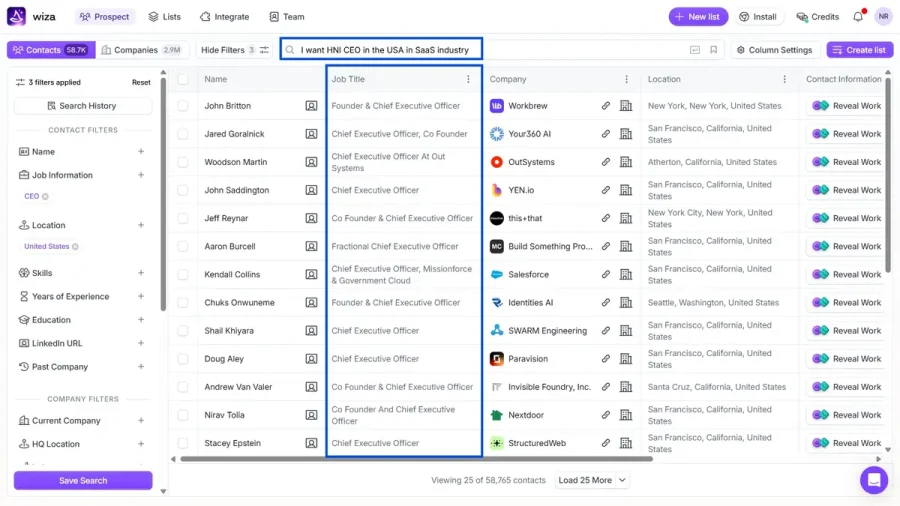
That means fewer wasted credits on bad data.
Marcia G. (Mid-Market Wiza user) confirmed this on G2: “I appreciate that if it doesn’t give me a good email, I don’t have to use a credit.“
Lusha
Lusha charges 1 credit per email reveal, regardless of confidence level. Even if the email is flagged as low confidence, the credit is spent.
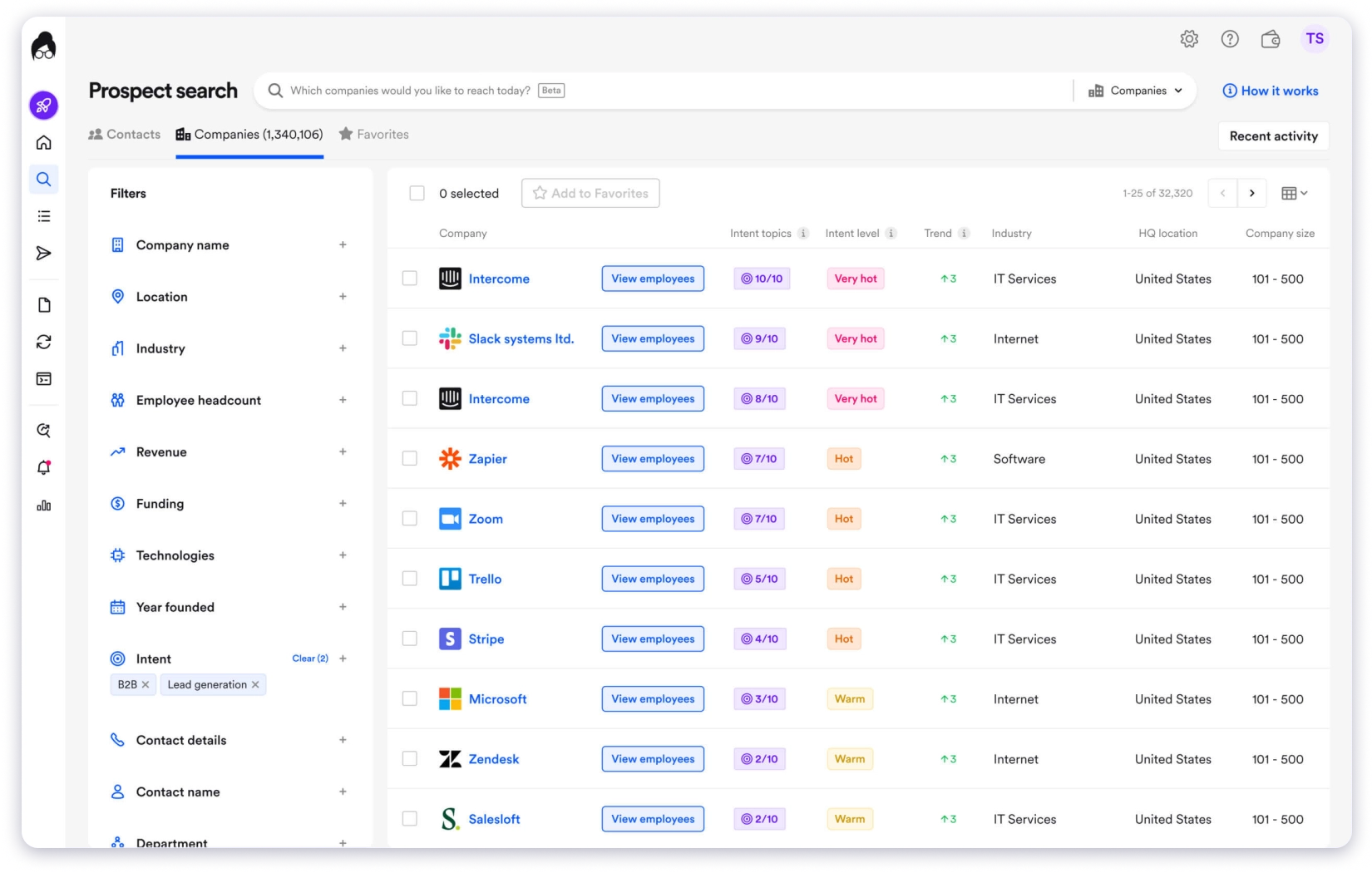
You can see the confidence score before deciding, but the bulk workflow does not filter these out automatically.
Which Tool Offers Better Email Finding?
Wiza wins again.
The pay-per-valid-email model is the single best thing about Wiza.
For teams prospecting at volume, this alone can cut your effective cost per lead by 20–30% versus Lusha.
3. Wiza vs Lusha: Phone Number Coverage
This is where the biggest pricing gap opens up.
Wiza
Wiza carries 60M verified mobile numbers. Each phone reveal costs 1 credit, flat.
The credits are also separated. Email credits and phone credits sit in different buckets, so pulling 100 phones does not drain your email budget.
Lusha
Lusha claims 85% US and 86% global phone accuracy. But each phone reveal costs 5 credits.
That number is not a typo. For every direct dial, Lusha charges five times what Wiza charges.
Shubhranshu S. (Small-Business Lusha user) flagged this directly on G2: “The credit system can burn out quickly. Phone number reveals consume multiple credits per contact (often up to 5 credits for a phone lookup vs. 1 credit for an email), making bulk cold-calling lists expensive to compile.“
Which Tool Offers Better Phone Coverage?
Wiza wins this one, clearly.
If you dial regularly, Lusha’s 5-credit phone cost makes it 2x to 5x more expensive per phone than Wiza.
Unless you specifically need Lusha’s regional coverage, Wiza is the safer bet for outbound calling teams.
4. Wiza vs Lusha: Chrome Extension and LinkedIn Workflow
Most buyers of these tools live on LinkedIn Sales Navigator. The Chrome extension matters.
Wiza
Wiza’s Chrome extension works on Sales Navigator and lets you scrape entire search results in one click.
You can export up to 10,000 leads from a single search.
The cloud scraping runs in the background, so you can close the tab and come back to a finished list.
Lusha
Lusha’s Chrome extension overlays contact reveals directly on LinkedIn profiles, company sites, and even Salesforce pages.
It is lighter and faster for single-contact reveals.
Shubhranshu S. explained it on G2: “Reps can reveal phone numbers and verified emails with a single click without opening a separate database tab.”
On G2, Lusha scores slightly higher on the Browser Extension rating (8.9 vs 8.7).
Which Tool Offers a Better Chrome Extension?
It depends on how you prospect.
- Pick Wiza if you build large lists from Sales Nav searches
- Pick Lusha if you reveal contacts one at a time while browsing
For high-volume list building, Wiza wins. For on-the-fly reveals during research, Lusha wins.
5. Wiza vs Lusha: CRM Integrations and Outreach
Pulling leads is only half the job. You also need them in your CRM and in your outreach tool.
Wiza
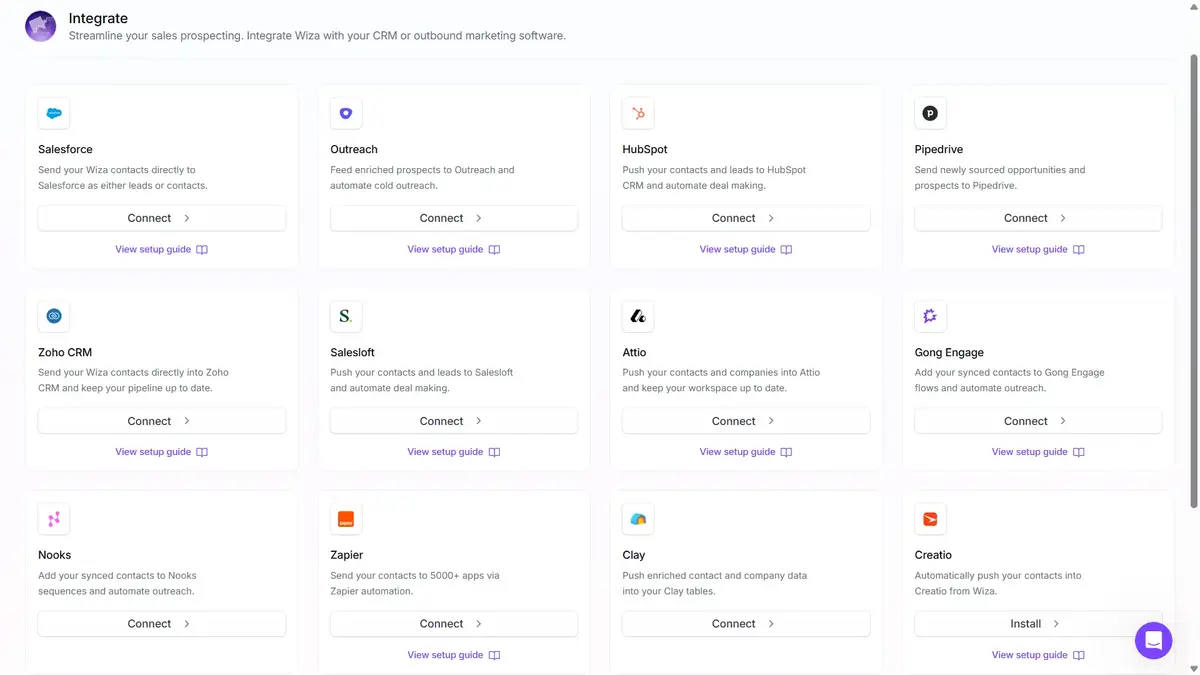
Wiza covers the essentials:
- HubSpot
- Salesforce
- Outreach
- Zapier (opens doors to 7,000+ other apps)
It does not have a native email sequencer. You need a separate tool to send cold emails.
Lusha

Lusha has a bigger native integration list:
- Salesforce
- HubSpot
- Microsoft Dynamics
- Pipedrive
- Salesloft
- Bullhorn
- Outreach
It also offers Lusha Engage, a basic email sequencing module.
But Engage does not include inbox warm-up, sender rotation, or inbox placement monitoring. If you want to send cold emails at scale, you still need a dedicated outbound tool.
Which Tool Offers Better Integrations and Outreach?
Lusha wins on CRM breadth.
The native support for Dynamics, Pipedrive, Salesloft, and Bullhorn makes Lusha the safer pick for teams with varied stacks.
⚠️ The real gap in both tools: Neither one gives you a full outbound engine. Wiza has no sequencer. Lusha Engage sends emails but does not warm up inboxes or protect deliverability. That means you will still need to buy a second tool.
6. Wiza vs Lusha: Intent Data and Buying Signals
This feature matters only if you work named target accounts.
Wiza
Wiza has no intent data layer. No buying signals, no account scoring, no ICP recommendations.
If you need to know when an account is in-market, Wiza will not tell you.
Lusha
Lusha’s ICP Hub tracks 30+ buying signals:
- Job changes
- Funding rounds
- Hiring spikes
- Technographic shifts
- Software adoption
It scores accounts as Warm, Hot, or Very Hot and pushes weekly alerts to reps.
Lusha also offers AI Recommendations that surface best-fit prospects daily.
Which Tool Offers Better Intent Data?
Lusha wins this round. Easily.
If you work high-intent target accounts, Lusha’s signals and scoring are worth paying for.
If you run high-volume cold outbound instead, this feature does not matter.
7. Wiza vs Lusha: Compliance and Data Sourcing
This matters for enterprise procurement and regulated industries.
Wiza
Wiza relies on real-time SMTP verification for email quality.
But it does not publish SOC 2, ISO, GDPR, or CCPA certification details on its homepage.
If your buyer needs compliance paperwork before signing, this is a hard filter.
Lusha
Lusha publishes a full compliance stack:
- SOC 2 Type II
- ISO 27001
- ISO 27701 (privacy information management)
- ISO 42001 (AI management system)
- ePrivacyseal certified GDPR
- TrustArc validated CCPA
That is the strongest compliance posture of any mid-market B2B data vendor.
Which Tool Offers Better Compliance?
Lusha wins clearly.
For regulated industries like finance, healthcare, or government sales, Lusha is the only choice between these two.
Wiza has not caught up on certifications.
8. Wiza vs Lusha: Pricing Plans
This section decides the whole thing for most readers.
Wiza
Wiza offers four plans:
Overage Pricing: $0.15 per extra email, $0.35 per extra phone.
Lusha
Lusha uses a credit-slider model instead of fixed plans.
The key ratio: email = 1 credit, phone = 5 credits.
The Real Cost at SDR Volume
Let’s run the math for one SDR who pulls 500 emails and 200 phones per month.
- Wiza Email + Phone plan: $199/mo. Fits inside the allowance.
- Lusha equivalent: 500 emails + (200 × 5) = 1,500 credits/month. That pushes you into Lusha’s Premium tier, which costs more.
Alastair T. (Enterprise Wiza user) on G2 noted even Wiza feels expensive at times: “The pricing could be better, and I’d really like to see cheaper options available.”
But against Lusha, Wiza is almost always the cheaper option for dialling teams.
Which Tool Offers Better Value for Money?
Wiza wins for dialling teams. Lusha wins if you only need emails and intent data.
For most outbound SDRs, Wiza will come out ahead by 30–50% on monthly cost. For enterprise ABM teams that care more about signals than per-credit math, Lusha justifies its price.
Pros and Cons of Wiza and Lusha
Before you decide, here is the honest scorecard.
Wiza Pros
- Pay only for valid emails. Risky emails are free.
- Separate credit buckets for email and phone
- Bulk export up to 10,000 leads per search
- Larger database (850M+) than Lusha
- Strong Sales Navigator workflow
Wiza Cons
- No intent data or buying signals
- Smaller CRM integration list than Lusha
- No published SOC 2 or GDPR certifications
Marcia G. on G2: “Even though it was quick to set up, it’s not intuitive to go through, and the Help chatbot is terribly slow.”
Lusha Pros
- Larger CRM integration list
- Intent data, ICP Hub, and AI recommendations
- Full compliance stack (SOC 2, ISO, GDPR, CCPA)
Krupa S. (Founder, Small-Business) on G2: “What I like about Lusha is its simple UI and UX. Compared with Apollo and ZoomInfo, I find Lusha much easier to use.”
Lusha Cons
- 5 credits per phone reveal burns through budgets fast
- Data staleness complaints from verified reviewers
- Trustpilot sits at 1.2 / 5 with heavy billing and data-removal complaints
Krupa S.: “With Lusha we generally tend to get only a single email and a single number most of the time.”
Wiza vs Lusha vs Saleshandy: Is There a Better Option?
Wiza and Lusha help sales teams find contact information. But what happens after you’ve found your prospects?
If your workflow also includes cold email outreach, follow-ups, and deliverability management, you may need more than a contact database.
That’s where Saleshandy offers a different approach.
It combines 852M+ B2B contacts, 9-provider waterfall enrichment, and multichannel outreach in one platform.
Here’s how all three compare.
Database sizes are vendor-reported, not independently measured. Pricing and free offers vary by billing term, seat count, and credit type.
The Core Difference
- Choose Wiza if: You primarily use LinkedIn for prospect research and need real-time contact enrichment, CSV exports, or CRM integrations.
- Choose Lusha if: You need contact discovery, phone numbers, buying signals, and automated email sequences without building a larger outbound stack.
- Choose Saleshandy if: You want to find verified contacts, launch multichannel outreach, warm up inboxes, and manage responses from one platform.
Bottom line: Wiza emphasizes prospect discovery and enrichment. Lusha combines contact intelligence with prospecting and sales engagement features. Saleshandy brings contact discovery and outbound campaign execution together.
If your goal is to move from finding prospects to contacting them without switching platforms, Saleshandy is worth considering.
Final Verdict: Which One Should You Pick?
Both Wiza and Lusha are good tools. They just serve different buyers.
Wiza wins if your sales motion lives on LinkedIn Sales Navigator and you dial regularly.
The pay-per-valid-email credit model and the clean 1-credit phone cost make it the better pick for small teams running high-volume outbound.
Lusha wins if you work named enterprise accounts, need intent data and buying signals, and your buyer asks for compliance paperwork before signing.
But here is the truth.
Neither tool finishes the job.
You still need a sequencer, warm-up, and inbox placement monitoring to actually run outbound.
If your GTM motion needs both verified data and outbound execution on one plan, Saleshandy is the simpler pick with 852M+ contacts, built-in verification, native sequences, and 50 free credits to test.
Take a 7-day free trial of Saleshandy.
FAQs on Wiza vs Lusha
1. Is Wiza Better Than Lusha?
Wiza is better for LinkedIn-first prospecting and small teams. It has a larger database (850M+) and charges only for valid emails.
Lusha is better if you need intent data, ICP scoring, and enterprise compliance paperwork. Pick based on your sales motion, not ratings.
2. Which Is Cheaper, Wiza or Lusha?
Wiza is almost always cheaper for teams that dial regularly. Lusha charges 5 credits per phone reveal versus 1 credit on Wiza.
For 500 emails and 200 phones a month, Wiza runs $199, while the same volume on Lusha needs 1,500 credits.
3. Does Lusha Have Better Phone Numbers Than Wiza?
Lusha publishes 85% US and 86% global phone accuracy. Wiza carries 60M verified mobile numbers with real-time verification.
G2 reviewers rate Wiza slightly higher on Contact Data Accuracy (8.3 vs 7.6). Phone quality depends on your target region.
Yes. Both tools work without a Sales Navigator license, but you lose the bulk prospecting workflow. Wiza runs its best plays through Sales Nav URL scraping.
Lusha can be used standalone through its own Workspace and database search.
5. What Is a Better Alternative to Both Wiza and Lusha?
Saleshandy Lead Finder covers both data and outreach on one plan.
You get 852M+ verified contacts, 75+ filters, 9-provider email verification, built-in email warm-up, and full sequences. The starting price is $25/mo with 50 free credits.