 Anil Salvi
 Contents
- 1 Email Scraping Tools – TOC
- 2 TL;DR: Which Email Scraping Tool Should You Pick?
- 3 What is an Email Scraping Tool?
- 4 How I Evaluated These Email Scraping Tools
- 5 A Quick Comparison of Top 13 Email Scraping Tools in 2026
- 6 13 Top Email Scraping Tools in 2026 [Best-Rated by Users]
- 7 How to Verify Scraped Emails and Avoid Bounces
- 8 Is Email Scraping Legal? What You Need to Know in 2026
- 9 My Final Take: The Email Scraping Tool I Would Pick
- 10 FAQs About Email Scraping Tools
- 10.1 1. Is it legal to scrape emails?
- 10.2 2. Can I use email scraping tools for free?
- 10.3 3. How accurate are email scrapers at finding emails?
- 10.4 4. What is the best free email scraping tool in 2026?
- 10.5 5. How do I scrape emails from a website?
- 10.6 6. What is the difference between email scraping and email finding?
- 10.7 7. Can email scraping tools find phone numbers, too?
- 10.8 8. How do I avoid getting my domain blacklisted when using scraped emails?
- 10.9 9. Which email scraping tool is best for LinkedIn?
- 10.10 10. How many emails can I scrape for free?
Finding the right email scraping tool shouldn’t feel like a gamble.
But for most sales reps and outreach teams, that’s exactly what it is.
You sign up for a tool, run a few searches, and half the emails bounce. The other half? Ending up with Outdated, generic, or just wrong email addresses.
I got tired of that cycle. So I did what most people skip.
I actually tested 13 email scraping tools side by side using the same prospect list, the same industries, and the same expectations.
For this list, I tracked how many emails each tool found, how many passed verification, and whether the experience felt worth the price.
This post covers everything: my test results, honest comparisons, actual pricing, and a clear recommendation for who each email scraper works best for.
So, let’s get started.
Email Scraping Tools – TOC
- TL;DR: Which Email Scraping Tool Should You Pick?
- What is an Email Scraping Tool?
- How I Evaluated These Email Scraping Tools
- A Quick Comparison of Top 13 Email Scraping Tools in 2026
- 13 Top Email Scraping Tools in 2026 [Best-Rated by Users]
- How to Verify Scraped Emails and Avoid Bounces
- Is Email Scraping Legal? What You Need to Know in 2026
- My Final Take: The Email Scraping Tool I’d Pick
- FAQs About Email Scraping Tools
TL;DR: Which Email Scraping Tool Should You Pick?
After testing all 13 tools, here’s the short version:
- Saleshandy: The best overall email scraper for B2B teams in 2026. Access an 800M+ verified database, AI-powered lead discovery, and cold email outreach from one platform (92% found, 85% verified in my testing).
- Snov.io: Best for bulk email scraping with built-in verification, outreach automation, and a free CRM included on all plans.
- Outscraper: Best for scraping business emails from Google Maps, Google Search, and public websites at scale with zero IP risk.
The detailed comparison table and individual reviews are below.
What is an Email Scraping Tool?
An email scraper is a tool that automatically collects email addresses from different sources.
The sources are websites, social media profiles, company domains, online directories, or B2B databases.
These tools typically work through one of four methods: pattern-based prediction (guessing formats like [email protected]), web crawling (extracting visible emails from pages), API-based database search (pulling verified contacts from large databases), and LinkedIn extension scraping (grabbing emails while you browse profiles).
The goal of using email scrapers is usually lead generation, outreach, or research. But how a tool collects data matters a lot, especially when it comes to compliance. (I’ll cover the legal side later in this post.)
Note: Always use email scrapers responsibly. Scraping emails without permission can break privacy laws like GDPR and CAN-SPAM. Make sure the tool you use follows compliance rules and respects people’s privacy.
How I Evaluated These Email Scraping Tools
I didn’t just read feature pages and compile a list. I ran every tool through the same prospecting workflow so the comparison would actually hold weight.
My Testing Methodology
I put together a target ICP across four industries: SaaS, marketing agencies, IT services, and recruitment.
Then I ran identical prospecting searches across all 13 email scrapers, using the same company domains, job titles, and LinkedIn profile URLs.
For each tool, I ran bulk searches of 100+ prospects per batch and measured the results against five criteria:
- Emails found rate: Out of every batch, what percentage of prospects returned a result?
- Verification accuracy: Of those results, how many passed verification and were actually deliverable?
- Risky or invalid results: Did the tool return generic addresses like info@ or sales@, or emails that were clearly outdated?
- Processing speed: How fast did results come back on bulk searches?
- Ease of use: Could I start pulling emails without sitting through a setup tutorial?
Evaluation Criteria
Beyond the raw numbers, I scored each email scraping tool across six areas:
- Accuracy and verification: Does it find real and deliverable emails? Does it verify them before showing results, or does that fall on you?
- Data richness: Do you get just email addresses, or also phone numbers, job titles, company details, and buying signals?
- Bulk search capability: Can you look up hundreds or thousands of contacts in a single run?
- Integration and workflow: Does it plug into your CRM and cold email software without friction?
- Pricing and value: What does a verified email actually cost you? Is there a free plan that’s usable?
- Compliance: Is the tool aligned with GDPR, CAN-SPAM, and CCPA?
A Quick Comparison of Top 13 Email Scraping Tools in 2026
Here’s a side-by-side breakdown so you can spot the key differences without reading every review:
| Tool | Emails Found (My Test) | Bulk Scraping | Verification Built-In | Starting Price (Annual) | Free Plan / Credits |
|---|---|---|---|---|---|
| Saleshandy | 92% | ✔ | Yes | $49/mo | 50 free credits + 7-day trial |
| Snov.io | 88% | ✔ | Yes | $29.25/mo | 50 free credits |
| Hunter.io | 70% | ✔ | Yes | $34/mo | 50 free searches/mo |
| Lusha | 80% | ✔ | Yes | $37.45/mo | 40 free emails/month |
| Kaspr | 82% | ✔ | Yes | €45/mo per user | 15 B2B email credits/mo (free plan) |
| Clay | 78% | ✔ | Via integrations | $167/mo | 100 free credits |
| Skrapp.io | 76% | ✔ | Yes | $30/mo | 100 free emails/mo |
| GetProspect | 73% | ✔ | Yes | $49/mo | 50 free valid emails |
| Outscraper | 68% | ✔ | Optional | Pay-as-you-go | 500 free domains/mo |
| AeroLeads | 65% | ✔ | Yes | $39/mo | 10 free credits |
| Apify | 72% | ✔ | Via actors | $49/mo | $5 free credits/mo |
| Findymail | 74% | ✔ | Yes (strict) | $49/mo | 10 free credits |
| Evaboot | 77% | ✔ | Yes | $8/mo | No free plan |
13 Top Email Scraping Tools in 2026 [Best-Rated by Users]
Let’s now learn about each platform in detail, one by one.
- Saleshandy Lead Finder
- Snov.io
- Hunter.io
- Lusha
- Kaspr
- Clay
- Skrapp.io
- GetProspect
- OutScraper
- AeroLeads
- Apify
- Findymail
- Evaboot
1. Saleshandy Lead Finder
- G2: 4.6/5 ⭐ (700+ reviews)
- Capterra: 4.5/5 ⭐ (125+ reviews)
- Best for: B2B teams that want to find verified emails, build prospect lists, and move directly into cold email outreach from one platform.
If you’re looking for an AI-powered email scraper, Saleshandy is a strong option to consider. (Trust me, it genuinely makes lead generation easier.)
When I tested Saleshandy, the data quality stood out right away.
Across my prospecting batches, it consistently returned a 92% find rate with 85% of those emails verified and deliverable. That was the highest across all 13 tools in my test.
What makes Saleshandy different from most email scrapers on this list is that it doesn’t stop at finding emails.
It’s a complete outreach platform. You find leads, verify emails, build cold email sequences, and track engagement, all without switching tools.
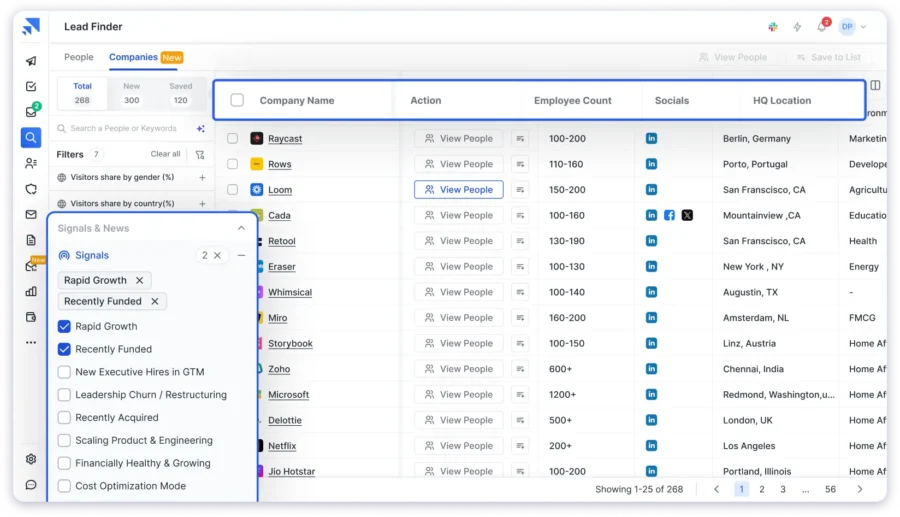
The Lead Finder gives you access to an 800M+ B2B database with 75+ advanced search filters. You can find leads by job title, department, industry, company size, revenue, funding stage, tech stack, and even buying signals.
That level of filtering depth is hard to find in tools that cost twice as much.
The AI Lead Finder is worth mentioning here. You describe your ideal customer profile in plain English, something like “marketing directors at SaaS companies with 50 to 200 employees in the US,” and it generates a targeted lead list.
No manual filtering needed. (The first time I tried this, I was genuinely surprised by how accurate the results were.)
Saleshandy also uses Waterfall Enrichment, which pulls contact data from multiple verified providers to maximize accuracy. If one source doesn’t have the email, it checks the next, and only returns contacts that pass real-time verification.
My Test Results: 92% emails found | 85% verified | 0% generic or risky
Key Features:
- B2B Database to access over 800 million professional contacts from 60M+ companies, verified in real time.
- 75+ Advanced Search Filters to find prospects by job title, department, industry, company size, revenue, funding, tech stack, hiring activity, and buying signals.
- AI Lead Finder that lets you describe your ideal prospect in plain English and generates a targeted lead list automatically.
- Waterfall Enrichment that pulls data from multiple verified providers to maximize email accuracy.
- Built-in Email Verification on every result before it’s delivered to you.
- Bulk Search & Export for up to 10,000 leads in a single go.
- Buying Signals to identify prospects with purchase intent, such as hiring activity, funding rounds, and tech adoption.
- CRM Integrations with HubSpot, Salesforce, Zoho, and Pipedrive.
Pros
- Get verified email addresses, which saves you time
- It allows you to manage end-to-end cold email outreach
- AI-powered lead discovery saves real time on prospecting
- Buying signals help you focus on prospects showing purchase intent
- An easy-to-use interface for all levels of users, even if you are a beginner
- Bulk export of leads in a single go
- Unused credits roll over monthly
Cons
- Free plan gives you 50 credits, which is enough to test the data but you’ll need a paid plan for campaigns
Pricing:
- Lead Starter at $49/month (annual) with 30,000 credits/year.
- Lead Pro at $79/month (annual) with 48,000 credits/year.
- 7-day free trial with 50 free credits, no credit card required.
2. Snov.io
- G2: 4.6/5 ⭐ (440+ reviews)
- Capterra: 4.5/5 ⭐ (200+ reviews)
- Best for: Bulk email scraping with built-in verification and outreach automation.
When I need to find, verify, and automate email outreach from a single platform, Snov.io is one of the email scrapers I turn to.
It performed solidly in my test, returning an 88% email find rate with 76% verified.
The bulk email search handled CSV uploads without issues, and I liked that verification runs automatically on every result.
The platform bundles email finding, 7-tier verification, warm-up, and campaign automation into one place.
It covers a database of 50M+ company profiles, which is smaller than Saleshandy’s 800M+ contacts but still useful for targeted searches.
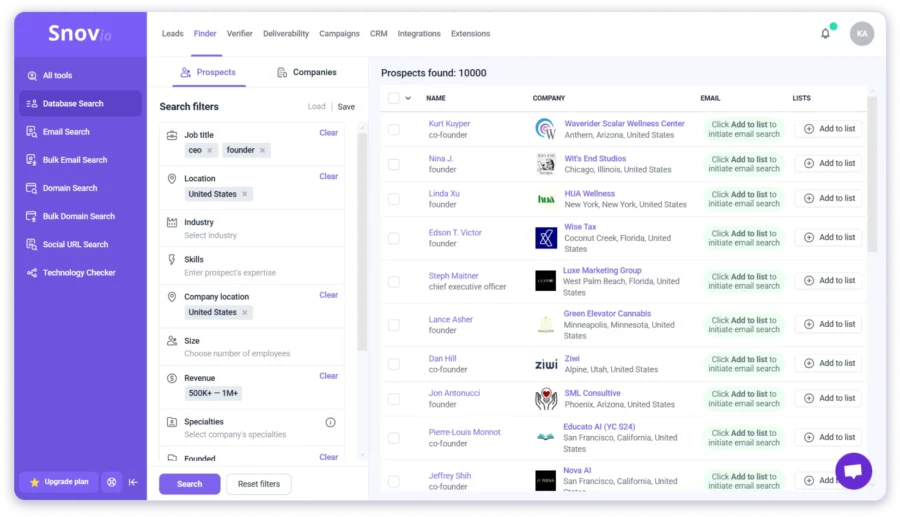
Beyond email scraping, Snov.io provides a technology checker that helps identify the tools and software a company is using. So you can get better and more detailed insights into your prospects.
One detail to keep in mind: LinkedIn automation is a separate add-on at $69/month per slot. That’s not included in any standard plan, and it adds up for teams running multichannel outreach.
My Test Results: 88% emails found | 76% verified | 12% risky
Key Features:
- Bulk email search (up to 50K contacts via CSV)
- Domain search with 50M+ company database
- LinkedIn Email Finder Chrome extension
- 7-tier email verification built in
- Technology Checker to identify a company’s software stack
- Free CRM is included on all plans
- 5,000+ integrations through Zapier
Pros
- All-in-one sales platform
- Bulk email search and verification
- A user-friendly interface
- Credits roll over with an active subscription
- Snov’s team provides reliable support
Cons
- LinkedIn automation costs $69/mo extra per slot
- Credits are shared across search and verification, which burns through faster than expected
- Some users have faced data accuracy issues
- Smaller database compared to tools like Saleshandy
Pricing:
Starter at $30/month (annual) for 1,000 credits. Free trial with 50 credits.
3. Hunter.io
- G2: 4.4/5 ⭐ (580+ reviews)
- Capterra: 4.6/5 ⭐ (690+ reviews)
- Best for: Finding and verifying emails from company websites and domains.
Hunter.io is what I reach for when I need to find every publicly available email tied to a company domain.
It’s a powerful email scraping tool that helps you get emails directly from websites by searching their domains.
With Hunter.io, I enter a company’s URL, and it automatically retrieves all available email addresses associated with that domain.
It even provides a confidence score, so I know which emails are valid for outreach. That kind of source transparency is rare among email scrapers.

In my test, it found emails for 70% of prospects, which is lower than database-driven tools on this list.
That’s because Hunter relies on crawling public web pages rather than a proprietary B2B database. If a company doesn’t list emails publicly, Hunter won’t return results.
I also use the Hunter.io Chrome extension, which allows me to find emails faster while browsing websites and on the go while researching prospects.
My Test Results: 70% emails found | 65% verified | 5% risky
Key Features:
- Domain Search: extracts all publicly available emails associated with a specific company website
- Email Finder: finds a person’s professional email based on their name and company
- Email Verification: validates emails to see if they are active or inactive before sending
- Bulk Email Search and Verification: extracts and verifies multiple emails at once
- Chrome Extension: find and extract emails while browsing company websites
- API Access: integrate Hunter.io’s email search into your software with confidence scores
Pros
- Accurate email scraping from company domains
- Built-in email verification
- A user-friendly interface to get started
- GDPR and CCPA compliant
Cons
- Limitations in the free plan
- It doesn’t extract emails from LinkedIn profiles
- It doesn’t allow you to find personal or non-public emails
- No phone number lookup
Pricing:
Starter at $34/month (annual) for 500 searches. Free plan with 25 searches/month.
4. Lusha
- G2: 4.3/5 ⭐ (1,500+ reviews)
- Capterra: 4.1/5 ⭐ (380+ reviews)
- Best for: Scraping direct emails and phone numbers from LinkedIn.
If I need to find direct contact details of business professionals, Lusha is a reliable email scraping tool.
The platform provides verified business emails and phone numbers from LinkedIn profiles, company websites, and its internal database.
Lusha provides its Chrome extension, which is designed for B2B sales, marketing, and recruitment. Click on a LinkedIn profile, and Lusha pulls up the person’s email, phone number, and company details.

In my test, it returned emails for 80% of prospects, with 74% verified.
One of the features I like about Lusha is its real-time data enrichment, which helps me get details about leads such as phone numbers, job titles, and company details.
It even provides CRM integration, which allows me to export leads directly to tools like Salesforce, HubSpot, and Outreach for easy follow-ups.
Pricing is where it gets tricky. Lusha gets expensive fast, especially when you need phone number credits.
My Test Results: 80% emails found | 74% verified | 6% risky
Key Features:
- LinkedIn Email and Phone Finder: extract verified email addresses and phone numbers directly from LinkedIn profiles using Lusha’s Chrome Extension
- Bulk Contact Search: finds multiple verified emails and phone numbers in one search
- Domain Search: retrieves company-wide emails based on a specific domain
- Chrome Extension: captures emails and phone numbers while visiting LinkedIn and company websites
- Phone Number Finder: get direct dials and mobile numbers to get started with outreach
Pros
- Accurate and verified B2B emails and phone numbers
- Real-time LinkedIn integration
- A user-friendly interface
- It’s compliant with GDPR and CCPA
Cons
- Limitations of the free plan
- Phone number availability varies
- More expensive than some competitors
Pricing:
Pro at $36/month (annual). Free plan with 50 email credits/year.
5. Kaspr
- G2: 4.4/5 ⭐ (800+ reviews)
- Capterra: 4.6/5 ⭐ (100+ reviews)
- Best for: LinkedIn-first prospecting with strong European data coverage.
If I need to find verified emails and phone numbers directly from LinkedIn profiles, Kaspr is one of the tools I reach for.
It provides a Chrome Extension that works across LinkedIn, Sales Navigator, and Recruiter Lite. Open a profile, click the extension, and the contact’s email and phone number show up in under five seconds.
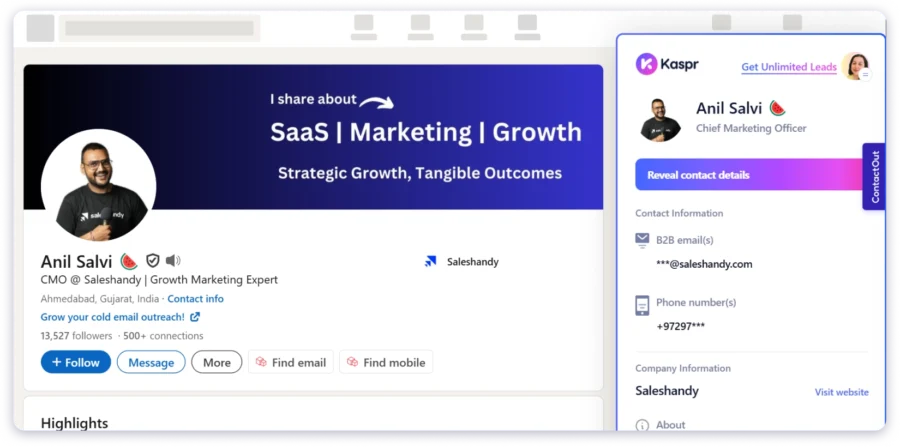
In my test, it found emails for 82% of prospects with 72% verified.
Where Kaspr really stands out is in European data. If your ICP includes the UK, France, Germany, or the Nordics, the database coverage is strong. It’s also GDPR-aligned, which matters for EU-focused outreach.
Kaspr also supports bulk enrichment through CSV uploads and automation workflows that enrich contacts from LinkedIn searches, groups, or events automatically.
The main limitation: Kaspr is purely a data tool. No outreach, no sequences, no campaign management. You’ll need a separate cold email software for sending.
My Test Results: 82% emails found | 72% verified | 10% risky
Key Features:
- LinkedIn Chrome Extension: extract emails and phone numbers from profiles, Sales Navigator, and Recruiter Lite
- Bulk Enrichment: upload CSV files and enrich contacts in bulk
- Automation Workflows: enrich contacts from LinkedIn searches, groups, and events
- Lead Management Dashboard: organize contacts into lists with notes and tags
- CRM Integrations: HubSpot, Salesforce, Pipedrive
Pros
- Strong European data coverage
- Unlimited B2B emails on paid plans
- Fast LinkedIn extension with real-time results
- 14-day free trial on paid plans
Cons
- No outreach or campaign features built in
- Phone credits are limited and expensive as add-ons
- US data coverage is not as deep as European
Pricing:
Starter at $49/month (annual). Free plan with 15 B2B email credits/month.
6. Clay
- G2: 4.9/5 ⭐ (200+ reviews)
- Capterra: 4.9/5 ⭐ (150+ reviews)
- Best for: AI-powered lead enrichment and outreach automation using data from 100+ sources.
If you’re looking for an email scraper that uses AI technology, Clay is worth considering.
It’s different from everything else on this list. It’s not just an email scraper; it’s a data enrichment platform.
Give it a list of companies or people, and Clay pulls contact data from over 100 providers to find emails, phone numbers, job titles, and company details.
In my test, it found emails for 78% of prospects. You just upload your list and ask Clay’s AI agent (Claygent), and it finds emails for you.
Clay checks public pages and gets accurate contact information. You get details like email address, name, job title, and the source from which it was found.
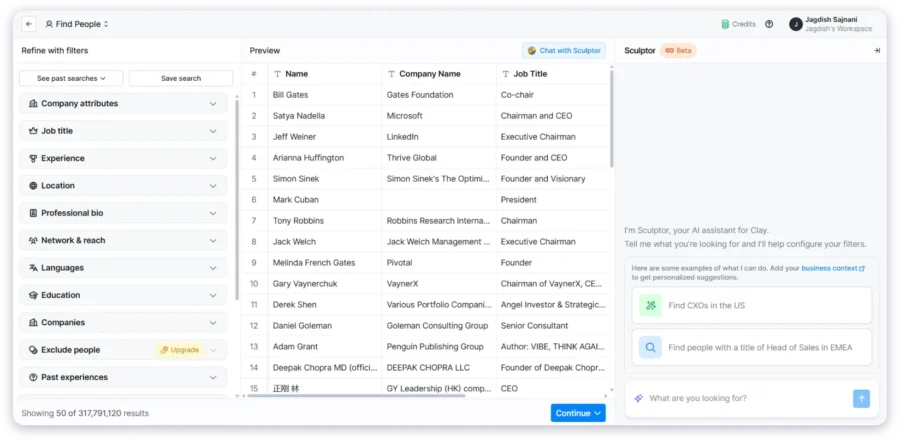
You can export the contact details in CSV, Excel, or JSON. It also verifies emails through integrations with tools like Apollo.io before you use them in campaigns.
The learning curve is a bit steeper than with simpler tools. And the pricing is the biggest barrier. Starting at $134/month, Clay is better suited for teams that have a budget and need enrichment depth over simplicity.
My Test Results: 78% emails found | 68% verified | 10% needed additional verification
Key Features:
- Scrapes emails from websites, LinkedIn, and social media
- Uses AI to understand and extract contact data
- Works with bulk lists: just upload and run
- Chrome extension for real-time scraping
- Email verification through integrations
Pros
- AI makes it easier to find specific contacts
- Works across different sources, including LinkedIn
- No coding or setup needed
- Handles both small and large scraping tasks
- Structured data export in multiple formats
Cons
- Expensive at $134/month starting
- You need clear prompts for the best results
- Only scrapes publicly available data
- Some emails may still need verification
Pricing:
Starter at $134/month. Free plan with 100 credits.
7. Skrapp.io
- G2: 4.5/5 ⭐ (50+ reviews)
- Capterra: 4.2/5 ⭐ (150+ reviews)
- Best for: LinkedIn email extraction and domain-based email search.
If I need to scrape business email addresses from LinkedIn and company domains, I prefer Skrapp.io. The platform helps me find and collect verified email addresses of professionals, which makes prospecting easy.
Skrapp.io works as a LinkedIn email finder at its core. It allows me to scrape email addresses while browsing LinkedIn profiles or using LinkedIn Sales Navigator. It also provides domain-based email search, which helps me locate emails associated with specific companies.
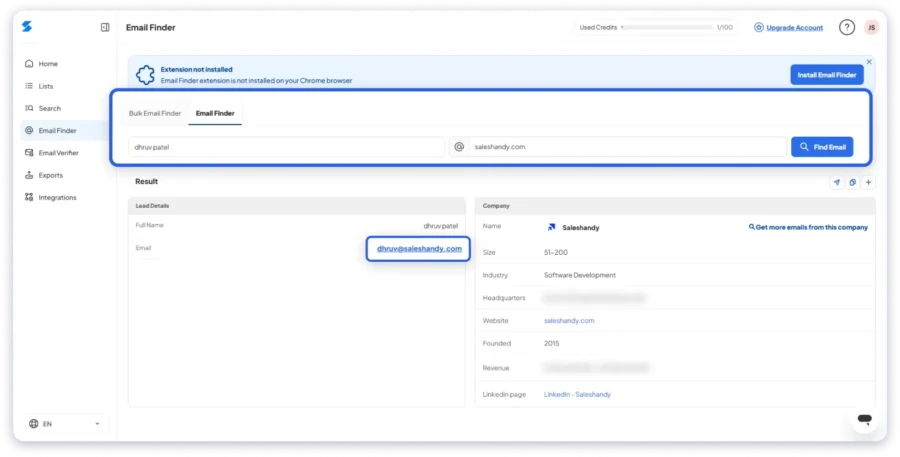
I tested it and got 76% emails found with 70% verified. Not the highest numbers, but the simplicity and pricing make up for it.
With its bulk email extraction and email verification features, I can build and validate a targeted lead list. For prospecting at scale, Skrapp.io allows me to export email lists in bulk and integrate them with CRM tools.
If you need a straightforward email scraper for LinkedIn without extra complexity, Skrapp does the job.
My Test Results: 76% emails found | 70% verified | 6% risky
Key Features:
- LinkedIn Email Finder: extracts email addresses from LinkedIn profiles and Sales Navigator
- Domain Email Search: finds emails associated with a specific company domain
- Bulk Email Finder: retrieve multiple email addresses at once
- Email Verification: checks that extracted emails are valid and deliverable
- Lead Management Dashboard: organize, save, and manage scraped email leads
- Data Export Options: export lead lists in CSV format
Pros
- A solid LinkedIn extension to find emails
- An easy-to-use interface
- Bulk email search and verification
- The starting plan of Skrapp.io is affordable
Cons
- A limited data source, as it relies on LinkedIn and company domains
- Some users have said that email accuracy varies
- A free plan has restrictions on searches and exports
- No phone number lookup
Pricing:
Starter at $21/month (annual) for 1,000 emails. Free plan with 100 emails/month.
8. GetProspect
- G2: 4.0/5 ⭐ (30+ reviews)
- Capterra: 4.4/5 ⭐ (90+ reviews)
- Best for: LinkedIn email scraping with data enrichment and CRM sync.
When I need to find business email addresses from LinkedIn and company websites, I rely on GetProspect.
It’s designed to help me find verified B2B email addresses while browsing LinkedIn profiles or searching for contacts based on job title, company, or industry.
What sets GetProspect apart is its ability to analyze publicly available data and company domain structures to generate verified emails.
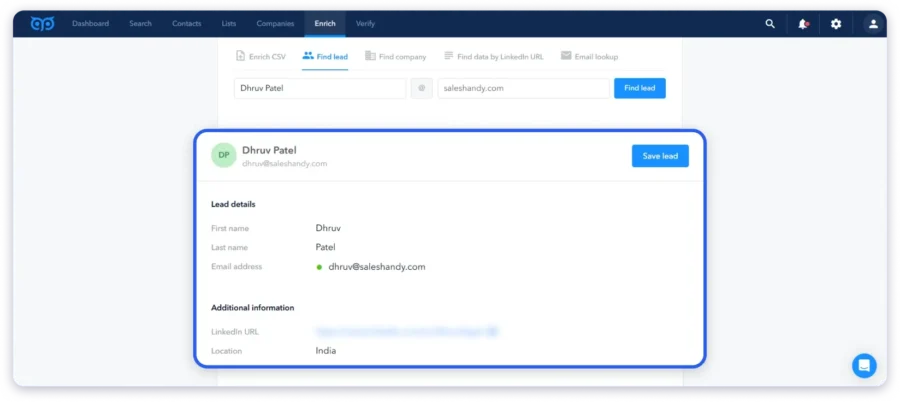
It also offers bulk email search, contact enrichment, and CRM integration, which helps streamline my lead generation process.
In my test, it found 73% of emails with 62% verified. The accuracy wasn’t the highest, but the enrichment data was useful for personalizing outreach.
The 200M+ contact database covers a decent range of industries.
My Test Results: 73% emails found | 62% verified | 11% risky
Key Features:
- LinkedIn Email Finder: extracts professional email addresses from LinkedIn profiles
- Domain-Based Email Search: finds emails linked to a specific company domain
- Bulk Email Search: get multiple emails at once for speedy prospecting
- Lead Management and CRM Integration: syncs with tools like HubSpot, Salesforce, and Pipedrive
- Chrome Extension: email extraction while browsing LinkedIn and company websites
- API Access: allows developers to integrate GetProspect’s email search capabilities into their workflows
Pros
- It helps users to find emails and contact information of potential customers
- Several users have noted that GetProspect is affordable compared to its competitors
- A user-friendly interface to get started
- It comes with CRM compatibility with direct integrations
Cons
- There are limited credits in the free version
- The platform lacks data for some domains, and phone numbers are not available
- Some users have reported inconsistent customer support
Pricing:
Starter at $49/month for 2,000 valid emails. Free plan with 50 valid emails.
9. Outscraper
- Trustpilot: 4.7/5 ⭐ (140+ reviews)
- Best for: Extracting business leads from Google Search and public directories at scale.
If you’re looking to scrape contact details from websites at scale, Outscraper is built for that.
With just a list of domains or URLs, Outscraper helps you pull emails, phone numbers, and social media links from public web pages. It’s a fully cloud-based tool, so there’s no software to install or IP risk to worry about.
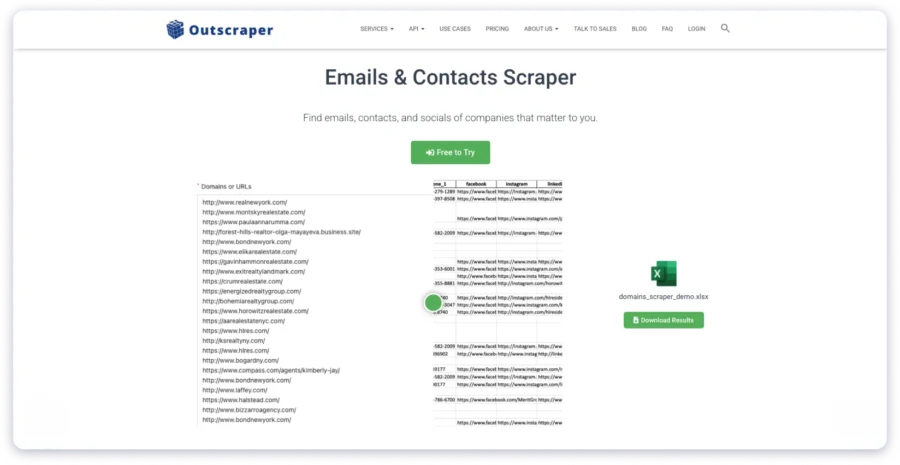
In my test, it found emails for 68% of prospects. Some results were generic addresses (info@, support@), which needed filtering. But for local business prospecting or building lists from Google Maps data, Outscraper is genuinely useful.
Just upload a list of domains or URLs, and the tool will extract up to 5 emails, 3 phone numbers, and social profiles per site. It pulls data from websites, Google search results, and Google Maps listings. It even comes with bulk email verification, so you don’t end up emailing invalid addresses.
And since everything runs on Outscraper’s cloud servers, your own IP stays protected.
My Test Results: 68% emails found | 60% verified | 8% generic/risky
Key Features:
- Email, phone, and social profile extraction from websites and public pages
- Bulk scraping from thousands of URLs using copy-paste or file upload
- Google Maps and Search scraper integration for more targeted results
- Real-time scraping with up-to-date contact info
- Optional email verification to filter invalid emails
- Export-ready formats (CSV, Excel, JSON) for easy CRM integration
Pros
- Scrapes contacts from both websites and search engines
- No software setup: runs fully on the cloud
- Free tier available for up to 500 domains/month
- Supports large-scale lead generation with bulk input and export
Cons
- Depends on publicly available data, so coverage may vary
- Some email results may require additional verification
- Credits-based pricing can add up for bulk scraping of leads
Pricing:
Pay-as-you-go. Free tier available.
10. AeroLeads
- G2: 4.0/5 ⭐ (60+ reviews)
- Capterra: 4.6/5 ⭐ (70+ reviews)
- Best for: Extracting emails from LinkedIn and company websites with CRM integration.
When I need to find verified business emails and contact details of prospects, AeroLeads helps me streamline the process. It’s a B2B lead generation and email finder tool that allows me to extract emails, phone numbers, and company details from LinkedIn, company websites, and other online sources.
AeroLeads works with a Chrome extension, letting me scrape contact details in real time while browsing LinkedIn profiles. The platform also provides bulk email search and domain-based email extraction.

In my test, it found emails for 65% of prospects with 58% verified. Not the strongest accuracy, but the pricing is friendly for small teams just getting started with outbound.
With CRM integrations, I can directly export leads to platforms like HubSpot, Salesforce, and Pipedrive, keeping the workflow smooth from lead discovery to outreach.
My Test Results: 65% emails found | 58% verified | 7% risky
Key Features:
- LinkedIn Email Finder: extracts emails and contact details while browsing LinkedIn profiles
- Company Domain Search: finds emails associated with specific companies
- Bulk Email Extraction: helps retrieve multiple email addresses at once for large-scale prospecting
- Email Verification: checks emails are valid before sending, reducing bounce rates
- Chrome Extension: allows email scraping from LinkedIn, company websites, and other sources
- CRM Integrations: syncs leads with HubSpot, Salesforce, Zoho, and Pipedrive
Pros
- The Chrome extension works well with LinkedIn
- The tools are helpful in finding prospects and import/export lists
- Bulk email search to find emails in an easy and fast way
- Easy CRM integrations to manage leads in a better way
Cons
- Some users have noted that the tool is slow
- The usage counter resets monthly, which could lead to wasted subscription
- Some users have reported that customer service is not customer-friendly
Pricing:
Take off at $39/month. Free trial with 10 credits.
11. Apify
- G2: 4.8/5 ⭐ (400+ reviews)
- Capterra: 4.5/5 ⭐ (200+ reviews)
- Best for: No-code web scraping and email extraction at scale from any website.
Apify isn’t a typical email finder. It’s a web scraping platform with 1,500+ pre-built scrapers (called Actors) for extracting emails, phone numbers, and social profiles from any public website, Google Maps, LinkedIn, or directory.
In my test, I used the Contact Details Scraper and Google Maps Email Extractor. It found emails for 72% of prospects. The results needed cleaning, but the volume and flexibility were impressive.
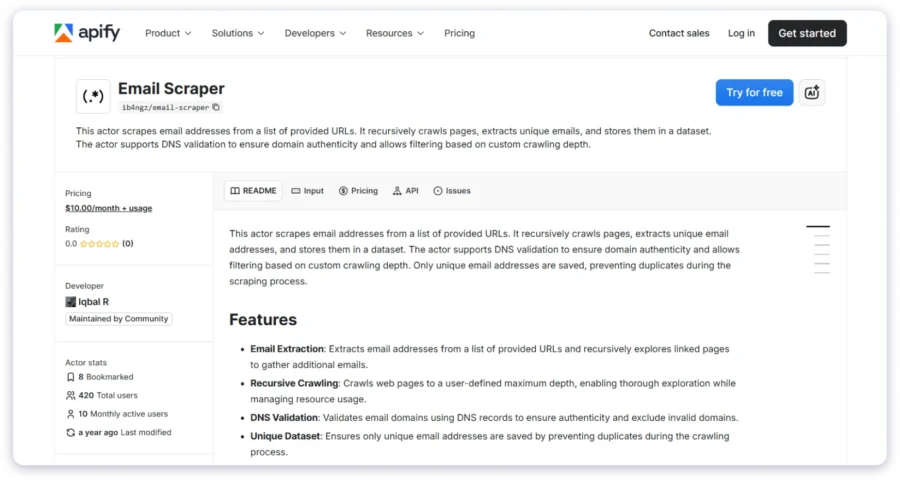
Everything runs in the cloud with built-in proxy rotation, so your IP stays protected. You can schedule jobs, integrate with Google Sheets and Zapier, and export in CSV, JSON, or Excel.
The trade-off is complexity. Apify is more technical than tools like Saleshandy or Hunter.io. But for scraping contact data from websites at scale, especially local businesses or niche directories, it fills a gap most email finders can’t.
My Test Results: 72% emails found | 63% verified | 9% generic/risky
Key Features:
- 1,500+ Pre-built Scrapers for websites, Google Maps, LinkedIn, and social media
- Contact Details Scraper: emails, phone numbers, and social profiles from any website
- Google Maps Email Extractor for local business leads
- Cloud-based with Proxy Rotation
- Export to CSV, JSON, Excel; integrates with Google Sheets and Zapier
Pros
- Scrapes almost any website or directory at scale
- No-code interface for pre-built scrapers
- Free $5 monthly credits on the free plan
- GDPR-compliant infrastructure
Cons
- More technical than typical email finder tools
- Results need external cleaning and verification
- Credit consumption varies by scraper complexity
Pricing:
Starter at $49/month. Free plan with $5 monthly credits.
12. Findymail
- G2: 4.9/5 ⭐ (48+ reviews)
- Best for: Email finding with strict verification for the lowest possible bounce rates.
If email deliverability is your top concern, Findymail is built for that. It finds emails and verifies them using a strict binary approach: valid or not valid. No “risky” or “unknown” categories.
In my test, it found 74% of emails, and 71% were verified. That’s the tightest gap between found and verified across all 13 tools. Almost every email it returns is actually usable. (That kind of consistency is rare.)
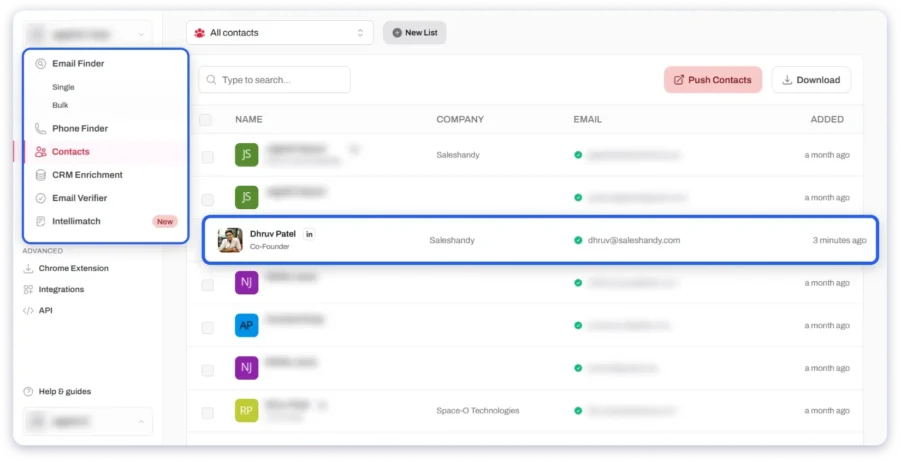
It works well with Sales Navigator for one-click exports with automatic formatting. It also supports bulk finding through CSV uploads and API integration for custom workflows. Credits roll over up to 2x your monthly limit, and you’re only charged for emails that are actually found and verified.
The limitation: Findymail is an email finder and verifier, not a prospecting platform. No sequences, no campaigns, no CRM.
My Test Results: 74% emails found | 71% verified | 3% risky
Key Features:
- Strict Binary Verification: emails are either valid or not returned
- Sales Navigator Export: one-click extraction with automatic formatting
- Bulk Email Finding via CSV uploads
- API Access for custom workflows
- CRM Integrations: HubSpot, Pipedrive, Salesforce, Lemlist, Instantly
- Credit Rollover up to 2x monthly limit
Pros
- Lowest bounce rate in my testing
- Binary verification removes guesswork
- Clean Sales Navigator integration
- Only charges for verified emails found
Cons
- Smaller database compared to Saleshandy or Snov.io
- Phone number lookup costs 10 credits per number
- No outreach or campaign features built in
Pricing:
Starter at $49/month for 1,000 verified emails. Free trial with 10 credits.
13. Evaboot
- G2: 4.6/5 ⭐ (150+ reviews)
- Capterra: 4.5/5 ⭐ (50+ reviews)
- Best for: Exporting and cleaning lead data from LinkedIn Sales Navigator.
If you use Sales Navigator as your main prospecting tool, Evaboot plugs directly into that workflow. It’s a Chrome extension that exports search results in one click, something LinkedIn doesn’t offer natively.
What makes Evaboot different is the data cleaning. It strips special characters from names, fixes company formatting, and flags leads that don’t match your search filters.
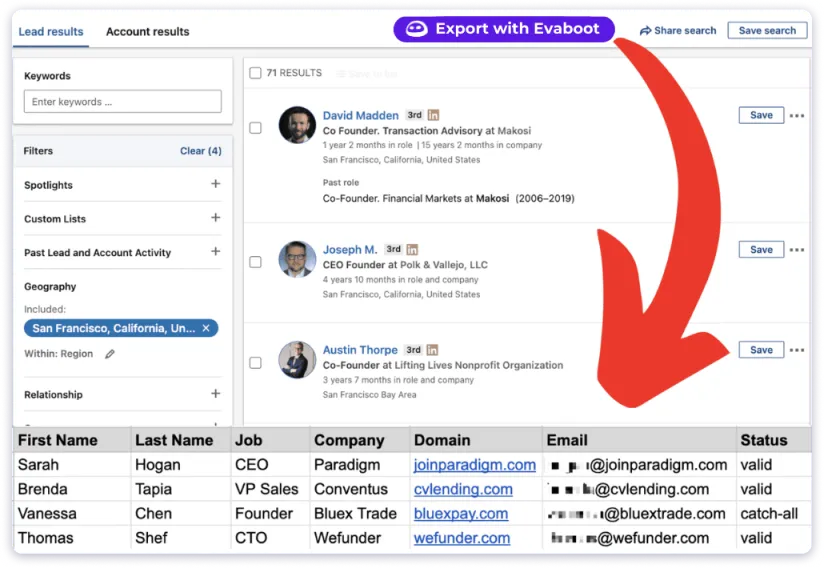
(If you’ve pulled a Sales Navigator list and noticed half the results don’t match your criteria, Evaboot catches that.)
In my test, it found emails for 77% of prospects with noticeably cleaner data than other LinkedIn scrapers. It also includes a built-in email finder and verifier as part of the export process.
The catch: Evaboot requires Sales Navigator ($99+/month) to work. It also uses 2 credits per lead (1 scrape + 1 email), so 500 credits gives you roughly 250 complete leads.
My Test Results: 77% emails found | 70% verified | 7% risky
Key Features:
- One-click Sales Navigator Export from searches, lead lists, and saved searches
- Automatic Data Cleaning: fixes names, company names, and formatting
- Filter Match Detection: flags leads that don’t match your search criteria
- Built-in Email Finder and Verification
- CSV Export with structured, outreach-ready formatting
- Credit Rollover on active plans
Pros
- Best-in-class Sales Navigator integration
- Automatic data cleaning saves hours of manual work
- Filter matching catches false positives other scrapers miss
- Simple Chrome extension setup
Cons
- Requires LinkedIn Sales Navigator ($99+/month additional)
- No outreach or campaign features
- Uses 2 credits per lead
- No phone number lookup
Pricing:
Starter at $29/month for 500 credits (roughly 250 complete leads). No free plan. Requires Sales Navigator separately.
How to Verify Scraped Emails and Avoid Bounces
Finding emails is only half the work. If you send to unverified addresses, your bounce rate climbs, your sender reputation takes damage, and your emails start landing in spam instead of inboxes.
Here’s the verification workflow I follow:
- Step 1: Start with a tool that verifies the built-in. Saleshandy, Snov.io, Hunter.io, and Findymail all verify emails before showing you results. That cuts out an entire extra step in your workflow.
- Step 2: Run a secondary check on larger lists. Even with built-in verification, I pass bulk lists through a dedicated email verifier to catch anything that slipped through the first filter.
- Step 3: Remove catch-all and risky addresses. Catch-all domains accept any email sent to them, which means you can’t confirm if a specific address actually works. I remove these from cold outreach lists entirely.
- Step 4: Watch your bounce rate after sending. Keep it under 2%. If it creeps higher, pause the campaign and clean your list before continuing.
- Step 5: Re-verify older lists before reuse. People switch jobs. Email addresses get deactivated. Any list older than 60 days gets re-verified before I send it again.
The email scrapers on this list that handle verification best are Saleshandy (waterfall enrichment across multiple providers), Findymail (strict binary verification), and Snov.io (7-tier verification).
If the tool you choose doesn’t verify, pair it with a standalone verifier before hitting send. Your email deliverability depends on it.
Is Email Scraping Legal? What You Need to Know in 2026
This is the most common question I get. The honest answer — it depends on how you collect the data and what you do with it.
GDPR (Europe): Collecting personal data without a lawful basis is prohibited. If you’re emailing prospects in the EU, you need a legitimate interest justification and must provide an opt-out option. France’s data authority (CNIL) fined Kaspr €240,000 for scraping contact details from LinkedIn without adequate compliance controls. That fine tells you exactly how seriously EU regulators are enforcing this in 2026.
CAN-SPAM (United States): You can email someone without prior consent, but every message must include an unsubscribe link, a real physical address, and an honest subject line. Violations carry penalties up to $51,744 per email.
CCPA (California): Gives consumers the right to know what personal data is being collected and to request its deletion. If you target California-based prospects, you need clear opt-out mechanisms in place.
Best practices for staying compliant:
- Only use email scraping tools that source data from public, legitimate channels
- Include an unsubscribe option in every outreach email you send
- Maintain a suppression list of contacts who’ve opted out
- Don’t scrape personal or private social media profiles
- Choose tools with SOC 2 certification and transparent data sourcing policies
Saleshandy is SOC 2-certified and GDPR-compliant, sourcing contact data through verified, legitimate channels. That’s worth considering if your team operates in regulated industries or runs outreach targeting EU contacts.
My Final Take: The Email Scraping Tool I Would Pick
After running every tool through the same test, here’s what I came away with.
For most B2B teams that need to find, verify, and reach out to contacts, Saleshandy covers more ground than anything else on this list.
The 800M+ database, AI Lead Finder, waterfall enrichment, buying signals, and the new CRM mean you can go from building a prospect list to running a full cold email campaign without leaving the platform. That kind of workflow consolidation saves real time every single day.
The right email scraper depends on your team, your workflow, and what you can budget. But if I had to pick one tool to handle the most ground, I’d go with Saleshandy.
Start your 7-day free trial — find 5 verified leads free, no credit card required.
FAQs About Email Scraping Tools
1. Is it legal to scrape emails?
It depends on the method you use and where your prospects are located. Scraping publicly available business emails is generally acceptable in most countries, but collecting personal email addresses without consent can violate GDPR, CAN-SPAM, or CCPA. Always use a compliant email scraping tool and include an unsubscribe option in every outreach message.
2. Can I use email scraping tools for free?
Yes — several tools on this list offer free plans or trials. Saleshandy gives you 50 free credits with a 7-day trial. Hunter.io offers 25 free searches per month. Snov.io provides 50 free credits. Kaspr has a free plan with 15 B2B email credits monthly. These work for testing and small-scale prospecting, but serious outbound campaigns need a paid plan.
3. How accurate are email scrapers at finding emails?
It varies quite a bit across tools. In my testing, Saleshandy returned the highest verified rate at 85%. Tools with built-in verification, Saleshandy, Findymail, and Snov.io, consistently outperformed those that only scrape without verifying. If accuracy matters to your outreach (and it should), pick a tool that verifies before delivering results.
4. What is the best free email scraping tool in 2026?
For usable free plans, Hunter.io (25 searches/month) and Kaspr (15 B2B email credits on the free tier) give you the most to work with. Saleshandy’s 50 free credits let you test the quality of the 800M+ database before deciding on a paid plan.
5. How do I scrape emails from a website?
Use a domain search tool like Hunter.io or Saleshandy. Enter a company’s website URL and the tool returns all publicly associated email addresses. For scraping contact details from any webpage at scale, Apify’s Contact Details Scraper or Outscraper handle that well. For LinkedIn specifically, use a Chrome extension from Kaspr or Skrapp.io.
6. What is the difference between email scraping and email finding?
Email scraping usually means extracting email addresses directly from web pages, HTML source code, or online directories. Email finding is a broader term, it covers B2B database lookups, pattern-based prediction, API-powered searches, and LinkedIn enrichment. Most modern tools on this list combine both approaches.
7. Can email scraping tools find phone numbers, too?
Some can. Lusha and Kaspr are strongest for direct phone numbers alongside business emails. Saleshandy’s Lead Finder also returns phone numbers. Hunter.io, Skrapp.io, and Findymail are email-only.
8. How do I avoid getting my domain blacklisted when using scraped emails?
Verify every email before sending. Keep your bounce rate under 2%. Use email warm-up to build sender reputation before increasing volume. Send from multiple inboxes with sender rotation. And always include an unsubscribe link in every message.
9. Which email scraping tool is best for LinkedIn?
For LinkedIn-first prospecting, Kaspr and Skrapp.io are the top options. Kaspr is particularly strong for European contacts. Evaboot is the best dedicated option for exporting and cleaning Sales Navigator results. Saleshandy adds the advantage of moving LinkedIn-scraped leads directly into cold email sequences from the same platform.
10. How many emails can I scrape for free?
Hunter.io gives 25 free searches per month. Snov.io offers 50 credits. Kaspr provides 15 B2B email credits on its free plan. Apify gives $5 in free monthly credits (enough for roughly 500+ emails from Google Maps). Saleshandy offers 50 free credits to test the database. For any real volume, a paid plan is necessary.