Dhruv Patel
 Contents
- 1 Find Email from Phone Number – TOC
- 2 5 Methods to Find an Email Address Using a Phone Number
- 2.1 1. Use a B2B Lead Finder Tool (Most Reliable for Business Contacts)
- 2.2 2. Search Google Using Advanced Operators
- 2.3 3. Check Social Media Profiles
- 2.4 4. Look Up Company Websites and Online Directories
- 2.5 5. Use an Email Permutator + Verification Tool
- 2.6 A Quick Comparison: Which Method Should You Use?
- 3 Why Phone-to-Email Lookup Fails for B2B (And a Smarter Alternative)
- 4 Verify Every Email Before You Hit Send
- 5 Legal and Ethical Best Practices
- 6 Pick the Right Method to Find Email Addresses from Phone Numbers
- 7 Frequently Asked Questions
- 7.1 1. Can you find an email address from just a phone number?
- 7.2 2. What is the most reliable way to find someone’s email using their phone number?
- 7.3 3. Are reverse phone lookup tools accurate for finding emails?
- 7.4 4. Is it legal to find someone’s email using their phone number?
- 7.5 5. Can I find a Gmail account using a phone number?
- 7.6 6. How do I find a business email when I only have a phone number?
- 7.7 7. What’s the best free method to find an email from a phone number?
- 7.8 8. How do B2B lead finder tools help with finding email addresses?
Finding an email address directly connected to a phone number is harder than most blogs claim.
I tested every popular method for this, including Google searches, social media lookups, free directories, and paid reverse phone tools.
Most of them gave me names and locations, but almost never a working email address.
The problem is that most guides online still recommend these methods as if they work every time. They don’t.
The methods that actually produce results require a different approach.
Instead of trying to extract an email from a phone number directly, you first identify the person behind the number and then find their verified email through a proper B2B database.
I have put together this guide based on what I found during my own testing.
It covers 5 methods that gave me actual results, what you should skip, and a smarter workflow for finding business emails. Let’s get into it.
Find Email from Phone Number – TOC
5 Methods to Find an Email Address Using a Phone Number
Here are 5 useful ways to get an email address from a phone number.
1. Use a B2B Lead Finder Tool (Most Reliable for Business Contacts)
If you’re looking for someone’s business email, this is the method I’d start with.
B2B lead finder tools don’t do phone-to-email lookups directly. They work differently.
You search by a person’s name, company, job title, or industry, and the tool returns their verified email address, phone number, and company details.
So the workflow looks like this: use the phone number you already have to identify the person (their name and company), then plug that information into a lead finder and get their verified business email.
I’ve used Saleshandy Lead Finder for this, and it’s been the most consistent method for B2B contacts.
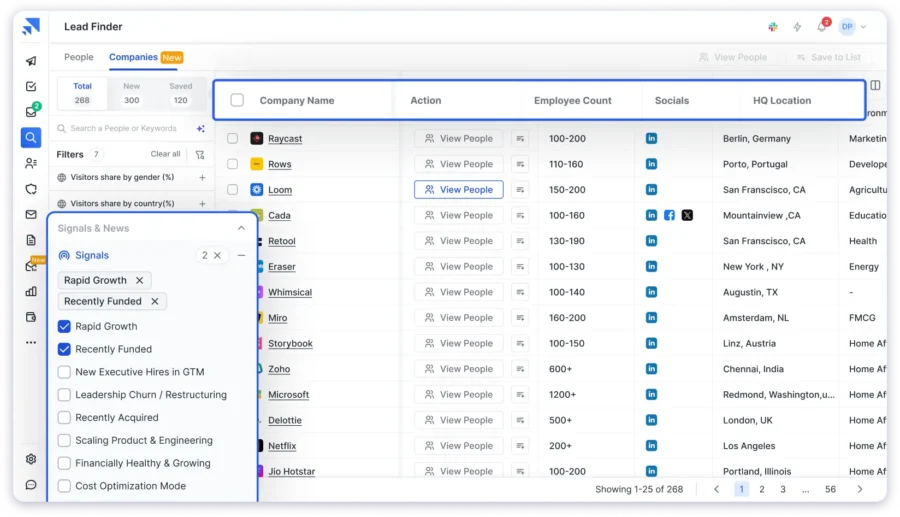
Here’s what makes it practical:
- It gives you access to an 800M+ B2B contact database.
- You can search using 75+ filters, including name, company, job title, location, industry, tech stack, revenue, and more.
- It uses waterfall enrichment, which means it pulls data from multiple providers. This gives a higher hit rate than tools that rely on a single data source.
- Contact details are verified in real time before they’re shown to you. So you’re not getting stale data.
- You can also describe your ideal prospect in plain English using AI-powered search, and it generates targeted results.
Here’s how I use it step by step:
This method works best for sales teams, SDRs, recruiters, and agencies doing B2B outreach.
The only requirement is that you need to know at least the person’s name or company. It’s not a direct phone-to-email converter, but it is the most reliable path to a verified business email.
You can sign up for free and get 5 leads to test it out.
2. Search Google Using Advanced Operators
This is the simplest free method, and it occasionally works. It is most useful for professionals who have a public online presence.
Google indexes pages where phone numbers and email addresses appear together. Think about company pages, conference speaker bios, press releases, and online directories.
If the person’s phone number and email are published on the same indexed page, Google can find them.
Here are the search techniques I use:
When I tested this across several phone numbers, it worked for about 2 out of 10 contacts.
Both of those were founders who had their details listed on their company’s website. For the other 8, Google returned either nothing relevant or unrelated directory listings.
This method is best for quick, one-off checks. If you need to find emails in bulk, it’s too slow and too unreliable to depend on.
3. Check Social Media Profiles
Social media can help in some cases, but not always in the way you might expect.
Here’s the honest takeaway: social media is more useful for identifying who owns a phone number than for directly finding their email. I treat it as a stepping stone.
Once I know the person’s name and company, I move to a B2B lead finder or email finder tool to get the actual email address.
4. Look Up Company Websites and Online Directories
If you can figure out which company the person works at, their website might have the email you need.
Here’s where I check first:
I also check industry directories like Crunchbase, Clutch, or trade association websites. These sometimes list individual team members or at least company-level emails.
Even if I don’t find the exact email, company websites help me figure out the email pattern.
For example, if I see [email protected] and [email protected] on the same site, I can guess that their format is [email protected].
That gives me a starting point for the next method.
This approach works best for contacts at smaller companies that openly list their team. Larger companies rarely publish individual email addresses.
5. Use an Email Permutator + Verification Tool
Once you know a person’s full name and company domain, you can make an educated guess at their email address.
Most businesses follow a standard email format. The common patterns are:
Free tools like Email Permutator+ and Mailmeteor’s email permutator generate all the likely combinations for you.
Just enter the first name, last name, and company domain, and you get a list of possible email addresses.
But here’s the critical part: never send a cold email to a guessed address without verifying it first.
Sending to an invalid email causes bounces. And a bounce rate above 2% can damage your sender reputation and reduce deliverability across all your campaigns. That’s a real problem if you’re doing outreach at any scale.
I run every guessed email through Saleshandy’s free Email Verifier before adding it to any outreach list.
It checks the email format, the domain, and whether the mailbox actually exists. Other tools like NeverBounce and ZeroBounce do similar checks.
This method is surprisingly effective when the company uses a standard email format. I’d estimate it works about 50 to 60 percent of the time, which is better than most methods on this list, as long as you verify.
A Quick Comparison: Which Method Should You Use?
Here’s how each method stacks up at a glance.
| Method | Best For | Email Accuracy | Cost | Works for B2B? |
|---|---|---|---|---|
| B2B Lead Finder (Saleshandy) | Business contacts at scale | High | Free to start | Yes |
| Google Advanced Search | One-off quick checks | Low | Free | Not reliably |
| Social Media Profiles | Identifying the person | Low | Free | As a stepping stone |
| Company Websites / Directories | Small business contacts | Medium | Free | Partially |
| Email Permutator + Verify | Known name + company | Medium to High | Free | Yes |
If you’re doing B2B outreach, the most practical workflow is to combine a couple of these methods.
Use Google or social media to identify the person. Then get their verified email through a lead finder or permutator with verification.
For personal contacts, social media and company websites are usually enough.
And whichever method you use, always verify before you send.
Why Phone-to-Email Lookup Fails for B2B (And a Smarter Alternative)
If you’ve searched for this topic before, you’ve probably come across recommendations for reverse phone lookup tools like Spokeo, TrueCaller, BeenVerified, or WhitePages.
I tested them.
Here’s what I found: they’re decent for identifying who owns a phone number.
They can often return a name, location, and sometimes a home address. But email is the weakest data field across all of them.
In most of my tests, they returned name and address data but no email, especially for business contacts.
The reason is simple. These tools pull from consumer data sources like public records, social media scrapes, and data broker aggregations.
They’re not built for B2B email discovery. Business email addresses don’t typically appear in public records or social profiles.
This is why the direct “phone number to email” path doesn’t work well for professional contacts.
The smarter approach is to flip the workflow:
This workflow works because you’re not asking a consumer database to do a B2B job. You’re using a tool built specifically for finding professional contact information, with data sourced from multiple providers through waterfall enrichment.
The difference in accuracy is significant. Where reverse lookups gave me email results maybe 20% of the time, this workflow gave me verified emails for over 80% of the contacts I searched.
Verify Every Email Before You Hit Send
This step is non-negotiable, no matter which method you use.
Sending to an unverified email address is risky.
If the email bounces, it signals to email service providers that you’re not maintaining a clean list.
A bounce rate above 2% can start to affect your sender reputation. And once that reputation drops, even your legitimate emails may start landing in spam.
If you’re using Saleshandy Lead Finder, this step is already built in. The tool verifies contact details in real time before revealing them. So the emails you get are already checked.
For emails found through Google search, social media, or email permutators, run them through a verification tool before adding them to any outreach list.
Saleshandy’s Email Verifier is free and checks format, domain validity, and mailbox existence. NeverBounce and ZeroBounce are other solid options.
It takes a few seconds per email. But it protects your entire outreach operation.
Legal and Ethical Best Practices
Finding someone’s email is not just a technical challenge. There are legal and ethical considerations, too.
Here are the general rules I follow:
- Only use found emails for relevant, professional outreach.
- Don’t scrape data from platforms that prohibit it in their terms of service.
- Always honor opt-out requests immediately.
- Use tools that source data compliantly. Saleshandy, for example, is SOC 2 certified and follows GDPR requirements.
The methods in this guide are meant for legitimate business outreach. Using them for spam, repeated unwanted contact, or anything outside professional communication is not just unethical. It can also have legal consequences.
Pick the Right Method to Find Email Addresses from Phone Numbers
Finding an email address from a phone number is not as simple as most guides suggest. Most methods are indirect, and the ones that promise direct results often disappoint, especially for business contacts.
The approach that works best is practical: use the phone number to identify the person, then find their verified email through a reliable source. For B2B, that means a lead finder tool. For personal contacts, social media and company websites may be enough.
Whatever method you use, always verify before you send. A clean email list protects your sender reputation and keeps your outreach landing where it belongs, in the inbox.
Frequently Asked Questions
1. Can you find an email address from just a phone number?
Sometimes, but not reliably. Reverse phone lookup tools occasionally return emails for personal contacts. For business emails, a more effective approach is to identify the person behind the phone number first, then use a B2B lead finder like Saleshandy to get their verified email.
2. What is the most reliable way to find someone’s email using their phone number?
For B2B contacts, use the phone number to identify the person’s name and company. Then search a B2B database with verified contacts. Saleshandy Lead Finder lets you search 800M+ profiles by name, company, job title, and more. It returns real-time verified emails. For personal contacts, reverse lookup tools like Spokeo or BeenVerified may help, though results are inconsistent.
3. Are reverse phone lookup tools accurate for finding emails?
Not really. Tools like WhitePages, TrueCaller, Spokeo, and BeenVerified are good at identifying who owns a phone number, including their name, location, and carrier. But email is the weakest data field across all of them. In my testing, most returned name and address data but not email, especially for business contacts.
4. Is it legal to find someone’s email using their phone number?
Finding publicly available business contact information for professional outreach is generally acceptable under CAN-SPAM (US) and GDPR’s legitimate interest provision (EU). The key is to use the data ethically. Include an opt-out option in your emails, honor unsubscribe requests, and comply with local privacy laws.
5. Can I find a Gmail account using a phone number?
Partially. Google’s account recovery page lets you enter a phone number to check if an account is linked to it. But it won’t reveal the full email address. It only shows a masked version. Beyond that, reverse lookup services or social media may help if the person has linked their phone number publicly, but results vary widely.
6. How do I find a business email when I only have a phone number?
Here’s the workflow I use: First, Google the phone number to identify the person and their company. Then check their LinkedIn profile or company website. Finally, use a B2B lead finder like Saleshandy to search by name + company and get their verified business email. Always verify the email before sending outreach.
7. What’s the best free method to find an email from a phone number?
Start by Googling the phone number in quotes with “email” as an additional search term. Check the person’s social media profiles for contact details. If those don’t work, identify their name and company, then use a free email permutator to guess the format and verify it with a tool like Saleshandy’s Email Verifier.
8. How do B2B lead finder tools help with finding email addresses?
B2B lead finders like Saleshandy maintain databases of 800M+ professional profiles with verified emails and phone numbers. Instead of reverse-searching a phone number, you search by name, company, job title, or industry. The tool returns verified contact data sourced from multiple providers and checked in real time. This is far more reliable than any phone-to-email lookup.