 Anil Salvi
 Contents
- 1 Find Emails from LinkedIn URLs – TOC
- 2 5 Best Methods to Find Emails from LinkedIn URLs
- 3 How to Verify Emails Found from LinkedIn URLs
- 4 From LinkedIn URL to Cold Email: Complete Workflow
- 5 Is It Legal to Find Emails from LinkedIn URLs?
- 6 Conclusion
- 7 Frequently Asked Questions
- 7.1 1. Can You Find Someone’s Email from Their LinkedIn URL for Free?
- 7.2 2. What Is the Most Accurate LinkedIn Email Finder Tool?
- 7.3 3. Is It Legal to Extract Email Addresses from LinkedIn Profiles?
- 7.4 4. How Do You Find Emails from LinkedIn URLs in Bulk?
- 7.5 5. What Should You Do After Finding an Email from a LinkedIn URL?
LinkedIn has over 1 billion professional profiles. Your ideal prospects are already there, with their name, title, and company clearly listed.
But their email address? Almost never visible.
Only about 15-30% of profiles show an email publicly. The rest are hidden behind connection walls and privacy settings. So you are left with a LinkedIn URL and no direct way to reach the person over email.
I have tested multiple methods for finding emails from LinkedIn profile URLs. In this guide, I will cover the 5 methods that actually work, with honest expectations about accuracy, cost, and limitations for each.
Let’s get into it.
Find Emails from LinkedIn URLs – TOC
- 5 Best Methods to Find Emails from LinkedIn URLs
- How to Verify Emails Found from LinkedIn URLs
- From LinkedIn URL to Cold Email: Complete Workflow
- Is It Legal to Find Emails from LinkedIn URLs?
- Conclusion
5 Best Methods to Find Emails from LinkedIn URLs
Now that the intent is clear, let me break down each method with step-by-step instructions, real success rates, and when to use each one.
1. Saleshandy Lead Finder
Best for: B2B teams that need verified emails from LinkedIn URLs at scale
Compliance: SOC 2 Type II Compliant, ISO 27001, and GDPR
Saleshandy Lead Finder is the top email extractor tool for finding emails from LinkedIn URLs. Here are 4 reasons why.
- It searches 800M+ verified B2B contacts using 75+ advanced filters.
- It lets you bulk extract emails from up to 100 company domains in one go.
- It helps you extract email addresses for up to 10,000 leads in a single search.
- It gives you double-verified emails and phone numbers, reducing bounces before your sequence starts.
On top of that, you get a built-in email verifier if you want to be 100% sure before taking the extracted emails into your outreach system.
- G2 Rating: 4.6 (770+ reviews)
- Capterra Rating: 4.5 (120+ reviews)
Saleshandy also allows you to extract details in bulk from social media profiles, industry, and skills.
How It Works with LinkedIn URLs
You can paste LinkedIn profile URLs directly into Lead Finder to find the associated email addresses.
The tool matches the profile data against its 800M+ B2B database using waterfall enrichment across multiple data providers, and returns verified contact details.
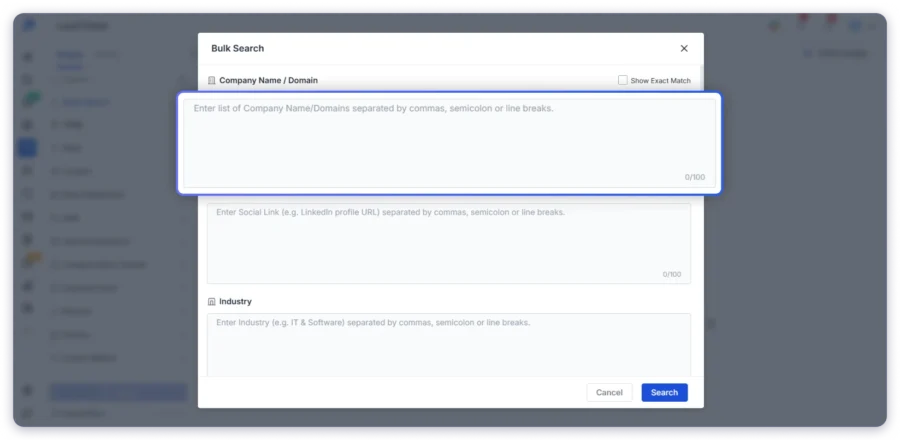
If you want to get emails directly from the lead database without pasting URLs, you can use the AI search feature. Just describe your ideal prospect in plain English, and the tool surfaces matching contacts instantly.
From the database, you can get details like name, social media links, organization name, email address, phone number, location, and designation.
Everything in seconds.
Most email finder tools provide email addresses that are not accurate or verified. If you use them directly, it will hurt your sender reputation and increase your spam score. Saleshandy solves this by double-verifying every email before it reaches you.
Key Features of Saleshandy Lead Finder
- Bulk extraction from up to 100 company domains
- Get up to 10,000 contacts in a single extraction
- Built-in email verifier for an extra accuracy check
- View full contact data, including name, company, role, phone, and social links
- Upload bulk filters or lists to extract contacts at scale
- Save filters to reuse the same search anytime
- Unused credits roll over to the next month
- Manage found prospects directly in Saleshandy CRM
Pricing
Saleshandy Lead Finder offers affordable pricing plans for email extraction.
- Lead Starter – $49/month (billed annually), 30,000 credits/year
- Lead Pro – $79/month (billed annually), 48,000 credits/year
- Custom – For enterprise-scale outreach, contact the team
You can also buy one-time credits starting at $13 for 500 credits if you need a burst of leads without upgrading your plan. Unused credits roll over to the next month.
Why Saleshandy Stands Out
Unlike standalone email finders, Saleshandy connects your entire outbound workflow in one place. You find the email, verify it, add the prospect to your CRM, and launch a cold email sequence from the same platform.
That is the difference between a tool that finds emails and a platform that helps you close deals.
The next method is completely free and works best as a quick first check before spending credits on any paid tool.
2. Check the LinkedIn Contact Info Section
Best for: Quick, free lookups before using a paid tool
This is the simplest method available. Some LinkedIn users make their email address visible directly on their profile. It takes about 10 seconds to check, and it costs nothing.
How to Do It
- Go to the person’s LinkedIn profile.
- Click “Contact info” just below their headline and profile photo.
- If they have shared their email, it will appear here along with any other contact details.
Some professionals also include their email in the About section of their profile. Founders, consultants, and freelancers do this often because they want to be reachable. Scroll down past the profile card and look for an address written in plain text.
Success Rate: Around 15-30% of profiles. Most decision-makers at mid-size and large companies keep their email hidden.
Limitations
This method does not scale. You have to visit each profile individually. It only works when the person has chosen to share their email publicly or with your connection level. For 1st-degree connections, the email is more likely to be visible. For 2nd and 3rd-degree connections, it usually is not.
When to Use This
Always check the Contact Info section first before spending credits on a paid tool. It is free, fast, and occasionally gives you exactly what you need. If the email is not there, move to the next method.
If the Contact Info section does not show an email address, Google can sometimes help you find it in other public sources.
3. Use Google Search Operators with LinkedIn Data
Best for: Researching high-value prospects where you want to invest a few minutes in finding contact details
This method combines information from a LinkedIn profile with Google’s indexing power.
Many professionals have their email addresses listed on company websites, conference speaker pages, press releases, or personal blogs. Even when they hide it on LinkedIn, Google may have indexed it elsewhere.
How to Do It
- Note the person’s full name and company from their LinkedIn profile.
- Open Google and search using specific operators:
- “firstname lastname” “company.com” email
- site:company.com “firstname lastname”
- “[email protected]”
- Review the results for email addresses on company team pages, event speaker listings, or industry directories.
You can also try searching with the person’s job title and company. For example: “VP Marketing” “company.com” email. This sometimes surfaces team directory pages that list contact details for the entire leadership team.
Success Rate:
Variable. Works best for executives and public-facing roles like founders, marketing leaders, and conference speakers. Less effective for junior roles or people at large enterprises with strict data policies.
Limitations
This method is slow. You cannot realistically do this for more than 10-15 prospects per day.
Results are inconsistent, and many searches return nothing useful. You will still need to verify any email you find through this approach using a tool like Saleshandy Email Verifier before sending outreach.
When Google does not return a direct email, there is another free approach worth trying. If you know the person’s name and company domain, you can predict their email format.
4. Guess the Email Pattern and Verify
Best for: Situations where paid tools do not have the contact in their database
Most companies follow predictable email formats. If you know a person’s name and company domain from their LinkedIn profile, you can generate likely email patterns and verify which one is active.
Common Email Patterns
- [email protected] (most common for mid-size companies)
- [email protected] (common for smaller teams under 50 employees)
- [email protected] (common for larger enterprises with 1,000+ employees)
- [email protected]
How to Use This Method
- Get the person’s full name and company domain from their LinkedIn profile.
- Create 3-4 email variations using the patterns above.
- Run each variation through an email verification tool like Saleshandy Email Verifier.
- Use the one that comes back as “Valid.”
Important Warning
Never send emails to unverified guesses. A bounce rate above 2% signals spam behavior to email providers. This damages your domain reputation and reduces inbox placement rates for every campaign you run going forward. Always verify before you send.
If you are new to cold email outreach, read this complete guide on cold emailing before launching any campaign.
Limitations
This method requires manual work for each prospect. It does not work for companies with unusual email formats. It also fails when companies use email aliases or forwarding addresses that do not follow standard patterns.
The final method is useful if you want to mine your existing LinkedIn network for email addresses you may already have access to.
5. Export Your LinkedIn Connections Data
Best for: Mining your existing network for outreach opportunities you may have missed
LinkedIn allows you to download a data file for your 1st-degree connections. This export sometimes includes the email addresses your connections have associated with their LinkedIn accounts.
How to Export
- Go to LinkedIn Settings and Privacy.
- Navigate to “Data Privacy” in the left sidebar.
- Click “Get a copy of your data.”
- Select “Connections” and request the archive.
- LinkedIn will email you a CSV file within a few minutes.
The file includes your connections’ names, companies, job titles, and, in some cases, their email addresses. You can open this CSV in any spreadsheet tool and filter for the contacts you want to reach.
Limitations
This method only works for people already in your network. Many connections do not share their email in the export file. LinkedIn has also tightened data-sharing policies in recent years, so the results are often incomplete.
You cannot use this method to find emails for prospects you are not connected with. It is useful as a supplementary approach, not a primary prospecting method.
Once you have found the emails, there is one critical step most teams skip. That is verification.
How to Verify Emails Found from LinkedIn URLs
Finding an email is only half the job. Sending to unverified addresses leads to bounces, and bounces damage your sender’s reputation.
Why Verification Matters
A bounce rate above 2% signals spam behavior to email providers. Once your domain reputation drops, even your good emails start landing in spam folders. This affects every campaign you run going forward, not just the current one.
Verified emails also improve reply rates. When an email actually reaches a real inbox, the prospect can read and respond to your cold email outreach. Skipping verification is the fastest way to waste your entire outreach effort.
How to Verify
- Use a dedicated email verification tool like Saleshandy Email Verifier.
- Paste the email address or upload a list.
- The tool checks whether the mailbox exists and can receive emails.
- Only send to addresses marked as “Valid.”
If you use Saleshandy Lead Finder, your emails are already double-verified at the time of extraction. The built-in verifier gives you an additional layer of accuracy if you want to be absolutely sure.
With verified emails in hand, here is the exact workflow top SDR teams follow to go from a LinkedIn URL to a booked meeting.
From LinkedIn URL to Cold Email: Complete Workflow
Next, once you find emails, you can set up a proper cold email automated campaign.
Step 1: Build Your Prospect List
Use LinkedIn or Sales Navigator to search for prospects matching your ICP. Apply filters like job title, industry, company size, and location.
If you need help defining your audience, this lead generation guide covers the full process.
Step 2: Collect LinkedIn Profile URLs
Copy the profile URLs of your target prospects. If you are using Sales Navigator, you can build a saved list of profiles and export the URLs.
Step 3: Find Emails Using Saleshandy Lead Finder
Paste the LinkedIn URLs into Saleshandy Lead Finder.
The tool matches profiles against its 800M+ database using waterfall enrichment and returns verified email addresses along with phone numbers.
Step 4: Verify Emails
Run extracted emails through the built-in verifier for an extra accuracy check before launching any campaign.
Step 5: Add Prospects to a Cold Email Sequence
Push verified contacts directly into a Saleshandy cold email sequence. No CSV export needed. Set up personalized emails with merge tags and automated follow-ups.
Step 6: Track and Follow Up
Monitor opens, clicks, and replies from your unified inbox. Use Saleshandy CRM to track each prospect’s progress through your pipeline with a Kanban board view.
This end-to-end workflow eliminates the need for separate tools for finding, verifying, and emailing prospects.
Before you start any outreach, it is important to understand the legal boundaries of email prospecting from LinkedIn.
Is It Legal to Find Emails from LinkedIn URLs?
Yes, finding professional email addresses from LinkedIn profiles is legal when done through compliant methods. But there are rules you need to follow.
What Is Compliant
- Using third-party databases that source data from public records and business directories.
- Sending B2B outreach with a clear unsubscribe option and a physical business address.
- Respecting opt-out requests promptly.
- Using tools that are SOC 2 Type II, ISO 27001, and GDPR compliant.
What to Avoid
- Scraping LinkedIn profiles directly. This violates LinkedIn’s Terms of Service.
- Sending emails without an unsubscribe option. This violates CAN-SPAM and GDPR.
- Using personal email addresses for unsolicited commercial messages.
Key Regulations
- CAN-SPAM (US): Requires a physical address, an unsubscribe link, and honest subject lines in every commercial email.
- GDPR (EU): Allows B2B outreach under “legitimate interest” but you must honor opt-out requests.
- CASL (Canada): Requires express or implied consent before sending commercial emails.
Saleshandy Lead Finder is SOC 2 Type II compliant, ISO 27001 certified, and GDPR compliant. The data you access through the platform is sourced and handled responsibly.
Conclusion
Finding emails from LinkedIn URLs is a daily task for sales teams, recruiters, and founders running outbound campaigns. The method you choose depends on your volume and the accuracy you need.
For single lookups, check the Contact Info section on LinkedIn first. It is free and occasionally gives you exactly what you need. Google search operators and email pattern guessing work as backup methods for high-value prospects.
For bulk prospecting, manual methods do not scale. You need a tool that matches LinkedIn profile data against a large, verified database and returns accurate emails without manual effort.
If you want the most efficient workflow, choose a platform that combines email finding, verification, CRM, and cold email outreach in one place. That way, you go from a LinkedIn URL to a sent email without switching tools, exporting CSVs, or losing time.
Sign up for Saleshandy and get 50 free credits to test the database. No credit card required.
Frequently Asked Questions
1. Can You Find Someone’s Email from Their LinkedIn URL for Free?
Yes, but with limitations. You can check the Contact Info section on their LinkedIn profile, use Google search operators with their name and company, or export your 1st-degree connections data. These methods are free but only work in specific situations. For consistent, accurate results at scale, a paid tool like Saleshandy Lead Finder is more reliable.
2. What Is the Most Accurate LinkedIn Email Finder Tool?
Saleshandy Lead Finder provides double-verified emails from an 800M+ B2B database. It uses waterfall enrichment, which means it checks multiple data providers in sequence to find the most accurate match. This multi-source approach delivers higher accuracy compared to tools that rely on a single data source.
3. Is It Legal to Extract Email Addresses from LinkedIn Profiles?
Yes, when done through compliant tools that source data from public business directories rather than by scraping LinkedIn directly. You must follow regulations like CAN-SPAM, GDPR, and CASL. This means including an unsubscribe option and respecting opt-out requests in every outreach email you send.
4. How Do You Find Emails from LinkedIn URLs in Bulk?
Use a B2B lead finder tool that supports bulk LinkedIn URL processing. Saleshandy Lead Finder lets you extract up to 10,000 contacts in a single search. You can also upload lists of company domains, apply 75+ advanced filters, or use AI search to find contacts matching your ICP at scale.
5. What Should You Do After Finding an Email from a LinkedIn URL?
Always verify the email before sending any outreach. Then create a personalized cold email sequence with a clear value proposition and an automated follow-up schedule. A platform like Saleshandy lets you find, verify, and email prospects from one place, keeping your entire workflow efficient and connected.