
 Anil Salvi
 Contents
- 1 Table of Contents
- 2 TL;DR: ListKit Pricing at a Glance in 2026
- 3 ListKit Pricing Breakdown: What You’ll Pay (And What You Actually Get)
- 4 How ListKit’s Credit System Actually Works
- 5 Three More Things Worth Knowing
- 6 Does ListKit Offer a Free Plan or Free Trial?
- 7 Hidden Costs in ListKit Pricing You Should Know
- 8 What ListKit Pricing Plan Is Best for Your Use Case?
- 8.1 You Are a Solo Founder or Freelancer Testing Outbound
- 8.2 You Run a Small Sales Team (2 to 5 People) Doing Email-First Outreach
- 8.3 You Are a Growing Agency or In-House Team Running Multiple Campaigns
- 8.4 You Are a Phone-Heavy SDR Team or Multi-Client Agency
- 8.5 You Need More Than 50,000 Credits Per Month
- 9 What Real Users Say About ListKit Pricing
- 10 Should You Invest in ListKit in 2026?
- 11 Why Saleshandy Is a Strong Alternative to ListKit
- 12 FAQs About ListKit Pricing
- 12.1 1. How much does ListKit cost per month?
- 12.2 2. Does ListKit offer a free plan or free trial?
- 12.3 3. Is ListKit cheaper than Apollo.io or ZoomInfo?
- 12.4 4. Do unused ListKit credits roll over to the next month?
- 12.5 5. Can I cancel or change my ListKit plan at any time?
- 12.6 6. What is the best alternative to ListKit in 2026?
ListKit has quickly become one of the fastest-growing platforms for finding triple-verified B2B emails in 2026.
With a 731M+ contact database, intent data, and a streamlined export workflow, it’s easy to see why sales teams, agencies, and founders are adopting it for outbound prospecting.
But when you start evaluating ListKit pricing, one question comes up, “What are you actually paying for?”
Because the monthly subscription is only part of the cost.
ListKit uses a credit-based pricing model, where credits, export limits, plan restrictions, and usage caps can significantly impact your real cost once you begin exporting leads at scale.
I broke down every ListKit pricing plan, explained how the credit system works, highlighted what real users complain about, and outlined where the costs start adding up so you know exactly what to expect before signing up.
Here’s the full breakdown.
TL;DR: ListKit Pricing at a Glance in 2026
Short on time? Here is what you need to know before choosing a ListKit plan.
1. Three plans, one credit system: Professional ($83/mo), Scale ($253/mo), and Ultimate ($508/mo), all on yearly billing. Every plan gives you the same features. You are paying for credits, not access.
2. Credits ≠ leads: Business emails cost 1 credit. Phone numbers cost 5. A single enriched contact can burn up to 10 credits, meaning your 2,000 credits could get you as few as 200 leads.
3. Yearly billing is the real pricing: Monthly plans cost more and give you far fewer credits. The gap is big enough that monthly billing rarely makes sense.
4. No free trial: You can cancel anytime, but there is no way to test the platform before paying. Pro tip: if your outbound volume is not steady week to week, annual credit plans are a trap. You do not “save 15%” if you donate unused credits back to the vendor every month.
⚠️ One thing worth noting: If your outbound volume changes week to week, annual credit plans can work against you. You do not save 15% if unused credits reset every billing cycle.
ListKit Pricing Breakdown: What You’ll Pay (And What You Actually Get)
If you choose annual billing, ListKit mainly pushes its yearly plans with a “Save 15%” tag.
But the built-in credit calculator can still recommend a different monthly plan depending on your usage, which is where a lot of the pricing confusion starts.
The pricing page also leans heavily into scale, highlighting stats like GDPR compliance, 5M verified emails monthly, 731M contacts, and 21B buying signals to position itself as more than just a basic lead database.
Before diving into the details, here is a quick look at all listkit pricing plans side by side:
| Plan | Monthly Billing | Annual Billing | Credits Included | Best For |
|---|---|---|---|---|
| Professional | $97/mo | $83/mo | 2,000/month (24,000/year) | Solo founders and freelancers starting outbound |
| ScaleMost Popular | $297/mo | $253/mo | 10,000/month (120,000/year) | Growing sales teams and cold email agencies |
| Ultimate | $597/mo | $508/mo | 50,000/month (600,000/year) | Phone-heavy SDR teams and high-volume outbound |
| Enterprise | Custom | Custom | Custom | Large teams needing bespoke credits + SLAs |
Now, let me break down what each plan actually gives you and where the trade-offs show up.
1. Professional Plan: $97/Mo (or $83/Mo Yearly)
This is the entry-level plan and where most first-time buyers land. You are likely to get every feature ListKit offers, just with a smaller credit allowance.
At $97/mo on a monthly billing plan, you get 2,000 credits.
On an annual billing plan, the listkit cost drops to $83/mo ($996 billed upfront for the year).
✅ What You Get
- 2,000 credits per month (24,000/year on annual)
- Unlimited Users (add your entire team at no extra cost)
- AI Company Search
- Triple-Verification
- Intent Data
- Data Enrichment
- CRM Integrations
❌ Where It Falls Short
- 2,000 credits can feel like a lot until you start enriching beyond email.
- Add phone numbers and intent data, and your actual lead count drops fast. (More on this in the credit system section below.)
- No billing reminders before renewal. If you forget to cancel or downgrade, the charge goes through.
“Set a reminder yourself before your monthly billing as they don’t remind you and don’t offer refunds.”
Best for:
Solo founders, freelancers, consultants, and small sales teams running cold outreach. If you need fewer than 2,000 enriched leads per month, this plan covers you comfortably.
2. Scale Plan: $297/Mo (or $253/Mo Yearly)
ListKit marks this as “Most Popular,” and the economics show why.
You get 10,000 credits per month at $297/mo (or $253/mo annual, $3,036/yr upfront). That is 5x the credits of Professional for about 3x the price.
✅ What You Get
- 10,000/month (120,000/year)
- Everything in Professional
- 5x more credits at a lower cost per credit
❌ Where It Falls Short
- The jump from Professional ($97) to Scale ($297) is $200/mo. If you are not consistently using 2,000 credits per month, upgrading means paying for credits that expire unused.
- One export of 1,000 leads with full enrichment can burn most of your monthly credits in a single pull.
Best for:
Growing agencies, sales teams running multiple campaigns, lead-gen freelancers serving several clients, and businesses scaling past their first outbound campaigns.
3. Ultimate Plan: $597/Mo (or $508/Mo Yearly)
This is the high-volume listkit pricing tier. Agencies running outreach for dozens of clients and in-house SDR teams enriching thousands of contacts per week tend to land here.
You get 50,000 credits per month at $597/mo (or $508/mo annual, $6,096/yr upfront).
Cost per credit at this tier is roughly 76% cheaper than Professional.
✅ What You Get
- 50,000/month (600,000/year)
- Everything in Scale
❌ Where It Falls Short
- High risk of wasted credits (That means if you don’t consistently use 100K+/month, you’re paying for capacity that vanishes).
- Still no dedicated account manager (reserved for Enterprise).
- No listkit free trial to test before committing to this price point.
Best for:
Large agencies running outbound for 10+ clients, high-volume cold email teams, lead-gen businesses, and established sales teams with multiple SDRs running parallel campaigns.
💡 Pro Tip:
Before committing, track your credit usage on Scale for two to three months. Only upgrade if you are consistently maxing out.
4. Enterprise Plan (Custom Pricing)
For teams that need more than 50,000 credits per month, ListKit offers custom Enterprise packages. You need to contact their sales team for a quote.
✅ What You Get
- Custom credit volume tailored to your business
- Bespoke packages built around your needs
- A live demo of the ListKit platform before purchase
❌ Where It Falls Short
- You cannot budget the listkit cost without a sales call.
- Annual commitments are typically harder to exit than self-serve plans.
“Akash Arora left a one-star review on Trustpilot in April 2026, describing an unprofessional sales interaction where the call was ended abruptly after a pricing discussion. If you are considering Enterprise, go in with clear requirements and a firm budget. Ask for a written proposal before signing.”
Best for:
Enterprise sales teams, large outbound operations, companies with custom CRM/integration needs, and any business whose monthly credit needs exceed what Ultimate offers.
💡 Rule of Thumb:
If you are testing the waters, go Professional. If you are running serious outbound consistently, Scale is the sweet spot. And if you are running outreach at the agency level, Ultimate is built for that kind of volume. You can also plug your details into the ListKit pricing calculator, and it will point you to the right plan based on your usage.
How ListKit’s Credit System Actually Works
This is the part of ListKit pricing that most buyers miss.
The plan price is just your entry ticket, but the credit system is what actually decides how many leads you get each month.
ListKit does not charge you per lead. It charges you per data point.
When you sign up for a plan, you get a bucket of credits each month.
You spend those credits only when you ask ListKit to reveal info like name, company, job title, and location, which is basic and is always free.
The deeper data costs credits!!
This is why two people on the same plan can get very different results.
One person might pull 24,000 leads in a month. Another might pull only 4,800 from the same plan. It all depends on what data they choose to unlock per lead.
What Is Free (0 Credits)
You can search ListKit’s database all day without spending a single credit. These data points come free with every search:
Company: Name, Domain, Industry, Employee Count, Location
Leads: First Name, Last Name, Job Title, Location
Before you spend anything, you already know who someone is and where they work. That’s where credits only start counting when you want to actually reach them or research them deeper.
What Costs Credits
Here is the full menu, straight from ListKit’s pricing page calculator.
1 Credit each: Business Email, Triple-Verified Email, LinkedIn URL, Company Address, Tech Stack, SIC Code, Job Postings, Founded Year, Funding, Revenue
2 Credits each: Personal Email, Intent Signals (last 24hrs), AI Company Summary
5 Credits: Mobile Phone Number
That is three price tiers for data. Most campaigns only need the 1-credit items. However, costs climb fast when you start adding phone numbers or intent data.
Now here is what that actually looks like in practice:
You want to email 5,000 SaaS founders.
5,000 leads x 1 credit (business email) = 5,000 credits. Fits inside a Scale plan with room to spare.
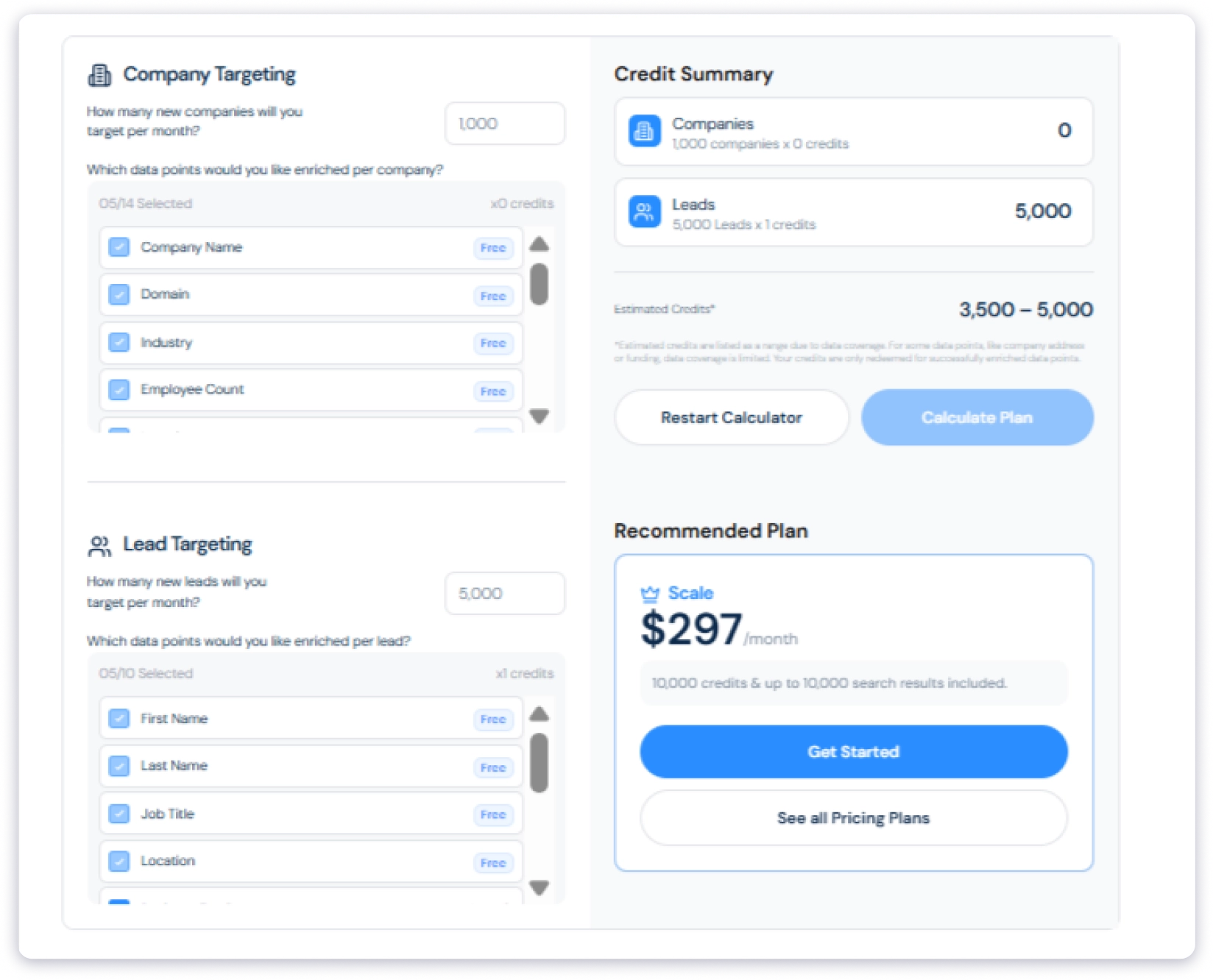
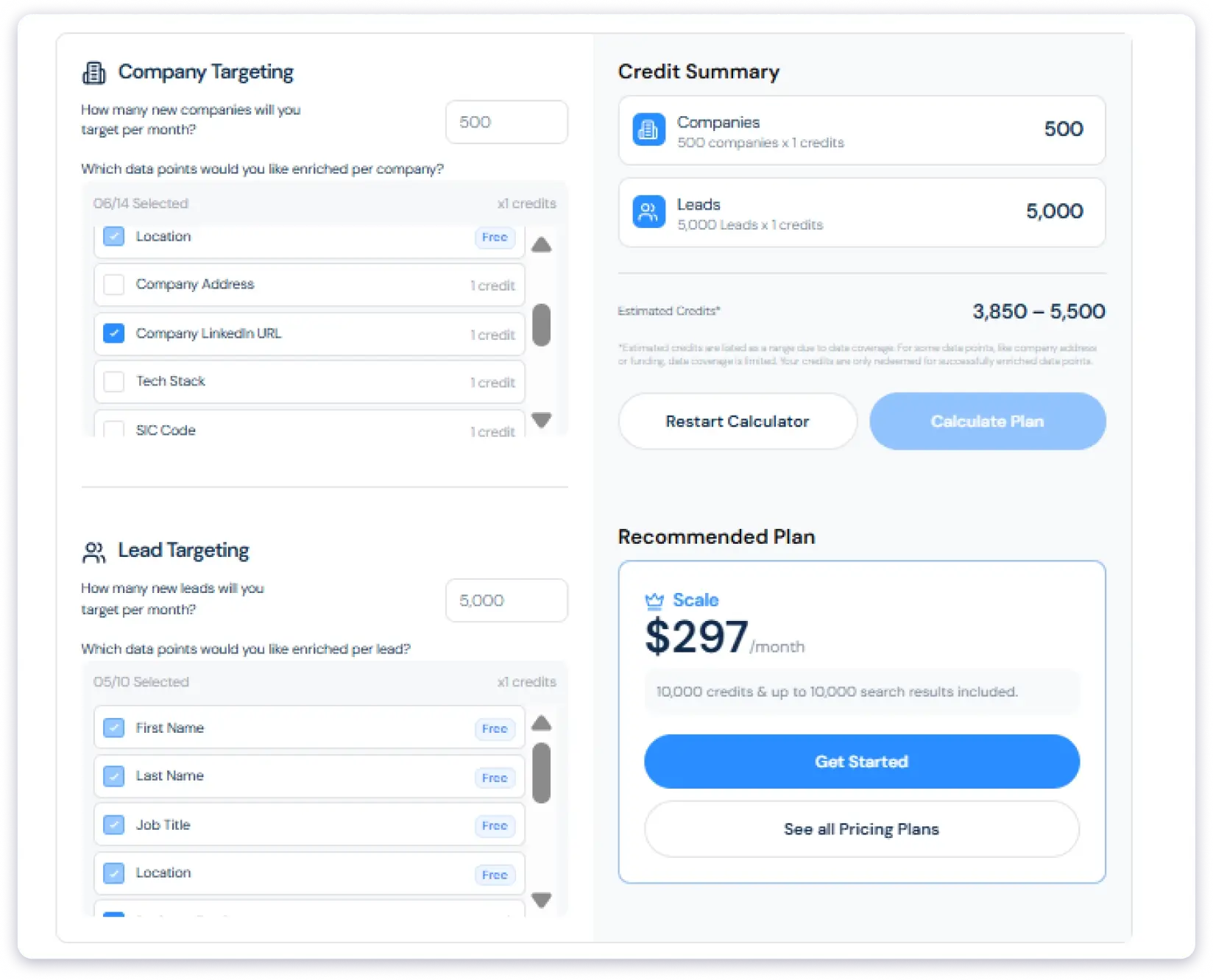
You want email + LinkedIn for those same 5,000 leads.
- 500 companies x 1 credits (LinkedIn URL) = 500 credits
- 5,000 leads x 1 credit (business email) = 5,000 credits
- Estimated total: 3,850 – 5,500 credits/month
This fits comfortably inside a Professional plan. You could run a campaign like this multiple times in a single month.
You want full intelligence on 500 top prospects: email, phone, LinkedIn, intent, and AI summary.
- 100 companies × 3 credits (LinkedIn URL + AI Summary) = 300 credits
- 500 leads × 10 credits (Email + Personal Email + Phone + Intent Signals) = 5,000 credits
- Estimated total: 3,710 – 5,300 credits per month
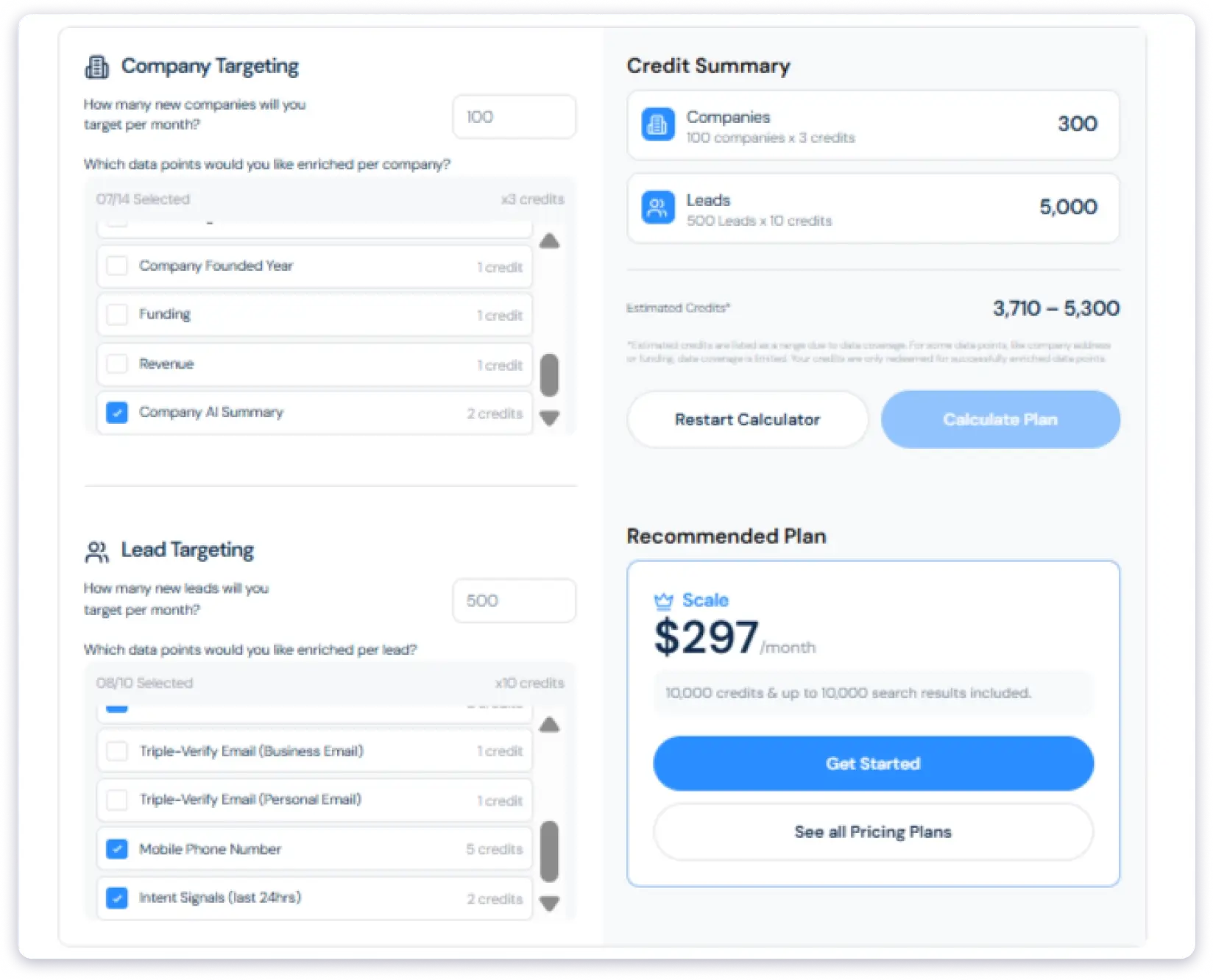
What this means:
This is the most expensive type of campaign. Even with just 500 leads, you’ll spend nearly the same credits as a 5,000-lead email-only campaign. That’s because each lead costs 10x more when you pull every data point.
A Scale plan handles this easily and gives you plenty of room to run it 20+ times a month. A Professional plan can run it 4–5 times.
How This Scales Across Plans
Per-lead reference (lead data only):
| What You Export | Credits Per Lead | Professional (2,000/mo) | Scale (10,000/mo) | Ultimate (50,000/mo) |
|---|---|---|---|---|
| Email only | 1 | 2,000 leads | 10,000 leads | 50,000 leads |
| Email + LinkedIn | 2 | 1,000 leads | 5,000 leads | 25,000 leads |
| Email + phone | 6 | 333 leads | 1,666 leads | 8,333 leads |
| Full enrichment | 10 | 200 leads | 1,000 leads | 5,000 leads |
Real campaign reference (company + lead data combined):
| Campaign Type | Companies | Leads | Estimated Credits | Fits In |
|---|---|---|---|---|
| Light prospecting (company LinkedIn + email) | 500 | 5,000 | 3,850 to 5,500 | Scale |
| Full intelligence (company AI + email + phone + intent) | 100 | 500 | 3,710 to 5,300 | Scale |
When you go for quality over quantity, the number of leads does not drive your cost anymore. The depth of data does. A campaign chasing 5,000 leads with basic data can cost the same as a campaign chasing 500 leads with full enrichment.
You can run these numbers yourself on ListKit’s calculator, given on the pricing page.
Three More Things Worth Knowing
✅ You only pay for data that is delivered.
If ListKit cannot find a phone number or email for a contact, you do not get charged for that attempt. Most competitors charge per lookup regardless of whether the data exists.
❌ Credits do not roll over.
Unused credits expire at the end of each billing cycle. Paying for credits you do not use is money wasted.
ℹ️ You can buy more anytime.
If you run out mid-month, you can purchase extra credits from inside the app or upgrade to a bigger plan with no penalties.
Does ListKit Offer a Free Plan or Free Trial?
No. ListKit does not offer a free trial. When I asked ListKit’s support team directly through the live chat on their pricing page, the response was clear:
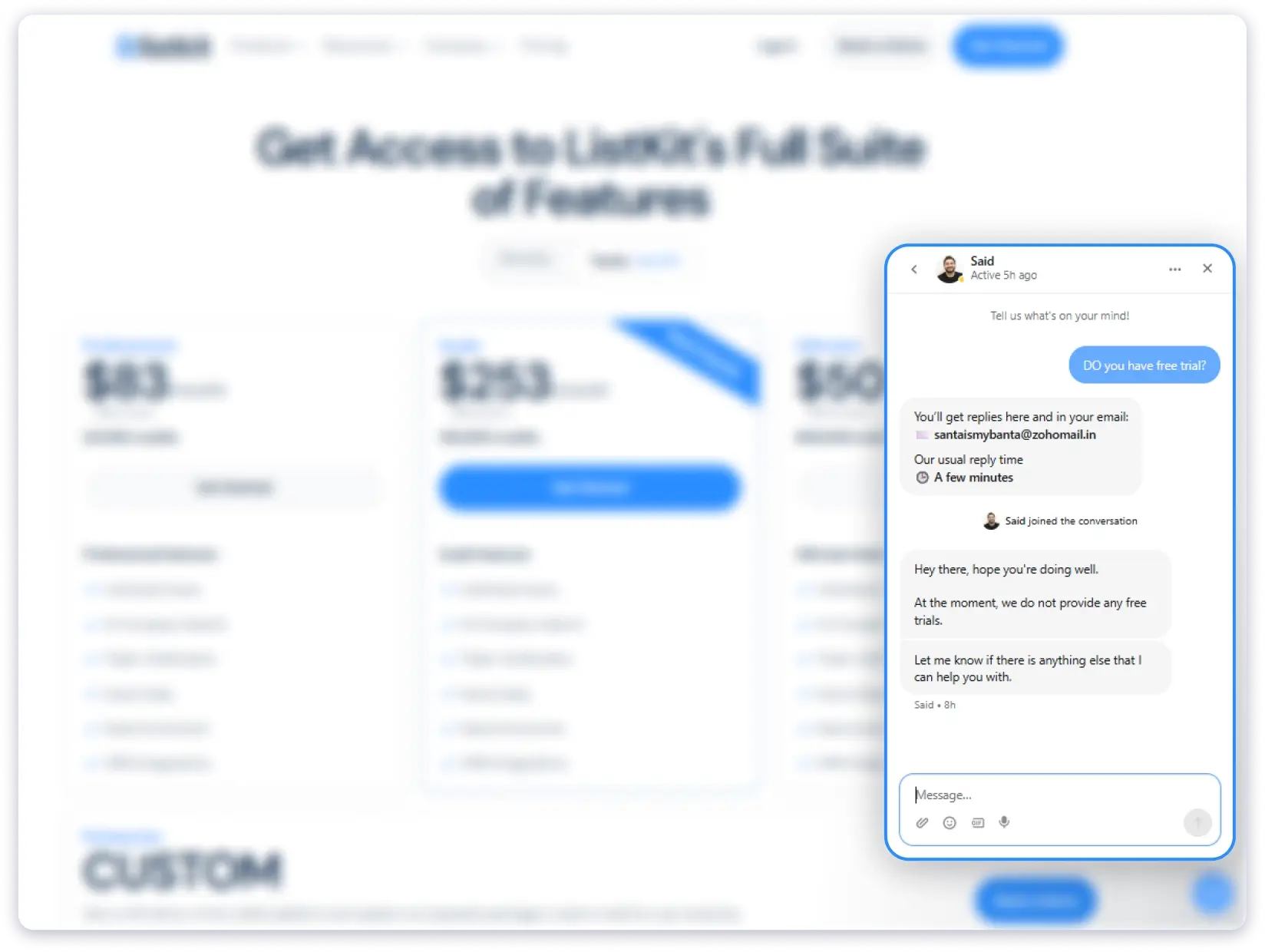
Some third-party review sites mention a free plan with 100 credits or a 7-day trial with 50 leads, but those offers are either outdated or no longer available through the main pricing flow.
Hidden Costs in ListKit Pricing You Should Know
ListKit uses a credit-based pricing system, and that’s where actual costs start pulling away from the plan price. Most of the extra spend comes from three things: per-field credit consumption, credits expiring before you use them, and features that require separate tools on top.
1. Unused Credits Don’t Roll Over
If your team doesn’t use all available credits before the billing cycle resets, the unused portion expires. You paid for them, they’re gone.
This raises your effective cost per lead significantly if your list-building fluctuates. A team that uses 1,200 out of 2,000 credits is paying for 800 leads they never pulled, every single month.
2. Pay-as-You-Go Overages
ListKit operates on fixed credit tiers. If your team exhausts the monthly allotment before the renewal date, you either wait or purchase top-up credits to keep sourcing.
The problem is that top-up rates aren’t published anywhere on the website. You only see them after you subscribe. That makes it nearly impossible to budget your annual b2b lead generation spend upfront. A $97/month plan can quietly become $150 to $200 once overages start adding up.
3. Separate Tech Stacks for Missing Features
ListKit finds leads. But it doesn’t send emails, follow up automatically, or keep track of who replied. To do anything with the leads you pull, you need to pay for other tools separately.
That extra spend isn’t on the ListKit pricing page, but it’s part of what you’ll actually pay each month.
4. High Per-Lead Cost for Low-Volume Users
Lower-tier listkit pricing plans cap your monthly credits, so teams that only build lists occasionally pay a high effective rate per usable lead compared to platforms offering flat-rate or higher-volume models.
A team that needs 500 leads a month is still paying $97 for a 2,000-credit plan. That’s wasted capacity every cycle, and those unused credits don’t carry forward.
What ListKit Pricing Plan Is Best for Your Use Case?
The right ListKit plan has nothing to do with which tier looks popular or which one the pricing page recommends. It comes down to three things: how many leads you need per month, how much data you pull per lead, and how predictable your outbound volume is.
Here is a practical guide based on real use cases.
You Are a Solo Founder or Freelancer Testing Outbound
Go with: Professional ($97/mo)
You are sending cold emails to test an offer, validate an ICP, or book your first few meetings. Your volume is low, maybe 500 to 1,500 leads per month, and you mostly need verified business emails.
At 1 credit per email, Professional gives you 2,000 leads per month. That is more than enough for early-stage outbound. Start monthly at $97 so you can cancel if the data does not fit your ICP. Only switch to annual ($83/mo) once you know you will use it consistently.
You Run a Small Sales Team (2 to 5 People) Doing Email-First Outreach
Go with: Professional ($97/mo), but watch your enrichment habits
Unlimited users means your whole team shares the same 2,000 credits. That works if everyone sticks to email-only exports.
But if even one person starts pulling phone numbers (5 credits each) or intent data (2 credits each) on every lead, the plan drains in days.
That one decision will determine whether Professional lasts the month or runs dry in the first week.
You Are a Growing Agency or In-House Team Running Multiple Campaigns
Go with: Scale ($253/mo annual or $297/mo monthly)
You are running outreach across multiple client accounts or multiple ICPs at the same time. Your monthly lead volume sits between 3,000 and 10,000, and you need a mix of email, phone, and intent data depending on the campaign.
Scale gives you 10,000 credits per month. For email-only campaigns, that is 10,000 leads. For mixed campaigns with phone numbers, it is closer to 1,400 to 1,600 leads. That range covers most growing teams without constant top-ups.
One thing to watch: a single export of 1,000 leads with full enrichment can burn 8,000 to 10,000 credits in one pull. Set enrichment guardrails before you scale up usage.
You Are a Phone-Heavy SDR Team or Multi-Client Agency
Go with: Ultimate ($508/mo annual or $597/mo monthly)
Your team makes cold calls daily. Every lead needs a mobile phone number, which costs 5 credits each. At that rate, Scale’s 10,000 credits only gives you about 1,400 to 1,600 leads per month, and you are buying top-ups every cycle.
Ultimate gives you 50,000 credits. Even with phone numbers on every contact, that is 7,000+ leads per month. If your team consistently burns through Scale’s cap, Ultimate is cheaper than Scale plus repeated top-ups.
But be honest about usage. If your actual monthly consumption sits around 15,000 to 20,000 credits, stay on Scale. Unused credits do not roll over, and paying for 50,000 when you use 15,000 is wasted budget.
You Need More Than 50,000 Credits Per Month
Go with: Enterprise (Custom Pricing)
You are a large outbound operation, a lead-gen business reselling data, or an enterprise sales team with dozens of SDRs running parallel campaigns. Self-serve plans no longer cover your volume.
Only book the Enterprise demo if you have genuinely outgrown Ultimate. For most teams under 50 seats, Ultimate already covers what you need.
A Warning Before You Pick Any Plan
A higher plan will not fix a bad ICP, weak copy, or broken sending infrastructure. Before you commit to any tier, make sure your targeting is tight and your outbound system works.
“We stayed with them for 4 months and sent over 30,000 emails. We did not get a single booked meeting.”
Picking a bigger plan only makes sense when your current plan runs out of credits because results are working, not because you hope more data will solve a conversion problem.
What Real Users Say About ListKit Pricing
Let us skip the marketing and get to what actually matters. I went through dozens of verified ListKit reviews on Trustpilot and G2 from founders, SDRs, agency owners, and in-house sales teams.
Here is the honest take on what works and what does not when it comes to listkit pricing.
Triple-verified emails at every tier
You don’t need a separate verifier tool. Even on the $97 plan, every email is triple-verified.
“In comparison to other famous list builders, they are much more accurate and more verified with the triple verification for the mails.”
Unlimited users on every plan
Most tools charge per seat, which gets expensive fast. ListKit lets you add unlimited users on Professional, Scale, or Ultimate at no extra cost.
Free onboarding call
Every paid plan includes a 1-on-1 setup call with the ListKit team. This is rare at the $97 price point, and users consistently call it out as a real value-add.
“I had a meeting with Hael (who is my account representative) and he put all of my concerns to ease with SIMPLICITY & CLARITY.”
Phone credits are expensive
Phone enrichment is the fastest way to empty your plan. A single 1,000-prospect list with mobile numbers eats 5,000 credits in one pull. Users notice.
“The only thing I can think of that I don’t like is that phone credits are a bit pricy.”
Verified Trustpilot User
Pricing feels high if you don’t use it daily
$297/month on Scale works for high-volume teams. For anyone running campaigns once a week or testing audiences, that monthly spend feels heavy.
Results can lag even at full price
Paying for a plan doesn’t guarantee outcomes, especially for service businesses or fuzzy ICPs.
“Over 18000 cold emails out. Not a single positive reply… I think the idea could work for product or retail companies but they have not proven at all capable of pivoting based upon the results we have seen.”
Should You Invest in ListKit in 2026?
ListKit does a few things very well. The triple-verified email data is accurate, the AI company search makes list building fast, and unlimited users on every plan means your team does not pay per seat. For what it is, a B2B lead database, it delivers.
But “worth it” depends entirely on your volume, your budget, and how you use credits.
✅ Who Should Use ListKit
- You mostly need verified business emails. At 1 credit per email, the credit math stays clean. Even Professional gives you 2,000 leads per month for $97.
- You value data accuracy over database size. Triple-verification is a real differentiator. Emails are checked three times before delivery, and you only pay for data that is successfully found.
- You run high-volume outbound consistently. If your team exports leads every week without fail, annual billing ($83/mo) makes sense and credits do not go to waste.
- You want unlimited team access. Most data providers charge per seat. ListKit does not. Your whole team shares one plan at no extra cost per user.
❌ Who Should NOT Use ListKit
- Your outbound volume fluctuates. Credits expire every billing cycle with no rollover. Quiet months mean wasted credits you already paid for.
- You need phone numbers on most leads. At 5 credits per mobile number, your plan burns 5x to 6x faster. A 2,000-credit plan gives you only 333 leads with phones.
- You are price-sensitive. $97/mo for 2,000 credits is on the higher end for a data-only tool. If your budget is tight, there are alternatives with larger databases at lower starting prices.
- You want credit flexibility. No rollover, no refunds, and credit redemption terms can change without notice. If you overbuy or underuse, the money is gone.
- You want to test before committing. There is no meaningful free trial on the pricing page. Your real evaluation starts with a paid month at $97.
ListKit is a strong lead database with genuinely accurate email verification. But if you want a larger database, lower starting price, more credits per dollar, and built-in verification that does not charge extra per data point, there is a simpler option worth comparing.
Why Saleshandy Is a Strong Alternative to ListKit
Saleshandy takes a different approach to data. Instead of limiting you to a narrower database, it gives you access to 852M+ verified contacts across 42M+ companies. Every search runs through waterfall enrichment, which pulls data from multiple sources to improve accuracy and coverage.
That includes 25+ people-level fields, 35+ company-level fields, and AI-powered natural language search to find exactly who you’re looking for.
And apart from the data, you do not need to buy a separate tool for your entire outreach workflow. Cold email sequences, email warm-up, sender rotation, unified inbox, and a built-in CRM are all included.
Among listkit alternatives in 2026, here is how the two compare:
| Feature | ListKit | Saleshandy ⭐ Best Pick |
|---|---|---|
| Starting price | $97/mo | $49/mo |
| Database size | 731M+ contacts | 852M+ contacts |
| Companies covered | Not published | 42M+ |
| Verification method | Triple-verification (single system) | Waterfall enrichment (multi-source) |
| Free credits to test | No free plan or trial | 50 free credits, no credit card |
| Monthly credits (entry plan) | 2,000 | 2,500 |
| Phone numbers | Yes (5 credits each) | Included |
| Intent data | Yes (2 credits each) | Included |
| Unlimited users | Yes | Yes |
| Credit rollover | No | Partial (50% rollover) |
| Refund policy | No refunds | Cancel anytime |
ListKit pricing is only “affordable” when your export template is lean and your outbound cadence is consistent. The moment you add mobiles and enrichment, or miss a month, the real cost per lead climbs fast.
But for teams that want a larger database at a lower starting price with credits that do not expire every billing cycle, Saleshandy’s pricing model eliminates the credit anxiety that ListKit users consistently flag on G2 and Trustpilot.
FAQs About ListKit Pricing
1. How much does ListKit cost per month?
ListKit starts at $97/month on monthly billing or $83/month if billed annually. The Scale plan is $297/month ($253/year), and the Ultimate plan is $597/month ($508/year). Enterprise pricing is custom and requires a sales call.
2. Does ListKit offer a free plan or free trial?
No. ListKit does not offer a free plan or a free trial. Their support team has confirmed this directly: “At the moment, we do not provide any free trials.” This means users need to choose a paid plan to access the platform, as there is no way to test the full product experience beforehand.
3. Is ListKit cheaper than Apollo.io or ZoomInfo?
Yes, ListKit is cheaper than both. In ListKit vs ZoomInfo, ListKit is the budget option. ZoomInfo costs around $14,995 per year, while ListKit starts at $97 per month. While comparing ListKit vs Apollo, it is more competitive. Apollo costs $49 per user per month, so a 5-person team pays about $245 per month. ListKit is $97 per month, but you may still need another tool for outreach. As an alternative, Saleshandy is an all-in-one option starting at $49 per month. It includes 852M+ verified contacts and lets you test with 50 free credits before paying.
4. Do unused ListKit credits roll over to the next month?
No. Monthly credits reset at the end of each billing cycle. According to ListKit’s Terms of Service, unused credits are forfeited and cannot be rolled over or refunded. On annual plans, your full credit allocation is available upfront for the year.
5. Can I cancel or change my ListKit plan at any time?
Yes. You can cancel, upgrade, or downgrade your subscription at any time through the billing section. There are no long-term contracts on self-serve plans, although Enterprise agreements may have different terms.
6. What is the best alternative to ListKit in 2026?
It depends on whether you want standalone data or an all-in-one stack. ListKit focuses on high-quality, triple-verified data. However, if you want verified data plus cold email outreach in one platform, Saleshandy is a strong alternative at $49/month. It offers 852M+ contacts, waterfall enrichment, built-in email sequences, and a CRM. For enterprise-level databases, tools like ZoomInfo and Cognism are also alternatives, though at significantly higher price points.