Dhruv Patel
 Contents
- 1 CRM Examples – TOC
- 2 What Is CRM Software?
- 3 TL;DR – 6 Best CRM Examples at a Glance
- 4 6 Best CRM Examples in Business
- 5 How to Choose the Right CRM for Your Use Case
- 6 Start Managing Your Outbound Prospects With Clarity
- 7 FAQs
- 7.1 1. What are CRM examples in business?
- 7.2 2. What are the 3 types of CRM?
- 7.3 3. How is CRM used in sales?
- 7.4 4. How is CRM used in marketing?
- 7.5 5. What is a CRM use case?
- 7.6 6. What is a good CRM example for small businesses?
- 7.7 7. What is the difference between CRM and a contact database?
- 7.8 8. Can CRM be used for cold email outreach?
Most people think CRM is just a glorified address book. Store contacts, log some notes, maybe track a deal.
That’s like saying Excel is just a calculator.
In reality, CRM looks completely different depending on how your team works.
A cold outreach team needs something very different from a SaaS company managing inbound demos. And both need something different from an agency juggling 15 client accounts.
This guide covers 6 real CRM examples across sales, marketing, support, and agencies. Each one follows the same format:
- What the CRM type is
- What problem it solves
- Which tool is the best example (and why)
Let’s get started!
CRM Examples – TOC
What Is CRM Software?
CRM (Customer Relationship Management) software helps businesses manage every interaction with prospects and customers in one place.
At its core, a CRM does four things:
- Stores contact and company data in a central, searchable database
- Tracks every interaction (emails, calls, meetings, notes) tied to each contact
- Automates repetitive workflows like follow-up reminders and lead routing
- Generates reports on pipeline health, team activity, and revenue forecasts
But here’s the thing.
The value of CRM depends entirely on how it’s used. A CRM built for enterprise sales looks nothing like one built for cold email outreach.
That’s why examples matter more than feature lists.
TL;DR – 6 Best CRM Examples at a Glance
Short on time? Here’s the quick version.
1. Outbound Sales CRM → Saleshandy CRM. Built for cold email teams. Kanban pipeline, prospect timeline, follow-up clarity.
2. Inbound Sales CRM → Pipedrive. Visual pipeline management for teams handling demo requests and trial sign-ups.
3. Small Business CRM → Zoho CRM. Affordable, easy to set up, replaces spreadsheet chaos without enterprise complexity.
4. Agency CRM → Monday CRM. Tracks client work, projects, and deliverables in one system.
5. Marketing CRM → HubSpot. Behavior-based segmentation and automated campaign workflows.
6. Customer Support CRM → Zendesk. Full interaction history and automatic ticket routing.
Each section below explains the CRM type, the problem it solves, and why that tool fits best.
6 Best CRM Examples in Business
Here’s how six different teams use CRM to solve six very different problems.
Each example covers the CRM type, the core problem, and the best tool for the job.
1. Outbound Sales CRM
An outbound sales CRM is built specifically for teams that run cold email outreach and rely on follow-ups to drive revenue.
Unlike traditional CRMs that start with “deals,” an outbound CRM starts with “prospects.” It tracks every cold email, reply, open, and click at the prospect level.

What problem does it solves?
Here’s a pattern I see constantly.
A team of 3-5 SDRs sends 500+ cold emails per week. Replies start coming in across different campaigns.
Some prospects open emails three or four times but never respond. Others reply with interest but get lost because nobody followed up within 48 hours.
The pipeline “looks” active. Hundreds of prospects sit in various stages.
But when the manager asks, “Which deals are actually moving?” nobody has a clear answer.
The root cause is almost always the same:
- It’s not bad messaging
- It’s not a weak prospect list
- It’s that there’s no system showing reps who needs attention right now
Spreadsheets can’t do this. They’re static.
By the time you update a row, three other prospects have replied.
Traditional CRMs can’t do it either. Most are designed around revenue stages and forecasting. They answer “what stage is this deal in?” but not “who should I email right now?”
This is exactly why we built Saleshandy CRM.
I watched too many outbound teams lose winnable deals. Not because their emails were bad. Because their follow-up system was broken.
Reps had data but no direction. They could see 500 prospects but couldn’t answer: “Who should I follow up with today, and why?”
Here’s what Saleshandy CRM gives you:
- Kanban pipeline: Prospects move through custom stages visually. Not Contacted, Contacted, Replied, Interested, Closed. Create your own stages to match your process
- Prospect activity timeline: Open any prospect and see their full history. Every email, reply, open, click, note, and task in one chronological view
- 1:1 emails and tasks: Send direct emails outside sequences. Add notes, tag prospects, create follow-up tasks for calls, LinkedIn, or WhatsApp
- Custom fields and views: Create fields for deal value, demo date, or priority level. Build separate views for SDRs, AEs, and managers
Reps know exactly who to follow up with, why it matters, and what to do next.
Follow-ups don’t slip. Conversations don’t stall.
And because Saleshandy CRM lives inside the same platform you use for cold email sequences and lead finding (800M+ B2B contacts), everything stays connected. No syncing between tools.
2. Inbound Sales CRM
An inbound sales CRM helps teams capture leads from website forms, demo requests, and trials. Then score them, route them, and move them through a structured pipeline.
The focus is pipeline visibility. Managers see where deals stall. Reps know which leads to prioritize.
What problem does it solve?
Picture a SaaS company getting 200 demo requests per month. Leads come from forms, chatbots, free trials, and referrals.
Without a CRM, reps cherry-pick the easy ones. Slower leads get ignored. The manager has no idea which deals are progressing and which are stuck.
Then there’s the “complex CRM” trap.
A team buys an enterprise CRM, thinking more features means better results. Instead, reps spend more time navigating the tool than actually selling.
The interface buries critical information. Pipeline health isn’t visible at a glance. Forecasting takes hours of manual cleanup.
What inbound teams actually need is simple. A CRM where every lead has a clear stage, reps see their priorities instantly, and managers get accurate pipeline data without begging for updates.
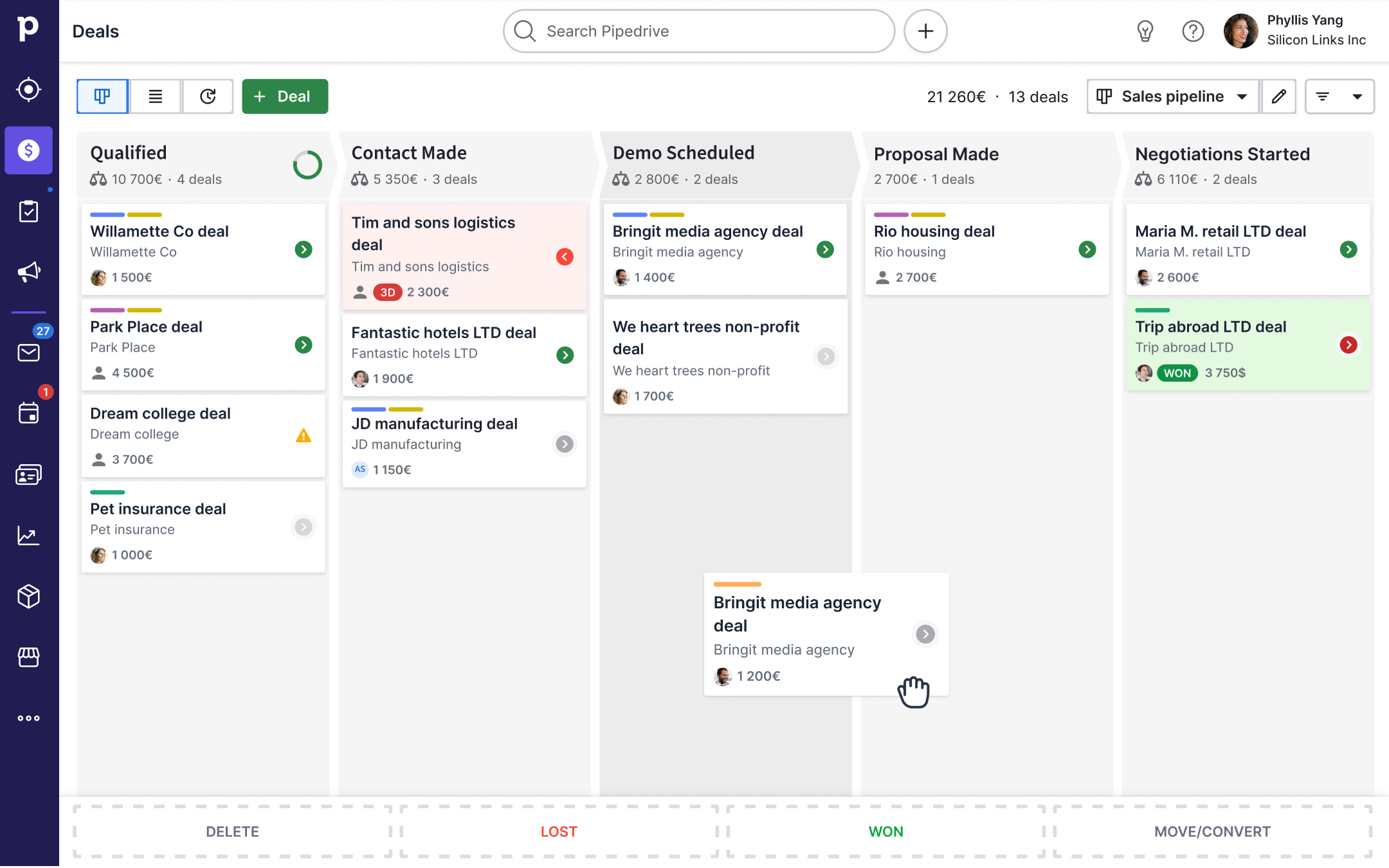
Pipedrive is built around one idea: the visual pipeline.
Every deal sits in a stage. You see the full board at one glance. Nothing is hidden behind tabs or reports.
Here’s what makes it work for inbound teams:
- Visual deal pipeline: Leads enter on the left, closed deals exit on the right. Drag and drop to move deals forward. Stalled deals get flagged automatically
- Multiple pipelines: Separate pipelines for inbound, outbound, and nurturing. Each workflow stays clean. No mixing demo leads with cold outreach
- Activity-based selling: Pipedrive doesn’t just track deal stages. It tracks activities. Calls made, emails sent, meetings booked. Reps focus on actions, not just outcomes
- Automation: Auto-assign leads based on source or territory. Trigger follow-up reminders when a deal sits in one stage too long. Move deals to the next stage when specific activities are complete
- Forecasting: Pipeline value, conversion rates, and average deal length are visible in real-time dashboards. No spreadsheet exports needed
Pipedrive works because it’s visual-first. Reps open it and immediately know what to do. Managers open it and immediately see where the pipeline stands.
3. Small Business CRM
A small business CRM replaces scattered spreadsheets with one organized system for contacts, deals, and follow-ups.
It’s simple enough for a 3-5 person team to use on day one. No months of configuration. No dedicated admin.

What problem does it solve?
Here’s how it usually starts.
A small team tracks everything in Google Sheets. Columns for name, email, deal size, last contacted, and notes.
It works when you have 20 leads. At 100+ leads, things break.
- Someone overwrites a cell
- Follow-up dates get missed
- There’s no history of what was discussed
- The founder asks, “Where does this deal stand?” and nobody knows
The team considers Salesforce or HubSpot’s paid plans. Too complex. Too expensive for a 5-person company.
They need something affordable, visual, and immediately usable. Something that doesn’t require a CRM consultant to set up.
Zoho CRM fits small businesses because it offers serious functionality without enterprise pricing or complexity.
Here’s what makes it work:
- Free tier for up to 3 users: Small teams can start without spending a dollar. Paid plans scale affordably as the team grows
- Lead and deal management: Separate leads from qualified deals. This keeps the pipeline honest. No vanity metrics inflating your numbers
- Workflow automation: Set up rules for follow-up reminders, lead assignment, and stage transitions. The system does the nudging, so the founder doesn’t have to
- Custom fields and views: Track what matters to your business. Lead source, deal value, priority level, and expected close date. Filter views so each team member sees only their work
- Built-in email and phone: Send emails and make calls directly from the CRM. Every interaction gets logged automatically. No copy-pasting between tools
- Reports without complexity: Pre-built dashboards for pipeline health, sales activity, and conversion rates. Enough insight to make decisions without drowning in data
The biggest reason Zoho works for small businesses? Low friction.
A founder can sign up on Monday morning and have their team using it by afternoon. No migration project. No training sessions.
That matters when you’re running a 5-person team. Every hour spent configuring a CRM is an hour not spent selling.
4. Agency CRM
An agency CRM helps teams manage client relationships, track project deliverables, and keep work organized across multiple accounts.
It’s not just about the sales pipeline. It’s about knowing where every client project stands, who’s handling what, and what’s due next.

What problem does it solve?
Agencies face a unique challenge. They don’t manage one workflow. They manage dozens at once.
Every client has different deliverables, timelines, and stakeholders. Account managers juggle 5-10 clients simultaneously.
Without a system:
- Project updates live in scattered email threads and Slack messages
- Nobody knows which deliverables are on track and which are late
- Client check-ins happen from memory, not data
- Onboarding new team members means weeks of “let me bring you up to speed.”
- Revenue forecasting is guesswork because there’s no view of active vs. at-risk accounts
The real cost? Missed deadlines, scope creep, and client churn that was preventable.
Most traditional CRMs don’t fit agencies well. They’re built for sales pipelines, not client work management. Agencies need both.
Monday CRM works for agencies because it combines client relationship tracking with project management in one platform.
Here’s what that looks like:
- Client boards for each account showing active projects, deliverables, deadlines, and status. One glance tells you where every client stands
- Custom workflows that mirror how your agency actually works. Creative briefs, review cycles, approval stages. Configure it once and reuse across clients
- Time tracking and workload views so managers see who’s overloaded and who has capacity. Prevents burnout and missed deadlines
- Automations for repetitive tasks. Auto-assign tasks when a project moves to a new stage. Send reminders before deadlines. Notify the account manager when a deliverable is approved
- Client-facing dashboards that give clients visibility into project progress without giving them access to internal notes
The result?
Account managers stop firefighting. Project timelines stay on track. Clients feel informed instead of chasing updates.
For agencies that need to track both the relationship and the work, a project management CRM like Monday fills the gap that pure sales CRMs leave open.
5. Marketing CRM
A marketing CRM connects subscriber behaviour to campaign automation.
Instead of treating every contact the same, it segments audiences by actions and triggers the right campaign at the right time.

What problem does it solve?
Here’s a scenario that plays out at thousands of companies.
A B2B brand has 40,000 email subscribers. The newsletter goes out every Tuesday. Same content to everyone.
Open rates are declining. Unsubscribes from climbing.
The marketing team knows they should segment. But their subscriber data lives in one flat list with no behavioral context.
They can see who opened an email. But they can’t see:
- Who visited the pricing page three times this week
- Who downloaded a case study but never booked a demo
- Who signed up six months ago and hasn’t engaged since
- Which leads came from paid ads vs. organic content
Without this context, every campaign is a guess.
HubSpot is the go-to marketing CRM because it connects contact data, website behaviour, and campaign automation in one system.
Here’s what a segmented workflow looks like:
- High-intent leads (visited pricing page + opened last 3 emails) trigger a personalized demo invite automatically
- Warm leads (downloaded content but haven’t engaged recently) enter a case study nurture sequence
- Cold leads (no engagement in 90 days) get a re-engagement campaign or get cleaned from the list
- New subscribers receive an onboarding drip tailored to how they signed up
Each segment triggers a different automated workflow. No manual sorting. No blasting.
HubSpot also lets marketing teams track which campaigns drive actual pipeline. Not just opens and clicks. But leads created, demos booked, and revenue influenced.
The real win isn’t sending more emails. It’s sending fewer, better ones to the right people.
6. Customer Support CRM
A support CRM gives agents full customer context before they respond to a ticket. Past conversations, purchase history, account details, and internal notes. All in one view.

What problem does it solve?
A subscription SaaS company handles 300+ support tickets per week. Customers email in, chat, or sometimes call.
Every time they reach a new agent, they explain their issue from scratch.
The agent doesn’t know:
- What the customer’s subscription tier is
- Whether they’ve contacted support before (and what was said)
- If they’ve had billing issues or product bugs in the past
- What their account health looks like overall
The customer repeats themselves. The agent scrambles for context. Resolution takes twice as long.
Worse, there’s no way to spot patterns. Are enterprise customers churning because of the same bug? Are free-tier users flooding support with questions a help doc could answer?
Zendesk is the most widely used support CRM because it combines ticketing, knowledge base, and customer context in one platform.
Here’s what that looks like:
- Full interaction history for every customer. Past tickets, chat logs, emails, purchases, and internal notes. All visible before the agent types a word
- Automatic ticket routing based on issue type, customer tier, or agent expertise. VIP customers skip the general queue
- Macros and templates for common questions. Agents handle routine tickets in 30 seconds instead of 5 minutes
- Reporting and pattern detection. If 40 enterprise customers reported the same bug this month, Zendesk surfaces that trend for the product team
- Self-service options. Knowledge base and community forums deflect common tickets before they reach an agent
The result?
Faster resolution, fewer frustrated customers, and support data that improves the product.
When agents have context, conversations shift from “Can you explain the issue again?” to “I see what happened. Here’s the fix.”
How to Choose the Right CRM for Your Use Case
Notice something about these six examples? The CRM that worked was the one that matched the actual workflow. Not the one with the longest feature list.
- Start with how your team actually works
- Match the CRM to your primary workflow
- Don’t over-buy
- Check if it connects to your existing tools
- Test with real data
Here’s how to think about choosing yours.
1. Start with How your Team Actually Works
- Cold outreach? You need a CRM built around prospects, email tracking, and follow-up stages.
- Inbound leads? You need pipeline visualization and lead scoring.
- Agency client work? You need project tracking alongside relationship management.
- Replacing a spreadsheet? You need something simple enough that everyone uses it by end of week one.
2. Match the CRM to Your Primary Workflow
The biggest mistake: buying a CRM for a feature you might need someday, then spending months customizing it.
Pick the one that solves your biggest problem on day one. Add complexity later.
3. Don’t Over-Buy
A simple CRM used daily beats an enterprise CRM nobody opens.
The best CRM is the one your reps actually log into every morning.
4. Check if it Connects to Your Existing Tools
Your CRM should work with your email, calendar, and sequences without manual data entry.
If you’re running outreach in one tool and managing prospects in another, context gets lost. Disconnected tools create more problems than they solve.
5. Test with Real Data
Import actual prospects. Send real emails. Run it through a normal work week.
That’s the only way to know if a CRM fits your workflow or fights it.
Start Managing Your Outbound Prospects With Clarity
If your team sends cold emails and relies on follow-ups to drive revenue, you already know the pain.
Warm prospects go cold. Replies get buried. Deals slip.
Saleshandy CRM gives you:
- A visual pipeline showing who needs action today
- Full prospect activity timeline with every interaction
- Next-action clarity without complex setup
FAQs
1. What are CRM examples in business?
Real CRM examples include:
- Outbound sales teams tracking cold email prospects and follow-ups (Saleshandy CRM)
- Inbound teams managing demo requests through visual pipelines (Pipedrive)
- Small businesses replacing spreadsheets with structured deal tracking (Zoho CRM)
Each business uses CRM differently based on its workflow.
2. What are the 3 types of CRM?
The three types are:
- Operational: manages day-to-day sales, marketing, and service processes
- Analytical: analyzes customer data for insights and forecasting
- Collaborative: shares customer information across teams and departments
Most modern CRMs combine all three. Outbound CRMs like Saleshandy lean operational.
3. How is CRM used in sales?
CRM tracks every prospect interaction in one place. Emails, calls, meetings, notes.
For outbound sales, CRM tracks cold email engagement and surfaces who needs action today. For inbound, it captures leads, scores them, and routes to the right rep.
4. How is CRM used in marketing?
Marketing teams use CRM to segment audiences by behavior, demographics, and engagement.
This enables targeted campaigns like cart abandonment emails, loyalty rewards, and re-engagement sequences. CRM also ties marketing activity directly to revenue.
5. What is a CRM use case?
A CRM use case is a specific scenario where CRM solves a business problem.
Example: a 5-person SDR team using CRM to track cold email replies and prioritize follow-ups. Or a SaaS company managing 200 inbound demo requests per month.
6. What is a good CRM example for small businesses?
Small businesses should look for CRMs that are affordable, visual, and don’t need weeks of customization.
Zoho CRM offers a free tier for up to 3 users with lead management, workflow automation, and built-in email. It scales affordably as the team grows.
7. What is the difference between CRM and a contact database?
A contact database stores names, emails, and basic info. That’s it.
A CRM adds interaction tracking, workflow automation, pipeline visualization, and performance reports. It’s the difference between static storage and an active system that helps you sell.
8. Can CRM be used for cold email outreach?
Yes. Outbound-focused CRMs like Saleshandy are built specifically for cold email.
They track every email, reply, open, and click at the prospect level. Reps see a full activity timeline before each follow-up, and a Kanban pipeline shows which prospects are in which stage.