
 Anil Salvi
 Contents
- 1 TL;DR: Best Lead Finder Software for Financial Services
- 2 Want to See How It Works Before Reading the Full Breakdown? Watch This
- 3 How I Evaluated These Lead Finder Tools for Financial Services
- 4 6 Best Lead Finder Software for Financial Services Firms
- 5 Final Verdict: Which is the Best Lead Finder Software for Finacial Services
- 6 Frequently Asked Questions About Lead Finder Software
- 6.1 1. Is There Free Lead Finder Software Available?
- 6.2 2. How Can I Find B2B Leads Quickly?
- 6.3 3. Can AI Tools Like ChatGPT Replace Lead Finder Software?
- 6.4 4. What Is the Difference Between a Lead Finder and a Lead Generation Tool?
- 6.5 5. Can Lead Finder Software Help Me Find High-Net-Worth Clients?
- 6.6 6. Do Lead Finder Tools Offer Browser Extensions or Mobile Apps?
Finding the right leads in financial services is notoriously tough.
Because you want to connect with HNIs, business owners, and C-suite decision-makers who actually need your services.
And most of the time, referrals are inconsistent, purchased lists are full of junk data, and manual prospecting eats up hours with little to show for it.
Good news?
Lead finder software is what finally answers that question.
You search a verified B2B database of millions of contacts, filter by revenue, job title, industry, and location, and walk away with a list of prospects that actually match your ideal client profile.
I’ve tested several lead finder tools, specifically looking at which ones work for financial services.
This blog breaks down the 6 that made the cut.
Here’s what you’ll find inside:
- A detailed breakdown of the 6 best lead finder software for financial services
- Honest pros and cons for each tool
- A side-by-side comparison table
- How to use lead finder software to build a repeatable client pipeline
Let’s get into it.
- TL;DR: Best Lead Finder Software for Financial Services
- How I Evaluated These Lead Finder Tools for Financial Services
- 6 Best Lead Finder Software for Financial Services Firms
- •Saleshandy Lead Finder
- •Apollo.io
- •LinkedIn Sales Navigator
- •ZoomInfo
- •Lusha
- •Cognism
- Final Verdict: Which Is the Best Lead Finder Software for Financial Services
- Frequently Asked Questions About Lead Finder Software
TL;DR: Best Lead Finder Software for Financial Services
If you’re short on time, here are my top 3 picks:
- Saleshandy Lead Finder: Biggest verified database (852M+ contacts), deepest filters for HNI targeting, and the only tool here with built-in outreach + CRM at no extra cost.
- LinkedIn Sales Navigator: Best for relationship-driven prospecting where trust and warm connections matter more than volume.
- ZoomInfo: Best for large financial firms that need enterprise-grade intent data and can afford the price tag.
Want the full picture? Here’s how all 6 tools compare:
| Tool | Database Size | Data Verification | Outreach | CRM | Best For |
|---|---|---|---|---|---|
| 852M+ | Multi-source | ✔ | ✔ | Best for HNI targeting | |
| Apollo.io | 210M+ | Email verified | ✔ | ➖ | Popular prospecting tool |
| LinkedIn Sales Navigator | 1B+ | Profile data only | ✖ | ✖ | Relationship-based sales |
| ZoomInfo | 260M+ | Multi-source | ✔ | ✔ | Enterprise teams |
| Lusha | 100M+ | Community | ✖ | ✖ | Quick lookups |
| Cognism | 400M+ | Phone verified | ✖ | ✖ | Compliance-first firms |
Want to See How It Works Before Reading the Full Breakdown? Watch This
How I Evaluated These Lead Finder Tools for Financial Services
Click to expand evaluation criteria
I didn’t just list popular tools and call it a day.
Every tool on this list was evaluated against criteria that specifically matter when you’re prospecting in financial services.
Here’s what I looked at:
1. Database size and accuracy
Your targets are niche. HNIs, C-suite executives, business owners. If the database is too small, your filtered results come back thin. I prioritized tools with large, multi-source verified databases that still deliver thousands of results after applying tight filters.
2. Filter depth for high-value targeting
Job title alone isn’t enough. I looked for filters that include company revenue, funding stage, company size, seniority level, and location. These are what separate a generic contact dump from a qualified prospect list.
3. Data verification method
Single-source databases tend to have higher bounce rates. I favored tools that use waterfall enrichment or multi-source verification, because in financial services, every bounced email hurts your sender reputation and wastes time.
4. AI-powered search
Some tools let you describe your ideal prospect in plain English and generate a lead list automatically. This saves hours of manual filter work when you’re running campaigns across multiple segments.
5. Built-in outreach and CRM
Finding leads is half the job. I gave preference to tools that include email sequences, follow-ups, and pipeline management in one place, so you’re not stitching together three separate platforms.
6. Compliance and data sourcing
Financial services operates in regulated environments. I looked at whether each tool is transparent about data sourcing, respects DNC lists, and aligns with GDPR/CCPA requirements.
6 Best Lead Finder Software for Financial Services Firms
These are the 6 lead finder tools that passed my evaluation.
Each one is here for a specific reason, and I’ve been honest about where each tool falls short.
1. Saleshandy Lead Finder
⭐ 4.6/5 on G2Saleshandy Lead Finder is the best lead finding software on this list.
And the reason is simple.
It has the biggest verified B2B database I’ve come across: 852M+ contacts across 42M+ companies.
And every contact goes through waterfall enrichment, which means the data is verified across multiple sources before you even see it.
That means fewer bounced emails, fewer dead numbers, and more conversations with the right people.
What I like most is the filter depth.
You get 75+ advanced filters, including company revenue, funding stage, company size, job title, seniority, industry, location, and tech stack.
So if you’re trying to reach C-suite executives at companies with $10M+ revenue in a specific region, you can build that list in minutes.
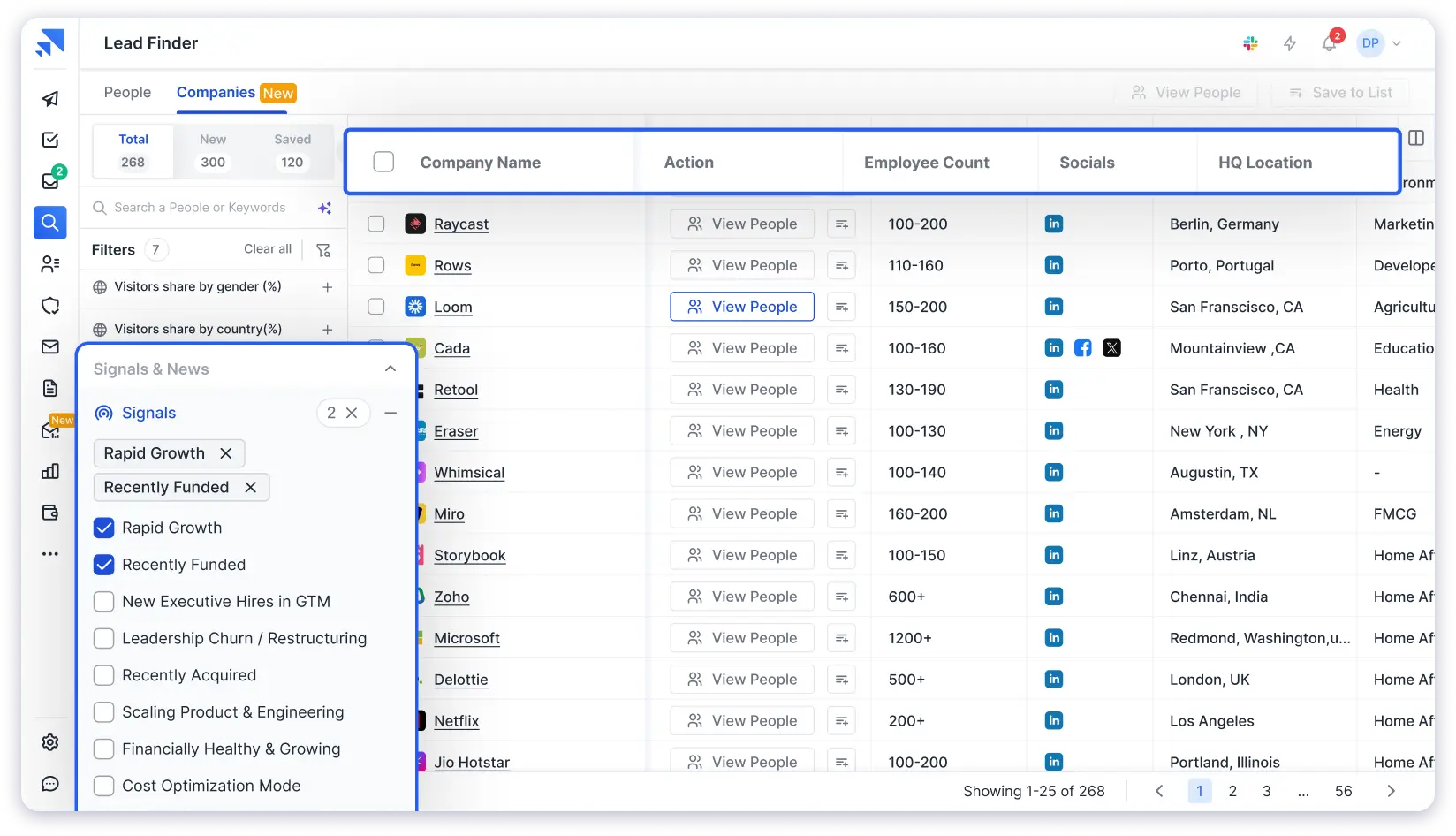
There’s also an AI-powered search.
You describe your ideal prospect in plain English and get a targeted lead list without touching a single filter manually.
That saves a lot of time when you’re running multiple campaigns for different client segments.
What stands out here compared to other tools is the combination of database depth and filter precision.
Most lead finders give you either a large database with basic filters or a small database with advanced filters. Saleshandy gives you both.
On top of that, Saleshandy lead finder exists in the Saleshandy eco-system which means you also get access to it’s multi-channel outreach sequences and built-in CRM.
Which means you don’t need to pay for a separate outreach or CRM tool.
You can find, send, and track every conversation in one place.
- Largest B2B database (852M+ contacts, 42M+ companies), giving you massive coverage even after applying tight filters for niche financial prospects.
- Waterfall enrichment ensures higher data accuracy by verifying contacts across multiple sources, reducing bounce rates and wasted outreach.
- 75+ advanced filters including revenue, funding stage, company size, job title, seniority, industry, location, and tech stack for precise targeting.
- AI-powered lead search allows you to describe your ideal prospect in plain English and generate targeted lists instantly.
- Built-in cold email outreach, follow-ups, and CRM eliminate the need for separate tools and simplify your workflow.
- Dialer support (US/Canada) enables multi-channel outreach from a single platform.
- The full platform may feel overwhelming if you only need quick one-off contact lookups instead of a complete prospecting system.
- Takes some time to learn if you have never used outreach automation or CRM tools before.
2. Apollo.io
⭐ 4.7/5 on G2The next lead finder software on my list is Apollo.io.
It’s one of the most widely used B2B prospecting platforms in the market, and there’s a reason for that.
Apollo’s database covers 210M+ contacts with built-in email verification that checks addresses before you send.
The coverage is solid across North America and Europe, especially for tech, SaaS, and professional services industries.
The filter set is strong.
You get job title, industry, company size, revenue, and technographics.
If you’re looking to target executives at mid-market companies in specific verticals, Apollo gives you enough precision to build a focused list.
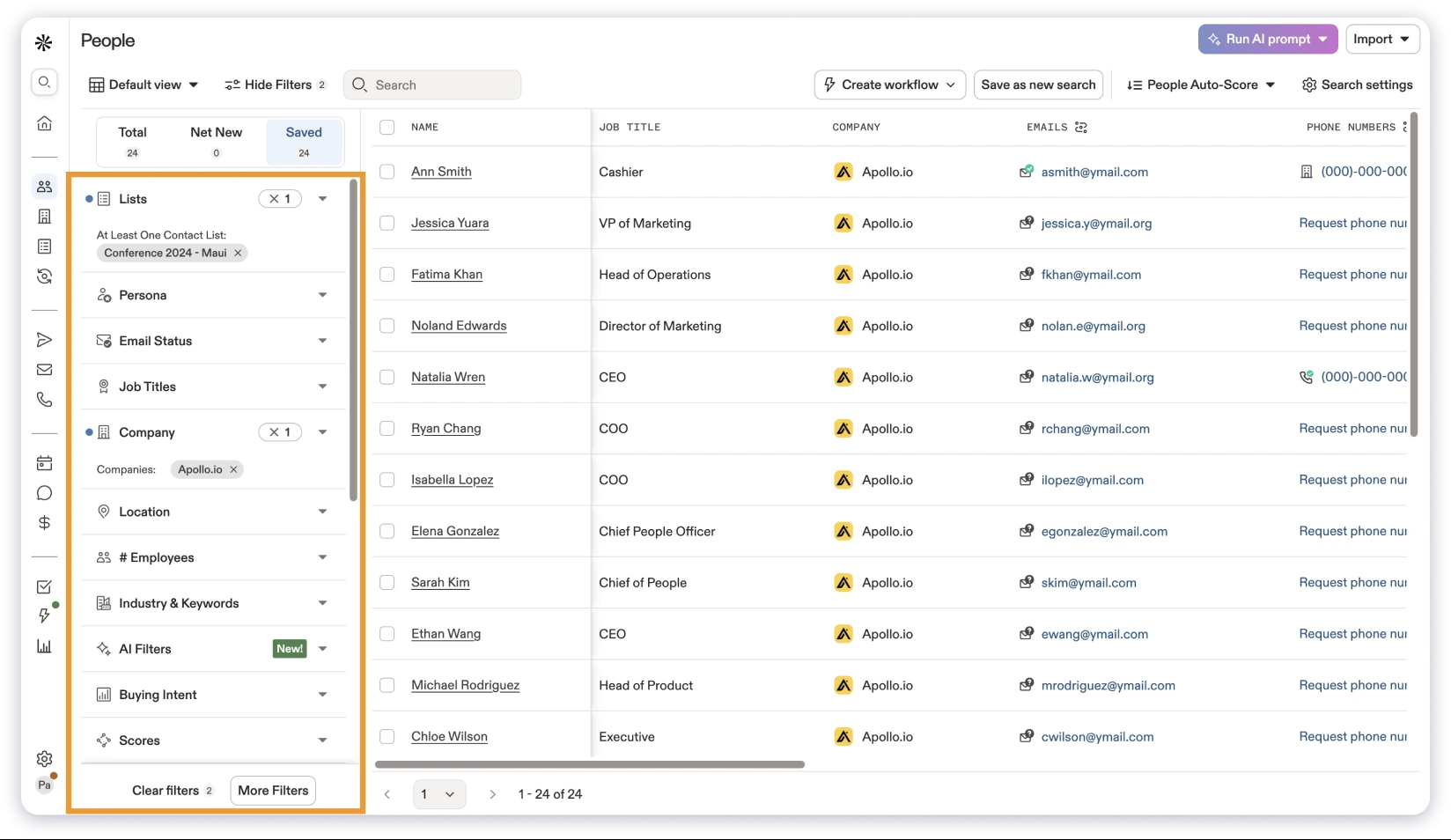
When you’re filtering for niche financial services prospects, say CFOs at healthcare companies with $20M+ revenue in the Southeast, a smaller database can mean thinner results.
What I didn’t love is the interface.
Apollo packs a lot of features into one platform, and it can feel overwhelming if you’re not used to complex sales tools.
The learning curve is real, especially for smaller teams or solo practitioners.
Apollo also includes a sequence builder for email outreach and a basic CRM for deal tracking.
It works, but teams with complex, multi-touch pipelines may find the CRM limiting compared to dedicated solutions.
- 210M+ contact database with built-in email verification that checks addresses before sending.
- Strong filtering capabilities including job title, industry, company size, revenue, and technographics.
- Sequence builder for automated outreach campaigns directly within the platform.
- Free plan available, making it easy to test before committing.
- Large user base and strong integration ecosystem.
- Smaller database compared to larger competitors, which can limit results for niche financial targeting.
- Built-in CRM is basic and may not support complex, relationship-driven sales processes.
- Interface can feel overwhelming due to the number of features packed into the platform.
- Mobile and export credits are restricted on lower-tier plans.
If Apollo’s pricing feels too steep for what you’re getting, here are some Apollo.io alternatives worth considering.
⭐ 4.3/5 on G2
Another lead finder software I’d recommend is LinkedIn Sales Navigator.
But it works differently from the other tools on this list.
Instead of a traditional contact database, Sales Navigator taps into LinkedIn’s network of 1B+ professional profiles.
You’re prospecting where your prospects already spend professional time.
And in financial services, that matters a lot.

The real value here is relationship-driven prospecting.
You can see mutual connections, track job changes (which is a strong trigger for financial outreach), and reach prospects through InMail.
The search filters cover job title, industry, company size, geography, and seniority.
What I like about it is the lead recommendations.
Based on your saved leads and account activity, Sales Navigator surfaces new prospects that match your profile.
That’s helpful when you’re expanding into a new region or vertical.
On the flip side, Sales Navigator doesn’t give you verified email addresses or phone numbers. You can’t export contacts without third-party tools.
And there’s no built-in email outreach or CRM. So you’ll need separate tools for those, which adds cost and complexity.
Still, if your prospecting style is built around warm introductions, trust-building, and networking, Sales Navigator is hard to beat.
- Access to LinkedIn’s network of 1B+ professional profiles, making it one of the largest sources of professional data.
- Strong relationship signals such as mutual connections, job changes, shared groups, and activity insights that help personalize outreach.
- InMail allows direct communication with prospects even if you are not connected.
- Lead recommendations based on saved searches and activity help you continuously discover new prospects.
- Ideal for trust-based, relationship-driven prospecting common in financial services.
- Does not provide verified email addresses or phone numbers, limiting direct outreach options.
- No built-in email outreach or automated sequences for scaling campaigns.
- No native CRM or pipeline tracking, requiring additional tools to manage leads.
- Contact export is not available without third-party tools, adding complexity.
- Can become expensive when scaling across teams.
4. ZoomInfo
⭐ 4.5/5 on G2For larger financial firms with enterprise budgets, ZoomInfo is worth a serious look.
ZoomInfo offers an enterprise-grade B2B database of 260M+ professional profiles.
Data accuracy is strong because it pulls from multiple verified sources and includes direct dials and org charts.
What sets ZoomInfo apart from other lead finders is intent data.
It can show you which companies are actively researching financial services, insurance, or investment solutions right now.
That’s a targeting layer most B2B lead generation tools don’t offer.
The filters go deep: revenue, funding, org charts, technographics, intent signals, and company attributes.
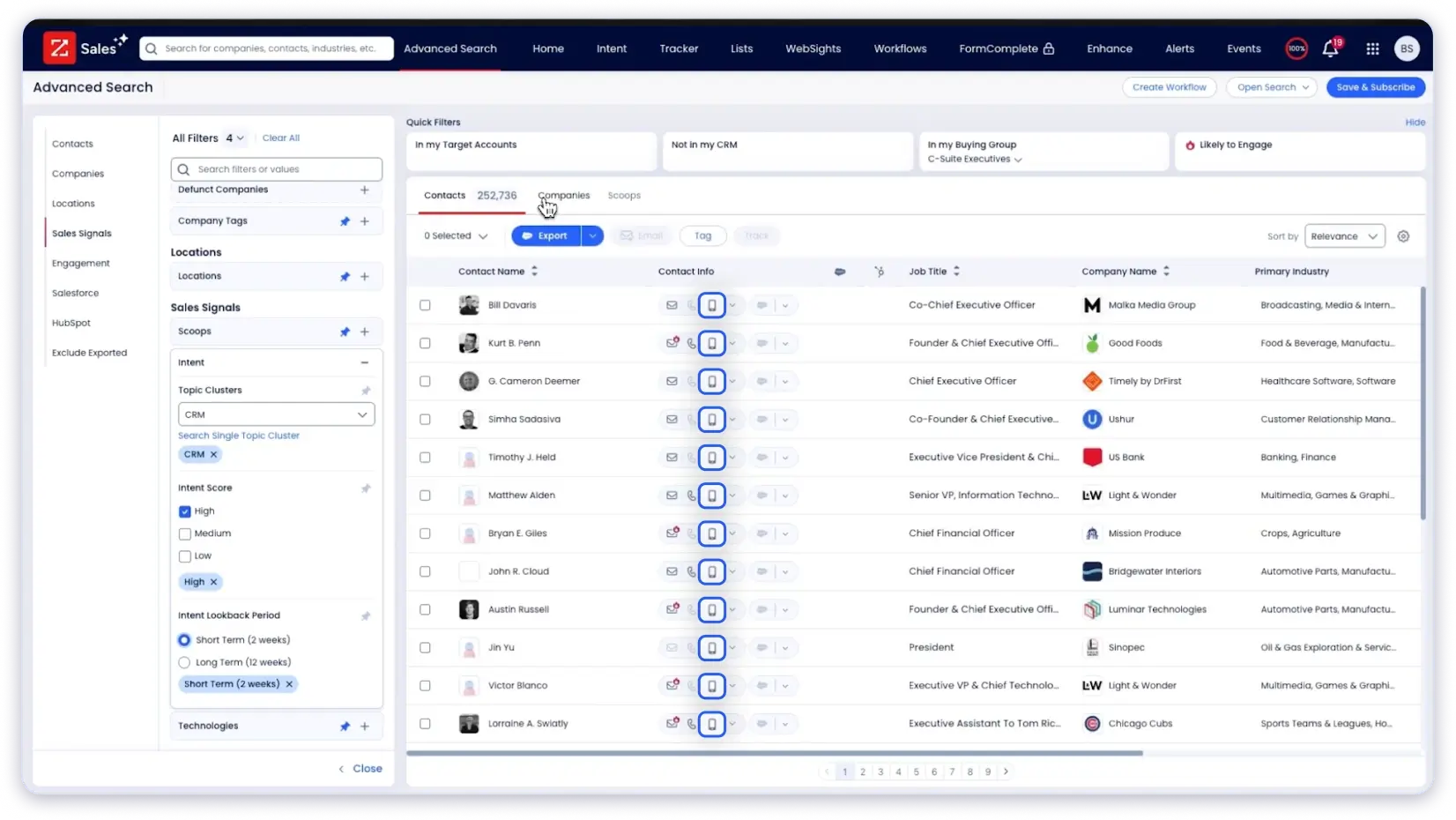
If you’re running a team of 10+ advisors targeting large institutional accounts, this level of detail matters.
That said, the pricing is where things get tricky. ZoomInfo typically starts at $15K+/year with annual contracts.
That’s a big commitment for smaller advisory firms or solo practitioners.
The platform also has a steep learning curve and takes time to onboard.
ZoomInfo includes outreach tools and conversation intelligence within its ecosystem.
But most teams use it primarily for data and pipe it into their existing CRM and outreach stack.
- Large database of 260M+ professional profiles with strong data accuracy sourced from multiple verified channels.
- Intent data helps identify companies actively researching financial services, allowing for better timing in outreach.
- Advanced filters including revenue, funding, org charts, technographics, and company attributes for deep targeting.
- Provides direct dials and verified phone numbers, improving connection rates for outbound teams.
- Enterprise-grade compliance, governance, and integrations with major CRMs.
- Expensive pricing, typically starting at $15K+ per year with annual contracts.
- Overkill for solo practitioners or small financial firms that do not need enterprise-level features.
- Pricing is not transparent and requires interaction with a sales team.
- Steep learning curve and longer onboarding time compared to simpler tools.
If ZoomInfo’s pricing is out of range, here are some ZoomInfo alternatives that deliver strong data at a lower price point.
5. Lusha
⭐ 4.3/5 on G2If you’re a solo practitioner or part of a small team and just need quick contact details without a full platform, Lusha is a practical pick.
Lusha offers a database of 100M+ contacts with a Chrome extension that overlays verified emails and phone numbers on LinkedIn profiles and company websites.
The data is community-verified and enriched through API sources.
The way it works is simple.
You find someone on LinkedIn, click the Lusha extension, and get their verified email and direct dial.
What I like about Lusha is that simplicity.
It does one thing and does it well.
For quick lookups and contact enrichment, it’s fast and reliable.
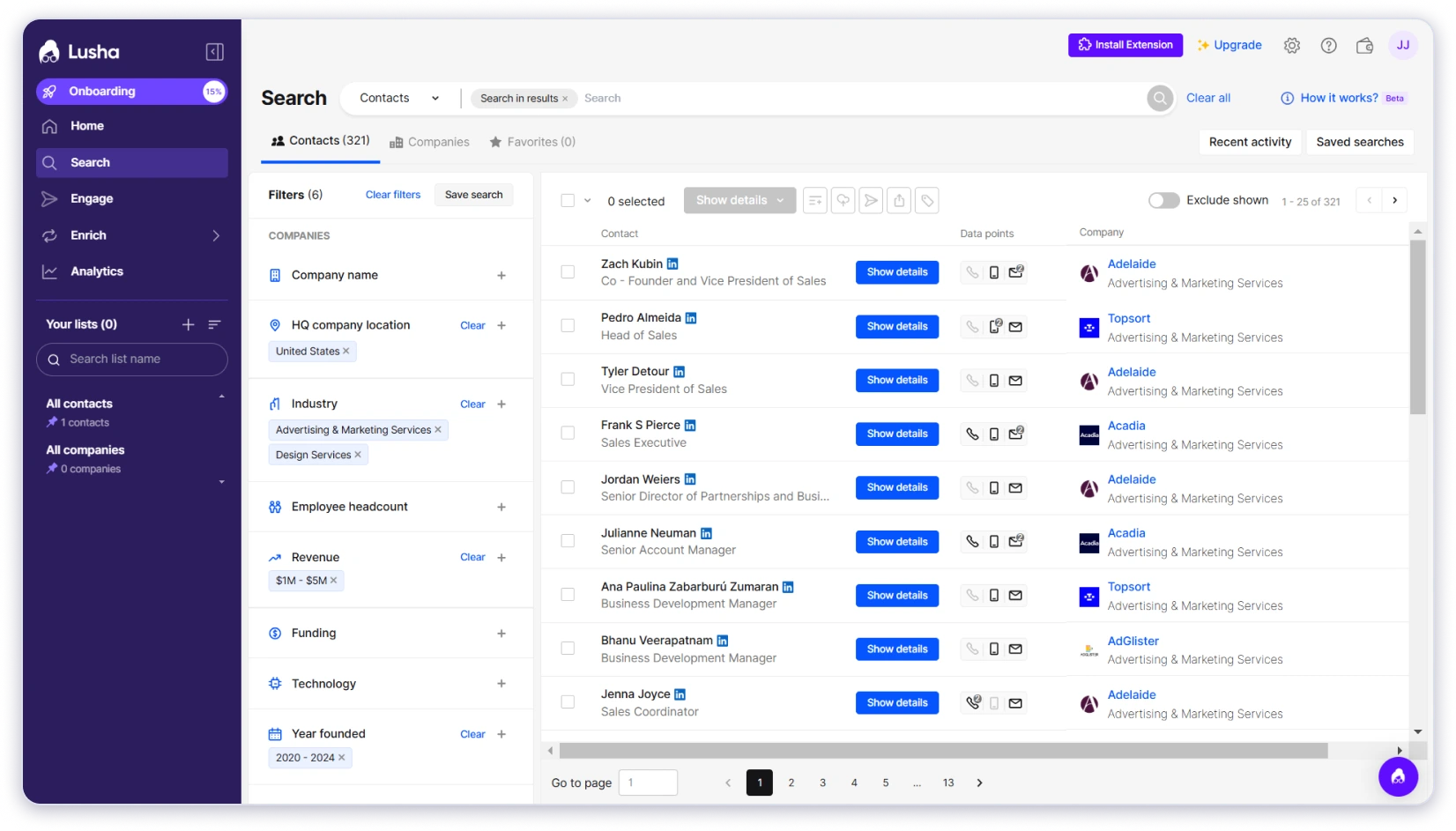
On the flip side, the database is significantly smaller than Saleshandy or Apollo.
The filters are basic: job title, industry, company size, and location.
There’s no revenue-based or funding-based targeting, which limits how precisely you can identify high-value prospects.
Lusha doesn’t include built-in outreach or CRM.
You’ll need separate tools for cold email campaigns and pipeline management.
- Quick and easy contact enrichment through a Chrome extension directly on LinkedIn and company websites.
- Simple interface with almost no learning curve, making it ideal for beginners or solo users.
- Reliable for pulling direct dials and email addresses for individual prospects on the fly.
- Free plan available for basic usage and testing.
- Smaller database (100M+ contacts) compared to larger lead finder platforms.
- Limited filtering options with no revenue or funding-based targeting for identifying high-value prospects.
- Does not include built-in email outreach or campaign automation features.
- No CRM or pipeline management capabilities, requiring additional tools.
If you’re evaluating Lusha for your team, here’s a detailed look at what Lusha actually costs to help you compare what you’re paying for.
6. Cognism
⭐ 4.5/5 on G2The last lead finder on my list is Cognism.
And it’s here for one specific reason: compliance-first data.
Cognism offers a B2B database of 400M+ profiles with phone-verified mobile numbers, which they call Diamond Data.
Every number in that dataset is manually verified by their research team.
DNC list scrubbing is built in, and the platform is aligned with GDPR and CCPA.
If you’re operating in a regulated environment where data compliance is a serious concern, this matters.
Insurance brokers, investment firms, and advisory practices with strict compliance requirements will find Cognism’s approach reassuring.
The filters include job title, seniority, industry, revenue, and location.
The data is stronger in European markets. US coverage is growing but not as deep as Saleshandy, Apollo, or ZoomInfo at this point.
What stands out is the phone data quality.
If cold calling is part of your outreach strategy, having manually verified mobile numbers reduces wasted dials significantly.

That said, Cognism doesn’t include built-in email outreach or sequences.
So if email is your primary channel, you’ll need a separate tool for campaign execution and pipeline management.
That adds cost and setup time to your stack.
- Phone-verified mobile numbers (Diamond Data) manually validated for higher connection rates.
- Built-in DNC list scrubbing helps maintain compliance and reduces legal risks.
- Strong alignment with GDPR and CCPA, making it suitable for regulated industries.
- High-quality data coverage in European markets.
- Particularly useful for teams that rely heavily on cold calling.
- US data coverage is not as deep as some competitors.
- Does not include built-in email outreach or automated sequences.
- Pricing is not transparent and requires sales engagement.
- No CRM or pipeline tracking features, requiring additional tools for full workflow.
Final Verdict: Which is the Best Lead Finder Software for Finacial Services
Here’s the verdict.
If you’re in financial services and still relying on referrals or purchased lists to find clients, you’re leaving money on the table.
The best lead finder software gives you access to verified, high-value prospects every single week, not when someone happens to send a referral your way.
Out of every tool I tested, Saleshandy is the clear winner for financial services firms.
It has the largest verified database (852M+ contacts), the deepest filters for targeting HNIs and decision-makers by revenue, company size, and industry, and it’s the only tool on this list that bundles outreach + CRM at no extra cost.
You don’t need three separate tools to find, reach, and track prospects.
You need one that does all three well.
Sign up, get 50 free credits, and see the data quality for yourself.
Frequently Asked Questions About Lead Finder Software
1. Is There Free Lead Finder Software Available?
Most lead finder tools offer free trials or limited free plans. Saleshandy gives you 50 free credits on signup to test the database and filters. Apollo.io has a free plan with limited credits.
Lusha also offers a free plan for basic contact lookups. These are good starting points to test data quality before committing to a paid plan.
2. How Can I Find B2B Leads Quickly?
The fastest way to find B2B leads is to use lead finder software with advanced filters.
Define your ideal client profile, set filters for job title, industry, revenue, and location, and generate a verified lead list in minutes.
Tools with AI-powered search let you describe your ideal prospect in plain English and get results without manual filtering.
3. Can AI Tools Like ChatGPT Replace Lead Finder Software?
No. AI chatbots like ChatGPT can help you brainstorm ICPs, write outreach copy, or research industries.
But they don’t provide verified contact databases with real-time email addresses and phone numbers.
Lead finder software gives you actual, verified prospect data you can act on. They solve different problems.
4. What Is the Difference Between a Lead Finder and a Lead Generation Tool?
A lead finder is a specific type of lead generation tool focused on finding and verifying contact information from B2B databases.
Lead generation is a broader category that includes inbound tools (landing pages, chatbots, forms), CRM platforms, and outreach automation.
A lead finder sits at the top of the funnel: it helps you identify who to reach out to.
5. Can Lead Finder Software Help Me Find High-Net-Worth Clients?
Yes. The key is using filters that go beyond job title. Look for lead finders that let you filter by company revenue, funding stage, and company size.
In Saleshandy, you can filter for CEOs at companies with $10M+ revenue in specific industries and geographies. That’s how you build a targeted list of HNI prospects instead of a generic contact dump.
6. Do Lead Finder Tools Offer Browser Extensions or Mobile Apps?
Several lead finder tools offer Chrome extensions for prospecting on LinkedIn and company websites.
Lusha and Apollo both have popular extensions for grabbing contact details while browsing.
Saleshandy offers a LinkedIn email finder extension as well. Mobile apps are less common in this category since most prospecting happens on desktop.