Piyush Patel
 Contents
- 1 Check and Improve Email Sender Reputation – TOC
- 2 What is Email Sender Reputation?
- 3 What Factors Affect Your Email Sender Reputation?
- 4 How To Check Your Sender Reputation?
- 5 How To Improve Your Senders Reputation: Best Practices
- 5.1 1. Use a Dedicated IP Address
- 5.2 2. Authenticate Your Email Security Protocols
- 5.3 3. Track Spam Rates through Google Postmaster
- 5.4 4. Follow the ESP’s Sending Limits
- 5.5 5. Maintain Email List Hygiene
- 5.6 6. Send Only Quality Email Content
- 5.7 7. Provide an Easy Unsubscribe Option
- 5.8 8. Use Double Opt-In for Email Marketing
- 5.9 9. Warm Up Your Email Accounts
- 5.10 10. Use the Right Email Sequence Platform
- 6 Improve Sender Reputation and Land Your Emails Where They Belong
- 7 Check and Improve Sender Reputation: FAQs
Every guide on email deliverability, spam avoidance, and inbox placement revolves around email sender reputation.
Why are my emails landing in the spam folder? — Low email sender reputation.
How do I increase my deliverability? — Improve your email sender reputation.
But what exactly is sender reputation? Why does it matter?
Is there a way to check it? And more importantly, how can you improve it to boost your email deliverability?
These are questions that don’t always get clear, actionable answers.
That’s the gap I’m here to fill.
In this guide, I’ll break it all down—what sender reputation is, how to check it, and the best ways to improve it.
Let’s dive in!
Check and Improve Email Sender Reputation – TOC
What is Email Sender Reputation?
In very simple terms: Sender Reputation is a measure of your trustworthiness as an email sender.
It’s like a credit score for your email accounts, assigned by Email Service Providers (ESPs) and Internet Service Providers (ISPs).
Why do your emails get assigned a sender reputation?
Well, ESPs want to protect their users from spam, phishing attacks, and other malicious emails.
So, they have algorithms in place to check and rate every sender based on various factors.
And it is these algos that ultimately decide where your emails end up – in inbox, in the promotional tab, in spam folders, or to blacklist your emails entirely.
Good Sender Reputation → Land in Inbox
Low Sender Reputation → Money, Effort + Time Wasted
Okay, now you know what sender reputation is and its use. Next, I’ll talk about the factors that affect your email account’s sender reputation.
What Factors Affect Your Email Sender Reputation?
To be bluntly honest, there is no clear, definitive, single rule that ESPs follow to determine sender reputation.
Every ESP out there has a different algorithm to evaluate the sender reputation, and it’s quite a complex process.
What is followed by Google (Gmail) is not the same as what Yahoo or Microsoft (Outlook) does.
All this said, there are still some universal factors that affect sender reputation I will walk you through each below.
- Spam Complaints from Users
- Email Engagement
- Bounce Rates
- Falling for Spam Traps
- IP Reputation
- Domain Reputation
- Your Sending History
- Unsubscribe Rates
1. Spam Complaints from Users
ESPs prioritize their users a lot, so if you’re emails get marked as spam, it sends a huge red signal to them.
Users marking your emails as spam = You sending unwanted emails (at least in the eyes of ESPs)
More spam complaints → Sender reputation drops → Lower email deliverability → More emails land in spam → Potential blacklisting/blocking of your email accounts.
So, what is a good spam rate you should maintain?
Anything below 0.1% is good. This translates to 1 for every 1,000 emails sent.
Here’s a breakdown:
- 0.01% – 0.05% → Excellent (Ideal for high deliverability)
- 0.05% – 0.1% → Acceptable (Needs monitoring)
- Above 0.1% → Risky (Likely to impact deliverability)
- Above 0.3% → Critical (ESP may start blocking emails)
2. How Recipients Interact with Your Emails
This again falls in the hands of the recipients – or, to be exact, how they engage with your emails.
If your emails are being opened, replied to, clicked on, or forwarded, etc., it shows EPSs that you have sent something of value.
I’ll list the positive interactions that will send green signals to EPSs:
- Opens
- Clicks
- Replies
- Forward
- Marking as important
- Marking as Starred
3. Bounce Rates
Whenever you’re conducting outbound email marketing for lead generation, you might be sending emails to thousands of recipients.
Now, there are chances that some of the email addresses on your list might be outdated or invalid.
These emails will end up bouncing back. (Never reach a destination)
ESPs view this poorly as it tells them you have poor list quality or bad sending practices.
Higher bounce rate = Poor sender reputation
4. Spam Traps
Just like you catching a sneaky mouse with a trap, ESPs have a way to catch senders who use poor email practices and try to avoid spam filters.
If you do a lot of cold emailing, spam traps are something you need to be extremely cautious about.
Here’s what ESPs do → They set up hidden email addresses that look real but are not used by actual people.
If you send an email to such an account, then the ESPs know that you have not followed the right practices to build your email list.
Want to know where you can get quality email lists for your outreach?
Read our 13 best places to buy an email list blog.
Also Read: Sending emails responsibly helps businesses avoid spam trap detection and spam complaints.
5. IP Reputation
Everything on the Internet can be traced back to an IP address.
And so can your email accounts—more specifically, the servers used to send your emails.
Your emails will travel through the email-sending server, which has its own IP address, and ESPs track this IP to determine whether your emails are trustworthy or potential spam.
Okay, so where does the problem start here?
It starts when you’re using a shared IP address with other senders.
When you send emails from a shared IP, your reputation isn’t just based on your own email behavior—it’s influenced by every other sender using the same IP.
So, if the other senders end up sending spam, receiving high bounce rates, or getting too many spam complaints, it affects the entire IP’s reputation—including yours.
So, even if you yourself are a reliable actor on the internet, the fact that you’re using the same IP address as a malicious person is enough to negatively affect your reputation.
6. Domain Reputation
Domain reputation is the trust score assigned to your email-sending domain (e.g., yourcompany.com)
It plays a key role in email deliverability, closely tied to sender reputation, as ESPs use both to decide where your emails land!
If you go deeper—IP reputation, Domain reputation, and Sender reputation are all connected.
IP Reputation → Tied to the server’s IP address sending the emails.
Domain Reputation → Tied to your email-sending domain (e.g., yourcompany.com).
Sender Reputation → The overall score based on your IP + domain + other factors discussed here.
If your IP reputation is bad, you can switch to another IP.
But if your domain reputation is bad, switching IPs won’t fix anything—ESPs will still recognize your domain and penalize your emails.
This means that domain reputation is more permanent and requires consistent good email practices to maintain.
Want to protect and improve your domain reputation?
Check out this blog on How to Warm Up Email Domains + Best Practices
7. Sending History
Every email you send is monitored by ESPs. They don’t just look at one email or campaign—they track your entire sending history.
The common red flags are:
- Sudden spikes in email volume
- Frequent blacklist appearances
- Long gaps between sending
So, make sure you maintain consistency and follow the right practices.
8. Unsubscribe Rates
If you send bulk emails, then you must include a way for recipients to easily opt out of receiving future emails.
It is MANDATORY!! No compromise.
Failing to provide an easy way to opt-out from your emailing list
+
A lot of your email recipients hitting unsubscribe sends a negative signal to ESPs.
ESPs will take it that you are sending unwanted emails!
Then you know what happens… Get ready to say goodbye to your sender reputation and your email deliverability.
Okay, that brings us to the end of 8 factors that can affect your sender reputation. Next, I’ll show how you can monitor and track your sender reputation.
How To Check Your Sender Reputation?
Thus far, we’ve discussed the various factors that negatively affect email sender reputation.
But how exactly can you find out what your sender reputation is?
There are several tools that you can use to keep an eye on your sender reputation and other factors that affect it.
In this section, I will show you 3 tools that have worked best for me:
Note: All three tools are free to use.
1. Google Postmaster Tools
Google Postmaster Tools is Google’s native platform that you can use to monitor the health of your domain and email addresses associated with it.

With it, you can gain valuable insights into:
- Email + Domain Authentication Status
- Encryption Status
- Spam Rate
- IP Reputation
- Domain Reputation
- Email Delivery Errors
As you can see, Google Postmaster provides you with comprehensive visual and analytical data regarding your sender reputation.
I personally like that it’s very easy to use and completely free!
2. Sender Score
Sender Score is a free-to-use tool that helps you calculate your sender reputation by assigning a numerical score to your domain.
It also has paid options in case you’re dealing with a high volume of emails.

It uses the following metrics to determine your sender reputation:
- Email Infrastructure (Authentication and Encryption Protocols)
- Spam Complaints
- Spam Rates and Bounce Rates
- Fluctuations in Your Email Send Volume
- Whether Your Email is on Block Lists
There are two ways to check your sender reputation through sender score.
One is by entering your domain name and related information, the other is to use your IP address and associated data.
3. Talos Intelligence
Talos Intelligence by Cisco is a free-to-use platform that helps you monitor your domain reputation.
It also tells you whether your emails or domain name have/has been added to a Block List.
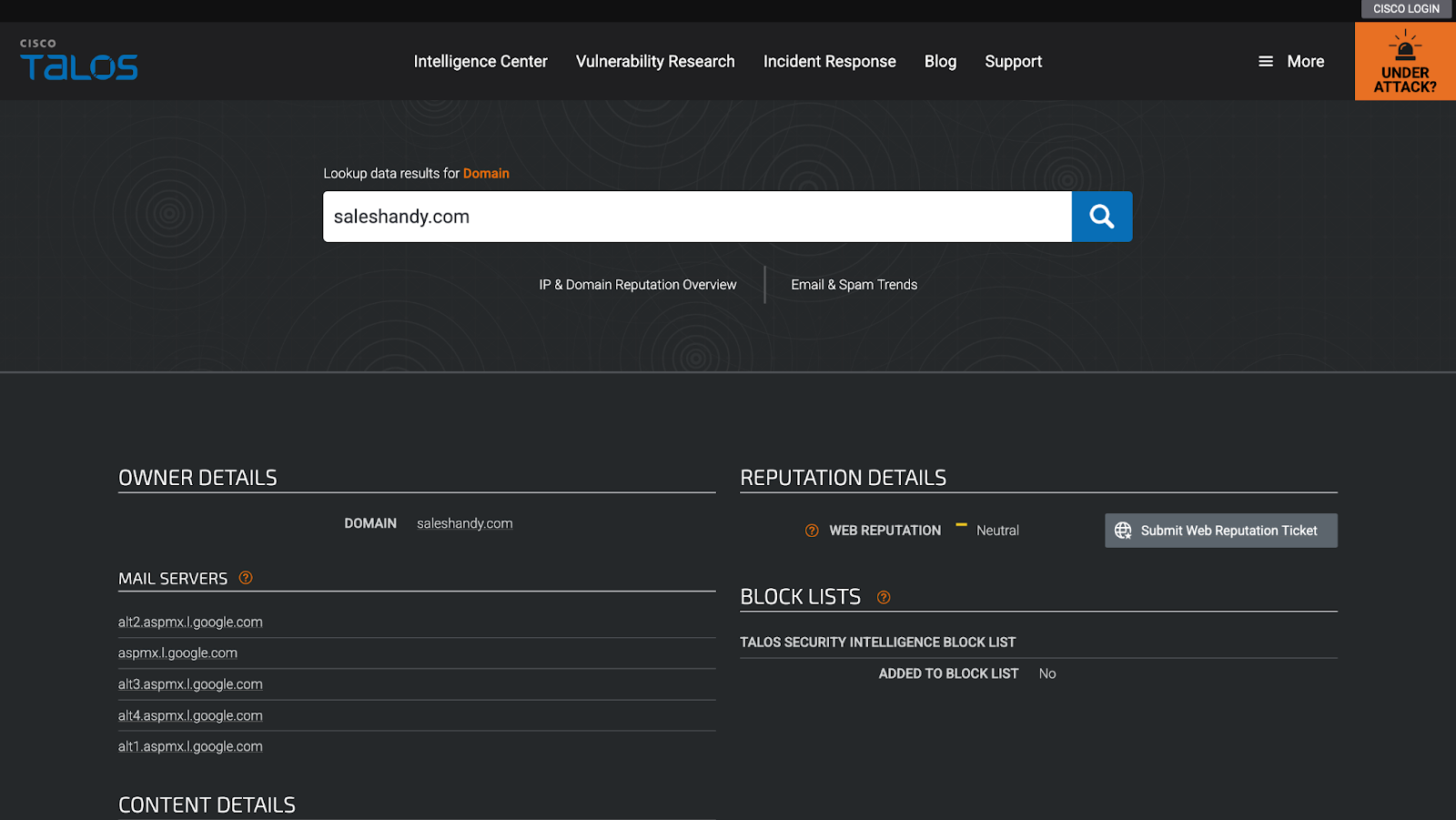
Like Sender Score, you can use either your domain name or IP address to check your sender reputation. As an added bonus, it also tells you your web reputation!
From my research, I’ve found that Talos determines your sender reputation based on the data of the IP address associated with your email address.
How To Improve Your Senders Reputation: Best Practices
Now that we know what can affect your sender reputation and how you can monitor it, the next question is, “How can you improve your email sender reputation?”
Here’s a comprehensive list of best practices to help you improve your sender reputation (and maintain it, too!):
- Use a Dedicated IP Address
- Authenticate Your Email Security Protocols
- Track Spam Rates through Google Postmaster
- Follow the ESP’s Sending Limits
- Maintain Email List Hygiene
- Send Only Quality Email Content
- Provide an Easy Unsubscribe Option
- Use Double Opt-In for Email Marketing
- Warm Up Your Email Accounts
- Use the Right Email Sequence Platform
1. Use a Dedicated IP Address
My first suggestion is that you switch to a dedicated IP address.
Why?
Back in the “What Factors Affect Your Email Sender Reputation?” section I would have told you about how a shared IP address can seriously affect your sender reputation.
So, if you want more control over your sender reputation and email deliverability, moving to a dedicated IP is the best way.
2. Authenticate Your Email Security Protocols
Authenticating your domain is the best way to show ESPs you’re someone legit.
It shows you’re a trusted sender.
There are three important protocols you should set:
- Sender Policy Framework: SPF is a DNS protocol. It ensures that all the servers sending your emails are authorized by your domain to do so.
- DomainKeys Identified Mail: DKIM helps a recipient verify who sent an email, and whether it is from the source that it claims to be from. It’s a way to prevent phishing and spam emails.
- Domain-based Message Authentication, Reporting and Conformance: DMARC enables you, as a domain administrator, to authorize and control the email addresses associated with your domain.
3. Track Spam Rates through Google Postmaster
In my experience, the one sure way of losing sender reputation is to have a high spam rate. And the first step to reducing spam rates is to monitor it.
As we’ve seen, Google Postmaster is one of the best free tools that helps you visualize and monitor your email addresses’ spam rate along with several other analytics.
My suggestion: Sign up for Postmaster and periodically monitor your domain’s spam rate. If the spam rate shows a spike, you should start taking corrective action.
Check out this blog on How to Warm Up Email Domains + Best Practices
4. Follow the ESP’s Sending Limits
Each ESP has its own sending limits that dictate how many emails you can send per day, per hour, or per minute.
You have to follow these limits if you don’t want your accounts to get suspended.
Here’s a quick look at the numbers:
| Email Service Provider | Sending Limit (Per Day) |
|---|---|
| Gmail (Free) | 500 |
| Gmail (Google Workspace) | 2,000 |
| Outlook (Free) | 300 |
| Microsoft 365/Office 365 | 10,000 |
| Zoho (Free) | 50 |
| Zoho (Paid) | 300 |
| Zoho (Custom) | 2,500 |
| GoDaddy | 250 |
| RackSpace | 10,000 |
| Yahoo! | 500 |
| BlueHost | 150 (per hour) |
| Amazon SES | 10,000 |
| Proton Mail (Free) | 150 |
| Proton Mail (Plus) | 1,000 |
| Proton Mail (Professional/Visionary) | Unlimited |
| AOL | 500 |
| Mailgun | 300 |
| SendGrid (Essentials) | Up to 100,000/month |
| Sendpost (Starter) | 10,000/month |
That said, for cold email outreach, these limits don’t apply!
The recommended number of emails you can send without triggering spam is 50 per day.
5. Maintain Email List Hygiene
Previously, I showed you how “Bounce Rates” and “Spam Traps” can affect your sender reputation.
This is the way you can effectively avoid both and maintain a good sender reputation 👇
Clean your sales prospect list and keep only valid email addresses of actual people.
In my experience, this step is very important if you’re sending cold emails.
6. Send Only Quality Email Content
If your email contains a lot of spammy words, there is a high chance that the ESP algorithm will flag you for spam.
Also, make sure your emails are personalized and relevant to your recipients.
Sending generic, low-value, or overly promotional emails will reduce engagement and hurt your sender reputation over time.
If you want to quickly personalize your email copies, then you should definitely check out email personalization tools!
7. Provide an Easy Unsubscribe Option
If you’re sending emails as part of your email marketing or cold email outreach, you must comply with privacy laws and ESP rules.
NON-NEGOTIABLE!
And one of the most important rules is to make it easy for recipients to unsubscribe from your emails.
By providing this, you comply with various privacy laws, ESP guidelines, and also reduce the risk of being marked as spam.
Win-Win-Win!
8. Use Double Opt-In for Email Marketing
In my experience, there’s also a much better way to reduce unsubscribe rates while also providing the “Unsubscribe” button with your emails.
The secret is to use a double opt-in for your marketing emails.
This will ensure that the user is genuinely interested in receiving your emails. Plus, it will prevent your emails from being marked spam by the ESP!
9. Warm Up Your Email Accounts
By now, you definitely understand that sender reputation is everything if you rely on cold emails to generate leads.
So, what’s the best way to improve the sender reputation of your new email accounts?
Warmup email accounts before using them!
This process will help you build trust and credibility with various ESPs.
Moreover, you can also use warm-up to boost sender reputation and improve the deliverability of existing email accounts.
Note: Manually warming up your email accounts is a tedious and time-consuming process.
Instead of handling this manually, you can automate the warm-up process using specialized email warm-up tools.
10. Use the Right Email Sequence Platform
If you’re serious about cold email outreach or email marketing, using the right email sequence platform is non-negotiable.
A good email sequencing tool automates your outreach, maintains compliance with ESP guidelines, and improves deliverability—all while helping you scale your campaigns effectively.
Here are some of my recommendations from personal experience:
- Saleshandy – AI-assisted cold email platform to automate and scale your outreach while maintaining high deliverability.
- Lemlist – Cold outreach platform with personalized images, videos, and LinkedIn outreach integration.
- Brevo – All-in-one email marketing automation platform with advanced segmentation, A/B testing, and transactional email capabilities.
Improve Sender Reputation and Land Your Emails Where They Belong
I’m sure by now you have all the answers to the questions you had about sender reputation, why it matters, and how to improve it.
Follow the best practices we have discussed to improve and maintain a good sender reputation for your email accounts.(the same applies to your domain reputation as well!)
Here’s a quick recap of what you need to do:
- Set up SPF, DKIM, and DMARC for email authentication.
- Warm up new email accounts before sending large volumes.
- Use a dedicated IP address for better control over deliverability.
- Make sure your email content is high quality, personalized, and relevant.
- Provide an easy unsubscribe option to reduce spam complaints.
- Monitor your sender reputation using tools like Google Postmaster.
- Use the right platform to automate and optimize your outreach.
Just remember, building a good sender reputation is not an overnight process – Monitor, adapt, and refine your approach.
Now, take action—your emails deserve to be seen!
Check and Improve Sender Reputation: FAQs
1. How Do I Check My Email Sender Reputation?
You can use a variety of free tools to check your email sender reputation. Here are the tools that stand out to me:
- Google Postermaster: Free tool that helps you monitor your domain reputation and spam rates.
- Sender Score: A free + paid tool (depending on your usage) that assigns your domain a numerical score based on deliverability metrics.
- Talos Intelligence: A free-to-use platform that helps you understand your domain and IP reputation.
2. How to Improve Sender Reputation for Email?
Here are some of tried and tested ways to improve sender reputation for emails:
- Use a Dedicated IP Address
- Authenticate Your Email Security Protocols
- Track Spam Rates through Google Postmaster
- Follow the ESP’s Email Sending Limit
- Remove Invalid Email IDs
- Provide an Unsubscribe Button
- Use an Email Warmup Tool
3. What is a Good Email Sender’s Reputation?
A good email sender reputation is a sign that your email address is a trustworthy source of email communication. It means that you follow the security protocols required by your Email Service Provider, and that you use your emails to send valuable information to your recipients.
4. How is Sender Reputation Calculated?
In my 10+ years of experience, I’ve noticed that email sender reputation is calculated based on the following metrics:
- Email authentication protocols
- Domain + IP Reputation
- Spam rates
- Bounce Rates
- Sender volume
- Block + spam requests
- Reply rate or engagement rate