Anil Salvi
 Contents
- 1 AI Lead Gen Tools – TOC
- 2 What Are Inside Sales Tools?
- 3 15 Best Inside Sales Tools to Streamline Your Sales Process
- 4 Close More Deals With the Right Inside Sales Tools
- 5 Inside Sales Tools – FAQs
- 5.1 1. What is Inside Sales?
- 5.2 2. What Strategy Works Best for Inside Sales Teams?
- 5.3 3. How Is AI Influencing the Development and Capabilities of Inside Sales Tools?
- 5.4 4. What Can You Do if an Inside Sales Tool Is Not Delivering the Expected Results?
- 5.5 5. Are These Inside Sales Tools Designed Explicitly for SMBs vs. Large Enterprises?
“Having meaningful conversations with prospects, finding new ways to move deals forward, nurturing warm leads, and closing confidently.”
That’s how your day should look if you’re in sales.
But if instead, you’re stuck cleaning up bad data, switching between five different tools, or chasing replies across inboxes, then something’s broken.
It’s not you or your team. It’s the system.
Without the right tools to back you up, even your best reps end up wasting hours on manual tasks that shouldn’t take more than a few clicks.
This is why a proper inside sales tool stack matters!
In this blog, I’ve rounded up the 15 top inside sales tools that can actually boost your team’s productivity and help you hit your revenue goals consistently.
Check them out!
AI Lead Gen Tools – TOC
What Are Inside Sales Tools?
Inside sales tools help your sales team find relevant prospects, connect with them, nurture and close deals without having to meet anyone in person.
Inside Sales Tools → Sales Tools Used “Inside” (the office or remotely).
They help you automate repetitive tasks such as:
- Updating spreadsheets and CRMs
- Sending timely follow-ups
- Logging calls, emails, and meetings
- Scheduling demos or appointments
- Scoring and Prioritizing high-intent leads
- Tracking progress across the pipeline
- And more.
This helps you and your sales team focus on what matters most: “building relationships and closing deals”.
What Are the Different Types of Inside Sales Tools
Before jumping into the 15 best tools, here are the essential categories of tools most inside sales teams rely on:
- Cold Outreach Tools
- Sales Intelligence Tools
- CRM (Customer Relationship Management)
- Sales Engagement Tools
- Meeting Scheduling Tools
There are many more specialized tools that support specific stages or needs in the inside sales process.
I’ve listed them in the breakdown below, so keep reading.
15 Best Inside Sales Tools to Streamline Your Sales Process
Some of the tools on this list are ones I use with my team on a daily basis. Others, I’ve explored in depth while evaluating options to strengthen our inside sales workflow.
Check them out:
- Saleshandy (Cold Email Outreach + B2B Data Provider)
- ZoomInfo (B2B Contact Data & Intelligence)
- Clay (Data Enrichment)
- LinkedIn Sales Navigator (Purely for LinkedIn)
- Klenty (Sales Engagement and Intelligence)
- Sendspark (Personalized Video Outreach)
- CallHippo (Call Dialer & Telephony)
- Intercom (Live Chat & Conversational Sales)
- Calendly (Meeting Scheduler)
- Zoom (Video Conferencing)
- Storylane (Interactive Product Demos)
- Salesforce Sales CRM (CRM)
- Gong (Revenue Intelligence)
- PandaDoc (Proposal & eSignatures)
- Chargebee (Billing & Subscription Management)
1. Saleshandy
Saleshandy is an AI-powered cold email outreach platform that also has a built-in B2B database for prospecting.
If you’re looking to quickly find relevant prospects and reach out to them through targeted and personalized email sequences, Saleshandy is a strong choice.

Here’s why Saleshandy makes it on my list of inside sales tools:
- It has a database size of over 700 million professional contacts from more than 60 million companies.
- You can easily create personalized sequences using the AI-powered sequence generator (Saleshandy Copilot). Plus, you can create condition-triggered sub-sequences that send tailored follow-ups based on prospect behavior.
- You can also manage replies from multiple accounts in a single location. This way, you and your team don’t miss important responses and can follow up faster without switching between inboxes.

The best part – you get all this and more at a very cost-efficient price!
You can read more about what Saleshandy has to offer in my Saleshandy Review blog.
Pros of Saleshandy
- Invite unlimited team members to collaborate and run outreach campaigns at scale. (No additional cost)
- You can create teams, assign roles, and track ownership to keep outreach organized.
- You get real-time analytics on campaign performance with clear, graphical dashboards.
- With Saleshandy, you can connect unlimited email accounts to scale your outreach safely without having to pay extra.
- If you run an agency, you can add and manage unlimited clients without having to pay extra charges.
Cons of Saleshandy
- You only get a 7-day free trial and 5 free leads.
What Users Have To Say About Saleshandy
- G2 – 4.6/5🌟 (740+ Reviews)
- Capterra – 4.5/5🌟 (120+ Reviews)
- Trustpilot – 4.6/5🌟 (170+ Reviews)
When I went through the recent reviews on G2 and Trustpilot, it was clear that Saleshandy has lived up to users’ expectations, especially in three areas:
- Ease of use
- Responsive support
- Consistent deliverability
Here’s what users have to say about Saleshandy:
“Saleshandy has streamlined our email outreach efforts. I love how easy it is to upload prospect lists, set up automated follow-ups, and track open and reply rates in real-time. The integration with Gmail is seamless, and the platform’s focus on deliverability gives me confidence that my messages are actually reaching inboxes.”
Read the Complete Review on G2
“Have been using Saleshandy for almost a year now. Most tools in the market restrict u adding team members or clients one way or the other.
But with Saleshandy, that’s not the case. You can add as many clients or team members as you want at no additional cost, as you said.
Also, had spontaneous responses from the customer support guys. Have been recommending people to try Saleshandy as well.
Hey if it fits your use case then it’s the best tool you can get in the market.”
Read the Entire Post on Reddit
Pricing (Annual Billing)
Saleshandy has 3 separate offerings, each with its own pricing structure:
- Cold Emailing (Business/Agency): Pricing starts at $25/month for 6K emails/month.
- B2B Lead Finder: Pricing starts at $24/month for 12K credits/year.
- Email Infrastructure: Pricing differs based on the provider you choose
The separate pricing allows you to choose only what you need, without paying for features you won’t use.
2. ZoomInfo
ZoomInfo is an enterprise-grade B2B data and intelligence platform designed to help sales teams find, prioritize, and reach the right prospects faster.

Here’s what ZoomInfo has to offer for inside sales teams:
- You get access to 321M+ business profiles, and with advanced filters, finding the right prospects feels way less overwhelming.
- You can view detailed company insights, including org charts, tech stacks, and even buying signals—super helpful before reaching out.
- Plus, it has built-in outreach tools, so your team can connect with prospects right when the timing’s right.
And more such features, all to help you and your sales team spend less time searching and more time closing.
Pros of ZoomInfo
- You get access to data that meets strict compliance standards, including GDPR, ISO 27001/27701, and SOC 2.
- ZoomInfo’s AI can recommend prospect profiles for outreach based on your previous successful deals.
- You can set up real-time alerts for events such as funding, leadership shifts, hiring, and more.
Cons of ZoomInfo
- It has a steep learning curve.
- Pricing can get expensive quickly.
- Many users have pointed out the aggressive annual contract renewal.
These are some of the reasons why many teams start exploring other options.
If these drawbacks feel like a blocker for your team, here’s a breakdown of the best ZoomInfo alternatives worth considering.
What Users Have To Say About ZoomInfo
- G2 – 4.5/5🌟 (8.5K+ Reviews)
- Capterra – 4.1/5 🌟 (300+ Reviews)
- Trustpilot – 1.6/5 🌟 (230+ Reviews)
“I like how leads and the contact Numbers on Zoominfo are accurate and mostly not fake compared to other Softwares B2B contact Data. I like how easy to implement it is. I use it everyday to fetch data and Contact details its very user friendly. It was east to integrate. Customer Support has been really nice.”
Read More About What Suzette R. Has to Say on G2
ZoomInfo Pricing (Annual Billing)
ZoomInfo does not have transparent pricing plans.
But from posts and user discussions on Reddit, pricing typically starts around $8K to $9K per year and can go up to $50K, depending on the features, credits, and product suites.
“We got a quote for almost $50,000 per year. They wanted to make it work by doing a free trial period and reducing the cost of the first month, but it was just too expensive.”
“8-9k for the pro package and you can ask for 10 users and probably 50k of additional credits. That’s the best value or you can do the same thing for the advanced which is $15000 at the lowest”
Read the Entire Post on Reddit
3. Clay
If you’re looking for a powerful data enrichment tool for your inside sales team, Clay is definitely worth considering.

Here are some reasons why you should have Clay in your sales stack:
- Clay connects with over 50 enrichment sources, including Clearbit, ContactOut, and FindyMail, allowing you to pull rich insights on your leads from a single place.
- You can create custom workflows that run on a schedule. This will help you identify new prospects for your outreach efforts.
- You can also monitor various buying signals, job changes, and social media mentions. This will give your team insight into the right time to reach out to prospects.
There’s so much more you can do with Clay, especially if your team values flexibility and automation.
Pros of Clay
- Clay uses waterfall enrichment to find verified emails and phone numbers, which means you get the best possible data without wasting credits.
- You can connect your entire tool stack directly with Clay using API keys.
- Its UI is similar to a spreadsheet. This makes it easy to build workflows without writing code.
Cons of Clay
- Clay is very expensive.
- It has a steep learning curve if you want to make full use of its capabilities.
What Users Have To Say About Clay
- G2 – 4.9/5🌟 (140+ Reviews)
- Capterra – NA
- Trustpilot – NA
“Its great, but massive learning curve unless you dedicate all your time to it. It is not for the non technical people. ~ Reddit User”
“It can be useful, but you have to know your specific use case before you hop onto it. Otherwise it can be a black hole for your time. ~ Reddit User”
Read the Entire Post on Reddit
“There’s just so much to like about Clay. Here are the highlights for me:
1. A lot of integrations that automate our entire workflow
2. A lot of in-built features and tools for free such as Clay Company Search and People Search, Company URL verification etc.
3. Paid tools like Claygent Neon and Clay enrichment are great too
4. Allows you to create a custom waterfall for each task making the whole process tailored to your needs. …
I don’t dislike anything specifically, but few things can be definitely improved:
1. Ease of Use/Learning Curve: It can get very expensive if you don’t know how to use it with API’s and integrations. Creating the correct waterfall and using the correct API’s can make it a game changer for your outbound. …”
Read the Complete Review on G2
Clay Pricing (Annual Billing)
Clay offers a 14-day free trial and 4 paid plans:
- Starter – $134/month
- Explorer – $314/month
- Pro – $720/month
- Enterprise – Custom pricing
Sales Navigator is LinkedIn’s premium sales tool built specifically for prospecting, lead nurturing, and account targeting.
You can find relevant decision-makers and connect with them directly on LinkedIn without having to connect with them.

It is ideal if LinkedIn is your team’s major lead generation channel.
Pros of Sales Navigator
- You can view your prospects’ complete profiles even if they are outside your network.
- You get direct integrations with popular CRMs like Salesforce, HubSpot, etc.
- Sales Navigator gives you real-time updates on job changes, hiring trends, and other intent signals.
Cons of Sales Navigator
- The learning curve can be steep for new users.
- It can get expensive as you scale.
What Users Have To Say About Sales Navigator
- G2 – 4.3/5🌟 (1.9K+ Reviews)
- Capterra – 4.5/5 🌟 (160+ Reviews)
- Trustpilot – NA
“What do you like best about LinkedIn Sales Navigator?
Ability to map out companies and stakeholders
Buyer intent visibility and track job changes to track relevant new leads
filters such as by growth per department, etc.
track relevant account changes (in particular for large accounts helpful)
What do you dislike about LinkedIn Sales Navigator?
Innovation, Lack there of! – I used SalseNav for at least 6+ years and since then the only innovation they come out with is limiting features on plans, pushing you to move to one of their higher plans. Aside from buyer personas, there is no true innovations that came out. …”
Read the Complete Review on G2
Sales Navigator Pricing (Annual Billing)
It has 3 paid plans:
- Core – $79.99/month/user
- Advanced – $149.99/month/user
- Advanced Plus – Custom. Starting at $1600/year/user
5. Klenty
Klenty is a sales engagement software that you can use to find your prospects and engage and follow up with them on multiple channels.

It supports outreach through:
- Phone Numbers
- SMS
It is ideal if you’re looking for an inside sales tool to run multichannel sequences without having to switch between platforms.
Pros of Klenty
- Klenty has a built-in B2B database from which you can filter and find your ideal prospects.
- You can automate follow-ups based on triggers like opens, clicks, or replies.
- It also offers an AI-powered feature that can handle calling and run personalized campaigns on autopilot.
- It has separate pricing for prospecting, email outreach, multichannel, dialer, so you only pay for what you need.
Cons of Klenty
- Pricing is based on the number of users, which can get expensive as your team grows.
- Some users report deliverability issues with cold email outreach.
What Users Have To Say About Klenty
- G2 – 4.6/5🌟 (380+ Reviews)
- Capterra – 4.6/5 🌟 (40+ Reviews)
- Trustpilot – <10 Reviews
“Klenty Review – After 6 Months of Use
I’ve been using Klenty for the past six months, and it has truly streamlined my outbound outreach process. The platform is very intuitive and easy to navigate, making it accessible even for those new to sales automation tools.
One of the standout features for me is how seamlessly Klenty automatically creates and groups leads from LinkedIn, then uploads them directly into the platform. This saves a significant amount of time and reduces the manual effort typically required in prospecting.
…”
Read the Complete Review on G2
Klenty Pricing (Annual Billing)
Klenty has different pricing plans for its products:
- Sales Engagement
- Starter – $50/month
- Growth – $70/month/user
- Plus – $99/month/user
- Sales Dialer
- Basic – $35/month/user
- Advanced – $99/month/user
- Prospect IQ – Charged depending on your needs
6. Sendspark
Sendspark is a video personalization tool that enables your sales team to create dozens of personalized versions from a single template video.
It does this by dynamically inserting each of your prospects’ names, companies, or other variables at set places in the video to tailor it to them.

Sendspark is a must-have inside sales tool if you’re looking to break the ice with your prospect in a unique way.
Pros of Sendspark
- You get alerts when your prospects watch your video.
- You can easily export the personalized videos and add them to your outreach tool.
- Sendspark also allows you to customize your video with landing pages, logos, CTAs, and brand colors.
Cons of Sendspark
- The free plan comes with limited features and branding.
- Sending videos at scale requires a lot of manual effort unless integrated with workflows.
What Users Have To Say About Sendspark
- G2 – 4.7/5🌟 (370+ Reviews)
- Capterra – 4.7/5 🌟 (40+ Reviews)
- Trustpilot – 3.9/5 🌟 (30+ Reviews)
“Simple and intuitive
It’s simple, and it does what it should do. The most important thing for me is, that you can record via one click and send via one click. Exactly this does sendpark (without desynchronization, which some cheaper tools do)…”
Read the Complete Review on G2
Sendspark Pricing (Annual Billing)
Sendspark has 4 paid plans:
- Solo Plan – $39/team/month
- Plus Plan – $129/ team /month
- Scale Plan – $349/team /month
- Enterprise & Agency – Custom
7. CallHippo
If you’re looking for a reliable calling solution for your inside sales team, CallHippo is worth a look.
Why CallHippo?
It uses AI to monitor prospects’ sentiments, identify customer pain points, and provide insights that you and your team can use to close deals or improve performance.

Pros of CallHippo
- You can mask phone numbers during calls to keep things private and professional.
- You get detailed reports to track performance and improve your sales calls.
- CallHippo is accessible on both desktop and mobile.
Cons of CallHippo
- Some users report unexpected charges or issues related to blocked accounts..
- A few users mention inconsistent customer support quality, with slow or unhelpful responses in certain cases.
What Users Have To Say About CallHippo
- G2 – 4.4/5🌟 (350+ Reviews)
- Capterra – 4.4/5 🌟 (650+ Reviews)
- Trustpilot – 2.5/5 🌟 (640+ Reviews)
“What I like best about CallHippo is how easy it is to set up and use. The interface is clean, and even non-technical users on our team got comfortable with it quickly. Call quality is consistently good, and features like call recording, number masking, and analytics are very helpful.
While overall CallHippo works well, the mobile app could be improved—it sometimes feels less responsive compared to the desktop version. Also, more integrations with CRM tools would make the platform even more powerful.”
Read the Complete Review on G2
CallHippo Pricing (Annual Billing)
CallHippo has multiple paid plans for its various products.
8. Intercom
If your sales team handles a lot of inbound leads or chats with prospects while they’re exploring your site, Intercom can be a huge help.
Intercom is a live chat and customer communication tool that lets you qualify leads, answer questions, and guide prospects, all in real time.
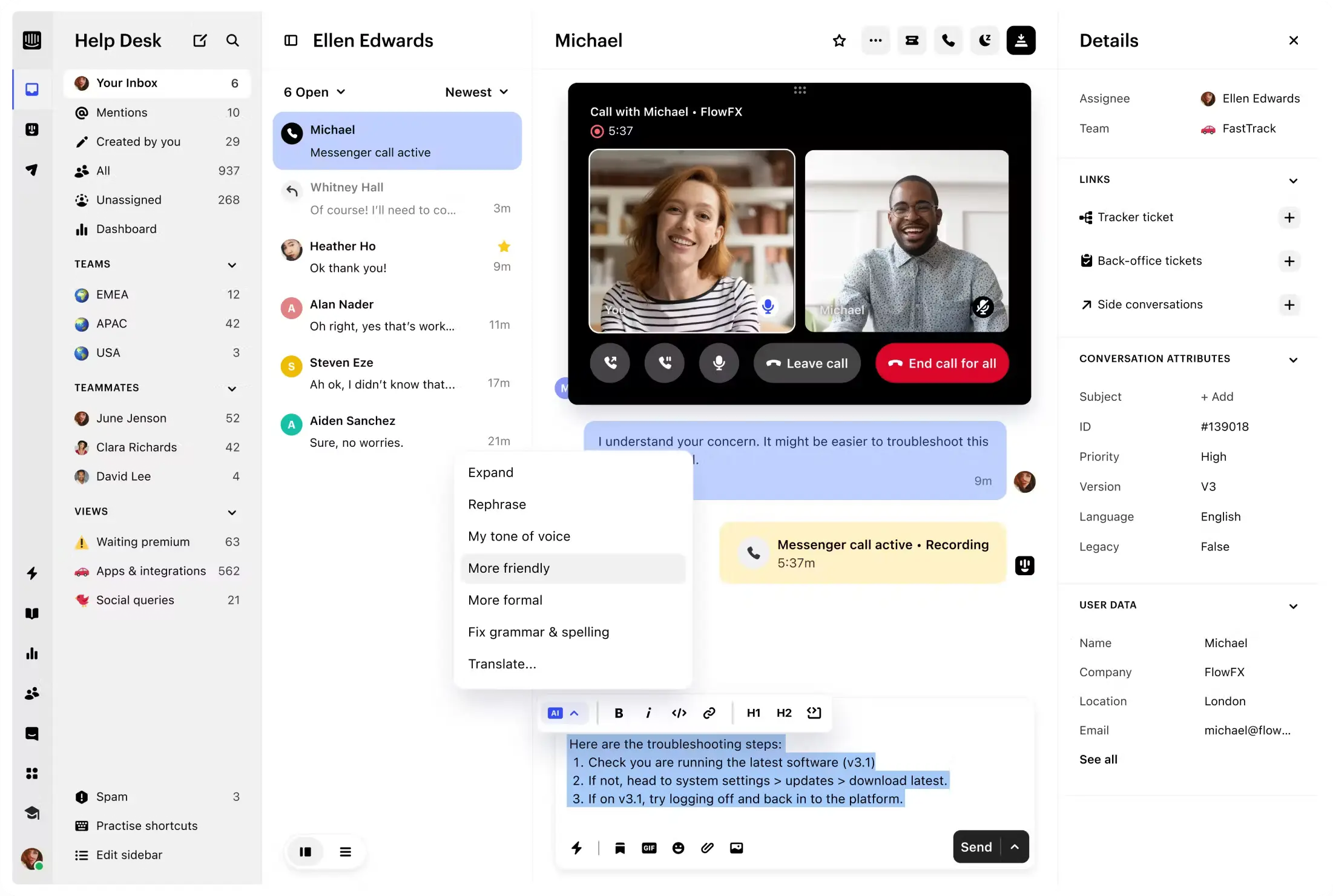
With features like chatbot automation, email sequences, and CRM integrations, it can help you speed up conversions without burning out your team.
Pros of Intercom
- You can qualify leads automatically through chatbots, saving reps’ time.
- It helps you stay connected with prospects across live chat, email, and in-app messages from a single platform.
- You can route conversations to the right rep based on availability or topic.
- Intercom’s AI agent Fin can handle common queries, freeing up your team to focus on high-value conversations.
Cons of Intercom
- It can get expensive quickly as your contact list grows.
- Setting up workflows and bots can be confusing without prior experience.
What Users Have To Say About Intercom
- G2 – 4.5/5🌟 (3.4K+ Reviews)
- Capterra – 4.5/5 🌟 (1.1K+ Reviews)
- Trustpilot – 3.1/5 🌟 (470+ Reviews)
“Fin. The #1 AI Agent for customer service
What I like best about Fin by Intercom is its incredible efficiency and natural language processing capabilities. It excels at understanding and instantly resolving a significant portion of customer queries, dramatically reducing the burden on our human support team…”
Read the Complete Review on G2
Intercom Pricing (Annual Billing)
Intercom has 3 paid plans:
- Essentials – $29/seat/month
- Advanced – $85/seat/month
- Expert – $132/seat/month
9. Calendly
Calendly is a scheduling automation platform that ensures you never miss an opportunity to connect with a hot lead.
What makes Calendly the best inside sales team?
You can schedule meetings in 3 simple steps:
- Pick your available time slots.
- Share your booking link.
- Let your prospect book a time that works for them.

As simple as that, no more back-and-forth emailing. No confusion. Just more booked meetings!
Pros of Calendly
- Leads are automatically assigned to available team members based on availability.
- Calendly has a very beginner-friendly interface.
- You can also customize your booking pages to match your brand.
Cons of Calendly
- Some useful features, like round-robin or SMS reminders, are only available in higher-tier plans.
What Users Have To Say About Calendly
- G2 – 4.7/5🌟 (2.3K+ Reviews)
- Capterra – 4.1/5 🌟 (300+ Reviews)
- Trustpilot – 1.6/5 🌟 (230+ Reviews)
“A Time-Saving Hero with a Minor Hang-up
Huge time saver: No more endless back-and-forth emails trying to find a good meeting time. I just share my link, and clients pick a slot—boom, it’s scheduled and added to my calendar instantly…
Occasionally, the mobile app freezes or crashes. Reinstalling or restarting works, but it’s a pain when you’re trying to set up on the go…”
Read the Complete Review on G2
Calendly Pricing (Annual Billing)
Calendly has a forever-free plan and 3 paid plans
- Free –$0 (forever free)
- Standard – $10 /seat/month
- Teams –$16 /seat/month
- Enterprise – $15K/year
10. Zoom
You can use Zoom to connect with prospects through virtual meetings, run sales demos, and follow up with warm leads.
The best part about Zoom is that you can auto-generate meeting transcripts and recordings.
So even if someone from your team misses a call, they can easily catch up on how the meeting went.

Pros of Zoom
- You can easily share your screen, record sessions, and use chat during live calls.
- Zoom has built-in collaborative features to keep discussions interactive.
- It integrates with most CRMs and scheduling tools.
Cons of Zoom
- Some features, such as webinar hosting or large meeting capacity, are only available with higher-tier plans.
- There’s limited customization in branding unless you upgrade to Zoom Business or above.
What Users Have To Say About Zoom
- G2 – 4.6/5🌟 (56K+ Reviews)
- Capterra – 4.1/5 🌟 (300+ Reviews)
- Trustpilot – 1.6/5 🌟 (230+ Reviews)
“Simple and effective for remote team collaboration
I use Zoom Workplace regularly for daily stand-up meetings, project coordination, and client discussions with my team. The interface is very clean and easy to use, and it makes scheduling, file-sharing, and communication really smooth. It plays a big role in helping our remote team stay connected and organized…
Sometimes the video calls lag a bit when the internet connection is unstable. Also, for first-time users, getting familiar with all the available features takes a bit of time…”
Read the Complete Review on G2
Zoom Pricing (Annual Billing)
Zoom Workplace has a free plan and 2 paid plans:
- Pro (1-99 users) – $13.33/month/user
- Business (1-250 users) – $18.33/month/user
11. Storylane
If your inside sales team spends too much time giving product demos or struggling to explain features clearly, Storylane might be what you need.
It lets you create interactive product demos that your prospects can explore on their own, no live sessions required.
This means your reps can qualify leads faster and focus on the ones that are actually interested.

Pros of Storylane
- You can build interactive demos without needing help from your tech team.
- Prospects can explore your product on their own without needing help from your team.
- You can track how people interact with the demo.
Cons of Storylane
- It takes a bit of time to learn how to create polished demos.
- Not ideal for complex products that need live walkthroughs.
What Users Have To Say About Storylane
- G2 – 4.5/5🌟 (8.5K+ Reviews)
- Capterra – 4.1/5 🌟 (300+ Reviews)
- Trustpilot – 1.6/5 🌟 (230+ Reviews)
“Powerful demo insights with surprisingly rich lead intel, even on the free tier
Storylane has been a smooth, no-fuss way to showcase our core features at Email Vault. Even at the free tier, it gives us real insight into who’s engaging with our demos, including firmographic data and intent signals that are actually useful for our sales and marketing teams.
We’ve especially appreciated:
– Session-level tracking that breaks down who watched what, how far they went, and whether they clicked a CTA.
– Lead syncing with HubSpot (plus UTM and GA integration) that gives us a view into attribution and demo engagement.
…”
Read the Complete Review on G2
Storylane Pricing (Annual Billing)
Storylane has a free plan and 4 paid plans:
- Starter – $40/month
- Growth – $500/month
- Premium – $1,200/month
- Enterprise – Custom
12. Salesforce Sales CRM
Salesforce is a widely used CRM (Customer Relationship Management) platform that helps your team track, manage, and move prospects through every stage of the sales cycle.
It also gives you actionable insights from your sales data, helping your reps focus on the right leads and close deals more efficiently.

Pros of Salesforce sales CRM
- It offers a wide range of features, including contact management, lead and opportunity tracking, and task and activity management.
- Salesforce is highly scalable and ideal for businesses of all sizes.
- You can create custom dashboards to track key metrics that align with your team’s goals and priorities.
Cons of Salesforce Sales CRM
- The interface and setup can be overwhelming for beginners without prior CRM experience.
- There is a bit of a learning curve to get the most out of its advanced features.
What Users Have To Say About Salesforce Sales CRM
- G2 – 4.4/5🌟 (23.3K+ Reviews)
- Capterra – 4.1/5 🌟 (300+ Reviews)
- Trustpilot – 1.6/5 🌟 (230+ Reviews)
“Reliable CRM tool that supports efficient customer interactions and data tracking.
What I like most is how centralized and customizable everything is. I can easily track customer cases, view interaction history, and log updates across multiple channels in one place. The ability to automate follow-ups, use quick text, and customize reports makes it very efficient for managing customer service workflows.
Some parts of the interface can be overwhelming or unintuitive—especially for newer users. The learning curve is a bit steep for advanced features, and some processes feel more complex than necessary.”
Read the Complete Review on G2
Salesforce Sales CRM Pricing (Annual Billing)
Salesforce does not have transparent pricing plans. You have to get in touch with the team to get a custom quote.
13. Gong
Gong is a revenue intelligence tool that provides actionable insights by analyzing your interactions with prospects, leads, and customers.
It helps you spot at-risk deals early and helps you make data-backed decisions to close the deal.

Pros of Gong
- You can spot what your top performers are doing and replicate that with your other team members.
- You get easy-to-understand visual reports.
- With Gong, you can easily coach your new reps using real call recordings and deal insights.
Cons of Gong
- Gong has expensive pricing plans.
What Users Have To Say About Gong
- G2 – 4.8/5🌟 (6.2K+ Reviews)
- Capterra – 4.1/5 🌟 (300+ Reviews)
- Trustpilot – 1.6/5 🌟 (230+ Reviews)
“Super Useful!
Gong has completely transformed how I approach sales calls. Being able to revisit recordings, track keywords, and see engagement insights has made it easier to coach myself and improve. I especially like how it helps spot trends across deals and keeps the whole team aligned. If you’re in sales and not using Gong, you’re missing out.”
Read the Complete Review on G2
Gong Pricing (Annual Billing)
Gong gives customized pricing plans based on your requirements.
14. PandaDoc
PandaDoc is a document automation tool that helps your team create, send, track, and e-sign sales documents.
For inside sales teams, PandaDoc reduces manual work and helps close more deals with less back-and-forth.

The best part?
It can integrate with your CRM and automatically fill in data and track document status within your sales pipeline.
Pros of PandaDoc
- It has an easy drag-and-drop editor.
- You get updated when a prospect opens,
- Your team can collaborate on proposals and contracts in one place.
Cons of PandaDoc
- It has a learning curve to get used to the customization options.
What Users Have To Say About PandaDoc
- G2 – 4.5/5🌟 (8.5K+ Reviews)
- Capterra – 4.1/5 🌟 (300+ Reviews)
- Trustpilot – 1.6/5 🌟 (230+ Reviews)
“Pandadoc has powerful editing tools, and the ability to upload PDF and DOCX files makes the creation of documents quick and easy. The experience for the signer is guided by an intuitive user interface, and everyone can figure it out.
The advanced features like quote builder, product catalogue and more help to make it a well-rounded e-signature platform…”
PandaDoc Pricing (Annual Billing)
There are 3 paid plans in PandaDoc
- Starter –$19 USD/user/month
- Business –$49 USD/user/month
- Enterprise –Custom
15. Chargebee
Chargebee is a subscription billing and revenue management tool.
It’s a great fit for your team if you work with a subscription-based business model that has flexible pricing plans.

Pros of Chargebee
- You can generate and share custom quotes quickly with prospects.
- It supports flexible pricing setups. This includes trials, discounts, usage-based plans, and add-ons.
- Chargebee can automate invoicing, tax management, and recurring billing.
Cons of Chargebee
- There’s a learning curve when setting up advanced workflows or billing models.
- It can become expensive as your billing complexity increases.
What Users Have To Say About Chargebee
- G2 – 4.4/5🌟 (830K+ Reviews)
- Capterra – 4.1/5 🌟 (300+ Reviews)
- Trustpilot – 1.6/5 🌟 (230+ Reviews)
“What I appreciate most is the platform’s comprehensive subscription management capabilities. Having all billing data, subscription statuses, and payment histories centralized in one place makes it much easier for me to understand customer account health and identify opportunities for upgrades or renewals.
While Chargebee generally meets our needs effectively, there are a few areas where I’d appreciate improvements:
The user interface, while functional, can sometimes feel complex when navigating between different sections. A more streamlined interface would help speed up daily tasks, especially when quickly looking up customer information during live conversations…”
Read the Complete Review on G2
Chargebee Pricing (Annual Billing)
It has 3 different products:
- Billing
- Revenue Recognition
- Retention
Each of these products has its own separate paid plans.
Close More Deals With the Right Inside Sales Tools
That’s 15 of the best inside sales tools that can help your team prospect smarter, engage better, and close faster.
So, what should you do after this?
Try what makes sense, skip what doesn’t, and give your reps what they need to win.
Here’s a tip!
Before you decide on a tool, ask yourself these questions:
- Does the tool integrate with my current sales stack?
- Can my reps start using it without spending weeks figuring things out?
- Will it scale with my team?
- Does the platform offer solid customer support and onboarding help?
- Am I paying for features that my team and I will actually use? Or would a leaner tool deliver better ROI?
Sales is already hard. Your picks shouldn’t make it even harder for your team.
Inside Sales Tools – FAQs
1. What is Inside Sales?
Inside sales is a sales model where you and your team sell your products or services from inside an office or home (remotely). You communicate with your prospects and close deals without actually having to meet them in person.
2. What Strategy Works Best for Inside Sales Teams?
There are many sales outreach strategies, but the most effective one is cold outreach. With cold outreach, you have control of who you target, how you pitch, and when you follow up. This lets you build a strong, qualified pipeline fast.
3. How Is AI Influencing the Development and Capabilities of Inside Sales Tools?
AI is revolutionizing inside sales tools by
- Enhancing predictive analytics for better lead scoring
- Automates routine tasks, follow-up, and scheduling meetings
- Forecast sales trends and recommend the best next steps.
4. What Can You Do if an Inside Sales Tool Is Not Delivering the Expected Results?
If an inside sales tool does not meet your expectations, consider alternatives and find the best solution that meets your requirements.
5. Are These Inside Sales Tools Designed Explicitly for SMBs vs. Large Enterprises?
Yes, these inside sales tools are designed to meet the specific needs and resources of SMBs and large enterprises.