 Anil Salvi
 Contents
- 1 Find Email & Phone Using SIC Code – TOC
- 2 TL;DR: How to Find Emails and Phone Numbers Using a SIC Code
- 3 What Is a SIC Code?
- 4 How to Find the Right SIC Code for Your Target Industry
- 5 How to Find Company Contact Information Using SIC Code (Step-by-Step)
- 6 Start Finding Contacts by SIC Code Today
- 7 Frequently Asked Questions
- 7.1 1. Can You Find Email Addresses Directly From a SIC Code?
- 7.2 2. What Is the Difference Between SIC and NAICS Codes?
- 7.3 3. How Many SIC Codes Are There?
- 7.4 4. Can I Search by SIC Code in Saleshandy Lead Finder?
- 7.5 5. Are the Contacts Found Through SIC Code Filtering Verified?
- 7.6 6. What Industries Have the Most Searched SIC Codes?
- 7.7 7. How Accurate Is B2B Contact Data Compared to Static Email Lists?
You have the SIC code of your target industry.
But you don’t have the emails or phone numbers of the people who actually work at those companies.
If that’s where you’re stuck, you’re in the right place.
SIC codes are one of the most precise ways to target companies by industry.
If you know your target market, finding the right SIC code takes less than a minute.
But here comes the hard part.
The tools that provide SIC code lists don’t include the contact information you actually need, like email addresses and phone numbers of decision-makers.
And even if you’re lucky enough to find some contact data on a few sources, you can’t rely on it because most of it is outdated.
I wrote this guide to close that gap.
I’ll walk you through how to find email addresses and phone numbers from any SIC code within 5 minutes.
Let’s get into it.
Find Email & Phone Using SIC Code – TOC
TL;DR: How to Find Emails and Phone Numbers Using a SIC Code
The ONLY way to find correct email addresses and phone numbers using a SIC code is to enter your 4-digit code into a B2B contact database that supports SIC code filtering, apply filters for location, company size, and role, and reveal verified contact details of decision-makers at matching companies.
That said, there are a few other ways to approach this. You can use SIC code directories like SICCODE.com and the NAICS Association, or government databases like SEC EDGAR that list public companies by SIC code.
These can give you a list of companies under any code, but they don’t include contact information.
On the other hand, static list vendors like Exact Data and InfoGlobalData sell pre-built contact lists by SIC code, but the data starts decaying the day it’s compiled, and there’s no way to verify how current it is.
Therefore, the method that always works and is the most effective is using a B2B contact database with native SIC code filtering, where every contact is verified in real time before you see it.
Saleshandy Lead Finder is one of the few platforms that has a dedicated SIC code input field.
- Enter any 4-digit SIC code to find relevant companies from a database of 42M+ businesses
- Apply filters like location, company size, job title, and seniority
- Get verified email addresses and direct phone numbers from 852M+ contacts
- All data is verified in real-time using waterfall enrichment (9 providers)
- Export contacts as CSV or add them directly to your cold email sequence
You can sign up free and get 50 lead finder credits to test it with your target SIC code. No credit card required.
What Is a SIC Code?
SIC stands for Standard Industrial Classification. It’s a 4-digit code that the U.S. government assigns to every business based on its primary activity.
The system has been around since 1937, and it’s still the go-to classification for B2B prospecting and marketing segmentation.
While NAICS codes have technically replaced SIC in official census data, most sales and marketing tools still use SIC because it’s simpler and more widely recognized.
The first two digits represent the major industry group. For example, 73 means Business Services. Add a third digit to get a subgroup — 737 narrows it down to Computer Services. The full four digits define the specific industry — 7372 refers to Prepackaged Software.
The more digits you use, the sharper your targeting gets. That’s what makes SIC codes so practical when you’re building prospect lists for outbound.
How to Find the Right SIC Code for Your Target Industry
Before you search for contacts, you need the right SIC code for the industry you’re going after.
This part is quick once you know where to look.
1. Use a Keyword Lookup Tool
If you don’t have your SIC code yet, the fastest way is a keyword search.
The OSHA SIC Code Search tool lets you type in a word like “construction” or “restaurant” and returns every matching code. The SEC EDGAR SIC Code List also has a full directory if you’re targeting public companies.
Both are free and take less than a minute.
2. Quick Reference: Most Searched SIC Codes by Industry
To save you the lookup, here’s a quick SIC code database of the codes that sales and marketing teams search for most often:
| SIC Code | Industry |
|---|---|
| 1521 | General Contractors (Residential) |
| 1711 | Plumbing, Heating, Air Conditioning |
| 2834 | Pharmaceutical Preparations |
| 3674 | Semiconductors and Related Devices |
| 4731 | Freight and Cargo Transportation |
| 5411 | Grocery Stores |
| 5812 | Restaurants and Eating Places |
| 6531 | Real Estate Agents and Managers |
| 7372 | Prepackaged Software |
| 8011 | Physicians and Surgeons |
| 8742 | Management Consulting Services |
If your target industry isn’t on this list, use the OSHA keyword search to find the exact 4-digit code.
How to Find Company Contact Information Using SIC Code (Step-by-Step)
Most B2B data providers don’t support SIC code filtering at all.
Saleshandy Lead Finder is one of the few that has a dedicated SIC code input field built right into its filter panel, which makes it the most practical option for this workflow.
Here’s how to do it step by step.
Step 1: Sign Up or Log In to Saleshandy
Step 2: Open Lead Finder
Step 3: Enter Your SIC Code and Apply Filters
Step 4: Reveal Verified Email Addresses and Phone Numbers
Step 5: Download Your Contacts or Start Sending Campaigns
Step 1: Sign Up or Log In to Saleshandy
If you don’t have an account yet, head to Saleshandy and sign up for free.
You’ll get 50 lead finder credits to start, and the 7-day free trial gives you access to every filter and feature. (No credit card needed.)
If you already have an account, just log in.
Step 2: Open Lead Finder
Once you’re inside the dashboard, look at the left sidebar.
Click the magnifying glass icon.
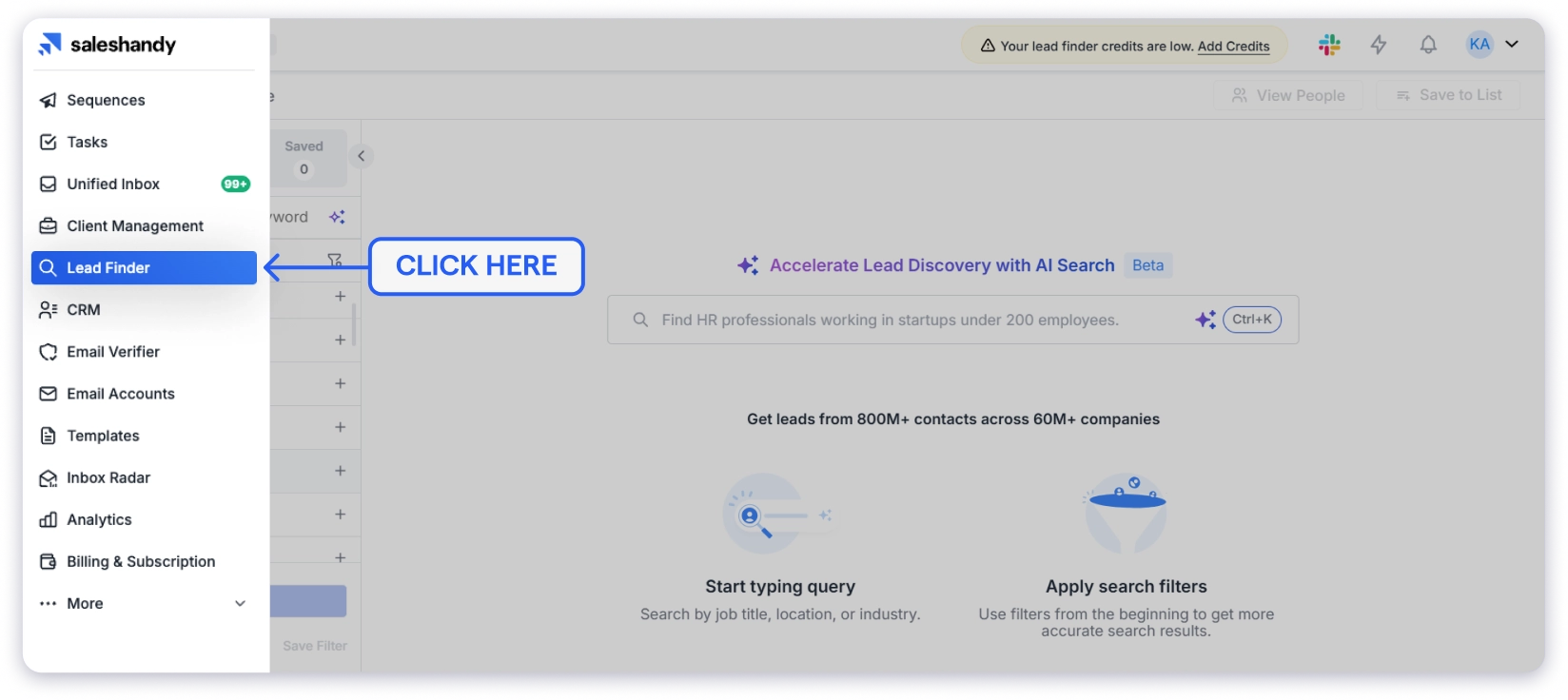
That’s Lead Finder.
It opens up the full search interface with People and Companies tabs at the top.
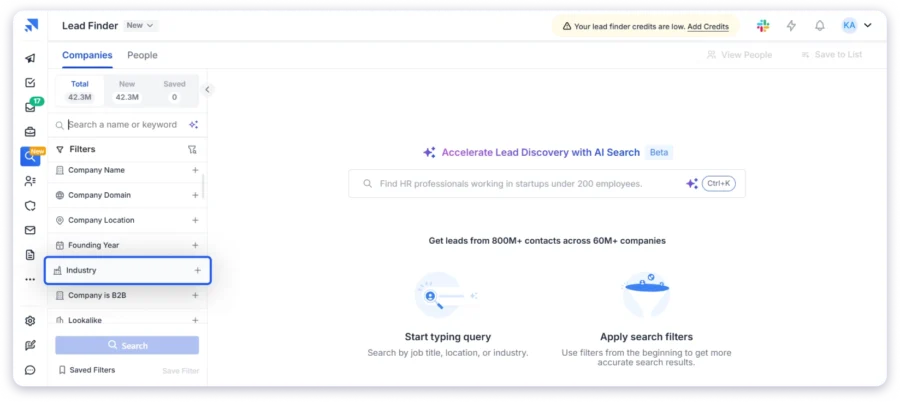
Step 3: Enter Your SIC Code and Apply Filters
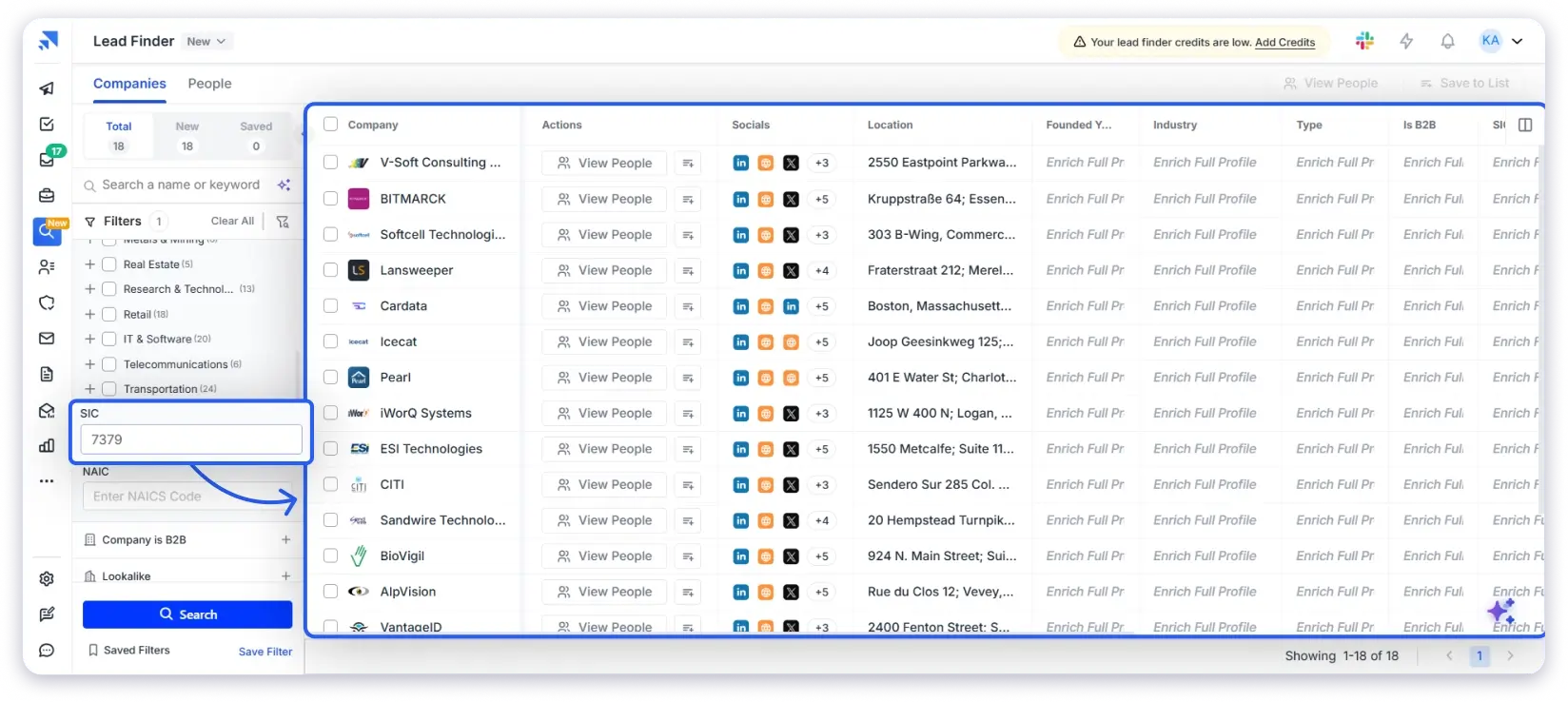
Now, click the Companies tab at the top of Lead Finder.
On the left-hand side, you’ll see the Filters panel.
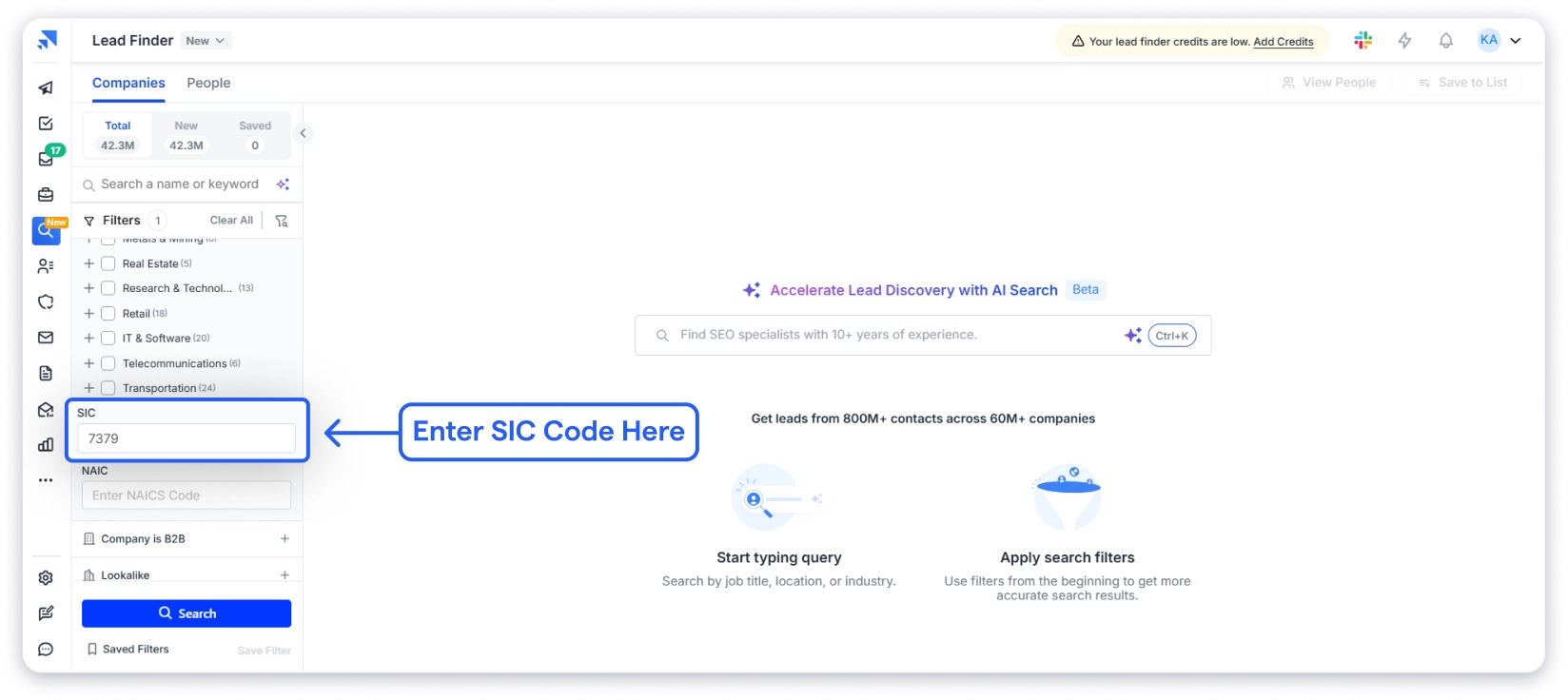
Scroll down past the Industry categories and you’ll find two dedicated fields: one labeled SIC and one labeled NAIC.
Type your 4-digit SIC code into the SIC field. For example, if you’re targeting pharmaceutical companies, enter 2834. If you’re going after real estate agents, enter 6531.
The moment you hit search, Lead Finder lets you find companies by SIC code from its database of 42M+ businesses.
Step 4: Reveal Verified Email Addresses and Phone Numbers
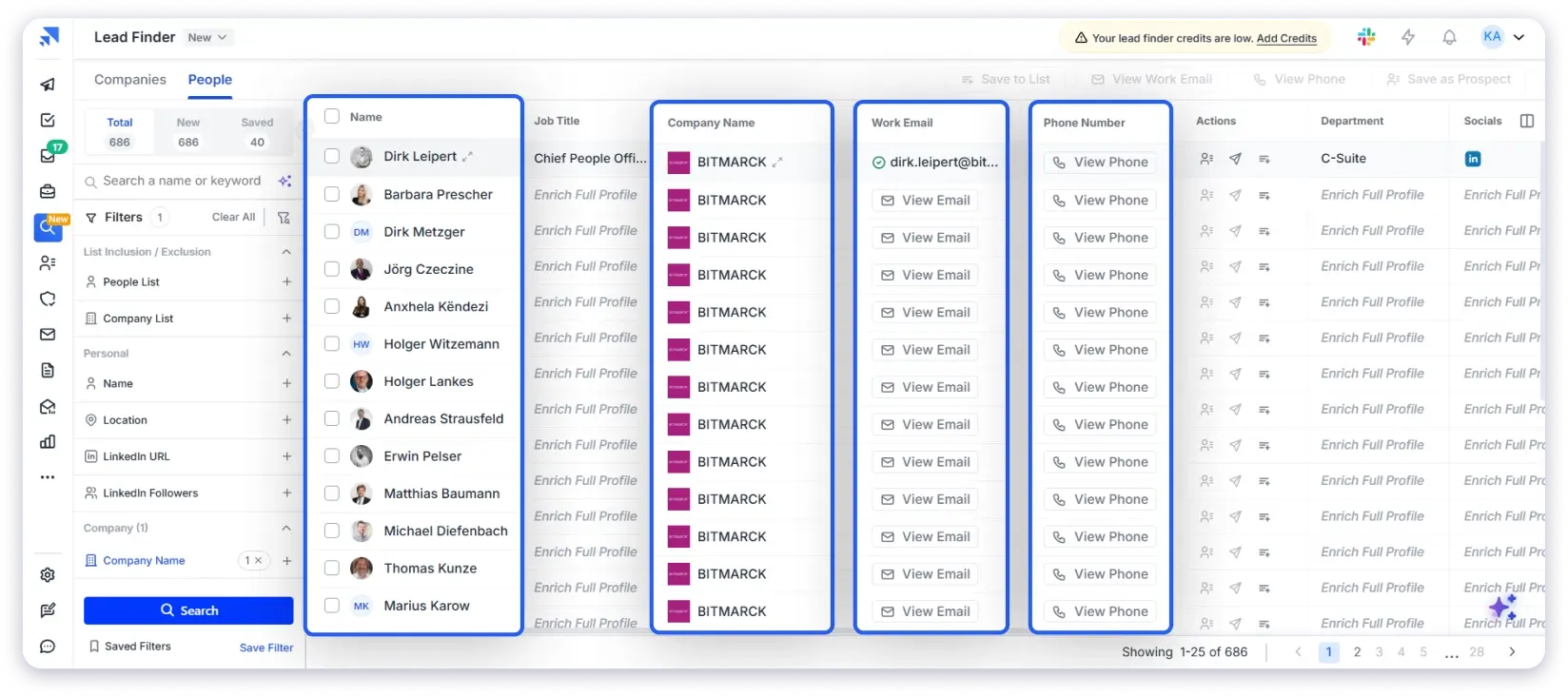
Once your filtered results appear, click View Email or View Phone next to any contact to reveal their verified business email address and business phone number.
Each reveal uses credits from your account.
Here’s what happens behind the scenes. Saleshandy runs a waterfall enrichment process that checks the contact across 9 premium data providers in sequence.
It keeps looking until it finds a verified match. If none of the providers can verify the contact, you don’t get charged. That means you only spend credits on data that’s actually usable.
This is what makes the process different from buying a static industry email list from a vendor.
Static lists start decaying the day they’re compiled. B2B contact data goes stale at roughly 2% per month, so a list that’s three months old already has around 6% bad data baked in.
With Lead Finder, every contact is verified at the moment you reveal it.
Step 5: Download Your Contacts or Start Sending Campaigns
You’ve found the emails and phone numbers you need. Now you have two options.
You can download your entire list as a CSV file. Lead Finder supports bulk export of up to 10,000 contacts at once, so you can load it into any CRM or outreach tool you’re already using.
Or, if you want to skip the export step entirely, you can add contacts directly to a cold email sequence inside Saleshandy and start sending campaigns right away. Select your contacts, pick a sequence, and your outreach begins from the same place where you found the leads.
Start Finding Contacts by SIC Code Today
Here’s the bottom line.
SIC codes are one of the most structured ways to target companies by industry. Finding the right code takes less than a minute. The hard part was always the next step: turning that industry classification into actual emails and phone numbers of people you can reach.
That gap used to mean hours of manual searching, buying static lists that go stale within weeks, or piecing together data from three or four different tools. None of that is necessary anymore.
With Saleshandy Lead Finder, you enter your SIC code, apply filters for location, company size, and role, and reveal verified contacts from a database of 852M+ professionals. The data is checked in real time. And once you have your list, you can launch outreach from the same platform.
If you’ve been sitting on a SIC code and wondering how to actually turn it into conversations, this is the fastest way to get there.
Frequently Asked Questions
1. Can You Find Email Addresses Directly From a SIC Code?
Not directly. SIC codes classify what a company does, not who works there. To get email addresses and phone numbers from an SIC code, you have a few options. SIC directories like SICCODE.com can give you company names but not contact data.
Static list vendors sell pre-built lists by SIC code, but accuracy degrades over time. The most reliable method is using a B2B database with native SIC code filtering, like Saleshandy Lead Finder, where contacts are verified in real time before you see them.
2. What Is the Difference Between SIC and NAICS Codes?
SIC uses a 4-digit structure and has been around since 1937. NAICS replaced it in 1997 with a 6-digit structure that provides more granularity.
NAICS is the official government standard now, but SIC codes are still widely used across sales and marketing tools because they’re simpler and more broadly recognized. Saleshandy Lead Finder supports both in its filter panel.
3. How Many SIC Codes Are There?
There are 1,514 SIC codes across 11 major divisions, covering every industry from agriculture to public administration. The codes range from 0100 (Agricultural Production) to 9999 (Nonclassifiable Establishments).
4. Can I Search by SIC Code in Saleshandy Lead Finder?
Yes. Saleshandy Lead Finder has a dedicated SIC code input field in its company-level filter panel. You can enter any 4-digit code and combine it with filters for location, company size, revenue, role, and seniority to build a targeted contact list.
5. Are the Contacts Found Through SIC Code Filtering Verified?
Yes. Saleshandy uses waterfall enrichment that checks each contact against 9 premium data providers in sequence.
Contacts are verified in real time at the point of reveal, not from a pre-built static database. If the system can’t verify a contact, you’re not charged credits.
6. What Industries Have the Most Searched SIC Codes?
The most frequently searched SIC codes include real estate (6531), restaurants (5812), construction (1521), property management (6552), software (7372), manufacturing (2000-3999 range), and healthcare (8011). These are high-volume industries with large addressable markets, which is why outbound teams target them heavily.
7. How Accurate Is B2B Contact Data Compared to Static Email Lists?
B2B contact data decays at roughly 2% per month. A static list you purchased three months ago already has around 6% or more invalid contacts in it. Real-time verified databases like Saleshandy check each contact at the moment of reveal, which means the data you get reflects the current state, not a snapshot from months ago. This protects your sender reputation and keeps bounce rates low.