
 Dhruv Patel
 Contents
- 1 How to Build a Verified Doctors’ Email List – TOC
- 2 TL;DR: Build an Email List of Doctors in a Minute
- 3 5 Best Ways to Build a Doctor’s Email List in the USA (Tried & Tested)
- 4 What a Good Doctor’s Email List Should Include
- 5 Start Building Your Doctors Email List the Right Way
- 6 FAQs on Building an Email List of Doctors
Building a doctor’s email list in the USA isn’t as straightforward as it sounds.
You can easily find doctors.
The NPI Registry and state medical boards give you their names, specialties, and practice details.
But when it comes to actually reaching them, things break down.
You can’t find their email addresses or phone numbers because they aren’t publicly available.
That’s why you need the right approach, not just more data.
I tested multiple ways to build a doctor’s email list in the USA, from manual methods to data providers, to see what actually works.
In this blog, I’ll break down 5 practical methods, when to use each, and their limitations so you can choose what fits your use case.
How to Build a Verified Doctors’ Email List – TOC
TL;DR: Build an Email List of Doctors in a Minute
Building a doctor email list comes down to speed, accuracy, and how much effort you want to invest.
1. Fastest Method: Use Saleshandy Lead Finder to filter doctors by speciality, location, and practice type from an 852M+ verified database and reveal emails instantly.
2. Free Route: Download NPI Registry data for physician names and specialities, then run it through an email enrichment tool to append verified email addresses.
3. For Small Lists: Browse medical association directories or search LinkedIn to find individual physician contacts manually.
4. One Rule to Follow: Always verify your list before sending because doctor contact data goes stale faster than most B2B segments, as physicians regularly switch practices, move states, and change hospital systems.
Now let’s talk about each method in detail so you can pick the one that fits your scale and budget.
5 Best Ways to Build a Doctor’s Email List in the USA (Tried & Tested)
Here are the five best ways listed to find emails and build a detailed list of doctors in the USA, so that you can reach out to them without worrying about the data quality and accuracy.
- Use Saleshandy Lead Finder (Best for Verified Lists at Scale)
- Use the NPI Registry and Enrich with Email Data
- Search Medical Association Directories
- Find Doctors on LinkedIn and Extract Emails
- Scrape Hospital and Clinic Websites
1. Use Saleshandy Lead Finder (Best & Recommended Method)
Best for: Building targeted and verified doctor email lists with 98% email accuracy.
A B2B lead finder tool lets you search a large contact database, apply filters for job title, speciality, location, and company size, and pull verified doctor emails in minutes.
I recommend Saleshandy Lead Finder for this because it gives you access to 852M+ B2B contacts with 75+ advanced filters and verifies every email in real time before charging credits.
Here’s the step-by-step process.
Step 1: Log in to Lead Finder
Go to Saleshandy Lead Finder and log in to your account.
Make sure you’re on the People tab and not Companies.
This is where you’ll find individual physicians’ contacts.
Step 2: Set the Industry Filter to Healthcare
On the left-hand side panel, scroll down to the Company section and click on the Industry filter.
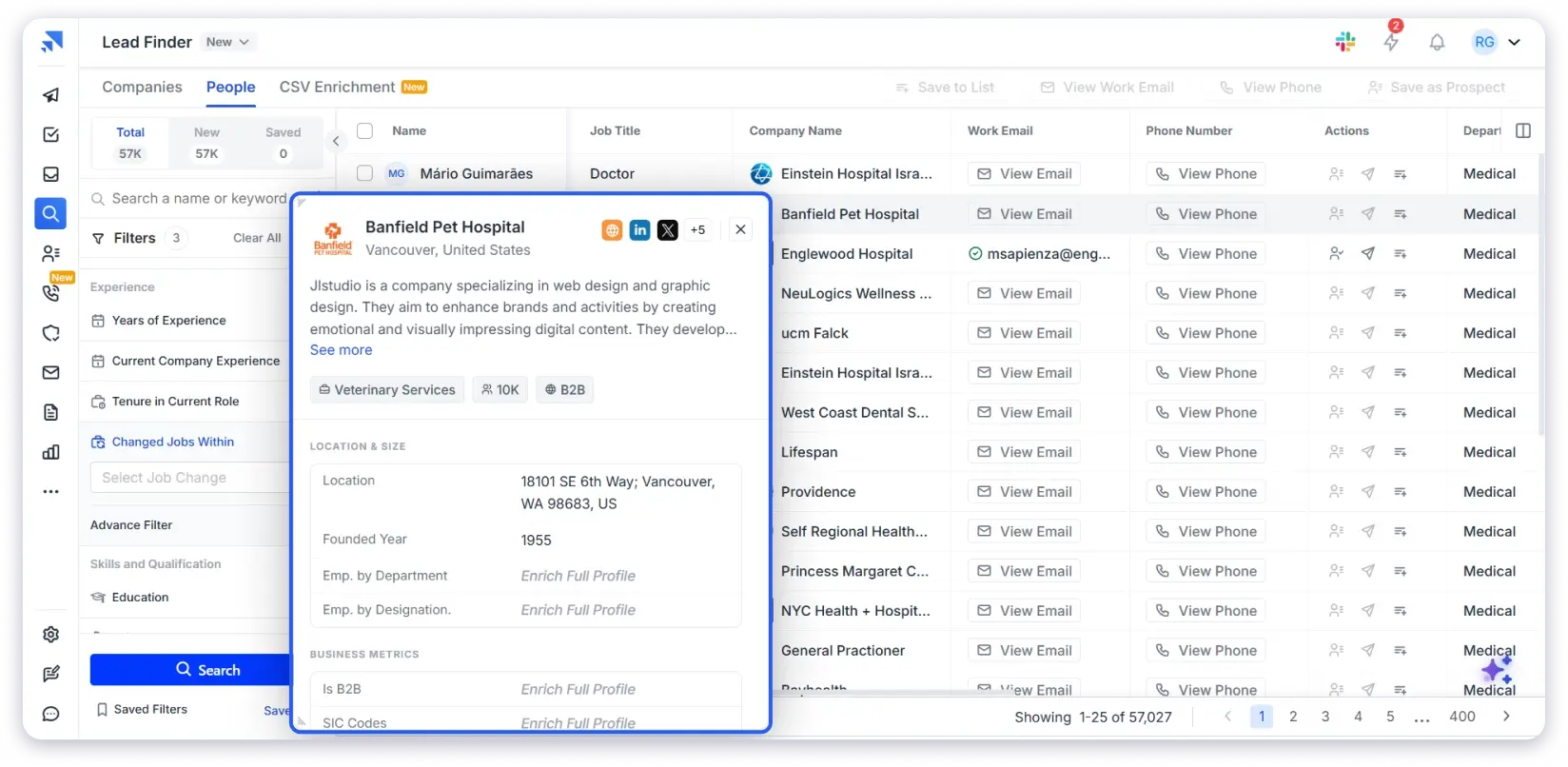
A dropdown will appear where you can search and select the industry you want to target. Type “Healthcare” and you’ll see options like:
- Hospital & Health Care
- Medical Practice
- Medical Devices
- Health, Wellness and Fitness
- Pharmaceuticals
Select the ones that match your target audience.
For Example: If you’re reaching out to doctors working in hospitals, select “Hospital & Health Care.” If you’re targeting physicians running their own clinics, “Medical Practice” is the better fit.
You can select multiple industries at once to widen your search or stick to one for a more focused list.
Step 3: Set Location to the USA
Select the United States as the country.
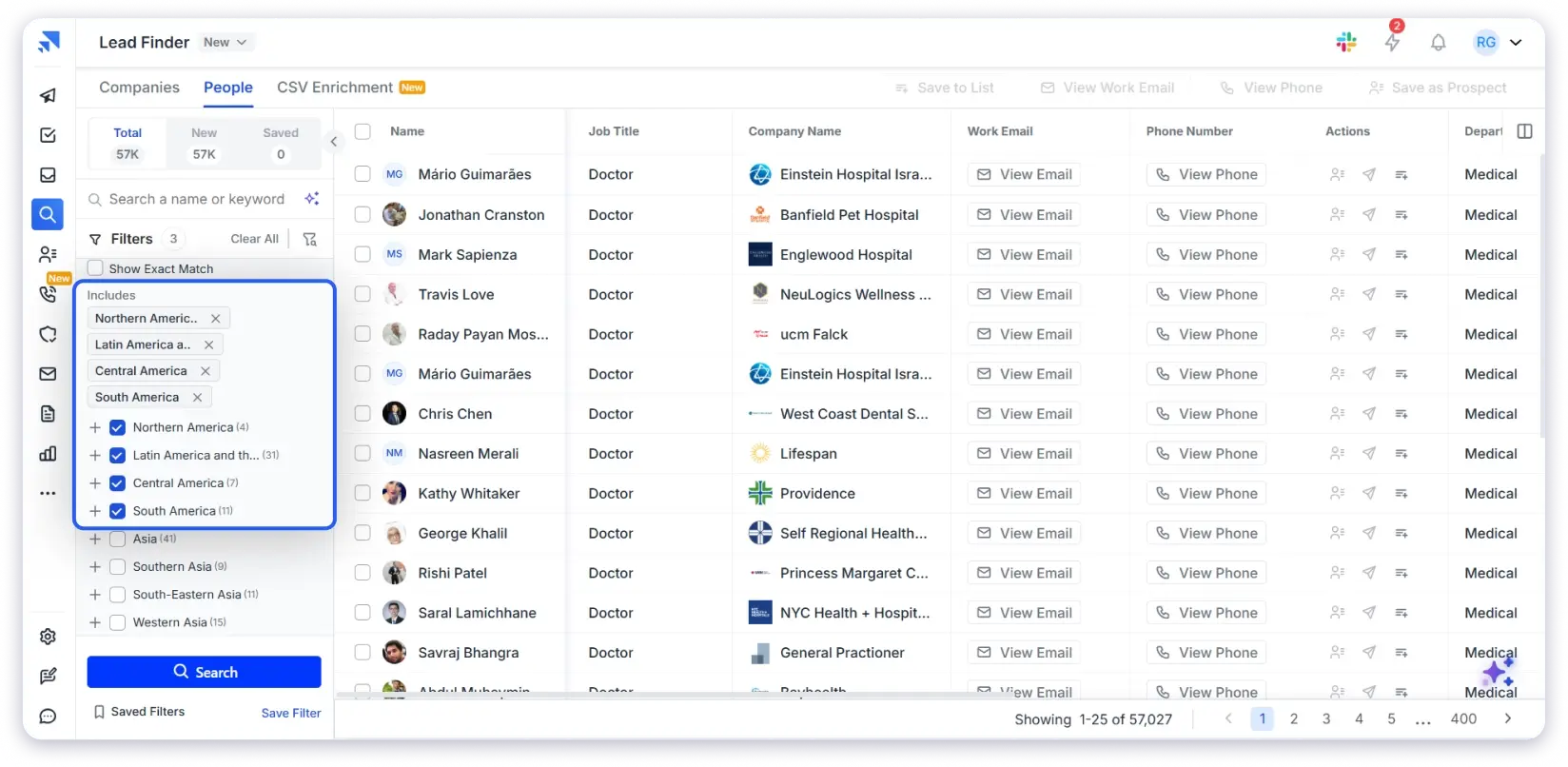
If your campaign is regional, go deeper by state, city, or ZIP code.
For Example: If you’re selling a medical device to orthopaedic surgeons in California, set State to California and Job Title to Orthopaedic Surgeon. You’ll get a list that’s specific in seconds.
Step 4: Reveal and Verify Emails
Click “View Email Info” on individual contacts or bulk-reveal up to 10,000 at once.
Saleshandy uses waterfall enrichment, which means it checks every email across multiple data providers in real time.
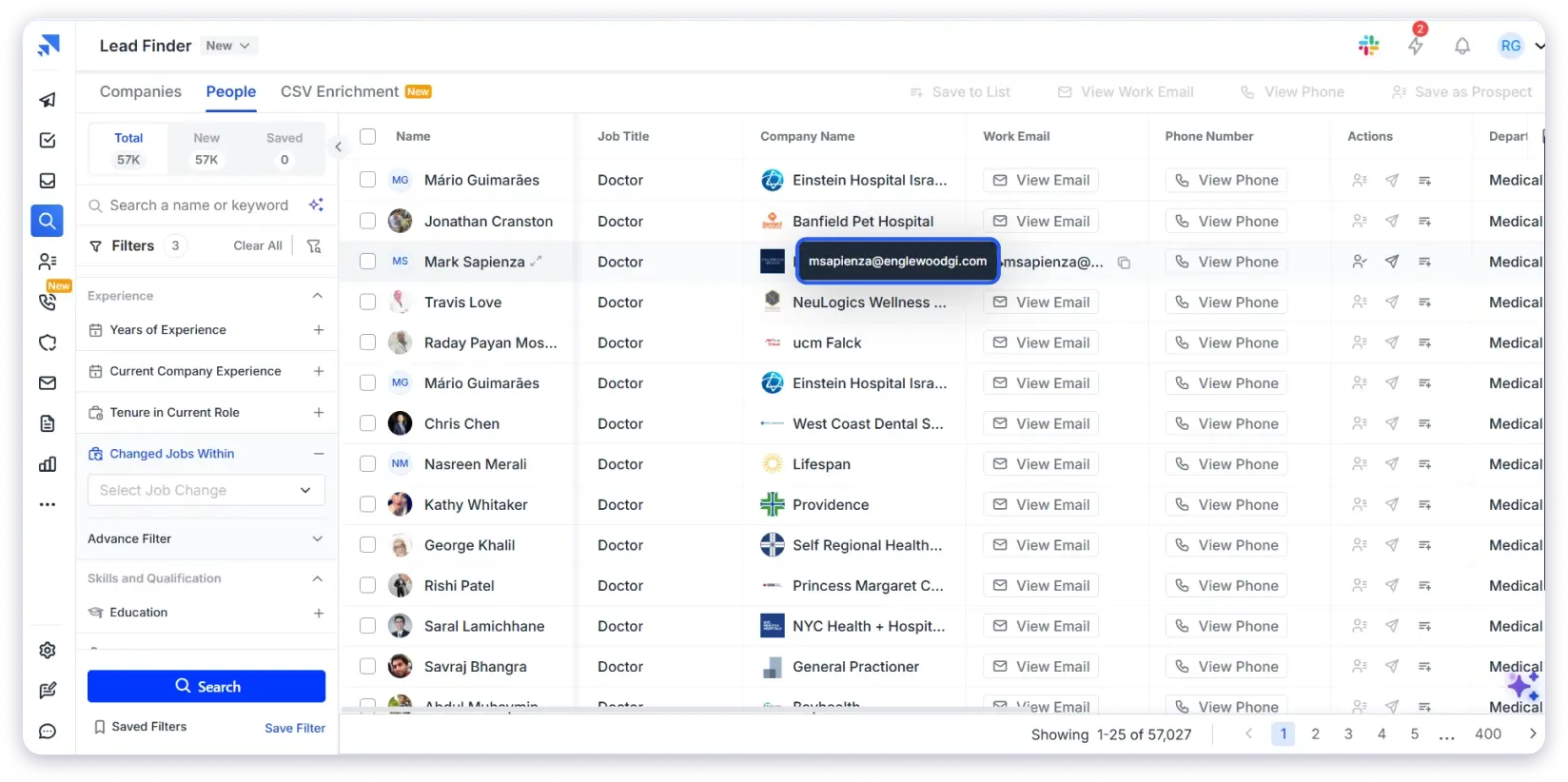
Only verified emails cost credits, and if a valid email can’t be found for a contact, you’re not charged.
You can also reveal phone numbers alongside emails, both of which are useful if you’re running a multi-channel outreach campaign combining cold emails and calls.
Step 5: Download Your Email List Directly
Once your list is ready, you have two options:
- Download it as a CSV and import it into your CRM.
- Add contacts directly to a Saleshandy cold email sequence and start outreach without switching platforms.
From there, you can set up automated follow-ups, track replies in the unified inbox, and manage your pipeline in the built-in CRM.
2. Use the NPI Registry and Enrich with Email Data
Best for: Getting a free, government-verified list of licensed physicians filtered by speciality and state.
Every licensed physician in the USA has an NPI number, and the full NPPES database is publicly downloadable.
You can also search it online at npidb.org.
What You Get from NPI Data:
- Full names
- NPI numbers
- Practice addresses
- Phone numbers
- Medical specialities and taxonomy codes
So the Workflow is Two Steps:
- Download the NPI data filtered by your target speciality and location.
- Take the physician names and practice details from the NPI file, use them as filters in Saleshandy Lead Finder or any other email finder tool, and search for their verified email addresses the same way I showed in Method 1.
Limitations:
- Adds an extra enrichment step, which increases both time and cost.
- Final email accuracy depends entirely on the enrichment tool you use.
- NPI data doesn’t include company size, revenue, or tech stack filters.
3. Search Medical Association Directories
Best for: Researching 10 to 50 specific physicians for a highly targeted, speciality-specific campaign.
Almost every medical speciality has a professional association with a searchable member directory.
Directories Worth Checking:
- AMA (American Medical Association): It is the largest physician directory in the USA with 1.4M+ records.
- Speciality associations: American College of Cardiology, American Academy of Dermatology, American College of Surgeons and similar organisations with directories searchable by location and subspecialty.
- State medical associations: Texas Medical Association, California Medical Association and others that list members with practice details.
How to Use Them:
- Browse individual physician profiles.
- Note down contact information.
- Build a manual list, one contact at a time.
Limitations:
- Most directories are behind paywalls or restrict bulk access.
- No option to export contacts in bulk.
- Contact info is often limited to practice address and phone, not email.
- Not practical for building lists beyond 50 contacts.
4. Find Doctors on LinkedIn and Extract Emails
Best for: Building small, high-intent lists of senior physicians and medical decision-makers.
LinkedIn has a strong base of physicians in leadership and administrative roles, including Medical Directors, CMOs, Department Heads, and Practice Owners.
How to Do It:
- Search by job title + healthcare industry + location on LinkedIn or Sales Navigator.
- Use a LinkedIn email finder extension to reveal email addresses directly from their profile page.
Limitations:
- Physicians in heavy clinical roles (surgeons, ER doctors, hospitalists) are far less active on LinkedIn.
- Coverage is inconsistent compared to a dedicated B2B database
- Doesn’t scale well beyond a few hundred contacts.
- Sales Navigator subscription adds extra cost on top of your email finder tool.
5. Scrape Hospital and Clinic Websites
Best for: Hyper-local campaigns targeting physicians at one or two specific hospital systems.
Many hospitals and health systems list their physicians on “Find a Doctor” or “Our Providers” pages with name, speciality, and sometimes a direct email.
How to Do It:
- Visit the hospital or clinic website and navigate to their physician directory page.
- Collect contact information manually or use a web scraping tool to speed things up.
Limitations:
- Extremely time-consuming at scale because every hospital website is structured differently.
- Emails are usually generic department addresses.
- ([email protected]) rather than direct physician inboxes.
- No way to filter by experience, company size, or other targeting criteria.
- Not viable for campaigns targeting more than one or two institutions.
For anything broader than a single institution, using a B2B data provider will save you hours of manual work.
Now that you know how to build the list, it’s equally important to understand what data points your list should actually contain before you start any outreach.
What a Good Doctor’s Email List Should Include
Your list is only as useful as the data points it contains.
Here’s what separates a usable list from a junk CSV:
- Full Name — For personalization (“Hi Dr Smith” vs. “Dear Healthcare Professional”).
- Verified Work Email — Direct inbox, not a generic hospital info@ address.
- Phone Number — For multi-channel outreach combining email and phone follow-ups.
- Medical Speciality — The most important filter for healthcare outreach.
- Practice/Hospital Name — Context for personalization.
- Location (City, State, ZIP) — Essential for territory-based campaigns.
- NPI Number — Confirms the contact is a real, licensed physician.
- Company Size — Solo practitioner vs. large hospital system changes how you pitch.
Start Building Your Doctors Email List the Right Way
You now have 5 different methods to build a doctors email list, each suited for a different scale and budget.
But regardless of which method you pick, three things will decide whether your list actually performs:
- Specialty Targeting — Reach the exact type of doctors who need what you’re selling
- Location Filtering — Cover only the states, cities, or ZIP codes your campaign needs
- Email Verification — Every contact on your list should be verified before you send a single email
If you’re working with a small list of 10 to 20 doctors, manual methods like LinkedIn or association directories will get the job done.
But if you need hundreds or thousands of verified physician emails ready for outreach, building from a real-time verified database is the fastest and safest way to do it.
FAQs on Building an Email List of Doctors
1. Is It Legal to Send Marketing Emails to Doctors?
Yes. B2B emails to doctors fall under CAN-SPAM, not HIPAA.
Include an unsubscribe link and accurate sender info, and you’re compliant.
2. How Many Doctor Contacts Can I Find with Saleshandy Lead Finder?
852M+ B2B contacts across 42M+ companies with healthcare coverage spanning physicians, surgeons, specialists, and medical directors across the USA and globally.
3. Can I Filter Doctors by Medical Speciality?
Yes. Use exact match job title filters for specialities like Cardiologist, Dermatologist, Orthopaedic Surgeon, or Oncologist.
Combine with location and company size for precision targeting.
4. How Accurate Is the Email Data?
Every email is verified in real time through waterfall enrichment across multiple data providers.
No valid email found means no credits charged. Bounce rates stay under 3%.
5. Can I Build a Doctor’s Email List for Free?
Partially. The NPI Registry gives you physician names and specialities for free, but not emails.
For verified emails, Saleshandy offers up to 50 free credits on signup to test filters and pull a sample list.