![9 Best CIO Email List Providers in 2026 [Verified + Compared]](https://www.saleshandy.com/blog/wp-content/uploads/2026/04/859860319-cio-email-list-providers.webp)

CIOs are the highest-converting buyers in enterprise sales.
But only if you can reach the right ones at the right time.
The problem?
CIOs get dozens of vendor emails every week.
Generic outreach gets buried before it’s even opened.
And even if your targeting is sharp, outdated contact data means your emails never reach the inbox in the first place.
That’s why the CIO email list provider you choose matters more than your email copy or your sequence structure.
I reviewed 9 of the best CIO email list providers on accuracy, targeting, pricing, and compliance to help you find the one that actually delivers data worth paying for.
CIO Email List Providers – TOC
TL;DR: Best CIO Email List Providers at a Glance
Before you go, scroll through the full comparison.
Here are the top 3 that consistently come up when teams compare CIO email list options, and where each one works best.
- Saleshandy Lead Finder → Best for teams that want 95%+ verified CIO emails with buyer intent data + technographics, across any industry or region.
- ZoomInfo → Best for enterprise teams that need the deepest CIO filtering with org charts, technographics, and intent data.
- Cognism → Best for getting updated, GDPR-compliant CIO email addresses in European markets with director+ contacts refreshed every 30 days.
| Feature | Saleshandy Lead Finder ⭐ | ZoomInfo | Cognism |
|---|---|---|---|
| Starting Price | $49/mo | Custom | Custom |
| Database Size | 800M+ | 260M+ | Not disclosed |
| Email Accuracy | 95%+ (real-time verification) | 75% | 80% |
| Built-in Outreach | Yes (sequences, follow-ups, sender rotation) | No | No |
| Direct Dials | Yes | Yes | Yes |
| Targeting Filters | Tech stack, buying signals, funding, job changes + company revenue (75+ data points) | Org charts, technographics + proprietary intent + website visitors | Technographics + Bombora intent + hiring signals |
| GDPR & CCPA Compliant | Yes (SOC 2 Type II + ISO 27001) | Yes | Yes |
In-depth Review of 9 Best CIO Email List Providers
Here are 9 CIO email list providers ranked based on data accuracy, targeting options, pricing, and compliance so you can reach the right decision-makers and get better results.
1. Saleshandy Lead Finder
⭐ Best for:
Teams that want 98%+ verified CIO emails with buyer intent data and technographics across any industry or region.
Saleshandy Lead Finder gives you access to 852M+ contacts across 60M+ companies with global coverages across CIOs across US, UK, Europe, India, Canada, and APAC.
You can build targeted CIO email lists using filters like:
- Job title
- Location
- Industry
- Company size
- Company revenue
- Tech stack
Every email is verified in real time through waterfall enrichment across 9 data providers.
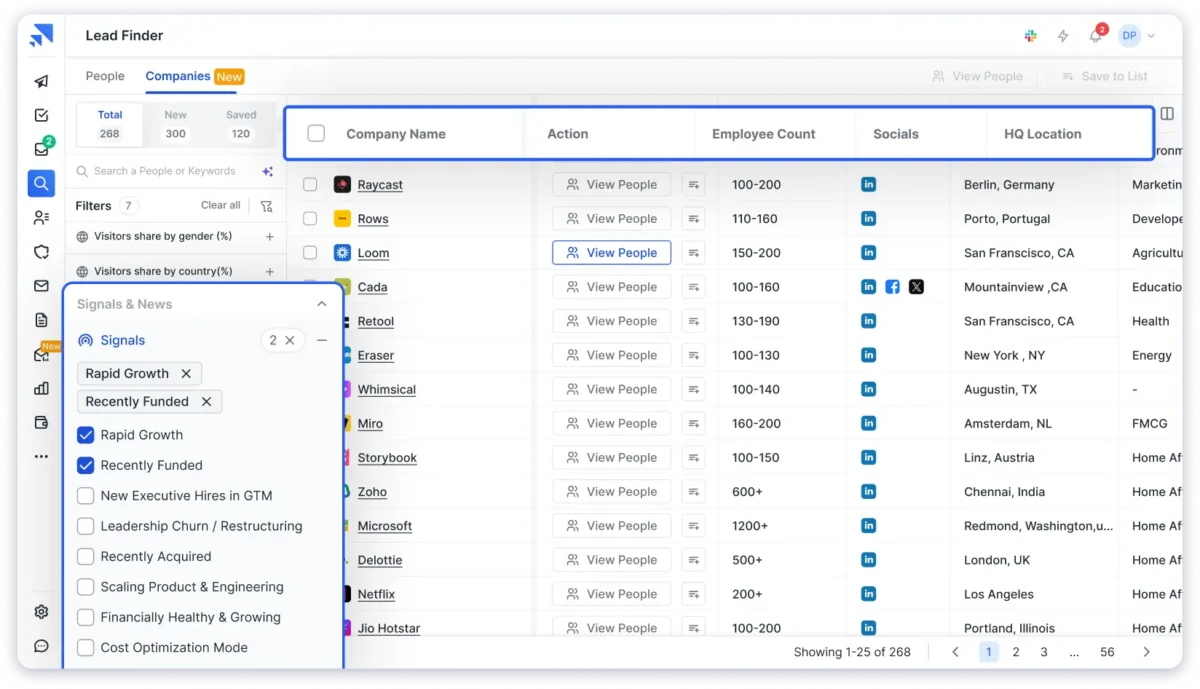
The best part? If an email can’t be found, no credits will be charged. It means you are only paying for the email address of CIOs which are accurate!
Now that’s something you won’t find with other email list providers on my list.
Key Features
- 852M+ contacts with real-time waterfall verification.
- 70+ filters (title, industry, geo, company size, revenue, tech stack, buying signals).
- Credits are only charged for verified emails.
- AI search via Sage (describe your ICP in plain English).
- CIO coverage across the US, UK, Europe, India, Canada, APAC.
How You Can Build a CIO Email List with Saleshandy Lead Finder In Simple 3 Steps
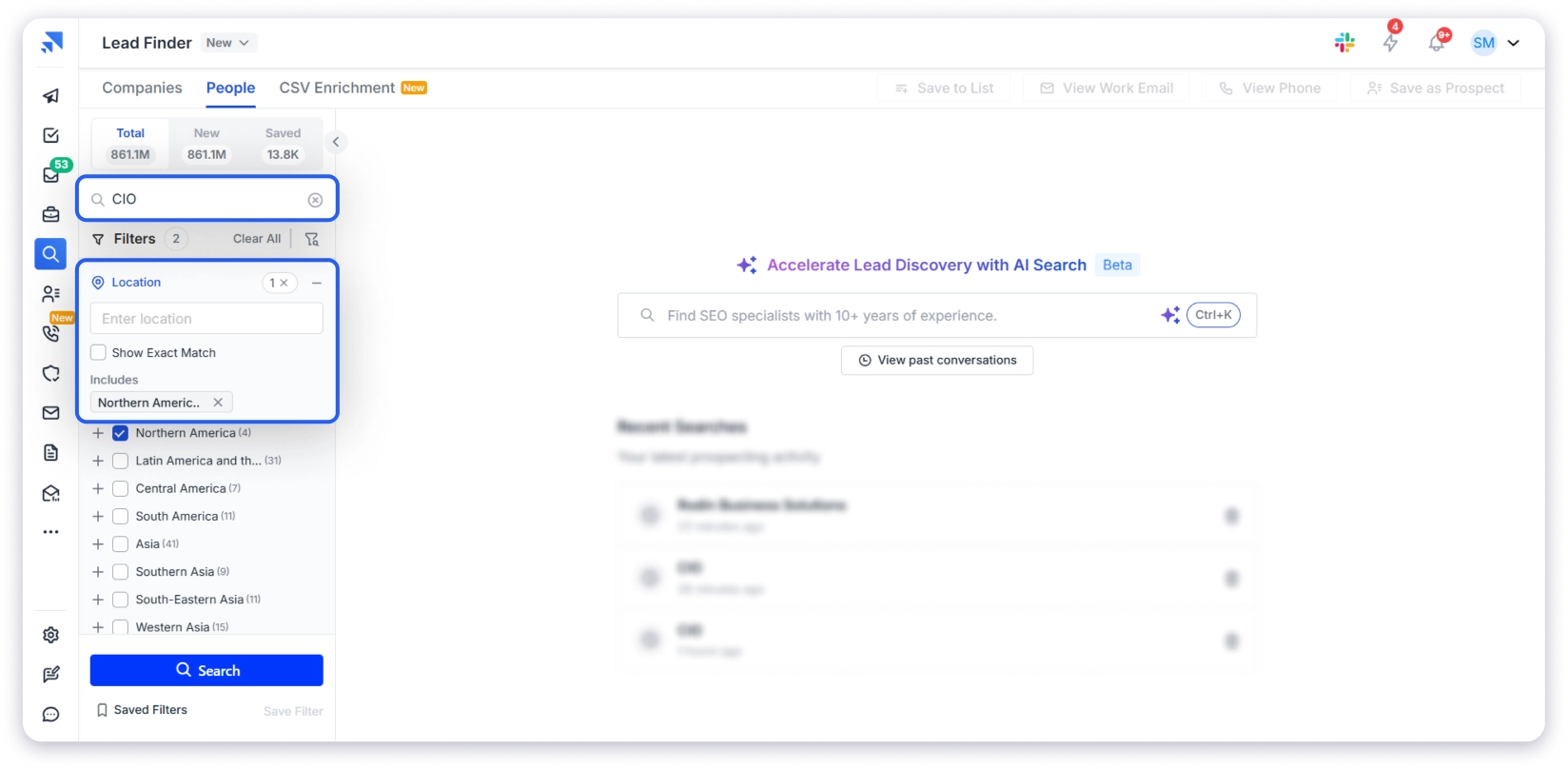
Step 1: Open Lead Finder. Click the People tab. Type “CIO” in the job title. Set the location to the United States.
Step 2: Set the industry to media & internet, research & technology, IT & software, telecommunications.
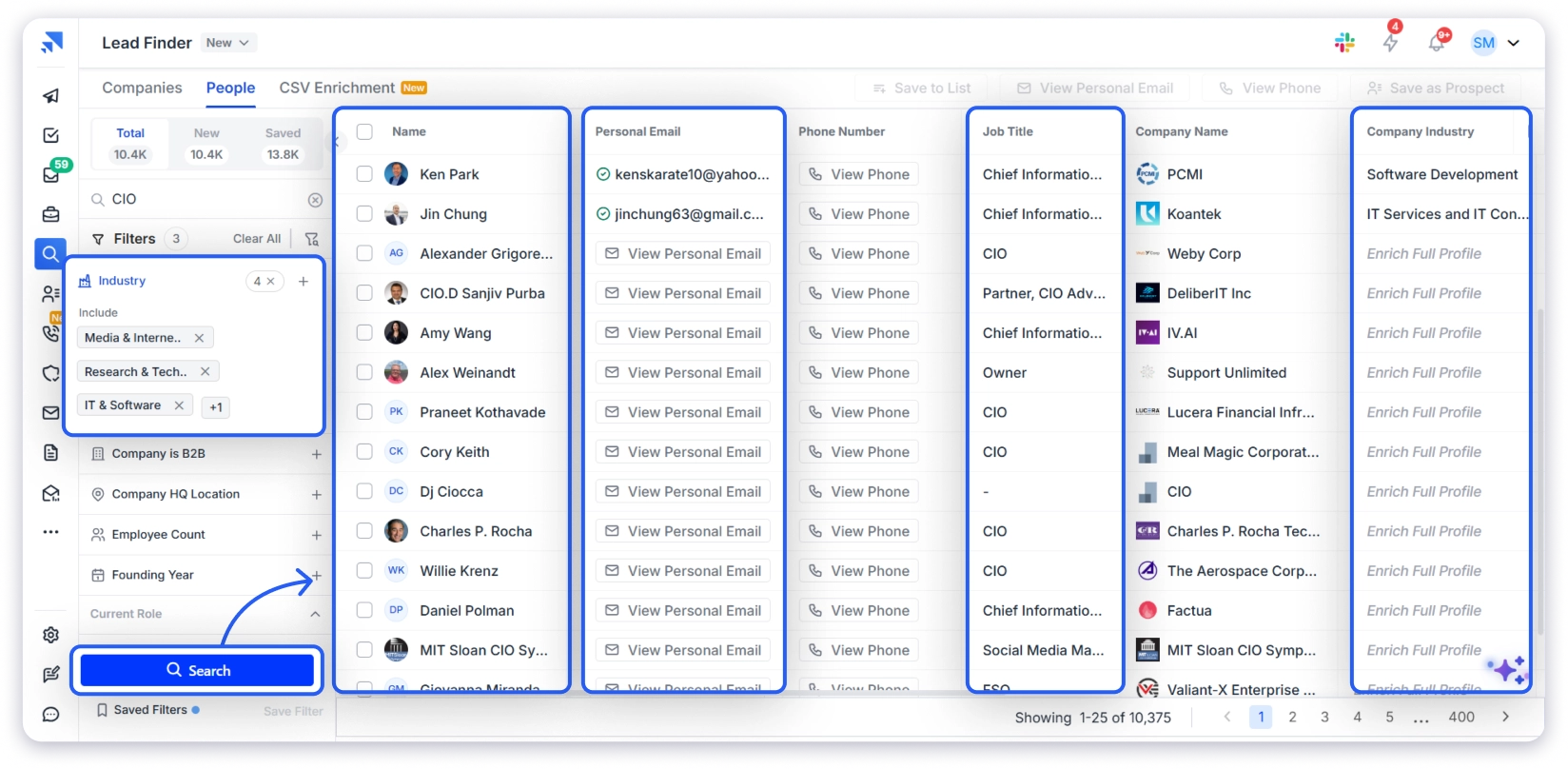
Step 3: Click Search.
Now select the CIOs whose email addresses you want.
Once you do that, click on reveal.
In the background Saleshandy will check every email across 9 data providers.
Saleshandy Lead Finder Pricing
Pros
- It only charges credits for verified contacts.
- It offers 70+ advanced search filters for targeted CIO list building.
- You can find prospects using ChatGPT-style textual prompts with Saleshandy’s AI search.
- Pricing is transparent and listed on the website.
- It covers CIOs globally across the US, UK, Europe, India, Canada, and APAC.
Cons
- Only up to 50 free credits on the free tier
What Users Have to Say?
“Finding email ID with phone numbers is so easy, especially using the LinkedIn extension.
It directly gives you all the verified information with just one click.”
2. ZoomInfo
⭐ Best for:
Enterprise teams that need deep CIO data with org charts, technographics, and intent signals.
ZoomInfo offers one of the largest B2B contact databases with deep CIO coverage across enterprise and mid-market companies. The platform also includes website visitor identification, so you can see which companies are visiting your site before reaching out to their CIO.
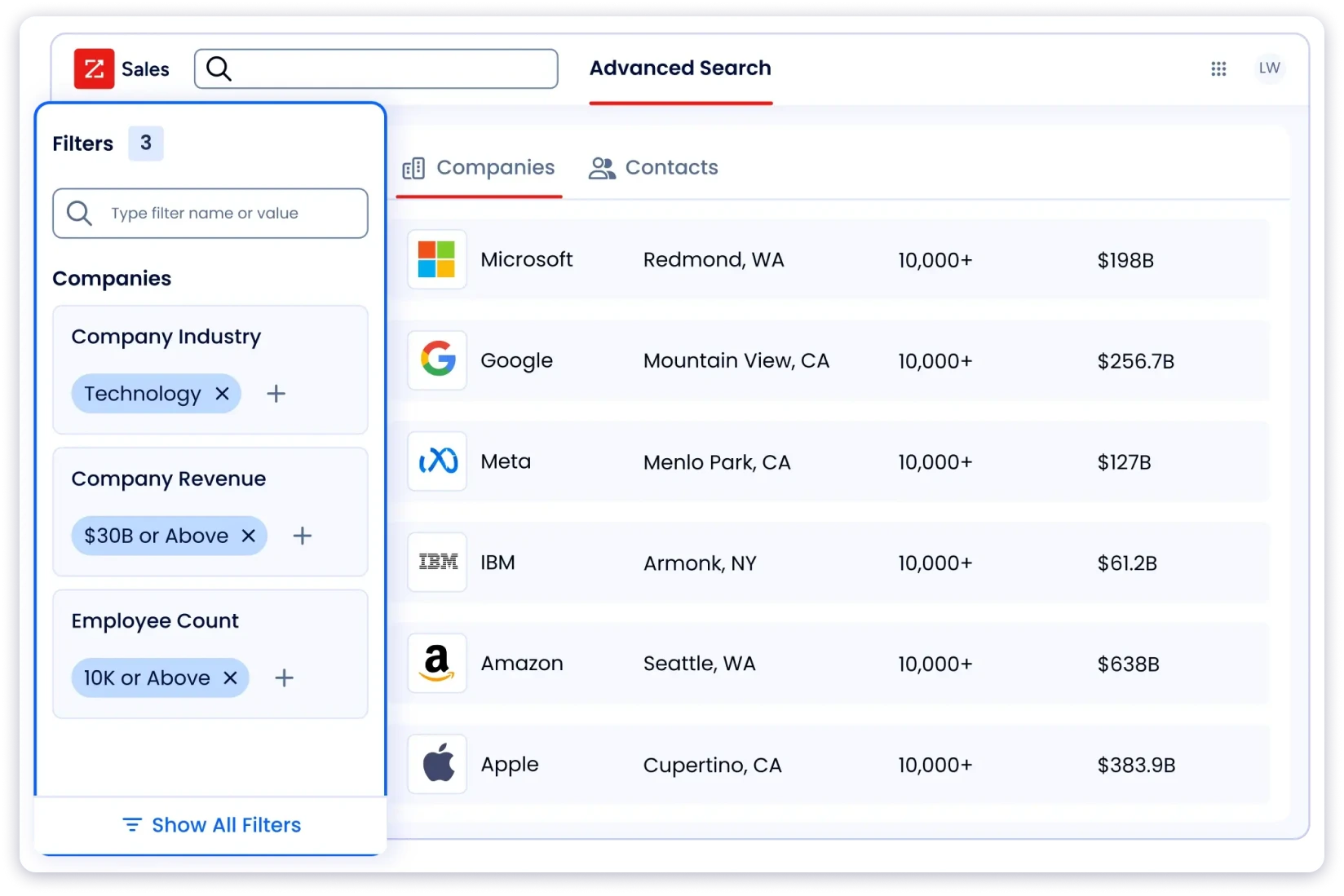
However, email accuracy varies, and many users still verify CIO contacts through external tools before sending. Intent data also gets flagged for false positives, where companies show as in-market when they’re not. If accuracy without the complexity is what you’re after, these ZoomInfo alternatives are worth a look.
Key Features
- Massive B2B database with broad CIO contact coverage.
- Intent data to find CIOs showing buying signals.
- Advanced filters for precise prospect targeting.
- Website visitor tracking for identifying interested accounts.
- Strong compliance support for GDPR, CCPA, and other regulations.
ZoomInfo Pricing
| Plan | Price |
|---|---|
| Enterprise | Custom Quote |
Pros
- It offers strong firmographic and technographic data depth across 16,000+ technologies.
- It provides powerful intent data for identifying in-market CIOs.
- It includes org charts and reporting structures for mapping the full IT buying committee.
- It offers website visitor identification for account-level targeting.
Cons
- Its accuracy can vary, and many users still need external verification.
- It has a complex interface with a steep learning curve.
- It does not offer a free trial to test data quality before committing.
What Users Have to Say?
“I find a significant portion of contacts have inaccurate information.
Whether it is an invalid or wrong phone number, an undeliverable email or even that the person has not been at the company for years prior, it can be a big hindrance when firing through a list pulled from Zoominfo.”
3. Cognism
⭐ Best for:
Teams prospecting European CIOs that need compliant data, intent signals, and verified mobile numbers.
Cognism is a sales intelligence platform with strong mobile number coverage for European markets. It lets you build targeted CIO email lists using firmographic, technographic, and intent filters, then export directly to your CRM.

The compliance-first approach also adds complexity if you just need a simple CIO list fast. It does not include email sequencing, a dialer, or outreach automation. You need a separate platform to send campaigns. If that is a dealbreaker, these Cognism alternatives offer outreach tools built in.
Key Features:
- Buying intent data identifies CIOs actively evaluating vendors.
- Integrations with CRM and other sales tools.
- GDPR and CCPA compliant with DNC checking across 15 countries.
- Phone-verified mobile numbers for CIO outreach.
Cognism Pricing
| Plan | Price |
|---|---|
| Annual Contracts | Custom Quote |
Pros
- It offers phone-verified mobile numbers with high connect rates through Diamond Data.
- It provides the strongest data coverage across EMEA, the UK, and DACH markets.
- It is fully GDPR-compliant with a documented sourcing methodology.
- It includes Bombora intent data and job change signals for timing CIO outreach.
Cons
- All plans require annual contracts with custom quotes.
- It does not include built-in email sequencing or outreach tools.
- Its US and APAC data coverage is weaker than its European data.
- Its platform fee plus per-seat model adds up fast for growing teams.
What Users Have to Say?
“The data is very poor.
We get a less than 50% success rate in terms of contacts having email addresses… It’s not really delivering close to what was promised.”
4. Apollo.io
⭐ Best for:
Small teams and SDRs that want to start building CIO email lists for free before committing to a paid tool.
Apollo gives you a 210M+ contact database with 65 search filters, built-in email sequences, a dialer, and CRM sync. For teams that cannot afford separate tools for data, outreach, and CRM, Apollo bundles all three.
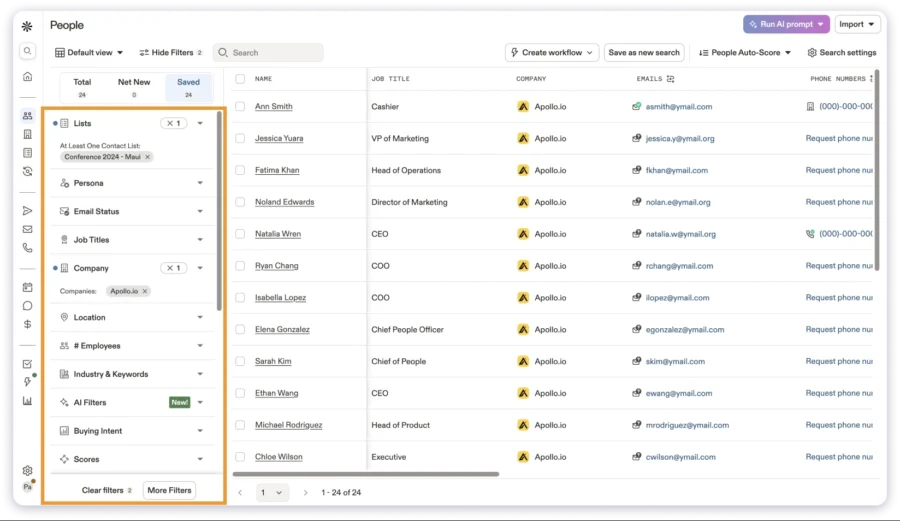
The free tier is genuinely usable. You get 50 email credits/month, basic filters, and a Chrome extension. Enough to test CIO outreach before committing budget. If data accuracy matters more than a free tier, these Apollo alternatives are worth comparing.
Key Features
- 210M+ contact database with 65+ search filters.
- Built-in email sequences with AI-assisted writing.
- Dialer with call recording for multi-touch CIO outreach.
- Chrome extension for LinkedIn prospecting.
- CRM sync with Salesforce, HubSpot, and other platforms.
Apollo Pricing
| Plan | Price |
|---|---|
| Free | $0 |
| Starter | $49/user/mo |
| Professional | $79/user/mo |
| Organization | $119/user/mo |
Pros
- It offers the most generous free plan for testing CIO outreach.
- It bundles data, sequences, dialer, and CRM in one platform.
- It provides 65+ filters for CIO targeting by industry, tech stack, and company size.
Cons
- Its bounce rates of 20-30% are reported by multiple G2 users.
- Its advanced filters and intent data are locked behind higher plans.
- Its interface can feel complex for teams that just need a CIO email list.
What Users Have to Say?
“Some contacts had outdated information,
which occasionally led to higher email bounce rates than expected.”
5. Lusha
⭐ Best for:
Small teams and reps sourcing CIO emails from LinkedIn who need quick contact reveals without enterprise pricing.
Lusha is a lightweight B2B data tool centered around its LinkedIn Chrome extension. Click on a CIO’s LinkedIn profile and Lusha reveals their verified email and phone number instantly.
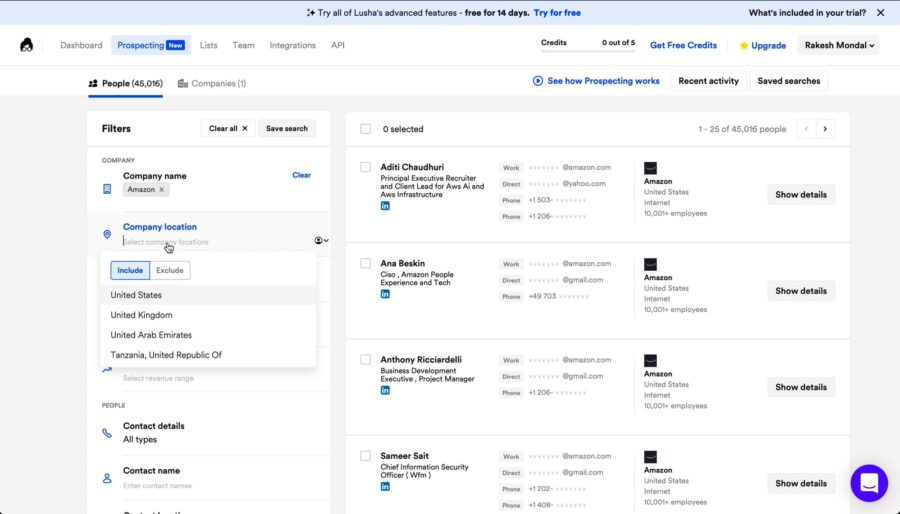
However, users frequently report outdated email addresses. Less suited for teams that need to build large CIO mailing lists in bulk. And credit-based pricing gets expensive fast if you’re building CIO lists in bulk.
If accuracy and database size matter more than LinkedIn lookups, compare other B2B data providers before deciding.
Key Features
- Chrome extension for instant contact reveal on LinkedIn profiles.
- 150M+ contact database with email and phone numbers.
- Bulk enrichment for processing CIO prospect lists.
- Behavioral tracking to see when CIOs show buying signals.
- GDPR and CCPA compliant.
Lusha Pricing
| Plan | Annual (per month) |
|---|---|
| Free | $0 |
| Pro | $22.45/user |
| Premium | $52.45/user |
| Scale | Custom |
Pros
- It offers a fast Chrome extension for instant CIO lookup on LinkedIn.
- It has an affordable entry point with a usable free plan.
- It is GDPR and CCPA compliant.
Cons
- Its database is smaller compared to Saleshandy, ZoomInfo, or Apollo.
- Its credit model gets expensive for phone numbers at 5 credits each.
- It offers limited filtering for building targeted CIO lists in bulk.
What Users Have to Say?
“Some of their data is ancient, over 10 years old.
They will not refund you for bad data… they sell you this platform, won’t refund bad data, and benefit off the fact that users are cleaning the data for them — paying monthly membership to do so.”
6. UpLead
⭐ Best for:
Teams prioritizing accuracy guarantees and tech stack targeting over raw database size.
UpLead is a B2B contact database that contains over 155 million contacts and offers one of the most comprehensive sets of technographic filters available.
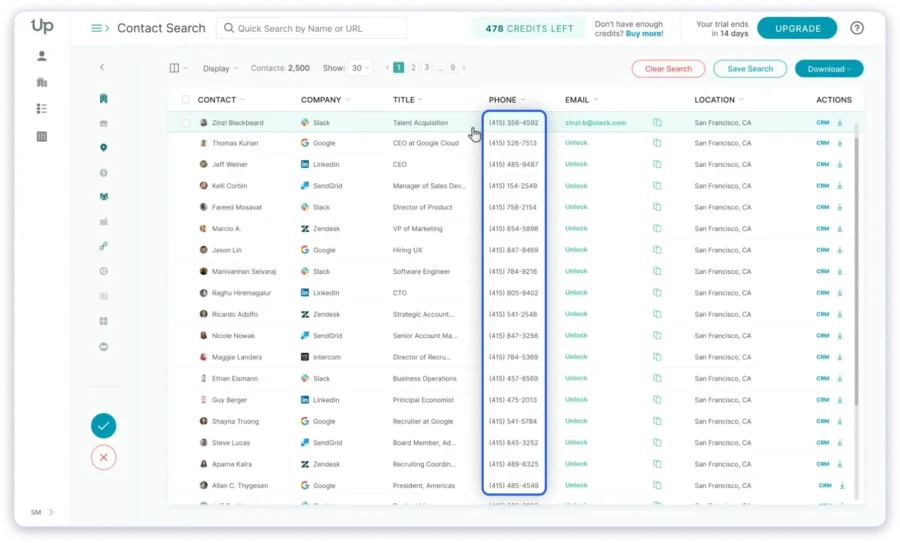
For teams selling displacement or migration solutions to IT decision makers email list, this filtering capability makes the subscription worthwhile.
While the size of the database is smaller compared to enterprise providers, it’s important to note that pricing can be high for users with large volumes of contacts.
Key Features
- 155M+ contacts with 95% email accuracy guarantee.
- Real-time email verification before export.
- Technographic search across 16,000+ technologies.
- 50+ search filters, including company size, revenue, and industry.
- Credit-back refund on any email that bounces.
- CRM integrations: Salesforce, HubSpot, Zoho, Pipedrive, Outreach.
UpLead Pricing
| Plan | Price |
|---|---|
| Free Trial | $0 |
| Essentials | $99/mo |
| Plus | $199/mo |
| Professional | Custom |
Pros
- It refunds credits for any email that bounces.
- It offers a strong tech stack targeting across 16,000+ technologies.
- It has a simple, easy-to-use interface with no learning curve.
Cons
- Its lower plans offer low credit counts at 170/mo on Essentials.
- Its intent data is locked behind the Professional plan.
- It does not include built-in outreach or sequencing tools.
What Users Have to Say?
“The number of verified emails exporting is a fraction of the total in the list…
half the list doesn’t export [as verified].”
7. ListKit
⭐ Best for:
Outbound teams that want intent-driven CIO prospecting with triple-verified data and private email infrastructure.
ListKit offers 731M+ contacts with triple-verified email and phone data. The platform includes intent data filters that identify CIOs actively researching specific technologies like cloud infrastructure, cybersecurity, or ERP systems.
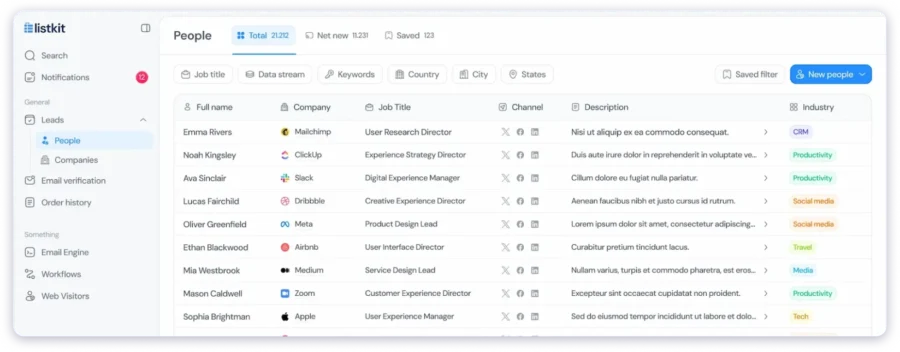
It also includes private cold email infrastructure with dedicated IPs on higher plans, which most tools on this list charge separately for. However, contact data may be outdated despite verification claims, and bounce rates can still be a concern.
Key Features
- 731M+ contacts with triple-verified email and phone data.
- Intent data filters to find CIOs actively researching solutions.
- Private cold email infrastructure with dedicated IPs.
- Unlimited exports on higher plans.
- CRM integrations with HubSpot, Salesforce, and Pipedrive.
ListKit Pricing
| Plan | Price |
|---|---|
| Standard | $97/mo |
| Pro | $197/mo |
| Enterprise | $397/mo |
Pros
- It offers three layers of verification before delivering the contact.
- It includes intent filters for CIO targeting by technology interest.
- It provides dedicated IP infrastructure for email deliverability.
Cons
- Its data freshness doesn’t hold up in real-world tests despite triple verification.
- Its intent data is US-only and costs extra credits per signal.
- Its CRM sync has reported failures across Pipedrive and Salesforce.
- It has no independent accuracy benchmarks available.
What Users Have to Say?
“Disappointing service, we sent 30,000 emails and only got 4 non-negative responses, with just 2 being real.
None converted. This is orders of magnitude worse than the 3% positive reply rate industry standard.”
8. RocketReach
⭐ Best for:
Quick, one-off CIO email lookups and bulk contact searches when you already know which companies to target.
RocketReach maintains a database of 700M+ profiles with both email and social media contact discovery. It is a contact lookup tool, not a sales intelligence platform. Good for one-off CIO email searches. Less suited for building targeted CIO mailing lists at scale.
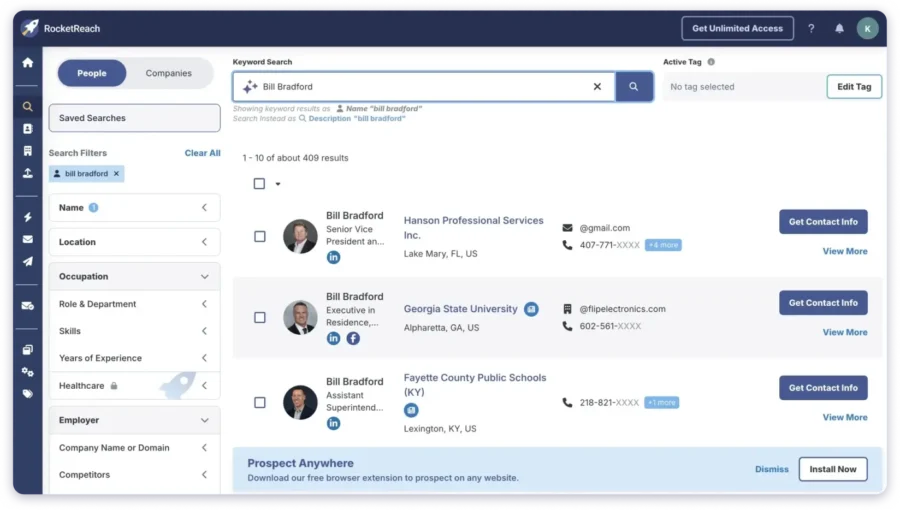
However, data accuracy varies by region. There is no real-time verification layer, so bounced emails are common. International coverage is limited compared to specialized providers. No intent data, no tech stack filters, and no buying signals on lower plans.
Key Features
- 700M+ profiles with email and social media data.
- Bulk lookup for processing large CIO prospect lists.
- Chrome extension for contact discovery on LinkedIn and company websites.
- API access for custom workflows on higher plans.
- Integrations with Salesforce, HubSpot, and Zapier.
RocketReach Pricing
| Plan | Price |
|---|---|
| Essentials | $39/mo |
| Pro | $99/mo |
| Ultimate | $249/mo |
Pros
- It offers bulk lookup for processing large CIO prospect lists quickly.
- It provides social media profiles alongside email for multi-channel touchpoints.
Cons
- It has no real-time verification layer, so bounced emails are common.
- It does not offer intent data or buying signals.
- Its filtering does not go beyond basic title and industry.
- Its data accuracy drops significantly outside the US.
What Users Have to Say?
“Useful for Finding Hard-to-Find Emails, But Could Be More Accurate.
Not all emails are verified or current…some bounce or go to the wrong people.”
9. Kaspr
⭐ Best for:
Individual SDRs and recruiters prospecting on LinkedIn who need a lightweight Chrome extension for CIO contact extraction.
Kaspr is a LinkedIn prospecting tool owned by Cognism. Its Chrome extension retrieves CIO emails and phone numbers directly from LinkedIn profiles, Sales Navigator, and Recruiter Lite.

It does not have a standalone database or sales intelligence platform. Prospecting is limited to contacts visible on LinkedIn. This means CIOs who aren’t active on the platform won’t show up.
If you need CIO data beyond what LinkedIn profiles show, a dedicated LinkedIn email finder with a standalone database will give you more coverage.
Key Features
- Chrome extension for LinkedIn, Sales Navigator, and Recruiter Lite.
- Extract emails and phone numbers from LinkedIn profiles, groups, and events.
- Bulk export from LinkedIn lists.
- LinkedIn automation: connection requests, messages, and follow-ups.
- GDPR and CCPA-aligned data.
Kaspr Pricing
| Plan | Price |
|---|---|
| Free | $0 |
| Starter | $49/user/mo |
| Business | $79/user/mo |
| Organization | $99/user/mo |
Pros
- It pulls CIO data directly from LinkedIn without switching tabs.
- Its free plan is enough to test data quality before paying.
- It supports bulk export from LinkedIn lists, groups, and events.
- It is GDPR and CCPA-aligned.
Cons
- It has no standalone database.
- It misses CIOs who aren’t active on LinkedIn.
- It offers no intent data, no tech stack filters, and no revenue filters.
- It is owned by Cognism with limited independent development.
- It is not built for bulk CIO list building at scale.
What Users Have to Say?
“I even used Kaspr for job hunting… and it worked!
Sometimes, the e-mails are not verified, and most of them have bounced, at least in México.”
How to Choose the Best CIO Email List Provider in 2026
Choosing a CIO email list provider in 2026 is about who gives you accurate, compliant, and decision-maker-grade data that actually replies.
CIOs are senior IT decision-makers. They get flooded with vendor outreach daily, so even small data issues (wrong title, outdated email, generic domain addresses) can kill your campaign before it starts.
That’s why email list provider selection matters the most.
Here’s a clean, practical framework to help you choose the right one.
1. Start with data accuracy, not database size
A big list is useless if half the emails bounce.
Look for providers that clearly explain:
- How they verify CIO emails
- Whether data is updated in real time or in batches
- Bounce rate guarantees (aim for <3%)
Some modern providers even use multi-step verification (format + domain + mailbox checks) to improve accuracy before export.
If they can’t explain verification clearly, that’s a red flag.
2. Check if the data is actually “CIO-level” filtered
Many vendors say “CIO list,” but it’s often mixed IT roles like:
- IT Managers
- Directors
- VP IT
- System admins
You want true decision-makers. A good provider should allow filtering by:
- Job title (strict CIO-only segmentation)
- Company size (enterprise vs mid-market)
- Industry (healthcare, finance, SaaS, etc.)
- Geography
This matters because CIO outreach only works when targeting real budget holders, not adjacent roles.
3. Look for intent signals (this is a 2026 must-have)
Static lists are outdated. Better providers now include:
- Buying intent data (who is researching tech solutions)
- Website activity tracking
- Technographic data (what tools companies use)
This helps you reach CIOs who are actually in a “buying mindset,” not just random contacts.
4. Ask how often the database is refreshed
CIO data decays fast due to:
- Job changes
- Company restructuring
- Mergers and layoffs
A strong provider should refresh data frequently (weekly or continuously), not quarterly dumps.
As a rule of thumb, stale databases can lose a big chunk of accuracy within a year if not updated regularly.
5. Compliance is not optional anymore
In 2026, ignoring compliance is risky.
Check for:
- GDPR compliance (especially for EU data)
- CAN-SPAM adherence
- Data sourcing transparency
If they’re vague about how data is collected, avoid them.
6. Test before you commit (non-negotiable)
Never buy a full list upfront.
Good providers will offer:
- Free sample records
- Trial exports
- Small test batches
Then you should check:
- Bounce rate
- Accuracy of CIO titles
- Responsiveness (even a small sample test campaign helps)
7. Evaluate integration with your workflow
A good CIO list provider should plug into your stack:
- CRM (Salesforce, HubSpot)
- Email tools (Outreach, Apollo, Saleshandy-style platforms)
- Enrichment tools
If you need manual CSV cleaning every time, it will slow down your entire pipeline.
8. Be cautious of “cheap bulk lists”
If a provider promises:
- “10M CIO emails instantly”
- Extremely low pricing
- No verification explanation
It usually means:
- Old scraped data
- High bounce rates
- Spam complaints waiting to happen
This doesn’t just waste money; it damages your sending domain.
Start Building Verified CIO Email Lists Today
Let me be direct. There are 9 providers on this list. Each one solves a different problem. But if I had to pick one that covers the most ground, it would be Saleshandy Lead Finder.
Here is why:
- Largest database at 852M+ contacts across 60M+ companies.
- Real-time waterfall enrichment across 9 verified data providers.
- 70+ targeting filters beyond basic title and industry search.
- Credits are charged only for verified contacts.
Whether you are prospecting US healthcare CIOs or European fintech CIOs, start with up to 50 FREE credits and let the data speak for itself.
Also read: 9 Best CTO Email List Tools in 2026 (Tested & Ranked).
Frequently Asked Questions
1. What Is a CIO Email List?
A database of verified contact details for Chief Information Officers, including business emails, phone numbers, job titles, and company data. Sales teams use CIO email lists to reach the IT decision-makers who control technology budgets and approve vendor purchases. Providers like Saleshandy, ZoomInfo, and Cognism let you build these lists filtered to your exact ICP.
2. Where Can I Find CIO Email Addresses for Free?
Saleshandy offers 50 free credits on signup with no credit card required. You can search for CIOs using 75+ filters, verify emails in real time, and test data quality before paying. If you want to find CIO emails from LinkedIn profiles, you can use a LinkedIn email finder for that.
3. Is It Legal to Buy a CIO Contact List?
Yes. The US allows cold B2B email under CAN-SPAM with an opt-out. Europe requires GDPR legitimate interest. Canada follows CASL. Always confirm your provider offers a Data Processing Agreement.
4. How Much Does a CIO Email List Cost?
Credit-based tools like Saleshandy ($34/mo) and UpLead ($99/mo) charge per verified contact. Enterprise platforms like ZoomInfo and Cognism run on custom pricing. Static list brokers charge $200-$5,000 for a CSV with no accuracy guarantee.
5. How Do I Get a Hospital CIO Email List?
Set industry to Healthcare, job title to CIO or IT Director, and location to US in a real-time lead finder like Saleshandy or ZoomInfo. That gives you a live hospital CIO email list verified at export, not a static hospital CIO mailing list from months ago. The same filters work for a hospital IT director’s email list. You can also find phone numbers for hospital IT leadership.
6. How Often Does CIO Contact Data Go Stale?
B2B data decays roughly 30% per year. CIO contacts decay faster due to shorter tenures. Real-time providers like Saleshandy verify at the point of export, so data is current every time you pull a list. Static lists should be re-verified at least quarterly.

 Anil Salvi