Dhruv Patel
 Contents
- 1 Outbound Sales Automation – TOC
- 2 What Is Outbound Sales Automation?
- 3 Outbound Sales Automation Processes That You Can Set Up Now
- 3.1 1. AI-Powered Prospect Research & List Building
- 3.2 2. Lead Enrichment, Validation & Data Cleaning Using AI
- 3.3 3. Intent Detection & AI-Based Lead Scoring
- 3.4 4. Automate Cold Email Outreach & Follow-Ups
- 3.5 5. Multi-Channel Outreach Automation
- 3.6 6. Smart Meeting Scheduling
- 3.7 7. AI-Led CRM Updates & Data Syncing
- 3.8 8. Analytics, Reporting & Optimization
- 4 Best Practices for Outbound Sales Automation
- 5 Choose the Right Approach to Outbound Sales Automation
- 6 Outbound Sales Automation: FAQs
Most outbound teams do not have a sales problem.
They have a workflow problem.
Your team spends hours finding leads, updating spreadsheets,
verifying emails, copying CRMs, sending manual follow-ups…
By the time they actually get to selling, the day is already gone.
That’s exactly why Henry Ford said:
“Man minus the Machine is a slave;
Man plus the Machine is a freeman.”
And in outbound sales, this can not be more true.
Without automation, your team is doing admin work disguised as outreach.
Once you set up outbound sales automation,
every rep suddenly becomes 3–4x more productive, and they will:
- Contact more prospects
- Get more meetings booked
- Close more deals
- Save time from doing repetitive tasks
However, You can not automate outbound overnight.
Choosing the wrong tools will break your pipeline instead of scaling.
So in this guide, I will show you the right way to automate outbound sales.
I will show you the right step, workflows, tools, and AI systems that actually work in 2026.
Outbound Sales Automation – TOC
What Is Outbound Sales Automation?
Outbound sales automation is the process of using tools and technology to automate repetitive and manual tasks.
This helps in improving the sales team’s overall productivity.
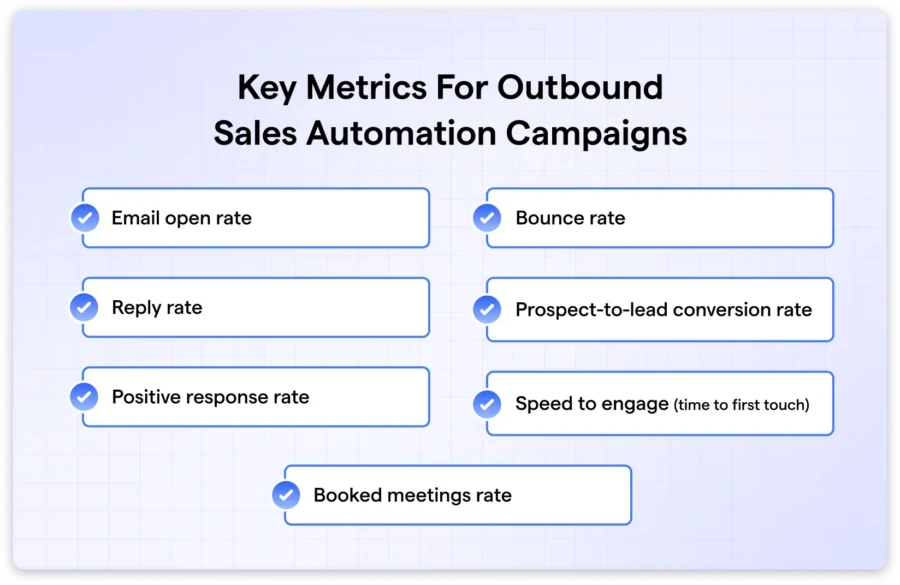
Thus, your sales team will be able to focus on scaling and important tasks like:
Relationship building, booking meetings, and closing deals.
Why Should You Automate Your Outbound Sales Process? (Benefits of Outbound Sales Automation)
- It saves time by automating repetitive tasks.
- Keeps outreach consistent with automated follow-ups.
- Helps to scale productivity.
- Get actionable insights with analytics and reporting.
- Improve conversions with smarter, personalized messaging.
Outbound Sales Automation Processes That You Can Set Up Now
Outbound sales is not a single action.
It is a workflow created by many moving parts working together.
This includes tasks like finding prospects, sending emails, to following ups.
Each step depends on the one before it.
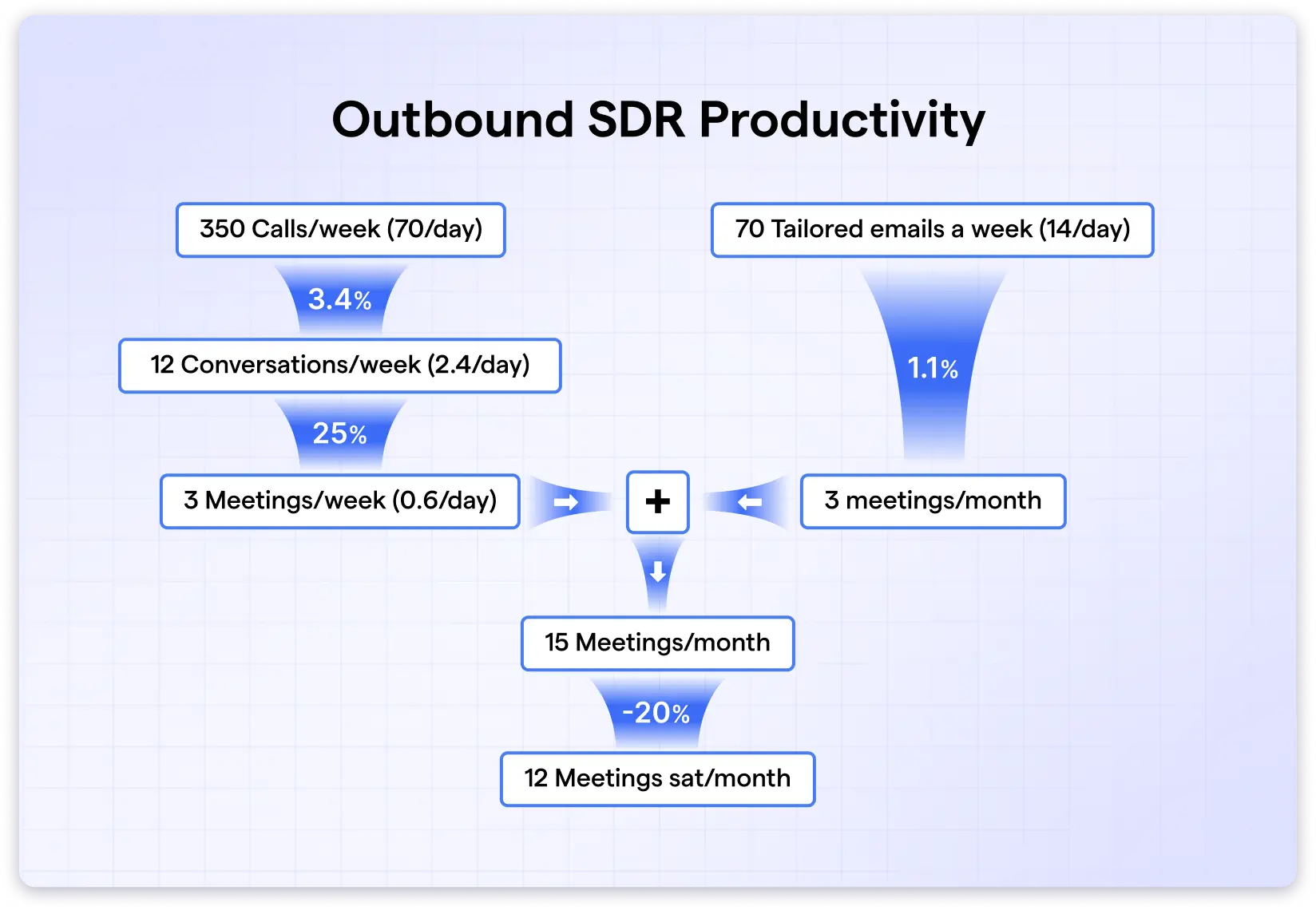
This helps you choose the right tools based on your actual requirements.
Many modern outbound tools now use AI to make this process even more efficient.
As AI can learn from your activity, adjust in real time, and fix gaps you might not even notice manually.
Over the years, I have tested many tools, and below you will find all the processes I follow and the tools I use:
- AI-Powered Prospect Research & List Building
- Lead Enrichment, Validation & Data Cleaning Using AI
- Intent Detection & AI-Based Lead Scoring
- Automate Cold Email Outreach & Follow-Ups
- Multi-Channel Outreach Automation
- Smart Meeting Scheduling
- AI-Led CRM Updates & Data Syncing
- Analytics, Reporting & Optimization
1. AI-Powered Prospect Research & List Building
Tools Used: Saleshandy Lead Finder, Saleshandy Connect
The first step in outbound sales is collecting accurate prospect data.
But before you start searching for leads, make sure to define your Ideal Customer Profile (ICP) and have a clear idea about your Buyer Persona.
Basically, your ICP helps you understand which type of company you should target.
And your buyer persona represents the decision maker working inside that company.
Knowing this will help you with your outbound sales automation while in your B2B sales lead list building process and give you high-quality leads.
Now to find leads, I mainly use the following tools:
- Saleshandy Lead Finder: to search and filter leads at scale.
- Saleshandy Connect Chrome extension: to extract contact details directly from LinkedIn.
How to Find Prospects Using Saleshandy AI Lead Finder
To find prospects inside Lead Finder, follow these steps:
- Log in to your Saleshandy account.
- Choose Lead Finder from the sidebar.
- Now, choose a search method:
- Use a prompt for AI Lead Finder.
- Set advanced filters manually.
With both methods, you will be able to easily find prospects.

Among these, my favorite is the AI Lead Finder, as I just need to type in my prompt:
“Marketing managers in mid-SaaS companies with 50-200 employees in the U.S.”
The tool then automatically sets all the relevant filters for me.
Saleshandy Lead Finder has a database of more than 700M+ contacts from 60M+ companies with an impressive 98% accuracy.
You can reveal up to 10,000 leads at once, which saves hours of manual filtering.
The data is also compliant with GDPR and SOC 2, so you can use it safely for outreach.
Now, if you want other options, then I’ve tested and prepared a list of the best B2B lead finders.
How to Find Prospects Using Saleshandy Connect Extension
If you spend time prospecting on LinkedIn, then the Chrome extension is very useful.
Here is how to use the Saleshandy Connect extension:
- Open the LinkedIn profile of the person you want the data for.
- Launch the Saleshandy Connect extension.
- Reveal their verified email and phone number.

Both Lead Finder and the Connect extension let you import contacts directly into Saleshandy’s cold outreach platform and start running your campaigns easily.
Also read: Best LinkedIn Email Finder Tools
2. Lead Enrichment, Validation & Data Cleaning Using AI
Tools Used: Saleshandy email verifier, Apollo
Once you have your lead list, the next step is to improve the quality of the data.
This is where enrichment, validation, and data cleaning come in.
None of these are a one-time process, as you need to run them at regular intervals.
Lead Enrichment
Lead enrichment adds more useful information over the basic data (name, email, phone number) about your prospects.
Usually, with lead enrichment, data added includes:
- Firmographic details like company size or industry
- Technographic details like the tools they use
- Job titles, seniority, work history
- Location and social profiles
- Buying intent or activity information
With the help of enrichment, the sales teams can prospect better, personalize messaging, and qualify leads more accurately.
There are many data enrichment tools in the market that can help you with the same.
One such tool is Apollo, which lets you automate data enrichment by CRM integrations, CSV uploads, and even API connections.
Another popular tool is Saleshandy, which has the AI Prospect Enrichment.
With this, you can use an AI model of your choice to create hyper-personalized cold emails.
Lead Validation
After enrichment, you need to validate the data.
Here, you will be mainly checking if the emails and phone numbers are active and deliverable.
Because of this, your outbound campaigns will not face issues like bounces.
Thus, it protects the domain reputation along with the time spent on incorrect or fake leads.
Right now, there are many email verification tools on the market.
But if you want a fast and easy solution, then Saleshandy Email Verifier is pretty useful.
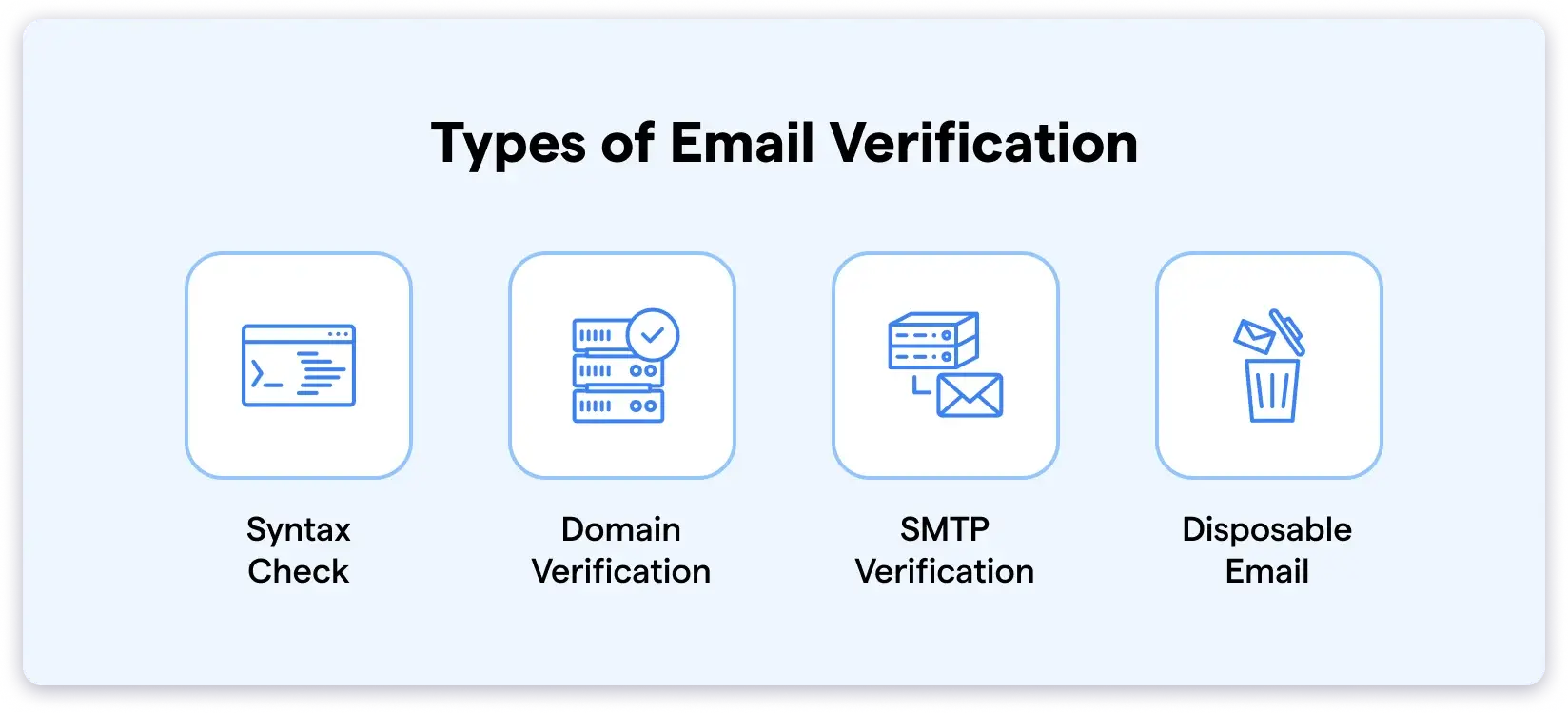
You can just upload your CSV file to it, and it will help you verify the contacts.
This is also a built-in feature with the Saleshandy software, where you can reverify your contacts before starting your campaigns.
Data Cleaning
With Data cleaning, you are removing data types from your list that are :
- Incorrect
- Duplicate
- Outdated
Clean data helps with segmentation, reduces workflow errors, and keeps your automated outbound sales campaigns running smoothly.
Although data cleaning often happens during validation, you should still check your CRM regularly.
Tools like Apollo has Data Health Center to keep your CRM updated by showing outdated contacts and letting you replace or remove them.
All you have to do is connect your CRM with it, and you will get updated about the outdated contacts and the option to remove them.
3. Intent Detection & AI-Based Lead Scoring
Tool Used: HubSpot
Now you have valid contacts.
Before automating your outreach, you need to know who deserves your attention first.
This is where intent detection and lead scoring help.
Intent detection helps you know who is showing interest in your brand/solution right now.
It is done by tracking their actions, like:
- Opening your email
- Clicking a link
- Visiting your website
- Downloading resources.
Using these actions, you will be able to understand whether they are actually looking for a solution like yours.
For example, if someone keeps opening your emails, visits your pricing page, or clicks your case study link, that is a clear sign of intent.
Lead scoring then ranks these prospects based on how important they are.
The higher the score, the more likely they are to match your ICP and be ready for outreach.
Once they reach a certain score, you know it is the right time to contact them or move them to the next step.
And you can automate both of these processes.
Here, I am using HubSpot CRM.
I make my lead list using Saleshandy Lead Finder and verified it with the built-in email verifier, I integrated it with HubSpot.
After that, to enable lead scoring, I:
- Log in to HubSpot
- Go to Settings (gear icon on the top)
- From here, choose properties from the sidebar
- Make sure to select Contact properties from the dialogue box next to select an object.
- Select the business unit, group, and give it a label.
- Click Next, and from the next dialogue box (Fuel type) select score.
- Now, click Build score.
- On the next page, you need to choose the positive and negative score criteria.
HubSpot allows up to 100 of them. - Once you are done, hit Create the scores.
Next, to automate actions based on lead scores:
- Choose Automations from the sidebar and choose workflows.
- Select Create a workflow.
- Click Contact based and click Next.
- From here, choose Set up triggers and select “When filter criteria is met.”
- Choose contact properties and select the one you created.
- Select the criteria to be notified (I usually select Is greater than or equal to), set the value to 100, and click Save.
From here, you can select who you wanna be notified wherever a lead qualifies.
Note: Even after setting this up, make sure to revalue the criteria once in a while.
This is just one of many workflow automations HubSpot offers.
You can create your own based on your needs or use their ready-made templates.
And if you are not using HubSpot, there are plenty of other tools that offer lead scoring as well.
4. Automate Cold Email Outreach & Follow-Ups
Tool Used: Saleshandy Cold Emailing tool
Cold email outreach is one of the easiest parts of outbound sales to automate.
But you need to set up the automation the right way to bring in conversions.
This ensures timely and relevant communication with prospects without having to manually track every interaction.
While there are many cold email tools in the market, I would always recommend Saleshandy.
As it is a great tool for almost all types of teams, whether their requirements are small or large.
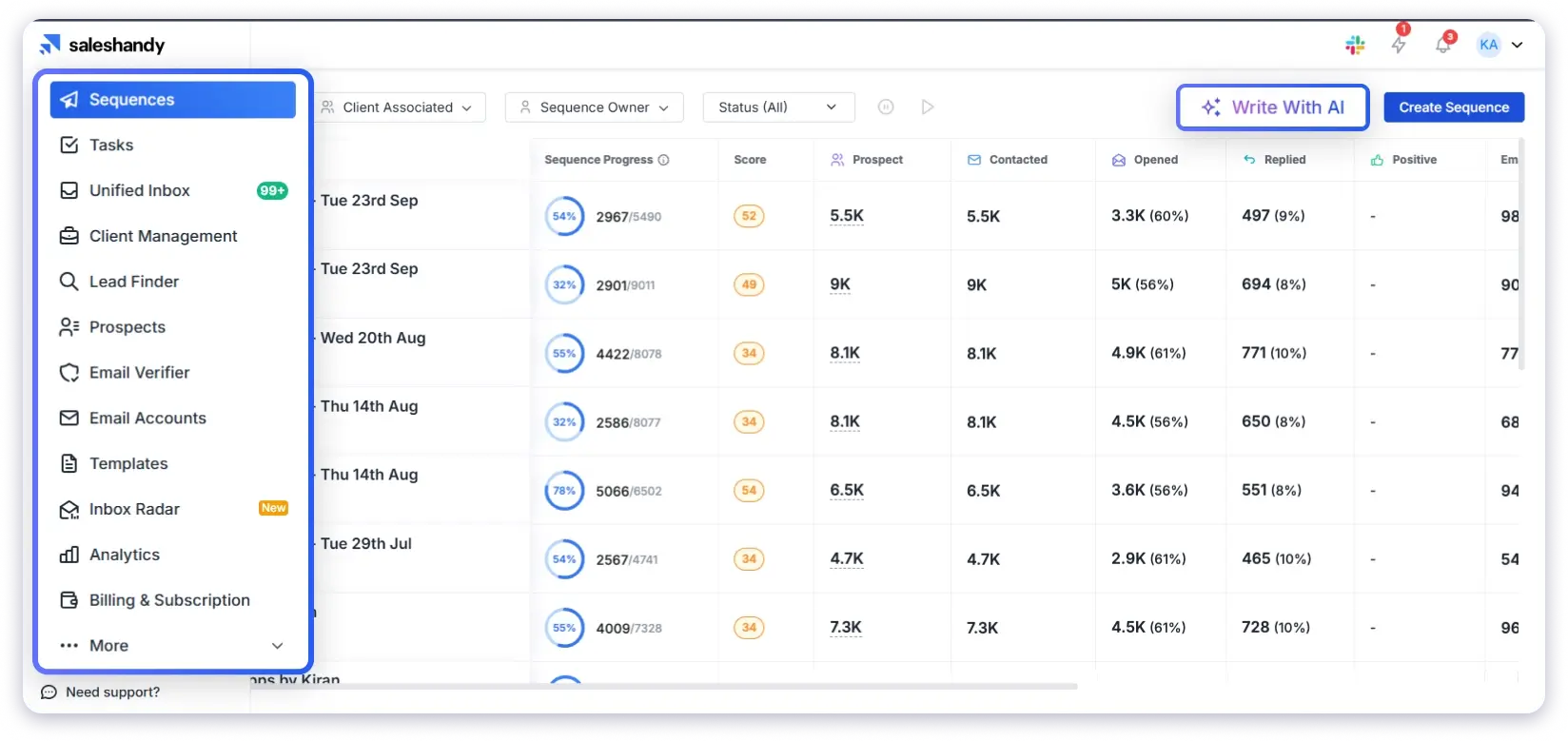
With Saleshandy, you can:
- Connect unlimited email accounts
- Set automated multi-step follow-ups
- Get detailed analytics for every campaign
The price is very pocket-friendly, and you are also not required to pay per user.
Their deliverability features, such as:
- Email warmup
- Email infrastructure
- Inbox placement tools
And many other such useful features ensure your email reaches the inbox and your domain authority remains strong.
You can easily find leads and use the AI Lead enrichment to send personalized outreach messages.
Setting up campaigns is also simple with the AI Sequence Co-pilot.
You choose what you want to achieve, and the AI helps you build the entire sequence.
And if you prefer the manual approach, you can set up everything yourself as well.
I also A/B test my emails inside Saleshandy’s A/Z testing and optimize my campaigns based on the results.
5. Multi-Channel Outreach Automation
Tools Used: Saleshandy, Ringover, LinkedIn Sales Navigator
Your prospects are busy, and hence, reaching them through only one channel is not the best idea now.
That is why multi-channel outreach is important.
I use Saleshandy to run my multichannel campaigns, where I also have the option to automate cold email campaigns.
If you want to turn fully automated multi-channel sequences, you can consider Klenty.
As it supports almost all channels, including LinkedIn tasks and WhatsApp touches.
For cold calling automation, Ringover is a good option to consider.
It comes with useful features like:
- Auto-dialers
- Call recording
- Call logging
These features help me review calls, understand what went well, and make improvements for the next outreach.
Ringover also offers unlimited calls to 110+ destinations, voicemail drops, and custom greetings.
And there are useful features like dual listening and AI conversation analysis (transcription + sentiment insights).
Both of which help with coaching and quality checks.
And if you are serious about LinkedIn outreach, then LinkedIn Sales Navigator is still the best option.
You can find prospects, build lead lists, and track their activity easily.
6. Smart Meeting Scheduling
Tool Used: Calendly
The main goal of most cold outreach campaigns is simple: to book meetings.
It is easy to handle one or two meetings.
But things can get really messy once it reaches 50, 80, or even 100.
You will face issues like:
- Constant back-and-forth to find a suitable time.
- Messing with the plans by rescheduling.
- Forgetting to send reminders.
And suddenly, you are spending more time coordinating than selling.
Going with a meeting booking tool will let you automate all of this, and your focus will be on running a great meeting.
I mainly use Calendly to handle all the meeting scheduling.
It lets me and my prospects pick a time that both of us can agree upon.
And everything syncs directly with your calendar (including Google, Outlook, or other popular ones).
When it is time for the meeting, Calendly can send automated emails for confirmation, reminder, and even options for rescheduling.
All of this saves me and my team hours! And we can use that time to focus on closing deals.
7. AI-Led CRM Updates & Data Syncing
Tools Used: HubSpot CRM, Pipedrive CRM
Choosing the right CRM tool is very important as this is where your pipeline is managed properly.
While you can always enter details into your CRM manually, they are mainly meant for automation.
Many CRMs let you integrate your tools to make sure the data is synced automatically.
You will be able to automate lead status updates based on specific triggers.
Eg: Set a trigger when a lead books a demo or replies to an email.
Automating CRM updates helps to improve your team’s efficiency.
It helps keep your data accurate and organized without wasting your time.
Above all, it is important to maintain a sales pipeline that allows you to send follow-ups in a timely manner and have up-to-date information.
I use HubSpot CRM in my workflow as it easily integrates with my tools
It was also helpful for me in tracking real-time emails, calls, and website activities.
8. Analytics, Reporting & Optimization
Tools Used: Saleshandy, HubSpot CRM, & Google Data Studio
Automation is never a “set it once and forget it” system.
At least not when it comes to outbound sales.
I always check my campaigns regularly to see how they are performing.
For some campaigns, it is once a month, and for new campaigns, it will be once or twice a week.
This helps me catch issues early and make improvements – making my outreach get better over time.
For my cold outreach analytics, I mainly use Saleshandy, as it gives me a clear picture of how each sequence is performing.
From the Unified Inbox, I can already see sequence scores.
And whenever I need more details, I open the Analytics tab, where I get detailed information about:
- Open, reply, unsubscribe, and bounce rates
- Number of positive and negative replies
- Sending account performance
The tools make it easy for me to see which emails perform well, which steps drop engagement, and what needs to be changed in the next iteration.
Furthermore, there is Inbox Radar by Saleshandy, which makes it easy to see where my emails land even before starting any campaigns.

I also use their A/Z testing tool, which helps me compare variations of email copies.
Get Detailed Reports Using CRMs
You will get detailed insights about your lead pipelines if you have integrated your tools with CRMs.
With that, you will be able to see:
- How many leads move through the pipeline
- Where they drop off
- Which outreach steps actually drive conversions
Another helpful feature inside HubSpot is automation triggers.
For example, you can set rules like:
“If the reply rate goes below 3%, pause the sequence.”
Or
“If a lead replies positively, move them to the next stage automatically.”
All of this saves time and keeps your campaigns running smoothly without manual checks.
Get Detailed Reports Using Google Looker Studio
I use Google Looker Studio to see my data in clean dashboards and to prepare visual reports.
It is also free!
You can turn the information into simple charts and tables.
The data can be pulled from:
- CRMs
- Spreadsheets
- Ad platforms
- Analytical tools
Looker Studio allows you to track KPIs like conversion rates, engagement, and lead acquisition in real time.
It is also easy to share dashboards with your team so everyone stays aligned and data-driven.
And all of this directly helps with personalization.
By analyzing which emails, I update my messages and create more relevant outreach for every segment.
Best Practices for Outbound Sales Automation
- Signal-Led Triggers: Automate outreach based on real-time events (job changes, funding rounds, etc).
- Domain Reputation Safety: Use secondary domains and warm-up tools to protect your primary domain from spam filters.
- Use Multi-Channel: Make sequences that touch across LinkedIn, email, and phone to increase touchpoint frequency.
- AI-Driven Personalization: Use features like AI Prospect Enrichment to dynamically inject specific references to a prospect’s or company’s activities into your templates.
- Strict Deliverability Standards: Maintain bounce back rates below 2%.
- Behavioral Branching: Program your CRM to automatically change a lead’s sequence path based on whether they click a link, open an attachment, or visit your pricing page.
- Reply Classification: Deploy AI to filter out “out of office” or “not interested” responses so reps only spend time on high-intent, positive replies.
- Lean Copywriting: Keep automated messages under 150 words with a single, clear “low-friction” Call to Action (CTA).
- Continuous A/B Testing: Iteratively test subject lines and sending windows weekly to adapt to changing inbox algorithms and prospect behavior.
Choose the Right Approach to Outbound Sales Automation
Automating your outbound sales process can make a huge difference in your business.
Rather than focusing your skilled teams’ time on manual and repetitive tasks, they will be focused on building relations and closing deals.
But to make your automations go well, you need to choose the right tools.
With this guide, I have made sure to explain each of the processes that you can automate in an outbound sales process.
Regardless, before investing in any tools, make sure to take a free trial.
This helps to see if it matches your requirements and if it can smoothly go with your workflow.
Outbound Sales Automation: FAQs
1. How often should I update my outbound sales sequences or templates?
It’s good to update your templates every few months. If a campaign didn’t do well, adjust your approach based on what you learned. Also, whenever your product or service changes, make sure your emails reflect that. Small updates keep your outreach fresh and compelling.
2. What is the future of outbound sales automation?
You will be able to see a huge influence of AI in Outbound sales automation. With this:
- Your messages can be hyper-personalized.
- Multi-channel workflows will get smarter.
- Tools will predict intent in real time.
- Campaigns will optimize themselves.
Overall, automation will further improve the efficiency of your sales team to help them scale better.
3. How do I ensure my outreach is not in the spam folder?
To avoid spam filter and reach the inbox, make sure to:
- Warm up your email accounts
- Use professional email addresses
- Avoid spammy words
- Personalize your emails.
- Set up email authentication
Also, keep track of your analytics, and if you see any issues, pause your campaigns and fix them.
4. How can I measure the ROI of my outbound sales automation efforts?
You can track the cost per lead (CPL), customer acquisition cost (CAC) by looking at your analytics. Apart from that, many tools will help you understand how much revenue is generated from each client and even know the specific cost incurred for them.