 Anil Salvi
 Contents
- 1 Data Enrichment Tools – TOC
- 2 What to Look for in a Data Enrichment Tool
- 3 Quick Comparison: 10 Best Data Enrichment Tools (2026)
- 4 10 Best Data Enrichment Tools for B2B Sales (Tested and Reviewed)
- 5 How to Choose the Right Data Enrichment Tool
- 5.1 Step 1: Get Clear on Your Target Market First
- 5.2 Step 2: Audit What is Actually Missing from Your Current Data
- 5.3 Step 3: Pick the Enrichment Method That Fits Your Workflow
- 5.4 Step 4: Understand How Credits Work Before You Commit
- 5.5 Step 5: Decide Whether You Need Outreach Built In
- 5.6 Step 6: Test Your Actual ICP Before You Pay for Anything
- 6 So, Which is the Best Data Enrichment Tool?
- 7 Frequently Asked Questions
- 7.1 1. What is data enrichment?
- 7.2 2. What is waterfall enrichment, and how does it work?
- 7.3 3. Which data enrichment tool is best for cold email outreach?
- 7.4 4. Which data enrichment tools offer a free trial?
- 7.5 5. How is AI prospect enrichment different from regular data enrichment?
- 7.6 6. How quickly does B2B contact data go stale?
Most prospect lists start with the same problem: a name, a company name, maybe a domain. That’s it.
Without verified emails, direct phone numbers, job titles, company size, tech stack, or buying signals, your cold outreach is a guess.
You don’t know if the person is the right contact. You don’t know if the company is the right fit.
And even when you do have data, it’s probably already going stale. B2B contact data decays at roughly 30% per year – job changes, company rebrands, role eliminations.
A list that was clean in January is already leaking by Q3.
Data enrichment tools fix this. They fill in the missing fields automatically using verified B2B databases, multi-source waterfall lookups, and AI-powered research.
The result: a list you can actually act on.
I evaluated 10 tools based on database size and accuracy, enrichment depth, AI enrichment capability, pricing transparency, and whether you can act on enriched data without switching to a separate tool.
Here’s what I found.
Data Enrichment Tools – TOC
What to Look for in a Data Enrichment Tool
Here is what actually matters before you pick one:
- Database size and verification method — A large database only matters if the data is verified in real time. Look for waterfall enrichment that queries multiple providers in sequence and only charges credits on verified matches.
- Firmographics — Company size, revenue, industry, location, and employee count. Every tool here covers this — it is the baseline.
- Technographics — The software stack, CRM, and tools your prospect’s company currently uses.
- Buying signals — Funding announcements, hiring activity, leadership changes, and web activity that tell you which accounts are actively in a buying cycle right now.
- AI enrichment capability — Not just field-filling. Look for AI that pulls live context from LinkedIn, recent news, and company data to generate personalized openers at scale.
- Pricing transparency — Is pricing public? Are credits charged only on verified matches? Do unused credits roll over or expire?
- Built-in outreach or export only — Most tools hand you a CSV and stop. The best ones let you go from enriched contact to active outreach sequence without leaving the platform.
- Geographic coverage — Some tools have deep US data with thin EMEA coverage. Always check coverage depth in your target market before committing.
Quick Comparison: 10 Best Data Enrichment Tools (2026)
Let’s understand the best data enrichment tools at a glance by going through this table.
| Tool | Database Size | Enrichment Type | Starting Price | Free Trial |
|---|---|---|---|---|
| Saleshandy Lead Finder | 800M+ contacts | Waterfall + AI Enrichment | $49/mo (annual) | 7 days + 50 free credits |
| Clay | 100+ data sources | Multi-source waterfall | $134/mo (annual) | Free plan available |
| Apollo.io | 275M+ contacts | Firmographic + AI insights | $49/user/mo (annual) | Free plan available |
| ZoomInfo | 260M+ contacts | Firmographic + Technographic + Intent | Custom (~$15K+/yr) | No, demo only |
| Cognism | Not disclosed | Phone-verified + Intent | Custom | No, demo only |
| Lusha | 280M+ professionals | Firmographic + Intent | $49/mo (annual) | Free plan, 5 contacts/mo |
| Breeze Intelligence | Not disclosed | Firmographic + Technographic | ~$30/mo in credits | No, HubSpot plan required |
| UpLead | 155M+ contacts | Real-time verified + Technographic | $99/mo (annual) | 7 days + 5 credits |
| Kaspr | 200M+ contacts | Contact data + LinkedIn | $49/mo (annual) | Free plan available |
| Adapt.io | 250M+ contacts | Firmographic + API-based | Free plan available | Free plan available |
10 Best Data Enrichment Tools for B2B Sales (Tested and Reviewed)
Let’s learn about each tool in detail, one by one. In this section, you will get an idea about each tool’s description, features, benefits, limitations, and pricing.
1. Saleshandy Lead Finder
G2 Rating: 4.6/5 ⭐ (747+ reviews) 🏆 G2 Leader Winter 2025
Best For:
B2B sales teams that want a single platform to find, enrich, personalize, and reach prospects without managing separate tools at each step.
Saleshandy Lead Finder is a B2B prospecting and data enrichment platform, trusted by 10,000+ businesses globally.
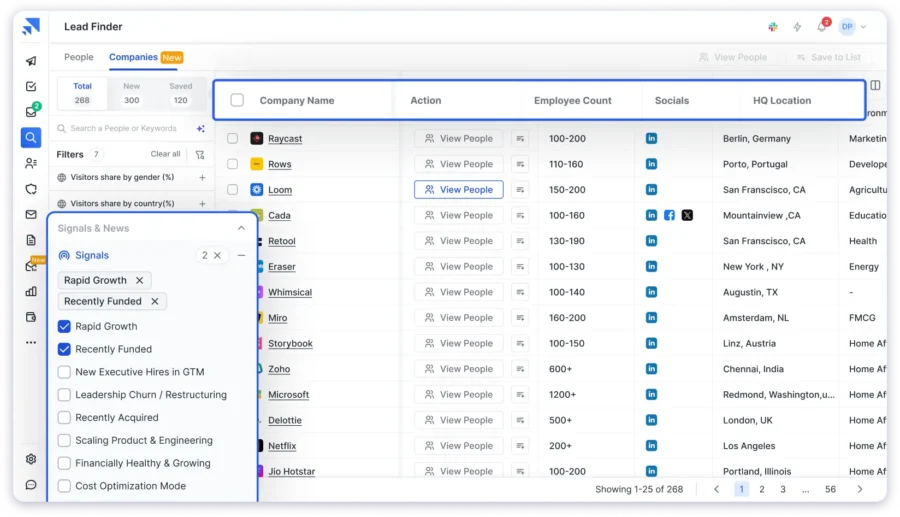
The database covers 800M+ verified contacts and 60M+ companies. Every contact is enriched through waterfall enrichment across 7 trusted data providers.
If one provider does not return a verified result, the next one takes over automatically. Credits are only charged when enrichment succeeds.
You only pay for what actually works.
What stood out to me was the data quality at this price point. Most tools I tested rely on a single verification source, which means you pay the credit and hope the contact is valid.
Saleshandy runs every contact through 7 providers before it reaches your list. Real-time email verification is also included at no extra cost.
One more thing I noticed: 50% of unused credits roll over to the next billing cycle. For teams running high-volume prospecting, that is a real difference in what your budget delivers every month.
Here are the core capabilities of Saleshandy Lead Finder 👇
800M+ Contact Database with Real-Time Verification
The database covers people-level and company-level data, including job titles, seniority, direct emails, phone numbers, company size, industry, revenue, tech stack, and buying signals.
Every contact is verified in real time at the moment of reveal. Invalid or low-confidence results are flagged before they reach your list. That is how Saleshandy maintains 95%+ email accuracy.
Waterfall Enrichment Across 7 Trusted Data Providers
Instead of relying on one source, Saleshandy runs each contact through 7 trusted data providers in sequence. Each provider checks what the previous one missed.
If one cannot verify a contact, the next one takes over. The result is higher match rates and no credits wasted on failed lookups.
75+ Search Filters Including Buying Signals
You can narrow down your target list using 75+ filters across the People and Company tabs:
- Firmographics: company size, industry, revenue, and founding year
- People data: job title, seniority, LinkedIn URL, tenure, career changes
- Technographics: filter by tools and software companies that are currently used
- Funding and financials: last funding date, round size, stage
- Buying signals: rapid growth, recently funded, new executive hires, leadership churn, cost optimization mode, and more
The Company Tab lets you search at the account level first and then find the right people inside those accounts. Look-Alike search helps you find companies similar to your best existing customers.
AI-Powered Lead Search
Describe your ideal customer in plain English, and the AI builds a verified list for you instantly. No manual filter setup needed.
AI Prospect Enrichment
A name, a title, and a company are not personalization. It is a mail merge.
Saleshandy’s AI Enrichment pulls from live web data using five AI models, including GPT-4.1, Claude Sonnet 4, Gemini 2.5 Pro, Perplexity Sonar Pro, and Grok 4.
It generates icebreakers, company summaries, and custom opening lines for each prospect. You can run this across up to 100,000 contacts in a single batch.
Built-In Outreach and CRM
Once your list is ready, you do not need to export it anywhere.
Prospects flow directly into cold email sequences with inbox warmup, sender rotation, and reply detection already built in. The Saleshandy CRM gives you a Kanban pipeline and a full prospect activity timeline so nothing falls through the cracks.
Find the lead. Enrich it. Email it. Track it. All in one platform.
Pros
- 800M+ database with waterfall enrichment across 7 trusted data providers
- 50% credit rollover every billing cycle
- Credits are only charged on verified matches
- 75+ filters, including 8 buying signals, technographics, and funding data
- AI enrichment generates personalized context per prospect
- Connects directly to outreach and CRM with no export needed
- 50 free credits on sign-up to test data quality before committing
Cons
- EMEA mobile number coverage is thinner than Cognism
- Large AI enrichment runs consume more credits than standard lookups
Pricing (Annual Billing):
- Lead Starter: $49/month — 30,000 credits/year
- Lead Pro: $79/month — 48,000 credits/year
- Custom: Contact sales for unlimited scale
2. Clay
G2 Rating: 4.9/5 ⭐ (180+ reviews)
Best For:
RevOps teams and GTM engineers who need fully customized multi-source enrichment pipelines and have the technical resources to manage them.
Clay is a data orchestration platform built for teams that want full control over how their enrichment works.
Instead of relying on one database, it connects to 100+ external providers, including Apollo, Clearbit, Hunter.io, LinkedIn, People Data Labs, and Crunchbase. It queries them in a waterfall sequence, so when one provider misses a match, the next one picks it up automatically.
What makes Clay different is Claygent, its built-in AI agent.
It browses the web and pulls enrichment data from sources that structured databases cannot cover, such as news articles, LinkedIn posts, job descriptions, and company blogs.
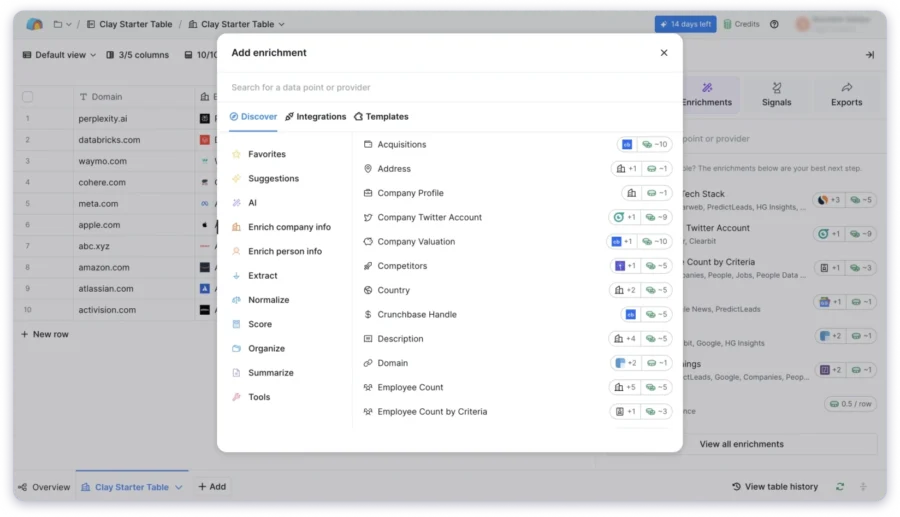
A no-code workflow builder lets you set the logic, and native CRM sync keeps HubSpot, Salesforce, and Pipedrive up to date.
What I noticed is that Clay rewards teams that invest in it. If you have a RevOps person who can build and maintain the workflows, match rates will be higher than almost any single-source tool.
If you do not, the setup complexity will cost you more time than the enrichment saves. A separate outreach tool is also still needed once enrichment is done.
Here are the core capabilities of Clay 👇
- Data Provider Connections: Clay connects to over 100 external providers and queries them in sequence to maximize contact match rates.
- Waterfall Enrichment Logic: Each provider is queried in order, and if one cannot find a verified result, the next one takes over automatically.
- Claygent AI Web Research: Claygent browses live web sources such as news articles, LinkedIn posts, and job descriptions to populate enrichment fields that databases do not capture.
- No-Code Workflow Builder: A spreadsheet-style interface lets you build and manage enrichment logic without writing any code.
- Native CRM Sync: Connects directly to HubSpot, Salesforce, and Pipedrive to keep records updated after enrichment runs.
- Built-In Email Verification: Verifies email addresses as part of the enrichment workflow before contacts reach your list.
- API Access: Full API access for teams that want to build Clay into custom internal tools and workflows.
Pros
- Highest match rates available by combining 100+ data sources simultaneously
- Fills personalization fields that structured databases cannot provide
- Full control over enrichment logic for technical teams
Cons
- Needs a dedicated RevOps person to build and maintain workflows
- No built-in outreach tool — a separate sequencer is required
- Credit costs can escalate quickly in complex multi-source workflows
Pricing (Annual Billing):
- Starter: $134/month
- Explorer: $314/month
- Pro: $720/month
3. Apollo.io
G2 Rating: 4.8/5 ⭐ (9,000+ reviews)
Best For:
Outbound sales teams that want database access, enrichment, and sequencing under a single mid-market subscription.
Apollo.io is an all-in-one sales platform that combines a 275M+ contact database with built-in enrichment and email sequencing.
For teams that currently pay separately for a data provider and an outreach tool, Apollo is often the most practical way to bring both under one subscription.
The database covers US, UK, and European professional contacts well. You get 65+ filters, including tech stack, funding stage, and intent signals.
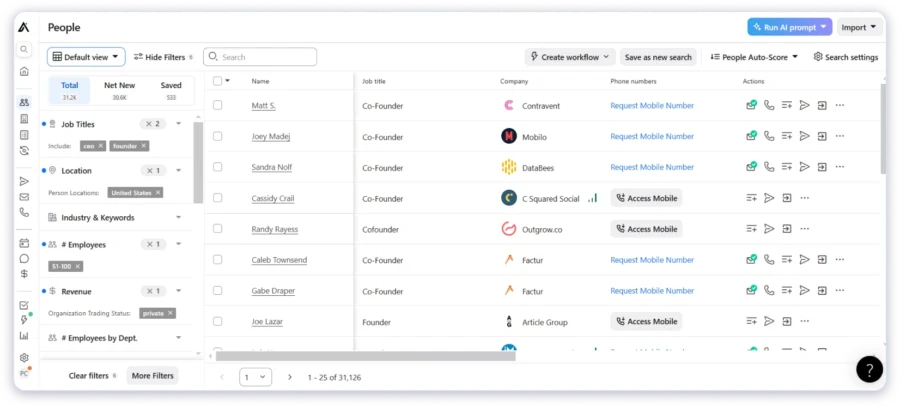
Scheduled CRM enrichment keeps your Salesforce, HubSpot, and Pipedrive records current automatically. The AI-powered ICP search lets you describe your target in plain English and returns a filtered list instantly.
The one gap I noticed consistently in G2 reviews is mobile phone coverage. It is limited especially for North American contacts.
If cold calling is a core part of your outreach motion, that is worth knowing before you commit.
Here are the core capabilities of Apollo.io 👇
- Contact Database: A large database of professional contacts searchable with 65+ filters, including job title, tech stack, funding stage, and intent signals.
- Scheduled CRM Enrichment: Automatically updates contact and company records in Salesforce, HubSpot, and Pipedrive on a set schedule without manual effort.
- CSV Upload Enrichment: Upload an existing contact list, and Apollo enriches the missing fields against its database in bulk.
- API Access Developers and RevOps teams can integrate Apollo enrichment directly into custom tools and internal workflows.
- Built-In Email Sequencing: A sequence builder with conditional logic, reply detection, and automated follow-ups built into the same platform as the database.
- Chrome Extension: Look up contact details directly from LinkedIn profiles and company websites without leaving the page.
- AI-Powered ICP Search: Describe your ideal customer in plain English, and Apollo builds a filtered list for you automatically.
Pros
- One subscription covers database access, enrichment, and email sequencing
- Strong coverage for US and European professional email addresses
- Flexible enrichment options via API, CSV upload, and CRM sync
Cons
- Mobile phone coverage is limited, especially for North American contacts
- Enrichment features are not available on the free plan
- Support response times get mixed reviews on lower-tier plans
Pricing (Annual Billing):
- Free: Limited database access, no enrichment
- Basic: $49/user/month
- Professional: $79/user/month
- Organization: $119/user/month (3-user minimum)
If you’re looking for a platform that offers similar capabilities to Apollo.io, but at a more cost-effective price, check out this list of 12 Apollo.io alternatives.
4. ZoomInfo
G2 Rating: 4.5/5 ⭐ (8,900+ reviews)
Best For:
Enterprise teams with a dedicated data budget that need intent intelligence, technographic depth, and automated CRM enrichment at scale.
ZoomInfo is the enterprise standard for B2B contact and company data.
Its Bidstream intent engine tracks behavioral signals from web activity across millions of pages to surface companies that are actively researching your category right now.
Technographic data covers the full software stack across 60+ vendor partnerships, and CRM auto-refresh keeps Salesforce, HubSpot, and Dynamics records current as contacts change roles or companies.
The genuine differentiator here is the intent layer.
When a prospective company is researching a problem your product solves, ZoomInfo flags them before your competitors do.

Add organizational chart data and buying committee visibility, and you get the most complete picture of an enterprise account available at this scale.
No tool on this list matches this combination at enterprise scale. The barrier is price.
There is no public pricing page; the minimum annual commitment typically starts around $15,000, and multiple G2 reviewers flag difficulty exiting or modifying contracts.
Here are the core capabilities of ZoomInfo 👇
- Contact Database: A large database of professional contacts with organizational charts and buying committee data for enterprise account targeting.
- Bidstream Intent Data: Tracks web activity across millions of pages to identify companies actively researching your product category in real time.
- Technographic Data: Maps the full software stack of target accounts across 60+ vendor partnerships so you know exactly what tools they use.
- CRM Auto-Refresh: Automatically updates contact and company records in Salesforce, HubSpot, and Microsoft Dynamics as data changes.
- Chrome Extension: Look up contact details directly from LinkedIn profiles without leaving the page.
- Chorus Conversation Intelligence: Records and transcribes sales calls and provides insights to help reps improve performance over time.
- API Access: Full API for teams that need to integrate ZoomInfo data into custom tools and enterprise workflows.
Pros
- Intent and technographic depth at enterprise scale is unmatched on this list
- CRM auto-refresh keeps records current without any manual effort
- Broad North American coverage with growing European market data
Cons
- No public pricing
- Contract terms are rigid, and G2 reviews flag difficulty modifying or exiting agreements
- Feature depth is more than most small and mid-size teams will ever need
Pricing:
- Custom only
- Minimum typically starts around $15,000 per year
- No free trial
So, if you like ZoomInfo’s features but not its pricing, check out this list of ZoomInfo alternatives to find one that aligns with your requirements and your budget!
5. Cognism
G2 Rating: 4.6/5 ⭐ (1,143+ reviews)
Best For:
EMEA-focused outbound teams that cold call and need phone-verified mobile numbers with full GDPR compliance.
Cognism is a B2B data enrichment platform built for teams that sell into European markets primarily through phone.
Its Diamond Data product phone-verifies mobile numbers before they enter the database, delivering 98% reported accuracy with connect rates roughly three times higher than standard database numbers.
For outbound teams where cold calling is the primary motion, that difference shows up in meetings booked every week.
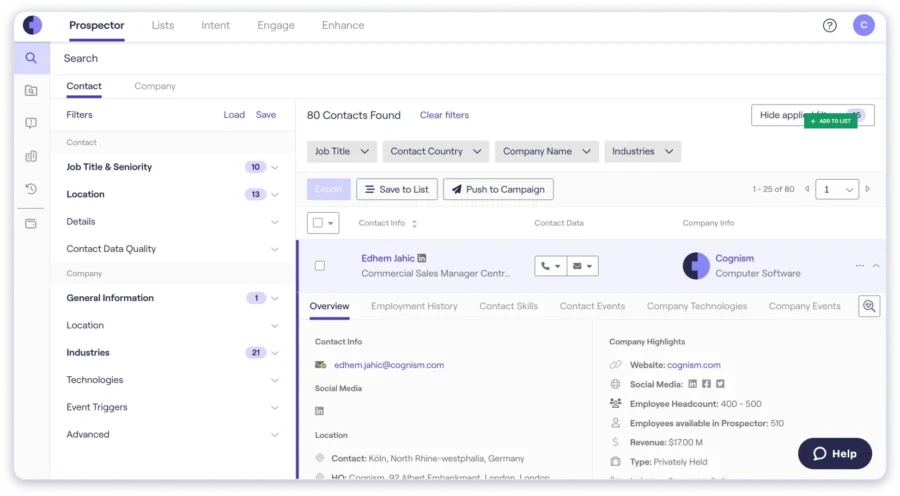
What makes Cognism stand out beyond the data itself is how it handles enrichment operationally. You can upload a CSV to update your existing database instantly or use the
Cognism API to embed enrichment directly into your CRM, prospecting workflows, or product. The API gives you direct access to their data engine, so inbound leads get auto-enriched the moment they come in without any manual effort.
The compliance layer is another genuine strength for EU cold outreach. Cognism checks contacts against 13 global Do Not Call registries, handles GDPR Article 14 notification obligations, and holds SOC 2 and ISO 27001 certifications.
Bombora intent data is included to help reps prioritize the accounts most likely to be in an active buying cycle right now.
One thing worth knowing before you evaluate: there is no public pricing and no free trial.
A demo is required before you can see any data, such as emails or phone numbers.
Do you like the features of Cognism, but it’s too costly? You can check Cognism alternatives to find the best fit for your requirements and budget.
Here are the core capabilities of Cognism 👇
- CSV Enrichment: Upload your existing contact list, and Cognism finds the best match based on your provided data points and fills in the missing fields automatically.
- API Enrichment: Direct API access to Cognism’s data engine lets you auto-enrich inbound leads, build prospecting workflows, and embed contact data into your CRM or internal product.
- Bombora Intent Data: Surfaces accounts that are actively in a buying cycle so reps can prioritize outreach to prospects most likely to engage right now.
- 13 Global Do Not Call Registry Checks: Every contact is automatically checked against 13 Do Not Call registries across different countries before delivery.
- Native CRM Integrations: Connects directly with Salesforce, HubSpot, Outreach, and Salesloft for enriched data transfer.
- Chrome Extension: Look up verified contact details directly from LinkedIn profiles without switching tabs.
Pros
- Most reliable phone-verified mobile coverage for EMEA cold calling on this list
- CSV and API enrichment cover both manual and automated workflows
- Built-in GDPR compliance reduces legal overhead for European outreach
- Intent data helps prioritize the accounts most likely to respond
Cons
- No public pricing
- No native email sequencing
- US database coverage is less comprehensive than ZoomInfo or Apollo
Pricing:
- Custom only.
6. Lusha
G2 Rating: 4.3/5 ⭐ (1,557+ reviews)
Best For:
Individual SDRs who prospect on LinkedIn and need quick verified contact lookups without leaving the platform.
Lusha is a contact enrichment tool built around LinkedIn prospecting.
Its Chrome extension sits directly within LinkedIn and surfaces verified email addresses, direct phone numbers, and job details for the profile you are viewing.
There is no tab switching or manual searching involved.
Intent signals help you identify accounts in an active buying cycle, and job change alerts notify you when a tracked contact moves to a new company.
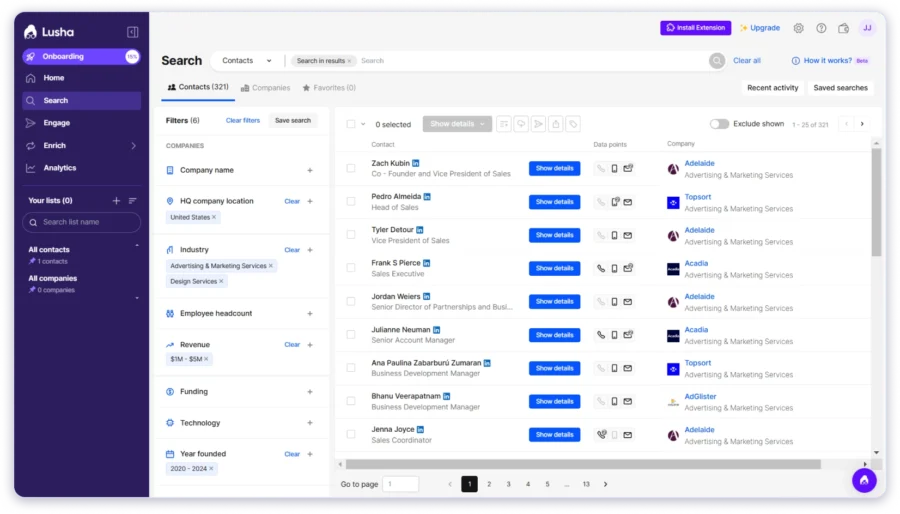
The database at 66M+ professionals is smaller than most tools on this list. That means lower match rates in niche industries and non-English-speaking markets.
A few things worth knowing before committing: multiple G2 reviews flag concerns around auto-renewal practices and credit expiry terms on lower-tier plans.
Read the billing terms carefully before you sign up.
Here are the core capabilities of Lusha 👇
- Intent Signals: Flags accounts that are showing active buying behavior so you can prioritize outreach to in-market prospects.
- Job Change Alerts: Notifies you when a tracked contact moves to a new company, which is often the best time to reach out.
- 30+ Enrichment Data Points: Each contact reveal includes over 30 data fields covering job title, company size, industry, and contact details.
- One-Click CRM Export: Sends enriched contacts directly to Salesforce and HubSpot with a single click.
- Team Collaboration: Shared lists and usage reporting help teams coordinate prospecting activity and track credit consumption.
Pros
- Very fast for LinkedIn-based contact lookup with no workflow interruption
- Intent signals and job change alerts add useful context for timing outreach
- Free plan available for low-volume testing
Cons
- A smaller database means lower match rates in niche or non-English-speaking markets
- Mobile number accuracy varies outside core English-speaking markets
Pricing (Annual Billing):
- Pro: $49/month
- Premium: $79/month
- Scale: Custom
7. Breeze Intelligence
G2 Rating: 4.1/5 ⭐ (22 reviews)
Best For:
HubSpot users who want native automatic CRM enrichment without adding another tool to their stack.
Breeze Intelligence is Clearbit rebuilt natively inside HubSpot.
It enriches contact and company records with 100+ firmographic and technographic attributes and automatically refreshes every record every 30 days.
A buyer intent layer surfaces companies currently researching your category directly in HubSpot and shortens the form to fill in company data from just an email address at the point of capture.
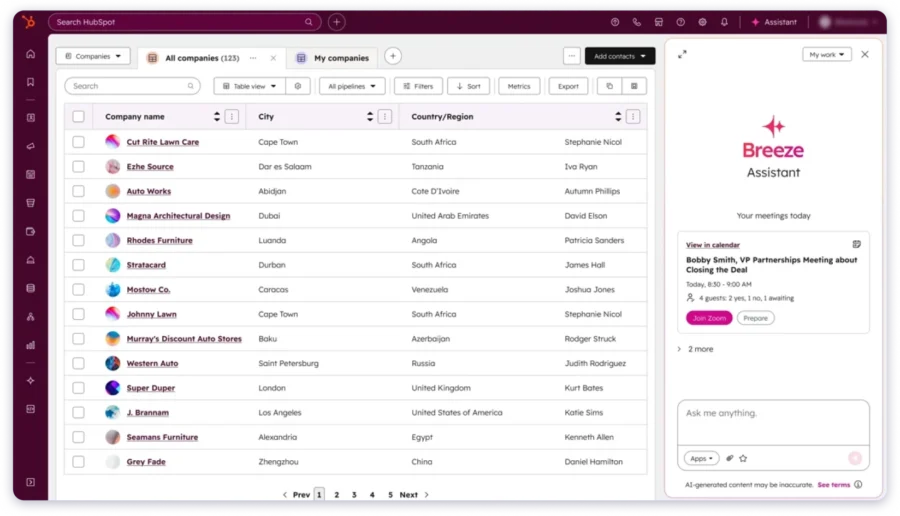
Everything happens inside HubSpot with no data transfer, no file exports, and no integration maintenance. For HubSpot-native teams, this is the cleanest enrichment workflow available on this list.
The one hard constraint is that it only works inside HubSpot. If your team runs Salesforce, Pipedrive, or any other CRM, this tool is not an option.
Here are the core capabilities of Breeze Intelligence 👇
- Firmographic and Technographic Attributes: Enriches every contact and company record in HubSpot with over 100 data fields, including job title, company size, revenue, and tech stack.
- Automatic 30-Day Record Refresh: Every enriched record is automatically updated every 30 days, so your CRM data stays current without manual effort.
- Buyer Intent Signals: Surfaces companies that are actively researching your product category directly inside your HubSpot dashboard.
- Form Shortening: Automatically fills in company data from just an email address, so web forms require fewer fields from visitors.
- Anonymous Website Visitor Identification: Identifies companies visiting your website, even when they do not fill out a form.
Pros
- Native HubSpot integration with no data transfer or import required
- 100+ enrichment attributes per record with automatic monthly refresh
- Intent signals surface in-market accounts directly inside HubSpot
Cons
- Requires an active HubSpot subscription and cannot be used on any other CRM
- Pricing is bundled inside HubSpot tiers, which makes it difficult to calculate separately
Pricing:
- Included in HubSpot Sales Hub Professional and Enterprise plans
- Credit packs from approximately $30/month for existing HubSpot customers
- No standalone pricing
8. UpLead
G2 Rating: 4.7/5 ⭐ (950+ reviews)
Best For:
SMB outbound teams that need high-accuracy verified contact data at a transparent and predictable price.
UpLead is a B2B data enrichment platform built around one commitment: you only pay for verified data.
If an email you reveal fails real-time verification, you get the credit back automatically.
Most tools charge you whether the contact bounces or not. That refund policy, combined with consistently strong G2 scores for accuracy and ROI, makes UpLead a reliable choice for teams that have been burned by bad data before.
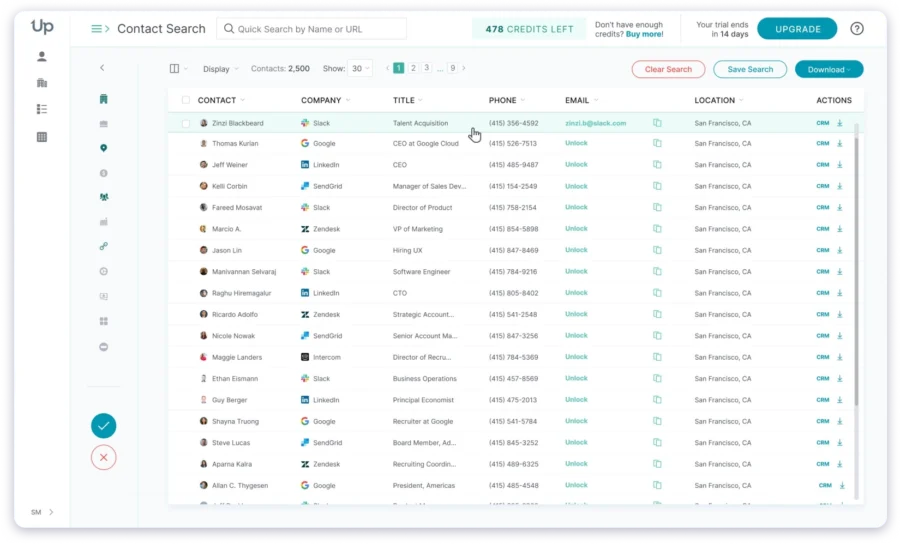
The platform covers firmographic and technographic enrichment across 155M+ contacts.
Before you export any list, UpLead tells you exactly how many verified matches it found, so you stay in full control of how you spend your credits.
Pricing is fully public, with no sales call required, making it easy to evaluate and compare without going through a discovery process.
What I noticed is that UpLead is genuinely built around zero-waste data.
You see the match count before you download, and you only pay for what is verified. That level of transparency is not common at this price point.
Here are the core capabilities of UpLead 👇
- Contacts, Companies, and Email Enrichment: Upload a list of names, company URLs, or email addresses, and UpLead appends 50+ verified data fields, including emails, phone numbers, job titles, and social links.
- Real-Time Email Verification: Every email address is verified at the moment of reveal before it reaches your list.
- 50+ Search Filters: Filter contacts by job title, industry, company size, tech stack, and more to build targeted prospect lists.
- Bombora Intent Data: Identifies accounts that are actively researching your category and is available on higher-tier plans.
- Chrome Extension: Look up verified contact details from LinkedIn profiles and company websites directly from your browser.
- CRM Integrations: Connects to Salesforce, HubSpot, Zoho, and Pipedrive for direct export and sync of contacts.
Pros
- Credit refunds for failed verifications with the strongest accuracy commitment on this list
- Full control over credits — you see match counts before downloading anything
- Fully public pricing with no sales call needed
- Consistently rated highly for ease of use and data ROI on G2
Cons
- A smaller database means lower match rates in niche verticals
- Higher entry price compared to several tools at this tier
- No built-in email sequencing — a separate outreach tool is still needed
Pricing (Annual Billing):
- Essentials: $99/month — 170 credits/month
- Plus: $199/month — 400 credits/month
- Professional: $399/month — multi-user with higher volumes
- Free trial: 7 days, 5 credits included
9. Kaspr
G2 Rating: 4.4/5 ⭐ (750+ reviews)
Best For:
SDRs and sales teams who prospect through LinkedIn and need fast, accurate contact enrichment with direct CRM sync.
Kaspr is a contact enrichment platform built for teams that live inside LinkedIn.
Its Chrome extension lets you export and enrich complete contact data directly from LinkedIn, Sales Navigator, or Recruiter Lite without leaving the page.
For teams that prospect heavily on LinkedIn, it removes much of the manual work involved in finding and verifying contact details.
Beyond the Chrome extension, Kaspr also supports bulk CSV enrichment for existing lead lists and a full API for technical teams that want to pull contact data using LinkedIn URLs.

Enriched data can be sent directly to your CRM or outreach tools through native integrations. The platform is GDPR-aligned, which makes it a practical choice for teams prospecting into European markets.
What stood out to me was how straightforward the workflow is.
You find the person on LinkedIn, Kaspr surfaces the contact data, and you push it to your tools in one step. For SDRs focused on speed, simplicity matters.
Here are the core capabilities of Kaspr 👇
- LinkedIn Chrome Extension: Exports and enriches complete contact data directly from LinkedIn, Sales Navigator, and Recruiter Lite profiles without leaving the page.
- Bulk CSV Enrichment: Upload a list of leads, and Kaspr enriches their emails and phone numbers from its database in bulk.
- Kaspr API: Technical users can retrieve contact data from over 500 million profiles directly using LinkedIn URLs through the Kaspr API.
- Direct CRM and Tool Integrations: Send enriched contact data directly to your CRM or outreach tools via native integrations, without manual export.
- GDPR-Aligned Data: Contact data is checked against GDPR requirements, making it suitable for teams prospecting into European markets.
Pros
- Fast and simple workflow for LinkedIn-based prospecting with no tab switching
- API access for technical teams that need to enrich at scale from LinkedIn URLs
- Free plan available with unlimited email access and no credit card required
- GDPR-aligned data for European outreach
Cons
- Coverage outside European markets is noticeably weaker
- Less suitable for teams enriching from CRM databases or bulk CSV files at scale
- Analytics and reporting are less developed compared to larger platforms
Pricing (Annual Billing):
- Free: Limited credits/month
- Starter: $49/month
- Business: $79/month
- Organization: Custom
10. Adapt.io
G2 Rating: 4.7/5 ⭐ (2,700+ reviews)
Best For:
Revenue teams and developers who need reliable contact data enrichment across CSV, CRM, and API workflows without enterprise overhead.
Adapt.io is a data enrichment platform that helps revenue teams keep their contact data accurate and up to date. It gives you three ways to enrich your data depending on how your team works.
You can upload a CSV file, sync directly with your CRM, or use the Adapt API to scale enrichment inside your own workflows.
Each contact can be enriched with 50+ data attributes, including direct dials, mobile numbers, email addresses, job titles, revenue, and company size.
The platform is built around preventing data decay.
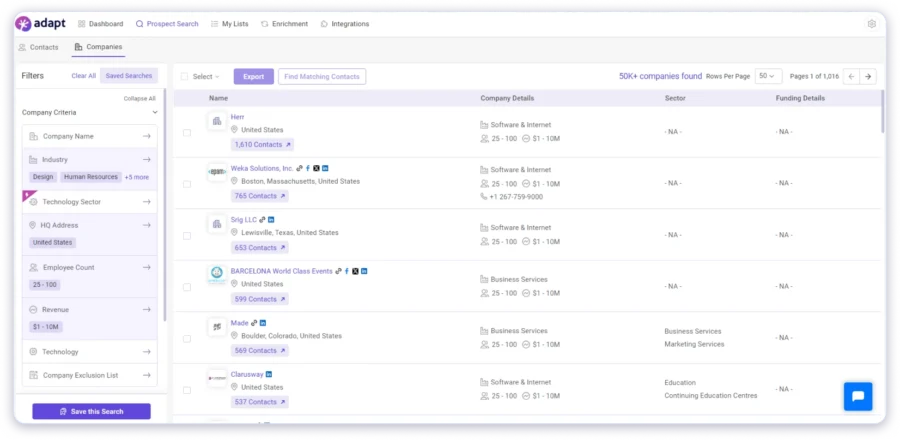
It works well for revenue teams that need a reliable enrichment layer without the complexity of enterprise platforms.
What I noticed is that Adapt is a practical tool for teams that need clean, enriched data feeding into their existing workflows.
It is not the most feature-rich option on this list, but it covers the core enrichment use cases cleanly and at an accessible price.
Here are the core capabilities of Adapt.io 👇
- CSV Enrichment: Upload your existing contact files, and Adapt enriches them with accurate and up-to-date data fields automatically.
- CRM Enrichment: Seamlessly syncs with your CRM to auto-enrich contact and company records and keep them current over time.
- API Enrichment: A developer-friendly API that lets technical teams scale data enrichment operations inside custom internal workflows.
- 50+ Data Attributes: Each enriched contact includes 50+ fields covering direct dials, mobile numbers, email addresses, job title, department, revenue, employee count, and location data.
- LinkedIn Chrome Extension: Finds verified contact data directly from LinkedIn or company websites and saves it to your list without leaving the page.
- Lead Scoring and Routing Support: Enriched data powers lead scoring and routing workflows so teams can segment and prioritize the leads most likely to convert.
Pros
- Three flexible enrichment methods covering CSV, CRM, and API workflows
- 50+ data attributes per contact, including direct dials and mobile numbers
- Free plan available with no credit card required
- Simple to set up with a low learning curve for basic enrichment tasks
Cons
- No intent data, technographic enrichment, or AI personalization
- Limited native integrations compared to larger platforms
Pricing:
- Free plan with credits included
- Paid plans available on request
- API pricing based on volume
How to Choose the Right Data Enrichment Tool
Picking the right enrichment tool comes down to understanding your workflow before you evaluate anything. Here is the exact process to follow.
- Get Clear on Your Target Market First
- Audit What is Actually Missing from Your Current Data
- Pick the Enrichment Method That Fits Your Workflow
- Understand How Credits Work Before You Commit
- Decide Whether You Need Outreach Built In
Step 1: Get Clear on Your Target Market First
Before you open a single pricing page, know who you are prospecting. Write down the geography, the industry, the company size, and the seniority level of the people you are trying to reach. This one step eliminates half the tools on any list immediately.
A tool with thin European coverage cannot serve a team selling into EMEA. A tool without phone verification cannot serve a team that cold calls. Start here, and the rest of the decision gets significantly easier.
Step 2: Audit What is Actually Missing from Your Current Data
Open your existing prospect list and look at it honestly. What fields are empty? What fields are wrong? Are you missing verified emails, direct dials, job titles, company size, or buying signals? The answer tells you exactly what enrichment depth you need.
Not every team needs technographics and intent data. Some teams just need a verified email and a phone number. Know your gap before you start comparing features.
Step 3: Pick the Enrichment Method That Fits Your Workflow
There are three ways enrichment actually works, and each one fits a different team:
- Search from scratch: build a net new list using filters and a live database
- Upload a CSV: take an existing list and fill in the missing fields automatically
- API or CRM enrichment: connect your tools and enrich records in the background without any manual steps
Pick the method that matches how your team works today, not the one with the most features on the demo call.
Step 4: Understand How Credits Work Before You Commit
This is the step most teams skip and regret later. Before signing up for anything, ask three questions. First, are credits charged only on verified matches or on every lookup, regardless of the result?
Second, do unused credits roll over at the end of the month or expire? Third, is pricing publicly available, or does it require a 45-minute sales call to get a number? These three answers directly impact your real cost per contacted lead every single month.
Step 5: Decide Whether You Need Outreach Built In
Most enrichment tools give you a verified contact and stop there. You export a CSV, import it into your sequencer, map the fields, and rebuild your workflow across two platforms every single time.
For teams running high-volume outbound, the friction compounds fast. Decide upfront whether keeping enrichment and outreach in one place matters to you. If it does, that single requirement narrows the list to one tool.
Step 6: Test Your Actual ICP Before You Pay for Anything
Every tool on this list has either a free plan or a free trial. Use it. Run your real target market through the tool before you commit to a paid plan.
The only number that matters is how many of your actual prospects the tool can find and verify.
A tool with 800M+ contacts that cannot find your ICP is useless. A tool with 66M contacts that finds every name on your list is the right tool.
So, Which is the Best Data Enrichment Tool?
If you are here, I am guessing you are tired of prospecting with incomplete or outdated contact data.
Tools like Clay, Apollo, ZoomInfo, Cognism, and UpLead are all solid options depending on your use case and budget.
And if you want to see how they stack up in specific areas, here are some detailed breakdowns worth checking out:
- Best Business Database Providers
- Best Email Finder Tools
- Best LinkedIn Email Finders
- Apollo.io Alternatives
- Cognism Alternatives
My take is simple. Choose a data enrichment tool that does not just fill in missing fields but actually helps you act on the data without jumping between five different tools.
And for that, Saleshandy Lead Finder is the best pick, 800M+ verified contacts, waterfall enrichment across 7 providers, built-in sequencing, and a CRM, all under one roof.
Start with 50 free credits and see if the data holds up for your target market.
Frequently Asked Questions
1. What is data enrichment?
Data enrichment adds missing information to existing contact or company records. A basic record might only have a name and email. Enrichment adds job title, company size, industry, phone number, tech stack, funding stage, and buying signals – enough context to make the record actually useful for targeted outreach.
2. What is waterfall enrichment, and how does it work?
Waterfall enrichment queries multiple data providers in sequence. If the first provider doesn’t find a verified match, the system automatically moves to the next provider and charges credits only when enrichment succeeds. Single-source tools charge you whether or not they return a valid result. The practical effect is higher match rates and fewer wasted credits on failed lookups.
3. Which data enrichment tool is best for cold email outreach?
Saleshandy Lead Finder. It’s the only tool on this list that includes built-in email sequencing, inbox warmup, and a CRM. You go from enriched contact to live sequence without switching platforms. For teams already committed to a separate sequencer, Apollo.io and UpLead are solid options with strong email coverage.
4. Which data enrichment tools offer a free trial?
Saleshandy Lead Finder: 7 days, 50 free credits, no credit card needed. Apollo.io: free plan available, enrichment requires a paid plan. UpLead: 7 days, 5 credits included. Kaspr and Adapt.io: free plans with limited credits. Clay: free plan with limited credits. ZoomInfo and Cognism: demo only, no free trial available.
5. How is AI prospect enrichment different from regular data enrichment?
Regular enrichment fills structured fields like job title or company size. AI prospect enrichment generates personalized context: a custom opening line based on a prospect’s LinkedIn activity, a company hook from a recent funding announcement, or a pain point angle derived from a job description. Saleshandy uses five AI models – GPT-4.1, Claude Sonnet 4, Gemini 2.5 Pro, Perplexity Sonar Pro, and Grok 4 – to generate this across up to 100,000 prospects in a single run.
6. How quickly does B2B contact data go stale?
Around 30% of B2B contact data becomes inaccurate every year, mostly from job changes and company moves. Breeze Intelligence auto-refreshes HubSpot records every 30 days. ZoomInfo refreshes continuously in the background. Saleshandy verifies emails in real time at the moment of every contact reveal, so what you see is current.