Dhruv Patel
 Contents
- 1 How to Write Follow-Up Emails– TOC
- 2 What Is a Follow-Up Email?
- 3 How to Write a Follow-Up Email That Gets You a Reply?
- 3.1 1. First, Get Clear on Why You Are Following Up
- 3.2 2. Check How Long It Has Been Since Your Last Email
- 3.3 3. Write a Relevant and Short Subject Line
- 3.4 4. How to Start a Follow-Up Email With a Personalized Greeting and Context
- 3.5 5. Clearly State the Purpose of Why You Are Following Up
- 3.6 6. Add Something New That Gives Them a Reason to Reply
- 3.7 7. End With One Clear CTA
- 3.8 8. Close With a Professional Sign-Off
- 3.9 9. Read It Once Before You Hit Send
- 4 Why Should You Send a Follow-Up Email?
- 5 How to Send a Follow-Up Email After No Response?
- 6 When to Send Follow-Up Email?
- 7 20+ Follow-Up Email Templates for Common Situations
- 7.1 1. Follow-Up Email After No Response
- 7.2 2. Follow-Up Email for Job Application
- 7.3 3. Follow-Up Email After the Interview
- 7.4 4. Follow-Up Email After a Networking Event
- 7.5 5. Sales Follow-Up Email After No Response
- 7.6 6. Final Follow-Up Email After No Response
- 7.7 7. Invoice Reminder Follow-Up Email
- 7.8 8. Proposal/Quotation Follow-Up Email
- 7.9 9. Follow-Up Email for an Update
- 7.10 10. Follow-Up Email After a Meeting or Call
- 7.11 11. Follow-Up Email After a Cold Pitch
- 7.12 12. Follow-Up Email to Request a Response
- 7.13 13. Follow-Up Email After Leaving a Voicemail
- 7.14 14. Follow-Up Email Template for Contract Signing
- 7.15 15. Follow-Up Email to Reconnect With an Old Contact
- 7.16 16. Follow-Up Email After a Sales Demo
- 7.17 17. Follow-Up Email to Your Boss
- 7.18 18. Business Follow-Up Email
- 7.19 19. Professional Follow-Up Email After No Response
- 7.20 20. Courtesy Follow-Up Email
- 7.21 21. Follow-Up Email for a Meeting Request
- 7.22 22. Second Follow-Up Email After No Response
- 8 4 Top Follow-Up Email Examples
- 9 How Many Follow-Up Emails Should You Send?
- 10 Best Practices for Sending Follow-Up Emails
- 11 Write That Follow-Up Email Now!
- 12 FAQs
- 12.1 1. How to Follow Up on an Email After No Response?
- 12.2 2. How Long Should I Wait Before Following Up?
- 12.3 3. How Many Follow-Ups Are Okay?
- 12.4 4. Should I Follow Up After No Response?
- 12.5 5. What is the Ideal Length of a Follow-up Email?
- 12.6 6. Can Follow-Up Emails Hurt Deliverability?
- 12.7 7. Should I Keep the Follow-up Email in the Same Email Thread?
Most people think it’s the first email that gets you a response.
But honestly, it’s rarely enough to get a ‘reply.’
It’s the first follow-up email that increases the chances of getting a reply by 49–66%.
We’ve seen it here at Saleshandy across millions of emails — follow-ups are where the actual replies come from.
But writing a perfect follow-up email is a delicate art.
You want to be persistent enough to get an answer, but professional enough not to come across as irritating.
The goal of following up is to give a gentle nudge while making it easy for the other person to say yes.
In this guide, I’ll walk you through
- how to write a follow-up email that actually gets replies
- when to send a follow-up email
- you’ll also find 20+ ready-to-use follow-up email templates and samples you can copy for any situation.
How to Write Follow-Up Emails– TOC
- What Is a Follow-Up Email?
- How to Write a Follow-Up Email That Gets You a Reply?
- Why Should You Send a Follow-Up Email?
- How to Send a Follow-Up Email After No Response?
- When to Send Follow-Up Email?
- 20+ Follow-Up Email Templates for Common Situations
- 4 Top Follow-Up Email Examples
- How Many Follow-Up Emails Should You Send?
- Best Practices for Sending Follow-Up Emails
- Write That Follow-Up Email Now!
- FAQs
What Is a Follow-Up Email?
A follow-up email is a short, polite message you send after an initial email, meeting, or call to remind someone, get a response, or keep the conversation moving forward.
Here is what the ideal follow-up email format looks like 👇

Now, this is a solid best follow-up email example because
- It gently reminds the recipient of the prior interaction
- offers a new value
- ends with a simple call-to-action
How to Write a Follow-Up Email That Gets You a Reply?
Whether you’re following up after a cold email, a job application, a meeting, or an invoice — these are the steps I follow every time.
They work across any situation.
- First, Get Clear on Why You Are Following Up
- Check How Long It Has Been Since Your Last Email
- Write a Relevant and Short Subject Line
- How to Start a Follow-Up Email With a Personalized Greeting and Context
- Clearly State the Purpose of Why You Are Following Up
- Add Something New That Gives Them a Reason to Reply
- End With One Clear CTA
- Close With a Professional Sign-Off
- Read It Once Before You Hit Send
Let’s get into this steps!
1. First, Get Clear on Why You Are Following Up
Before you start writing your follow-up email, take a step back and think about what you actually want out of it.
This might sound obvious, but I’ve seen so many follow-ups fail simply because the sender wasn’t clear on their own goal.
Your reason for following up shapes everything else in the email. For example, the tone you use, how urgent you sound, and what you ask for at the end.
A simple way to figure this out is to ask yourself —
- if they reply to this email, what do I want that reply to say?
- if you want them to book a call, your follow-up needs to make that easy
- if you want a status update, your email should ask for exactly that
The answer to this one question gives you your CTA, your tone, and your structure.
Here are a few common follow up objectives depending on the situation 👇
- Sales follow up: book a meeting, get feedback on a proposal, or re engage a prospect who went quiet
- Job application follow up: get an update on the hiring timeline or express continued interest
- Payment follow up: confirm that the invoice was received and get a timeline for processing
- Meeting follow up: summarize what was discussed and lock in the next steps
- Networking follow up: keep the connection warm and suggest a next interaction
Once you have this clarity, the rest of the email almost writes itself. You’ll know exactly what to say, what tone to strike, and what to ask for at the end.
Now that you know the purpose of your follow-up, the next thing to figure out is whether it’s the right time to send it.
2. Check How Long It Has Been Since Your Last Email
The timing of your follow-up matters more than most people realize. If you send it too soon, you will come across as impatient.
But if you wait for too long, your original email is buried so deep in their inbox that they’ve forgotten about it.
So before you start composing, go back to your sent folder and check when your last email actually went out.
If it was just yesterday, you need to wait.
I understand the urge to follow up quickly is real, especially when you’re waiting on something important.
But following up too soon can make you sound unprofessional and honestly you may get on their nerve!
The right gap depends on the situation. Here’s what I generally go by 👇
- General emails (no response): 2 to 3 business days
- Job applications: 5 to 7 business days
- Sales or cold outreach: 3 to 5 business days
- Urgent or time sensitive requests: 24 to 48 hours
- After a meeting or call: same day or next day
Giving the other person enough breathing room shows you respect their time.
And it actually makes your follow-up feel more natural when it does land in their inbox.
Once the timing is right, it’s time to start writing — and the first thing your recipient will see is the subject line.
3. Write a Relevant and Short Subject Line
Your subject line decides whether your follow-up gets opened or ignored.
It doesn’t matter how well you’ve written the rest of the email if the subject line doesn’t pull them in.
Now, when it comes to follow-up emails, you have two options here.
The first is to reply in the same email thread. This keeps the original subject line and gives the recipient the full conversation history when they open it.
I usually recommend this approach because it makes it easy for the other person to remember the context instantly.
But here’s the thing — if your first email didn’t get opened at all, the subject line might be part of the reason.
In that case, it makes sense to start a new thread with a subject line that’s more specific and relevant to what you’re following up about.
Either way, a good follow-up email subject line should remind the reader of what your original email was about without being vague or generic.
Here are a few subject line examples that tend to work well 👇
- Following up on [Project/Topic]
- Quick question about [specific thing]
- Any update on the [Role] application?
- [Name], thoughts on the proposal?
- Next steps from our [day] conversation
💡Pro tip: Keep your subject lines between 30 and 50 characters. Short, specific, and personalized subject lines consistently get higher open rates.
If you are sending a sales email, avoid using generic phrases like “Following up” or “Checking in” as they don’t tell the reader anything useful.
Instead check out these 85+ follow-up email subject lines that are tested and ready to use.
With a strong subject line in place, the next step is writing the actual email — starting with how you open it.
4. How to Start a Follow-Up Email With a Personalized Greeting and Context
The opening of your follow-up email has one job — remind the reader who you are and what this is about.
If they have to think too hard or dig through their inbox to find your previous email, chances are they won’t bother replying.
So start with their name. Always.
Then, in the very next line, give them a quick reminder of your last interaction.
This could be a reference to an email you sent, a call you had, a meeting you attended, or an application you submitted.
Here’s what this looks like across different scenarios 👇
Each of these does the same thing. It connects your follow-up to something the recipient already knows about. That’s how you make your email feel like a natural continuation of a conversation, not a random message out of nowhere.
💡Pro tip: Skip the “I hope you’re doing well” or “Hope this email finds you well” openers.
They add nothing to the email and take up valuable space. Your recipient will appreciate you getting to the point — especially if they’re busy, which they almost always are.
Now that you’ve opened with context, the next part is telling them exactly why you’re reaching out again.
5. Clearly State the Purpose of Why You Are Following Up
This is the core of your follow-up email.
After reminding them of your last interaction, you need to tell them exactly why you’re writing this email and what you need from them.
The key here is being direct without being pushy. Don’t make the reader guess what you want.
If you’re vague about the purpose, it becomes easy for them to put your email aside and deal with it “later” — which usually means never.
Here is how you can state your purpose clearly depending on the situation 👇
When you state the purpose clearly, it makes it easy for the reader to understand what you need and respond quickly.
The less effort it takes to reply, the more likely they will.
Now, stating your purpose gets them to understand what you need.
But if you want to increase the chances of actually getting a reply, you need to give them a reason to respond — and that’s where the next step comes in.
6. Add Something New That Gives Them a Reason to Reply
Here’s something I’ve noticed after years of sending follow-up emails — the ones that just say “checking in” or “wanted to circle back” rarely get a response.
And the reason is simple. They don’t give the recipient anything new.
If your first email didn’t get a reply, sending the same message in different words won’t change the outcome. You need to add something to the conversation that wasn’t there before.
Now, what this looks like depends entirely on the situation 👇
The idea is simple — each follow-up should bring something to the table that makes the reader think “this is actually worth responding to.”
That small addition is often the difference between an email that gets a reply and one that sits in their inbox forever.
With the body of your email done, it’s time to wrap it up with a clear ask.
7. End With One Clear CTA
This is where a lot of follow-up emails fall apart.
The body is well written, the context is solid, but then the email ends with something like “Let me know your thoughts” or “Looking forward to hearing from you.”
Those sound polite, but they don’t tell the reader what to do next.
And when people don’t know exactly what action to take, the default action is no action at all.
Instead, close your follow-up with one specific ask.
Make it something that takes less than 10 seconds to respond to.
Here are a few CTAs that work well in follow up emails 👇
The important thing is to keep it to one ask. Not two. Not three.
When you give people multiple things to respond to, it feels like work — and that’s when they decide to “come back to it later.”
💡Pro tip: Frame your CTA as a question, not a statement. Questions naturally prompt a response. “Can we schedule a call this week?” works much better than “I’d love to schedule a call this week.”
Want more ideas? Here are 100+ cold email CTAs that are proven to book more meetings.
Almost done — now let’s close the email properly.
8. Close With a Professional Sign-Off
The way you end your follow-up email is the last impression you leave. It doesn’t need to be fancy, but it should feel clean, professional, and appropriate for the relationship you have with the recipient.
A strong sign-off usually has two parts — a short closing line that wraps up the email on a warm note, and a signature block with your details.
For the closing line, keep it simple.
Some reliable email sign off options that work in almost any situation 👇
Then add your signature below with your full name, your role, your company, and one contact link. Don’t clutter it with multiple social media icons and links — it distracts from the email itself.
Here’s how a clean sign off looks 👇
Thanks,
Dhruv Patel
Co founder, Saleshandy
linkedin.com/in/dhruvpatel
💡Pro tip: Match your sign-off to the tone of the email.
If it’s a casual follow-up with someone you already know, “Cheers” or “Thanks” is perfectly fine. But for formal or first-time follow-up emails, go with “Best regards” or “Warm regards” to keep it professional.
Looking for more options? Check out these 80+ email sign-offs and 70+ email closing lines that fit any situation.
9. Read It Once Before You Hit Send
Your follow-up email is written. But before you send it, take two minutes to read through it one final time. This quick review can be the difference between an email that sounds great and one that has an embarrassing typo or a wrong name.
Once everything checks out, go ahead and hit send.
Here’s a simple checklist I run through every time before I hit send 👇
💡Pro tip: If you’re sending follow-up emails at scale, run your email through Saleshandy’s free spam checker to make sure it doesn’t contain any words or patterns that could land you in the spam folder.
Why Should You Send a Follow-Up Email?
If you’re wondering whether following up is even worth the effort — the short answer is yes. And the numbers make it pretty clear.
Most emails don’t get a reply on the first attempt. That’s not because people aren’t interested.
It’s because they’re busy, their inbox is overflowing, or your email simply landed at the wrong time. A follow-up brings your message back to the top and gives them another chance to respond.
Here’s what the data actually shows 👇
- The first follow up email alone can boost your reply rate by 49% to 66%
- 80% of deals require at least five follow up touchpoints before closing
- Emails with at least one follow up see 22% more conversions than those without
Beyond the numbers, follow-up emails also serve a few practical purposes that are easy to overlook →
- They show professionalism — following up signals that you’re organized and serious about the conversation, without assuming the other person is ignoring you
- They restore context — a follow-up brings the conversation back and restates your original purpose, which helps when someone has dozens of emails to get through every day
- They confirm next steps — after meetings, interviews, or calls, a follow-up helps both sides stay on the same page about what happens next
- They increase your response rate — whether it’s a job application, a sales pitch, or a business proposal, people often need more than one touchpoint before they take action
The bottom line is simple.
If you don’t follow up, you’re leaving replies on the table. And in most cases, the person on the other end isn’t ignoring you — they just need a reminder.
Now, following up when you’ve already received some kind of response is straightforward.
But what do you do when you haven’t heard back at all? Let’s talk about that.
How to Send a Follow-Up Email After No Response?
Not getting a reply can feel discouraging, but it happens more often than you’d think. People miss emails, get caught up with other priorities, or simply forget to respond.
That’s exactly why a well-timed follow-up after no response can make all the difference.
There are two ways to go about it →
Method 1: Sending Follow-Up Emails Manually
Method 2: Sending Follow-Up Emails Using Saleshandy
The right option depends on how many follow-ups you’re sending and how often.
Method 1: Sending Follow-Up Emails Manually
If you’re sending a handful of follow-up emails — say, after a job application, a networking event, or a one-on-one business conversation — doing it manually makes the most sense.
You have full control over the message and can personalize each email based on the specific situation.
Here’s how to do it 👇
- Open the original email thread in your inbox
- Click reply so the conversation stays connected
- Write a short, polite follow up that references your last email and clearly states what you need
- Double check the tone, the name, and the CTA
- Hit send
This approach works well when you’re dealing with a small number of follow-ups where each one needs a personal touch.
💡For example, job seekers following up on an application, professionals following up after a meeting, or anyone sending fewer than ten follow-up emails at a time.
But manual follow-ups have their limits. It’s easy to forget who you emailed, when you emailed them, and who still needs a follow-up.
And once the volume goes beyond a handful of emails, keeping track of everything becomes a full-time job on its own.
That’s where automation comes in.
Method 2: Sending Follow-Up Emails Using Saleshandy
When you’re sending more than a handful of follow-ups every day, doing it manually just isn’t practical.
You’ll miss follow-ups, lose track of timing, and spend more time managing emails than having conversations.
Here’s how to set up automated follow-ups using Saleshandy 👇

Step 1: Open Saleshandy and go to the Sequences tab. Click “Create Sequence.”
Step 2: Click “Add Step” to write your first email. Add your subject line, email body, and personalize it using merge tags.
Step 3: Click “Add Step” again below your first email to add your follow-up. Set the number of days you want to wait between each step.
Step 4: Add A/Z test variants if you want to test different versions of your follow-up to see what gets better replies.
Step 5: Set your sending schedule — pick the days, hours, and timezone that match your prospects.
Step 6: Upload your prospect list, verify the emails, and hit “Activate.” Saleshandy sends your follow-ups automatically and stops the moment someone replies.
You can track opens, replies, and clicks from the dashboard and adjust your follow-ups based on what’s working.
When to Send Follow-Up Email?
Knowing when to send your follow-up is just as important as knowing what to write in it.
If you follow up too early, you risk annoying the recipient. But if you wait too long, your original email is long forgotten and the moment has passed.
The ideal timing changes depending on the situation.
Here’s a quick reference table that I use as a general guideline 👇
| Situation | When to Follow Up |
|---|---|
| General no response | 2–3 business days |
| Job applications | 5–7 business days |
| Sales or cold outreach | 3–5 business days |
| Customer service requests | 24–48 hours |
| Urgent or time-sensitive | 24–48 hours |
| After a meeting or call | Same day or next day |
| Meeting requests | 1 week |
| Emails to senior executives | 7–10 business days |
And when it comes to sending multiple follow-ups, the key is to gradually increase the time gap between each one. Here’s a follow-up sequence that has worked well for me 👇
- Follow-up 1 — 2–3 days after the initial email
- Follow-up 2 — 4–5 days after the first follow-up
- Follow-up 3 — 7 days after the second follow-up
- Follow-up 4 (final) — 14 days after the third follow-up
This gradual spacing keeps you on the recipient’s radar without overwhelming them.
And once you’ve sent 3–4 follow-ups without getting a response, it’s usually best to stop and either switch channels or revisit after a few months.

💡Pro tip: Tuesdays and Thursdays between 9 AM and 12 PM tend to be the best times to send follow-up emails.
Most professionals have settled into their workweek by then and are more likely to engage with emails during those windows.
20+ Follow-Up Email Templates for Common Situations
I’ve put together these follow-up email templates for every common scenario you’ll come across. Each one is ready to copy, customize, and send.
I’ve written them using the same follow-up email practices covered in this guide, so you don’t have to build anything from scratch.
Pick the one that matches your situation and make it your own 👇
- Follow-Up Email After No Response
- Follow-Up Email for Job Application
- Follow-Up Email After the Interview
- Follow-Up Email After a Networking Event
- Sales Follow-Up Email After No Response
- Final Follow-Up Email After No Response
- Invoice Reminder Follow-Up Email
- Proposal or Quotation Follow-Up Email
- Follow-Up Email for an Update
- Follow-Up Email After a Meeting or Call
- Follow-Up Email After a Cold Pitch
- Follow-Up Email to Request a Response
- Follow-Up Email After Leaving a Voicemail
- Follow-Up Email Template for Contract Signing
- Follow-Up Email to Reconnect With an Old Contact
- Follow-Up Email After a Sales Demo
- Follow-Up Email to Your Boss
- Business Follow-Up Email
- Professional Follow-Up Email After No Response
- Courtesy Follow-Up Email
- Follow-Up Email for a Meeting Request
- Second Follow-Up Email After No Response
Just copy and paste!
1. Follow-Up Email After No Response
Use this template when your initial message has not received a reply.
It is polite in tone, adds a subtle value reminder, includes timing reference (helps jog memory), and ends with a low-pressure but clear CTA.
Subject: [Recipient’s Name], Following up on [topic]
Hi [Recipient’s Name],
I just wanted to check in in case my previous message got buried quickly.
I’m still very interested in [role/opportunity/conversation topic] and thought I would follow up to see if now might be a better time.
Happy to share any additional information if helpful.
Either way, thanks for your time, and feel free to let me know if it makes sense to reconnect later.
Best,
[Your Full Name]
[Your Role / Context]
[LinkedIn / Portfolio link]
2. Follow-Up Email for Job Application
Send this when you have applied for a job but haven’t heard back within 2-3 days. This template strikes the perfect balance between professionalism and interest in the job.
Moreover, it reinforces fit with specific skills/company context, and gives the hiring manager an easy way to respond without pressure.
Subject: Following up on [Position] application
Dear [Hiring Manager Name],
I hope you’re doing well. I wanted to briefly follow up on my application for the [Job Title] role I submitted on [date].
I remain very interested in the opportunity and would love to contribute my skills in [specific skill or area relevant to the role] to your team at [Company Name].
After learning more about your work in [recent initiative, product, or value], I’m even more excited about the potential fit.
I understand hiring timelines can vary, so I appreciate your time and consideration. Please let me know if there’s anything further I can share to support my application.
Looking forward to hearing from you.
Best regards,
[Your Full Name]
[Your LinkedIn or Portfolio link]
3. Follow-Up Email After the Interview
Send this follow-up email within 24 hours (ideally, same day) to keep momentum alive while the conversation is still fresh in everyone’s mind. Plus, add all the details from your talk to make sure everyone is on the same page.
Subject: Thank you — great speaking with you
Hi [Interviewer Name],
Thank you for taking the time to meet with me yesterday regarding the [Position] role.
I enjoyed learning more about [Company] and the exciting projects your team is working on.
Our conversation about [specific topic discussed] reinforced my enthusiasm for this position.
I believe my experience in [relevant skill] would allow me to contribute meaningfully to your team.
Please let me know if you need any additional information as you make your decision.
I look forward to the next steps.
Thank you again for the opportunity.
Best regards,
[Your Name]
Must read: A detailed guide on when to follow up after an interview.
4. Follow-Up Email After a Networking Event
This template helps you reconnect with someone you met at a networking event and opens the door to building a real professional relationship.
Subject: [Recipient’s Name], It was great connecting at [Event Name]
Hi [Name],
It was great meeting you at [Event Name]—I really enjoyed our conversation about [specific topic you discussed].
I’ve been thinking about what you shared around [challenge, idea, or insight], and it sparked a few ideas I’d love to explore further.
It would be great to stay in touch and continue the conversation when it makes sense.
If you’re open to it, I’d be happy to grab a quick coffee or do a short call sometime in the coming weeks.
Either way, thanks again for the great conversation.
Best,
[Your Full Name]
[Your Role / Company]
[LinkedIn profile link]
5. Sales Follow-Up Email After No Response
A great follow-up email that adds fresh value (like a case study or relevant insight) instead of just asking “Did you get my last email?”
This approach gives them a reason to respond.
Subject: Thoughts on [Your Solution]?
Hi [Name],
I am following up regarding my earlier email about [Your Product/Service].
Since my last message, I came across an article about [relevant industry challenge] that made me think of [Prospect Company].
We recently helped [Similar Company] achieve [specific result].
I have attached a brief case study that shows how they overcame [pain point] using our solution.
Would it make sense to schedule a quick call to discuss how we might help [Prospect Company] achieve similar results?
Let me know your thoughts.
Best regards,
[Your Name]
6. Final Follow-Up Email After No Response
This email gives the recipient one last chance to respond while gracefully closing the loop.
PS: It also leaves the door open for future conversations if their situation changes.
Subject: [Recipient’s Name]- Closing the loop
Hi [Name],
I just wanted to send one final note to close the loop on this.
I know priorities shift, so if this isn’t something you’re focused on right now, no problem at all. I’ll step back for now unless I hear otherwise.
That said, if this becomes relevant later or if there’s a better time to reconnect, I’d be glad to pick things up then.
Thanks again, and wishing you continued success.
Best,
[Your Name]
7. Invoice Reminder Follow-Up Email
Nobody likes chasing payments, but this template makes it easier.
Plus, the friendly tone helps maintain the relationship while getting your invoice paid.
Subject: Friendly reminder about Invoice #[Number]
Hi [Name],
I hope you’re doing well. I just wanted to send a quick reminder regarding Invoice #[Invoice Number], which was due on [Due Date].
I understand things can occasionally slip through the cracks, so I wanted to check in and see if everything is okay on your end, or if there’s anything you need from me to help with processing.
For convenience, I’ve reattached the invoice here.
Thanks so much, and I appreciate your help with this.
Best regards,
[Your Full Name]
[Your Company Name]
[Payment details or link]
8. Proposal/Quotation Follow-Up Email
Send this follow-up email after sending a quotation to clarify details and show you are flexible and genuinely want to help, not just close a deal.
Subject: Following up on your quote request
Hi [Name],
I just wanted to check if you had a chance to review the quotation I sent on [Date] for [Product/Service].
I am happy to walk you through the details or answer any questions you might have about pricing, timeline, or deliverables.
Sometimes these documents can be overwhelming, so I am here to clarify anything.
If you need any adjustments to better fit your needs, please let me know.
I want to ensure this solution works perfectly for [Company Name].
Looking forward to your feedback.
Best regards,
[Your Full Name]
[Your Title / Company]
[Contact details]
9. Follow-Up Email for an Update
Use this when you need an update on a task but don’t want to sound rude. It is short and makes it easy to respond.
Subject: Checking in on [Project/Decision]
Hi [Name],
I hope you’re doing well.
I wanted to check in to see if there have been any updates regarding [project/decision] since we last spoke.
I understand these things can take time—happy to share any additional details or context if that would be helpful.
Looking forward to your update.
Best regards,
[Your Name]
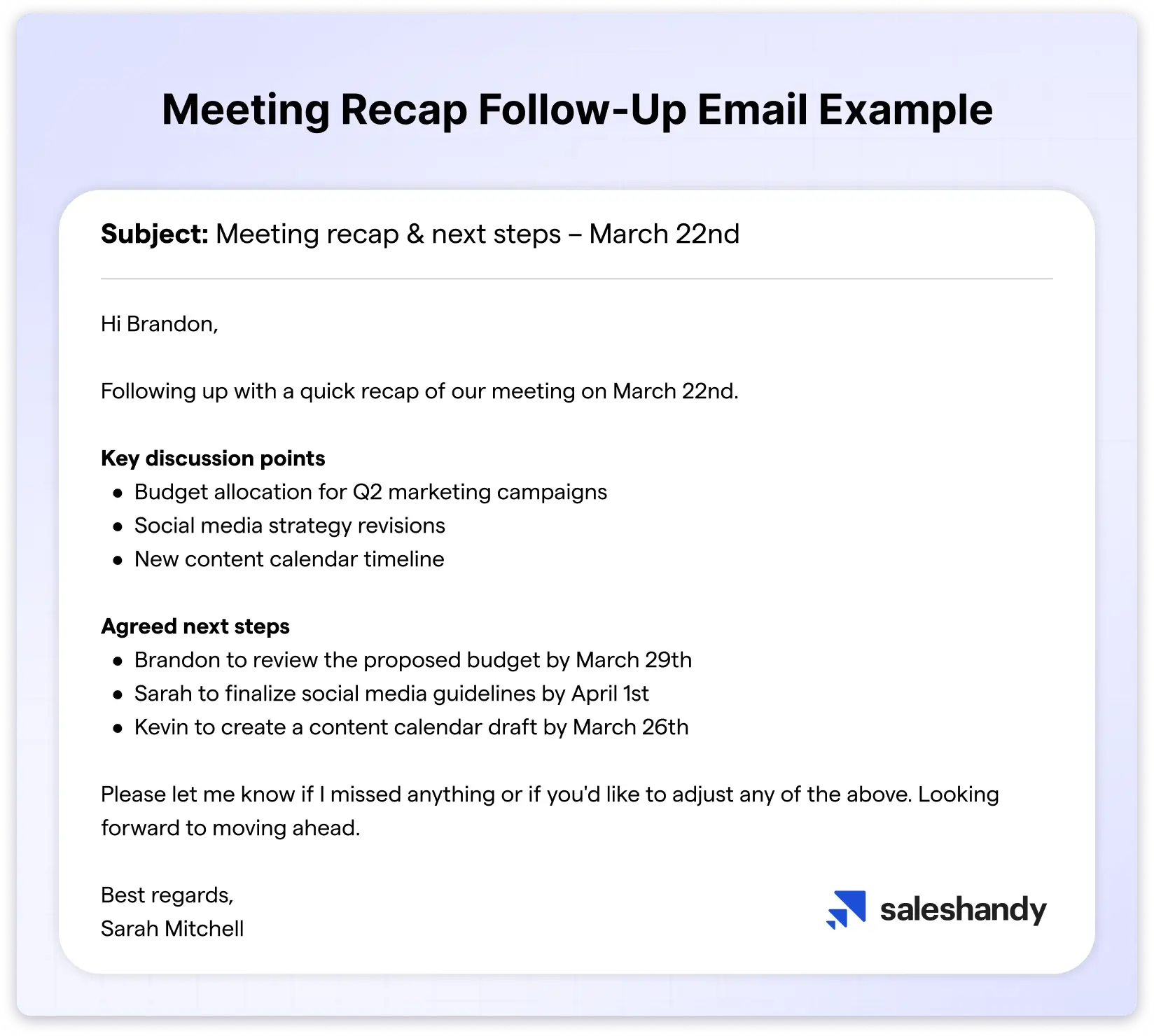
10. Follow-Up Email After a Meeting or Call
You can send this follow-up email right after a meeting or call ends to summarize what was discussed and confirm next steps.
Subject: Meeting recap & next steps – [Date]
Hi [Name],
Following up with a quick recap of our meeting on [Date].
Key discussion points
- [Point 1]
- [Point 2]
- [Point 3]
Agreed next steps
- [Your responsibility] — Due [Date]
- [Their responsibility] — Due [Date]
Please let me know if I missed anything or if you’d like to adjust any of the above. Looking forward to moving ahead.
Best regards,
[Your Name]
11. Follow-Up Email After a Cold Pitch
Cold emails rarely get responses on the first try. This follow-up email template can help, as it is personalized and adds credibility with specific examples.
Subject: Quick idea for [Company Name]
Hi [Recipient’s Name],
Following up on my earlier note around [topic].
We recently worked with [Similar Company / Industry Peer], where we helped them [specific, measurable result] by focusing on [specific lever or strategy].
While reviewing [Company Name], I noticed [specific observation that shows insight—not flattery].
Based on that, there’s a clear opportunity to [specific benefit] without adding [common objection: headcount, budget, complexity].
If you’re open to it, I’d be happy to walk you through the approach in a 15-minute call next week.
If this isn’t a priority right now, just let me know, and I’ll step back.
Best,
[Your Name]
12. Follow-Up Email to Request a Response
This email politely but directly asks for a response. It makes it clear that you will respect whatever answer they give.
It’s honest without being pushy and often gets people to reply.
Subject: Hoping to hear from you
Hi [Name],
I am following up regarding my earlier email about [topic].
I have not heard back from you, and I wanted to make sure my previous messages reached you.
Now, I understand you are busy, but I would really appreciate a quick response, even if it is just to let me know you are not interested at this time.
That way, I can plan accordingly.
Is there anything I can clarify or any information I can provide to help you make a decision?
Thank you for your time.
Best regards,
[Your Name]
13. Follow-Up Email After Leaving a Voicemail
You can send this email as a backup and share the same information via email.
Moreover, it also respects that they might prefer to respond via email rather than calling back.
Subject: Following up on my voicemail
Hi [Name],
I tried reaching you by phone earlier today and left a voicemail.
I wanted to follow up here as well, in case email is more convenient for you.
My call was about [brief explanation of reason].
I believe we can [specific benefit], and I would love to discuss this with you when you have time available.
Please let me know a good time to connect, or feel free to reply to this email if you prefer.
Thank you,
[Your Name]
[Phone Number]
14. Follow-Up Email Template for Contract Signing
This email gently nudges them while offering to answer questions or make adjustments.
It removes barriers to getting that signature and moving forward with the project.
Subject: Ready to move forward with the contract, [Recipient’s Name]
Hi [Recipient's Name],
I hope you’re doing well.
I’m just following up on the [contract/agreement name] we shared on [date] to see if you had a chance to review it.
Please let me know if you have any questions, need revisions, or if there’s anything I can clarify to help move things forward.
Once signed, we’re ready to proceed with [next step: kickoff, onboarding, start date].
Happy to jump on a quick call if that’s helpful.
Best regards,
[Your Name]
[Title / Company]
[Contact details]
15. Follow-Up Email to Reconnect With an Old Contact
Use this polite reminder to reconnect with old contacts by sharing a quick update on what you have been doing and expressing your interest in reconnecting.
Subject: [Recipient's Name], It has been a while
Hi [Name],
It has been some time since we last spoke, and I wanted to reach out and reconnect.
I hope everything has been going well with you and [their company/project].
A lot has changed on my end since we last talked.
[Brief update about what you have been doing]. I was thinking about you recently when [relevant reason] came up.
I would love to catch up and hear what you have been working on.
Would you have time for a quick call or coffee sometime soon?
Looking forward to reconnecting.
Best regards,
[Your Name]
16. Follow-Up Email After a Sales Demo
Demos give prospects a lot to think about.
You can use this email to help them process what they saw, answer questions that came up afterward, and move them toward a decision.
Subject: [Recipient’s Name], Questions after the demo?
Hi [Recipient’s Name],
Thank you for taking the time to join our demo of [Product] yesterday. I hope it gave you a clear picture of how we can help [Company Name] with [pain point].
I wanted to follow up to see if any questions came up after you had time to reflect on what you saw.
Sometimes questions arise once you have had a chance to think things through.
Based on what we discussed, I would recommend [specific next step or plan] to move forward.
Would you like to schedule a follow-up call to discuss implementation?
Looking forward to hearing your thoughts.
Best regards,
[Your Name]
17. Follow-Up Email to Your Boss
It is the best polite reminder email to send when you need a decision or update from your manager on something you’ve requested.
Subject: [Recipient’s Name], Following up on [topic]
Hi [Boss Name],
I wanted to follow up on [topic/request] that we discussed in our last meeting.
I know you have a lot on your plate, but I kindly request an update when you have a moment.
I am happy to provide any additional information that would help with your decision.
Please let me know if there is anything else you need from me.
Thank you for your time and consideration.
Best regards,
[Your Name]
18. Business Follow-Up Email
This is your formal business follow-up for bigger opportunities. It outlines specific ideas for collaboration and moves the conversation.
Subject: [Recipient’s Name], Following up on our conversation
Dear [Recipient’s Name],
I am following up regarding our recent conversation about [business opportunity/partnership].
I have given it some thought and believe there is real potential for us to work together.
I have outlined a few ideas on how we could [collaborate/proceed]:
- [Idea 1]
- [Idea 2]
- [Idea 3]
Would you be available for a meeting next week to discuss this in more detail?
I am confident we can create something valuable together.
Looking forward to your response.
Best regards,
[Your Name]
19. Professional Follow-Up Email After No Response
Some situations require a more polished, professional tone.
This template works well for formal business settings, corporate environments, or when reaching out to senior executives.
Subject: [Recipient’s Name], Circling back on my previous email
Dear [Recipient’s Name],
I am following up regarding my earlier email from [Date] about [topic].
I understand you have many priorities, but I wanted to ensure this did not get overlooked.
I believe [Your Product/Service/Proposal] could provide significant value to [Company Name], particularly in [specific area]. I have attached [relevant document] that provides more details.
Would you be willing to have a brief conversation about this?
I am happy to work around your schedule.
Thank you for your consideration.
Sincerely,
[Your Name]
20. Courtesy Follow-Up Email
This is your “no pressure” follow-up. The courtesy approach works well when timing is uncertain or when you want to maintain goodwill above all else.
Subject: [Recipient’s Name], Just checking in
Hi [Recipient’s Name],
I hope this email finds you well.
I wanted to send a quick courtesy follow-up on [topic] we discussed earlier.
I completely understand if this is not a priority right now.
However, if you do have any questions or need any clarification, I am here to help.
Please feel free to reach out whenever you are ready to continue the conversation.
Best regards,
[Your Name]
21. Follow-Up Email for a Meeting Request
It is an ideal email for following up when you’ve asked for a meeting but haven’t gotten a response on scheduling.
Subject: [Recipient’s Name], Following up on meeting request
Hi [Recipient’s Name],
I hope you are doing well. I am following up regarding my meeting request from [Date].
I understand your schedule is likely very busy.
I believe a conversation about [topic] could be mutually beneficial.
The meeting would only take [15/30] minutes of your time.
Would any of these times work for you?
- [Option 1]
- [Option 2]
- [Option 3]
If none of these work, please suggest a time that is more convenient for you.
Thank you for considering this.
Best regards,
[Your Name]
22. Second Follow-Up Email After No Response
You can send this email after your first follow-up has also gone unanswered. This is your second attempt, therefore try to add more value.
Subject: [Recipient’s Name], quick follow-up on [topic]
Hi [Recipient’s Name],
I wanted to follow up once more and share something new that may be relevant for [Company Name].
Since my last note, we’ve seen [new insight/result/resource], which is particularly useful when [specific situation they’re likely in].
In short, it can help [clear outcome or benefit].
If this isn’t a priority right now, no problem at all—I’ll step back after this message.
Otherwise, happy to share more or walk through it briefly if helpful.
Thanks for your time,
[Your Name]
4 Top Follow-Up Email Examples
You’ve seen the templates that show what to send. Now, let’s look at examples that explain why people actually replied. Each one comes from real business situations where timing and context made all the difference.
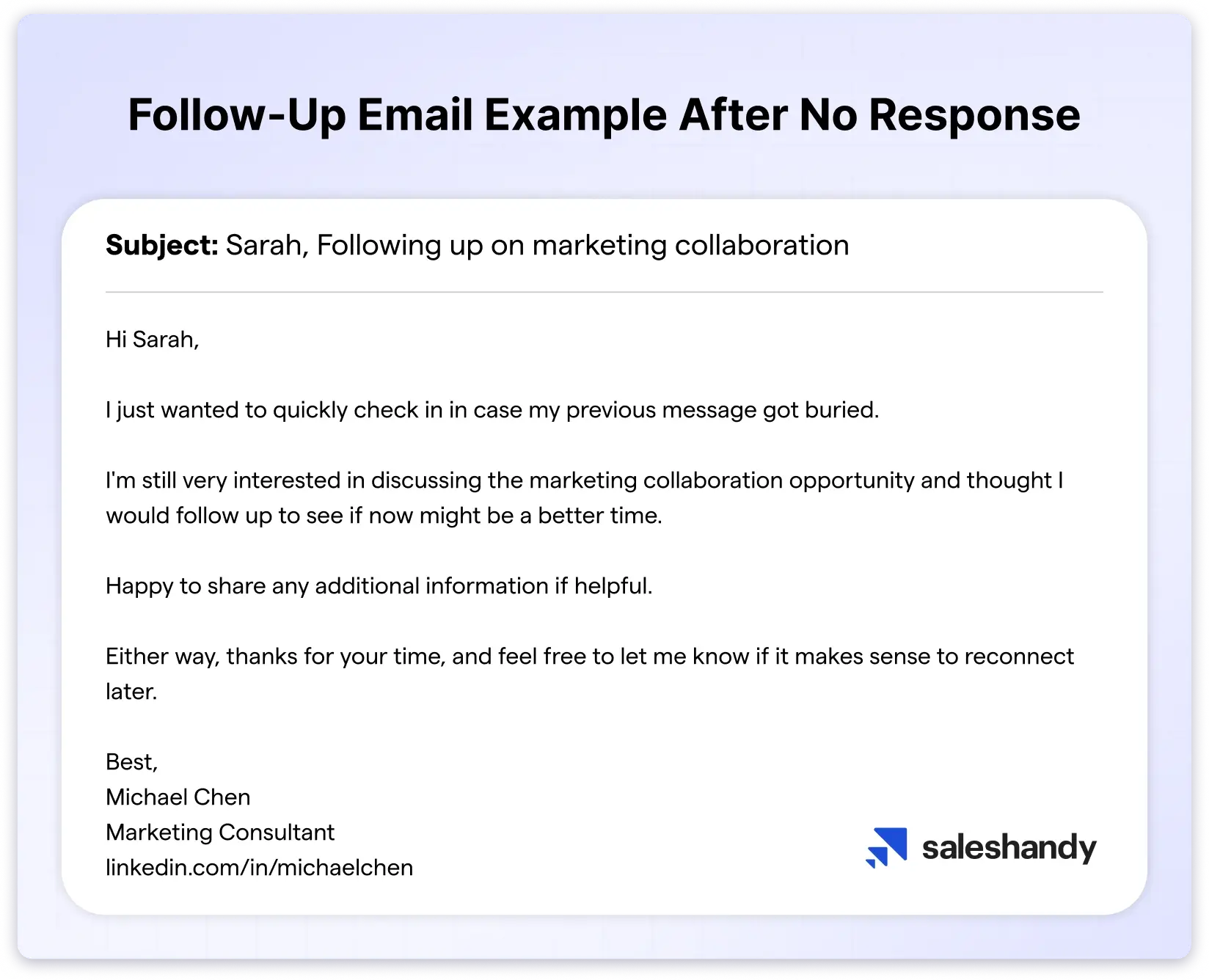
1. Follow-Up Email After No Response
Why this worked: It referenced the original email, added a new piece of value, and ended with a specific question that was easy to respond to. The tone was polite without being pushy.
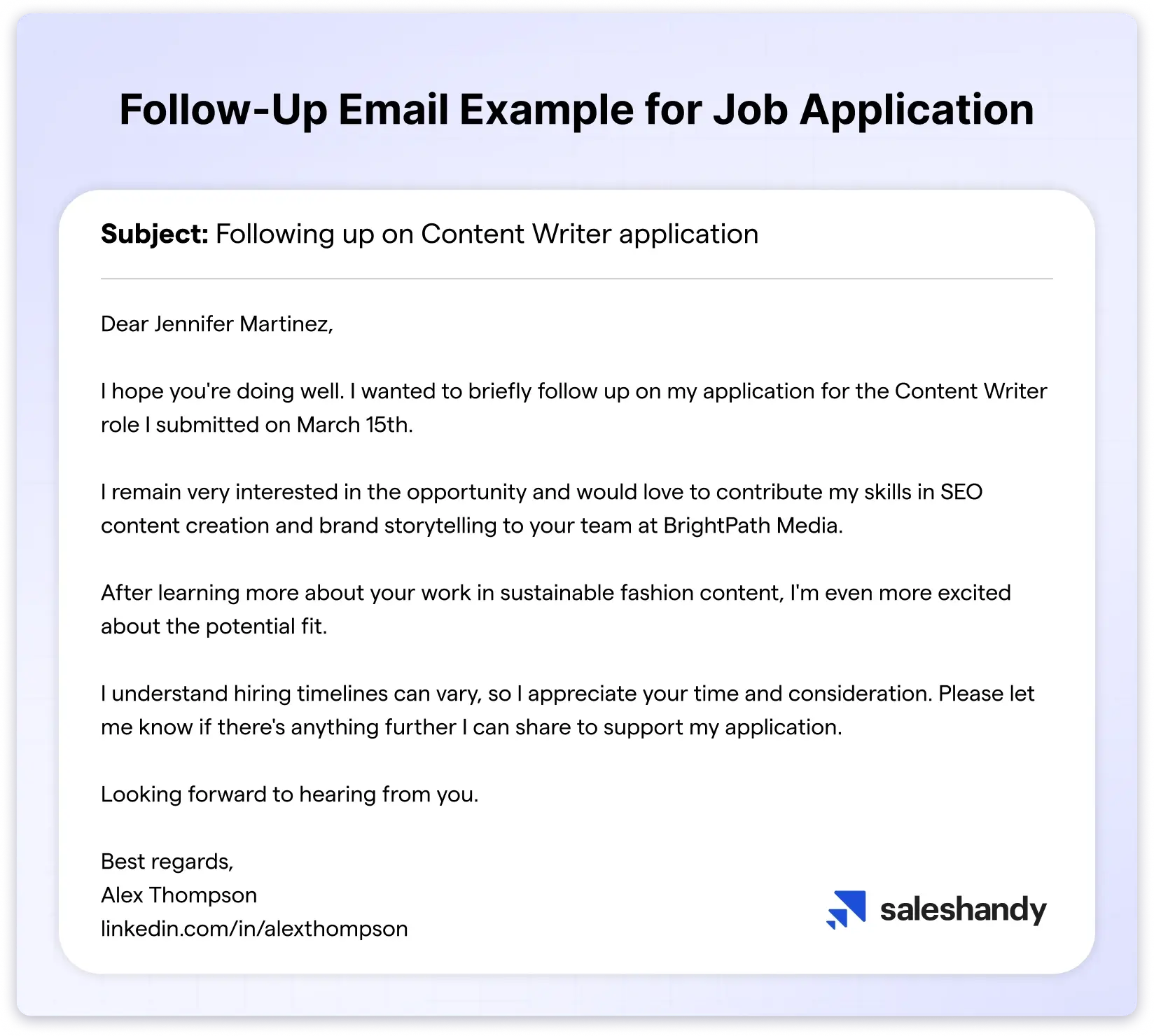
2. Follow-Up Email After Applying for a Job
Why this worked: The sender kept it brief, reaffirmed their interest in the role, and mentioned a specific skill that connected to the company’s recent work. It gave the hiring manager a reason to revisit the application.
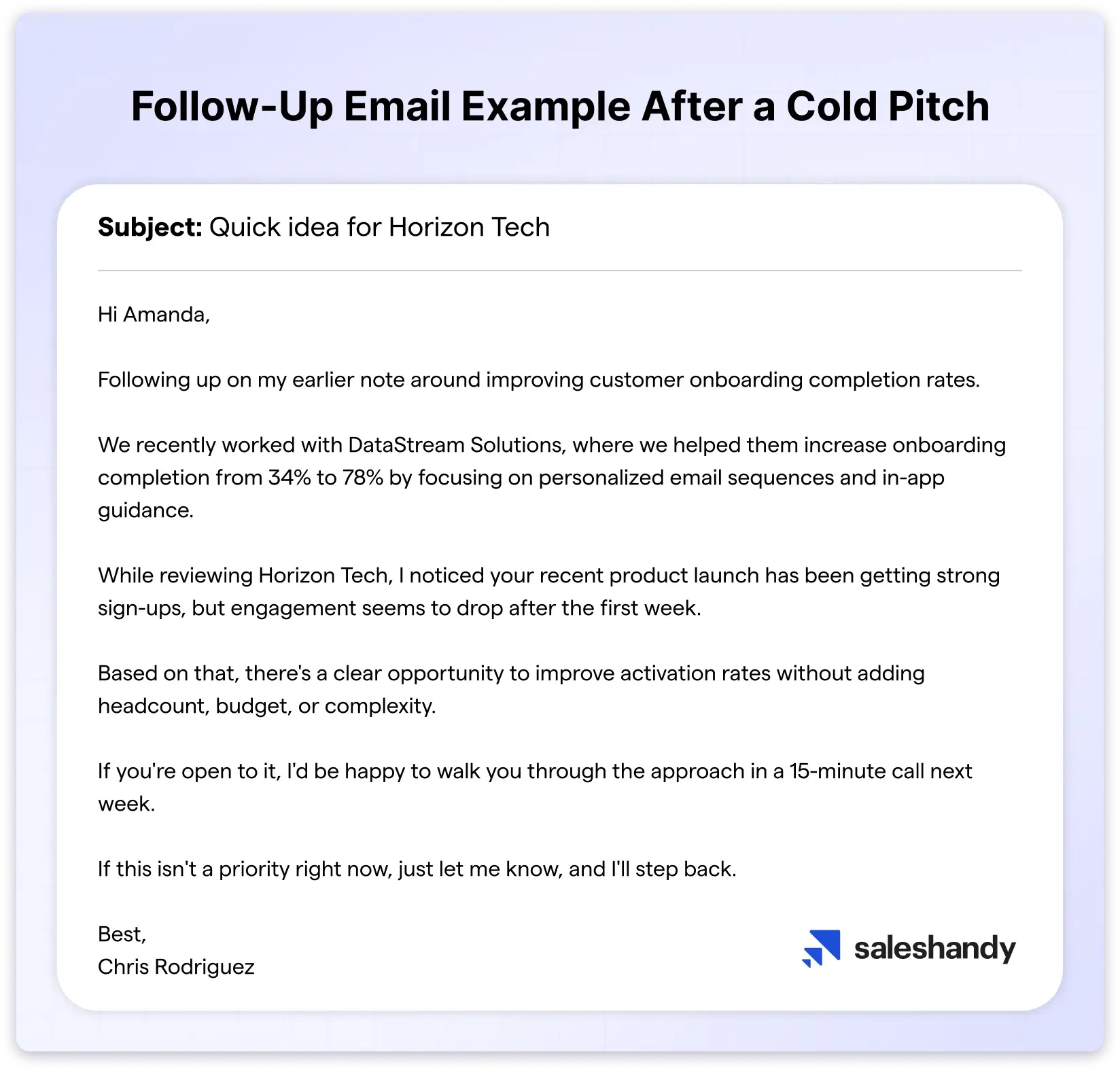
3. Sales Follow-Up Email Example
Why this worked: Instead of just “checking in,” the sender shared a relevant case study that was directly related to the prospect’s industry. This gave the recipient something new to consider and a reason to reply.
4. Follow-Up Email Example After Meeting
Why this worked: It was sent the same day, recapped the key discussion points clearly, and outlined the next steps with specific dates. It made it easy for everyone to stay aligned without another meeting.
How Many Follow-Up Emails Should You Send?
Follow-up emails increase your chances of getting a reply.
But there’s a point where more follow-ups start hurting instead of helping.
Here’s what the data tells us 👇
- No follow ups: reply rates stay around 9 to 16%
- One follow up: reply rates increase to roughly 13 to 27%
- A sequence of 4 to 7 emails: reply rates can reach around 27%
- More than 8 emails: replies drop off and spam risk increases
Based on what I’ve seen, 2 to 4 follow-ups is the sweet spot for most situations.
You want to gradually increase the time between follow-ups so you’re not flooding someone’s inbox.
And the moment you get a reply, stop the sequence immediately. Nothing feels worse than getting a follow-up from someone you’ve already responded to.
If you’ve sent 3–4 follow-ups and still haven’t heard back, it’s probably time to change your approach.
You can try reaching out on a different channel, like LinkedIn, or park the contact and come back to them after a few months with a fresh angle.
Best Practices for Sending Follow-Up Emails
Before you start sending your follow-up emails, here are a few things that are worth keeping in mind. These come from real-world testing and patterns I’ve noticed across thousands of follow-up campaigns.
1. Keep it under 100 words
The shorter your follow-up email, the easier it is to read and reply to. Anything over 125 words, and you start losing people. Aim for 50 to 100 words — just enough to get your point across without making it feel like a task to respond.
2. Avoid spam trigger words
Certain words and phrases can send your email straight to the spam folder before the recipient even sees it. Use Saleshandy’s free spam checker to run a quick check on your email before you send it.
3. Send at the right time
Tuesdays and Thursdays between 9 AM and 12 PM consistently show the highest engagement for follow-up emails. Avoid Mondays when inboxes are already overflowing and Fridays when people are winding down for the weekend.
4. Stay polite and sound like a real person
Your tone should be warm, professional, and human. Read the email out loud before you send it — if it sounds like something a robot would write, rewrite it.
5. Define your goal before you write
Every follow-up should have one clear objective and one clear ask. If you’re not sure what you want from the follow-up, the recipient won’t be either.
Write That Follow-Up Email Now!
Writing a good follow-up email isn’t about chasing a reply. It’s about reaching out at the right time, with the right message, in a way that makes it easy for the other person to respond.
Here’s what to take away from this guide 👇
- Every follow up is a fresh chance to get a reply. Don’t treat it as a repeat of your first email. Bring something new to the conversation each time.
- Don’t follow up too soon. Give the other person 2 to 5 business days before you send your first follow up, and gradually increase the gap between each one after that.
- Always reply in the same thread when possible. It keeps the context intact and makes it easier for the recipient to pick up where you left off.
- Be clear about why you’re following up and what you need. Vague follow ups get ignored because the reader doesn’t know how to respond.
- Keep your email short, polite, and easy to read. One clear ask, under 100 words, with a CTA that takes less than 10 seconds to respond to.
And if you’re sending follow-ups at scale, use a tool like Saleshandy to automate the process so nothing falls through the cracks.
Read this guide on when to stop follow-up emails.
FAQs
1. How to Follow Up on an Email After No Response?
Well, for sending a follow-up email, you need to send a short and polite reminder message in your original email thread.
However, make sure that you add some reference to the original email and clearly end with an easy-to-answer CTA.
2. How Long Should I Wait Before Following Up?
Different situations require different timelines for sending the follow-up email →
- Standard professional emails: 2-5 business days
- Cold emails: 2-3 days
- Urgent or time-sensitive emails: 24-48 hours
- Emails to senior executives: 7-10 business days
- Existing relationships: 2 to 3 days
Choosing the right timing makes your follow-up feel thoughtful, not forced.
And it increases your chances of getting a reply without creating unnecessary pressure.
3. How Many Follow-Ups Are Okay?
Yes, you should follow up after no response, as it shows persistence.
It depends on the situation, but if you’re doing cold outreach or applying for jobs, you should stick to 2-3 follow-up emails.
4. Should I Follow Up After No Response?
But while doing it, make sure you:
- Wait for a reasonable time (3-7 days, depending on urgency). Keep it polite and brief,
- add new value, and have a clear ask.
5. What is the Ideal Length of a Follow-up Email?
Your follow-up email should be within 50-125 words. Try to add only relevant and useful information which helps that subtly nudges the reader to give the response.
6. Can Follow-Up Emails Hurt Deliverability?
No, follow-up emails do not hurt your email deliverability. That said, excessive or poorly executed follow-up emails can absolutely hurt deliverability by
- triggering spam filters
- increasing spam complaints
- damaging your sender’s reputation
Therefore, make sure you follow all the best practices shared in the blog.
7. Should I Keep the Follow-up Email in the Same Email Thread?
Yes, you should always keep follow-up emails in the same thread to provide context and maintain a clear conversation history.