
 Dhruv Patel
 Contents
- 1 Lemlist Review – TOC
- 2 TL;DR: Is Lemlist Worth it?
- 3 In-depth Review of Lemlist’s Features
- 3.1 1. Lemlist’s Multichannel Sequence Builder
- 3.2 2. Lemlist’s AI-powered Personalization
- 3.3 3. Lemlist’s Deliverability and Warm-Up
- 3.4 4. Lemlist’s B2B Lead Database & Prospecting
- 3.5 5. Lemlist’s Agency and Team Management
- 3.6 6. Lemlist’s In-app Calling
- 3.7 7. Lemlist’s Campaign Analytics and Tracking
- 3.8 8. Lemlist’s Integrations
- 4 Lemlist Pricing: Is It Worth It?
- 5 Lemlist Pros and Cons
- 6 Top 3 Lemlist Alternatives
- 7 Final Verdict: Should You Choose Lemlist in 2026?
- 8 FAQs
When it comes to cold outreach tools, they love to make big promises like
“personalization at scale,” “boost reply rates,” or “never hit spam again.”
But honestly, many of them fail to deliver.
So, if Lemlist is what you have shortlisted to add to your outreach stack,
This review will be of a big help to you.
I tested Lemlist for 14 days and ran multiple campaigns
to see how it performs when it comes to deliverability, automation, personalization, usability, and whether it justifies the cost (or not).
In this review, you will find:
- My experience of its features
- What Lemlist does well
- Where it falls short
- Real G2 and User Reviews
By the end, you will know if Lemlist fits your outreach goals.
And I will also share an alternative worth considering
If you are looking for something more scalable (and affordable 😉)
Lemlist Review – TOC
TL;DR: Is Lemlist Worth it?
Before we go in-depth, let me tell you this upfront:
Lemlist is a great tool, but it is quite expensive for scaling outreach.
That is why many teams, including mine, consider Saleshandy a close alternative to Lemlist
Here is a quick comparison before we get into the details 👇🏼
| Feature | Lemlist | Saleshandy (Alternative) | Winner |
|---|---|---|---|
| Best For | Sales reps and small teams who prefer visual personalization and multi-channel outreach | Agencies, sales teams, and individuals who want to scale multichannel outreach with high deliverability | Depends on use case |
| G2 Rating | 4.4 / 5 ⭐ | 4.6 / 5 ⭐ | Saleshandy |
| Pricing | $59/user/month (per-seat pricing) | $25/month (unlimited email accounts) | Saleshandy |
| Automation & Sequences | - Visual campaign builder - Email + LinkedIn + call steps - Basic triggers | - AI-powered sequences - Advanced conditional triggers - Email automation & LinkedIn+WhatsApp+calling steps | Saleshandy |
| Personalization | - Strong visual personalization (images, videos, GIFs) - Dynamic text variables | - Text personalization at scale with custom merge and variable tags | Lemlist |
| Deliverability Suite | - Lemwarm for email warm-up - Spam tests - Inbox rotation | - Integration with TrulyInbox for email warm-up - Inbox placement tests - Spam tests - Sequence score - Inbox rotation | Saleshandy |
| Database | 600M+ B2B database | 700M+ verified contacts | Saleshandy |
| Team & Agency Features | - Pay additionally to add clients and team members - Role-based permissions | - Unlimited client and team workspaces at no extra cost - Role-based permissions - White labeling | Saleshandy |
Want a deeper breakdown?
Check out the full Lemlist Vs Saleshandy comparison.
In-depth Review of Lemlist’s Features
In this section, we will take a closer look at Lemlist’s primary features and see
How they work, where they might fall short, and how they can help you reach your outreach and sales goals.
- Lemlist’s Multichannel Sequence Builder
- Lemlist’s AI-powered Personalization
- Lemlist’s Deliverability and Warm-Up
- Lemlist’s B2B Lead Database & Prospecting
- Lemlist’s Agency and Team Management
- Lemlist’s In-app Calling
- Lemlist’s Campaign Analytics and Tracking
- Lemlist’s Integrations
Let’s find out!
1. Lemlist’s Multichannel Sequence Builder
One of the best things about Lemlist is its sequence builder.
I created a few sequences to see how well it handles multichannel outreach, and I was impressed with its intuitive interface!
You can create multiple touchpoints inside one sequence, like:
- Email → Automated email sequences with personalization
- LinkedIn → Profile visits, connection invites, messages, voice messages, and AI-generated voice messages
- Phone → Cold calling integration and manual call tasks
- WhatsApp → Automated messaging

The visual flowchart-type layout makes it easy to see how each step connects.
I just had to click on “Add Step”
To add my preferred channel, content, and customization, set delays, and the sequence was ready.
What I liked most was that you can add Advanced Conditions to your sequence.
For example, set it to send a new message only if someone opened your previous email or accepted your LinkedIn invite.
And then there is the AI Campaign Generator (which is in beta phase).
You just enter your company description, and Lemlist builds a lead list, creates campaigns, personalizes it, and all.
I tried it once, and it built an almost-ready-to-launch campaign
(obviously, you have to make some edits to the content; you cannot trust the AI fully) in 10 minutes.
That said, if you are new to multichannel cold outreach, Lemlist makes things easy.
But once you begin scaling, you will start to see some challenges 👇🏼
Note 👇🏼
- WhatsApp Integration is an add-on for $20/month per seat, and you must be on the Multichannel Expert ($99/month) or Enterprise plan to access it.
- For every additional email account, you’ll pay $9/month.
- Advanced conditions are only available on Multichannel Expert and Enterprise plans.
2. Lemlist’s AI-powered Personalization
Next, I tried the feature that makes Lemlist… well, famous
Lemlist’s personalization tools.
And I have to say, this is where Lemlist actually beats all other tools.
You can personalize almost everything,
- email text
- landing pages
- images
- video thumbnails
- LinkedIn voice messages
When I started personalizing my sequence, I started with the Custom Variables feature.
Lemlist already gives you a few common ones, like first name, company name, and LinkedIn URL, but you can also create customized variables.
Next, I moved to AI-Powered Personalization, which honestly amazed me.
I gave it a prompt: “Create a one-line compliment based on LinkedIn profile details.”
It generated some surprisingly good icebreakers that only needed minor editing.

The best part is?
Lemlist’s AI can write personalized intros for up to 1,000 prospects at once.
This really saves a lot of time when you are sending hundreds of campaigns
That said, I really wanted to try the LinkedIn voice message personalization feature,
But sadly, it’s not available during the free trial. So I could not try it 🥹
Note 👇🏼
- Custom Landing Pages are only included with Multichannel Expert and Enterprise plans.
3. Lemlist’s Deliverability and Warm-Up
No matter how personalized your email copy is, it does not matter if it does not make it to the inbox.
Well, luckily, Lemlist does offer solid features to improve email deliverability.
The core deliverability feature is email warm-up through Lemwarm.
And it’s included across all paid plans at no extra cost.
Lemwarm uses a network of 10,000 healthy mailboxes and mimics human email-sending patterns
To ensure your email accounts are properly warmed up and build domain credibility.
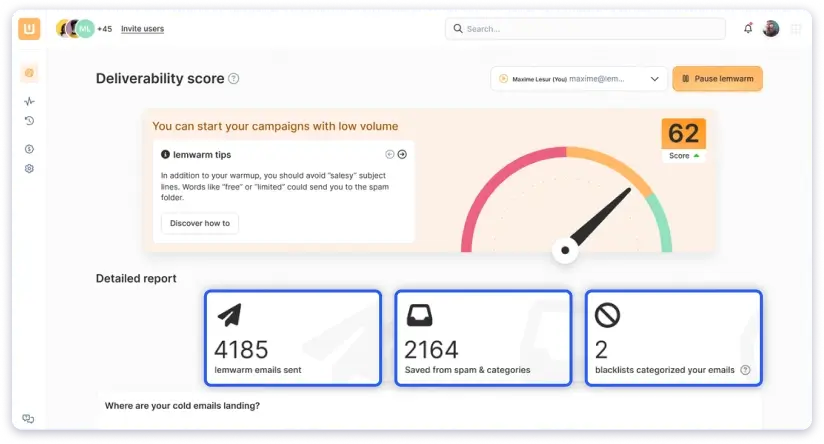
Once your account is warmed up, Lemwarm keeps track of your account’s deliverability score
And sending volume to make sure no spam filters are triggered.
Apart from email warm-up, Lemlist offers the following deliverability features:
- SPF, DKIM, and DMARC configuration support
- Inbox Rotation
- Custom Tracking Domain setup
- Intelligent Sending Algorithm
- Email Verification
- Blacklist Monitoring
- Deliverability scoring and guidance
That said, I have found very mixed reviews of Lemlist’s email deliverability online,
And many of them are negative.
Here is a Reddit review of a user who mentioned frustration with low deliverability rates and a declining domain reputation.

And honestly, I understand why it is happening.
While Lemlist offers solid email warm-up functionality, it lacks advanced deliverability tools beyond that.
Other cold outreach tools, such as Saleshandy and Instantly, offer features like inbox placement tests, but Lemlist does not.
It is 2026, and it takes more than a good email warm-up to land in the inbox.
4. Lemlist’s B2B Lead Database & Prospecting
Along with outreach, you can also do prospecting through Lemlist.
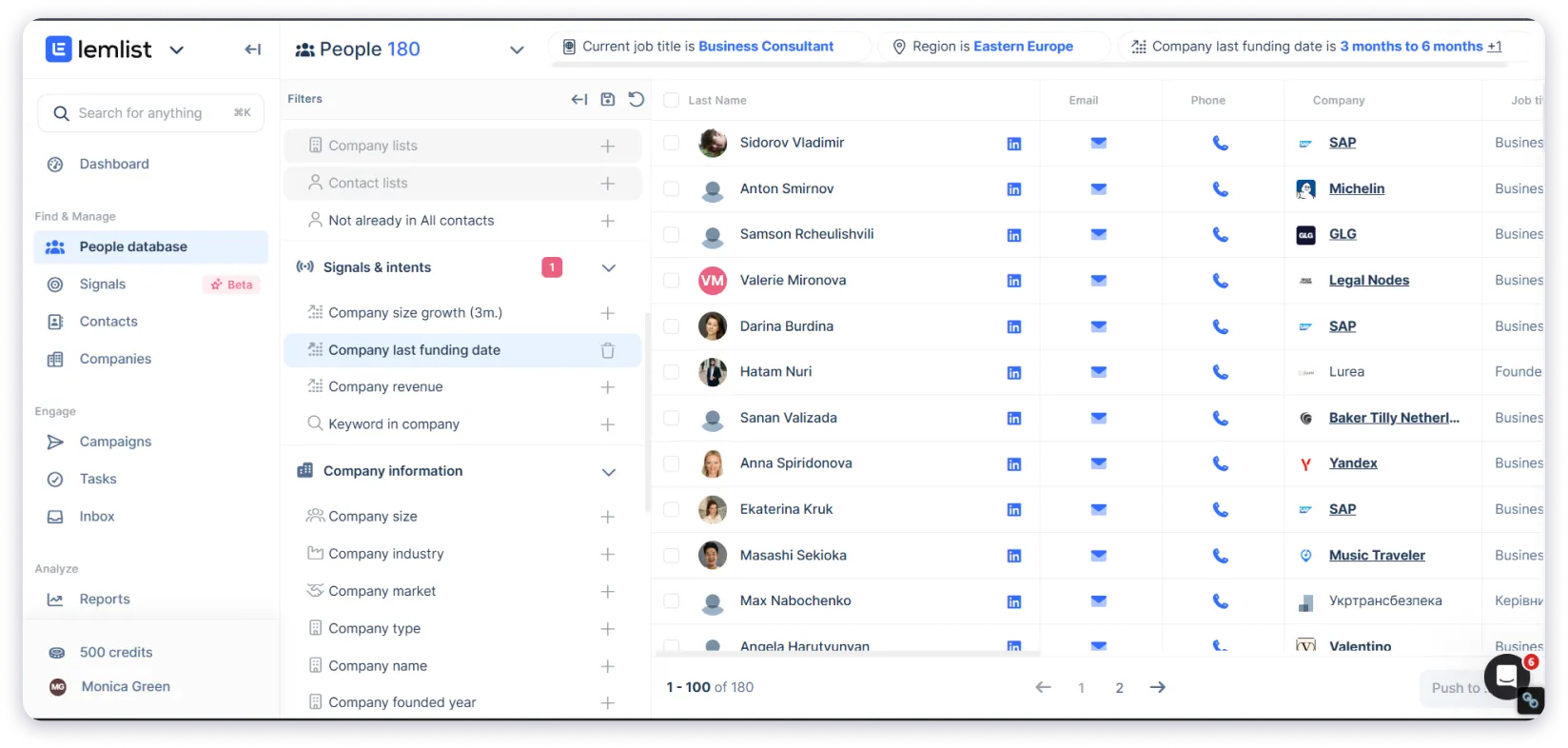
You get access to its massive database of 600M+ verified contacts, along with advanced filters like job title, company size, industry, and location.
This makes it easier to find the right leads for your campaigns.
Apart from that, Lemlist also provides features that help make your prospecting faster:
- Email Finder (find verified emails using name and domain, ~80% accuracy)
- Phone Number Finder (waterfall enrichment to fetch accurate phone numbers)
- LinkedIn Prospecting (via Chrome extension)
- Intent Signals (identify prospects showing buying intent)
- Website Visitor Tracking (see who visited your site and their activity)
While using its database, I liked how Lemlist separates searches into two categories,
People and Company.
This makes segmentation much easier and allows for more targeted searches, which is rare.
I ran a few searches in the European region using the Intent Signal filter to find companies that received funding more than three months ago.
And the results looked something like this 👇🏼
Note 👇🏼
All prospecting features are available across all Lemlist’s paid plans, with varying monthly credit allowances (1,000–2,500 credits depending on your plan). If you exhaust your monthly credits, you’ll need to purchase additional ones.
Credit Usage Breakdown:
- Email Finder & Verifier: 5 credits per lead (charged only for deliverable or risky emails found)
- Email Verification: 1 credit per lead
- Phone Number Finder: 20 credits per lead (charged only when a valid phone number is found)
- LinkedIn Enrichment: 2 credits per lead (extracts all available LinkedIn profile details)
Daily Limit:
Each team has a daily spending limit of 5,000 credits.
5. Lemlist’s Agency and Team Management
After exploring Lemlist’s core outreach and prospecting automation features, it’s time to see how Lemlist handles team and client management.
Because such features are really important for smooth collaboration if you are running outreach at scale and managing multiple clients.
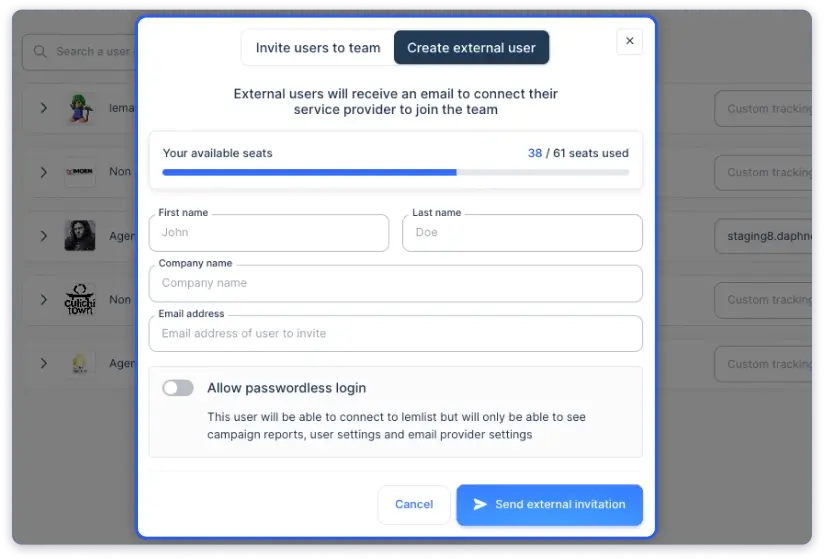
With Lemlist, you can invite teammates as Guest Seats.
Here is how it works across pricing plans:
- Up to 5 guest seats on the Email Pro and Multichannel Expert plans
- Unlimited guest seats on the Enterprise plan
Note 👇🏼
You cannot add more than 5 guest seats on the Email Pro and Multichannel Expert plans. If you want to add more teammates, you will need to upgrade to their enterprise plan.
Now, depending on the role, you can give guest users permissions/access.
For example, a user with admin access can fully manage campaigns, teams, and settings.
When it comes to client management, Lemlist requires you to create a separate workspace for each client.
Every workspace has its own billing, data, and settings.
Now, honestly, I appreciate this kind of flexibility and setup for agencies because it makes their life easier
as they can keep their internal outreach and client campaigns separate.
And the best part?
To control and manage all of this, you do not have to log in and out of different accounts.
You can do everything from a central Cockpit Dashboard, where you can switch between teams, view billing details, manage seats, and even update payment info.
So yes, Lemlist gives good flexibility in managing clients and billing,
But it comes at a HEAVY PRICE.
As I said, adding clients in Lemlist means you will need a separate workspace, which means you need to buy an individual plan for each one.
Even if you go with the basic plan at $55 per month, managing just 10 clients turns into:
💸 $55/mo × 10 clients = $550 per month
Now imagine adding more clients or moving to a higher plan. 😢
Therefore, scaling with Lemlist is expensive.
And I have found many users on G2 sharing the same concerns
“The pricing grows quickly if you need several users, which can be a blocker for small teams.”
“When it comes to scale, it becomes expensive.”
6. Lemlist’s In-app Calling
Previously, Lemlist relied on third-party dialers for calls.
But recently, it launched its new in-app calling feature, which supports 23 countries and lets you manage calls without switching tools.
I really liked the flexible functionalities it offers.
You can mute, pause recording, take notes, and end calls right inside Lemlist.
After each call, it even generates AI-powered summaries and lets you mark the status of your prospect as Connected, No Answer, or Left Voicemail.
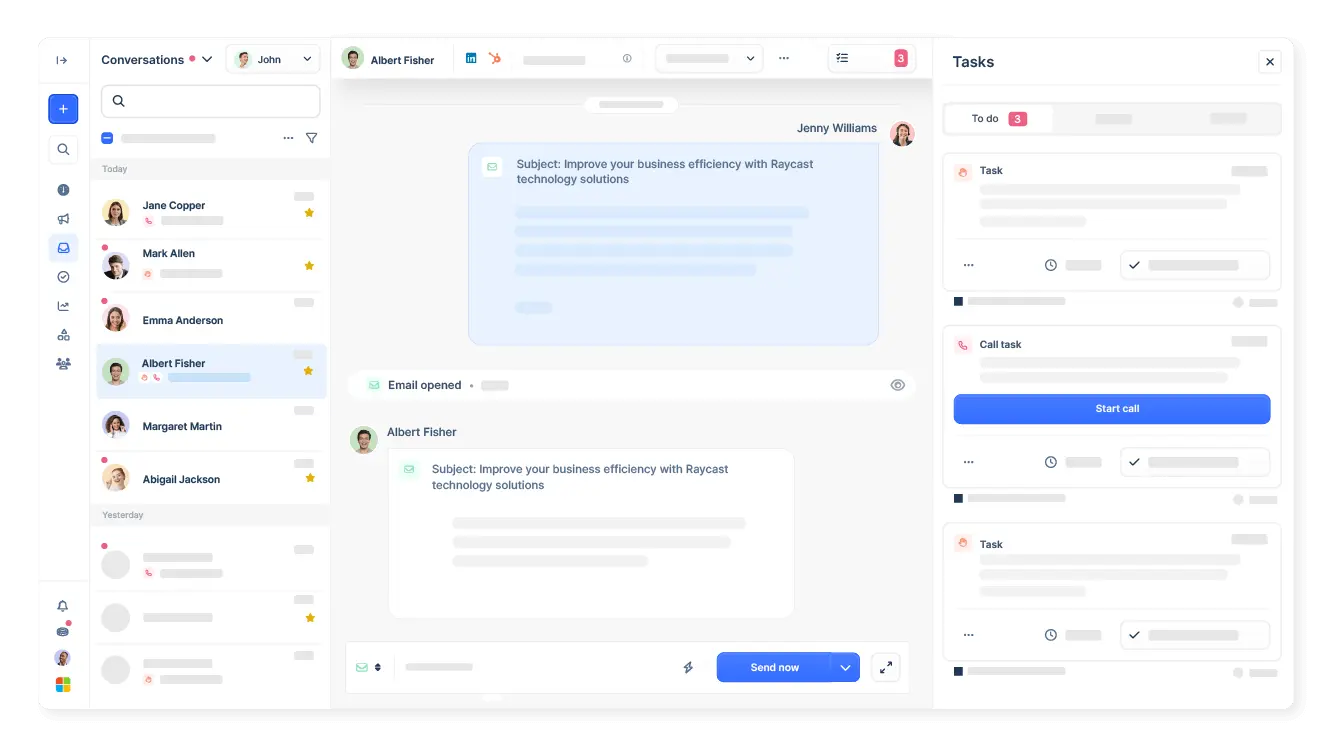
You can either connect your existing phone number after a quick verification process or purchase dedicated local numbers for $15/month/user.
Here’s the list of countries where Lemlist’s phone numbers are currently available (each with different setup requirements):
- United States: Landline only (no restrictions)
- France: Mobile & Landline (requires company registration details)
- United Kingdom: Mobile & Landline (requires business documents)
- Germany: Landline only (must have a company in Germany)
- Belgium: Landline only (must have a company in Belgium)
- Canada: Mobile & Landline (no specific requirements)
7. Lemlist’s Campaign Analytics and Tracking
To truly understand how your outreach campaigns are performing, you need a clean and insightful tracking dashboard.
When I opened Lemlist’s reports dashboard, I was honestly a bit disappointed,
Because there were no default metrics set up.
Yes, Lemlist gives you the flexibility to customize your own metrics, which sounds great.
But here’s the problem: too much customization can become an issue.
Only experienced users will know what to track and how to set it up properly.
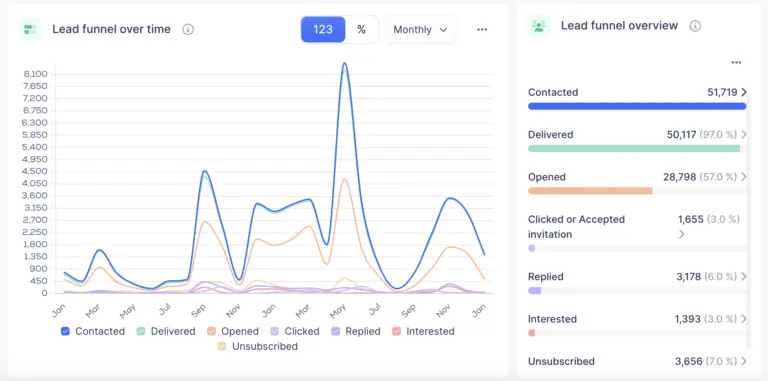
For beginners, it can feel confusing and takes a bit of a learning curve to understand which metrics actually matter.
And it is not just me, several users on G2 have shared similar feedback,
mentioning that Lemlist’s analytics and reporting could be deeper and more user-friendly.
“The reporting and analytics could be deeper. For example, the dashboard sometimes feels too high-level, and I often need to export data to get real insights.”
PS: Lemlist also allows you to analyze and track your sales calls and meetings.
8. Lemlist’s Integrations
Integrations are super important because they decide how well your outreach tool fits into the rest of your workflow.
The good news is, Lemlist integrates with most major sales and productivity tools.
But it still has a few gaps depending on how advanced your setup is.
Here’s what I found 👇🏼
- It offers direct integrations with popular CRMs like HubSpot, Salesforce, and Pipedrive
- Ringover, Aircall VoIP
- If you love automating tasks, Lemlist integrates with Make, Clay, and n8n
- Advanced API (only available in the Enterprise plan)
Lemlist Pricing: Is It Worth It?
We have covered Lemlist’s core features,
Now it is time to understand how much it will cost you.
Here’s a breakdown of its pricing tiers…
Lemlist Pricing Plans 💰
Email Pro Plan
- Monthly: $69/mo/user
- Annual: $55.20/mo/user
Multichannel Expert Plan
- Monthly: $99/mo/user
- Annual: $79.20/mo/user
Enterprise Plan
- Custom pricing (minimum 5 seats)
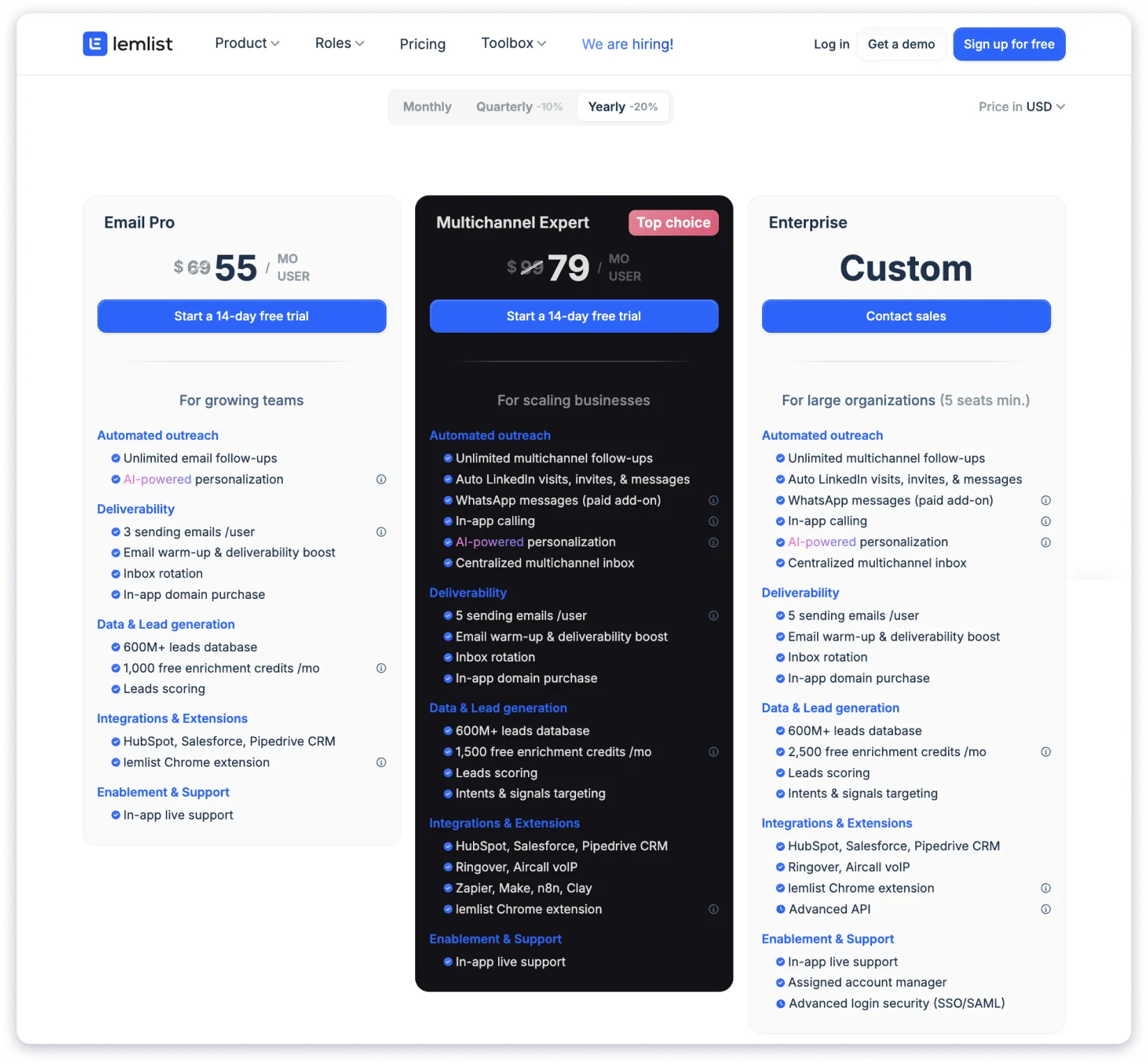
PS: Lemlist offers a 14-day free trial, which is a great time period for testing out its features before you buy the tool.
Lemlist’s pricing plans come with a lot of features, but they can get pricey as you scale.
Get the detailed breakdown of Lemlist’s Pricing, to see what each plan offers and which plan is suitable for whom.
Lemlist Pros and Cons
Still on the fence about Lemlist?
Let us make your decision a little easier.
Here is a quick look at the pros and cons of using Lemlist 👇🏼
| Pros ✅ | Cons ❌ |
|---|---|
| Strong personalization features (email, LinkedIn, voice messages) | Expensive pricing plans, especially for small businesses and agencies |
| In-app caller (no need for third-party tools) | Complex and limited analytical dashboard |
| 600M+ verified contacts with advanced filtering options | Limited integrations on lower plans |
| Email warm-up, domain credibility, and spam prevention tools | Lacks advanced delivery features |
| Seamless CRM integrations (HubSpot, Salesforce, Pipedrive) | |
| Custom API access for advanced automations and workflows | |
| Multichannel outreach (email, LinkedIn, phone, WhatsApp) |
Top 3 Lemlist Alternatives
If you have come this far, it probably means Lemlist does not fully
convince you, or you are actively looking for an alternative.
Well, here is something I can help with:
I will share some cold outreach tools that offer similar features to Lemlist but come at a more affordable price.
1. Saleshandy
Saleshandy is an advanced cold outreach automation tool that lets you send hyper-personalized cold emails and create tasks for WhatsApp and LinkedIn outreach.

Here are the key features of Saleshandy:
- Create unlimited sequences with advanced conditions and the AI sequence builder
- AI-powered business database of 700M+ contacts, allowing you to find emails and phone numbers
- Hyper-personalize cold emails with merge tags and custom variables
- LinkedIn Chrome extension for easy outreach
- Deliverability suite with features like unlimited email warm-up, spam score, and inbox placement tests
- Real-time email verification that only shows A-grade email addresses
- Add unlimited email accounts, clients, and team members at no extra charge
2. Instantly
Instantly is another sales intelligence tool that helps you send cold emails with high email deliverability.
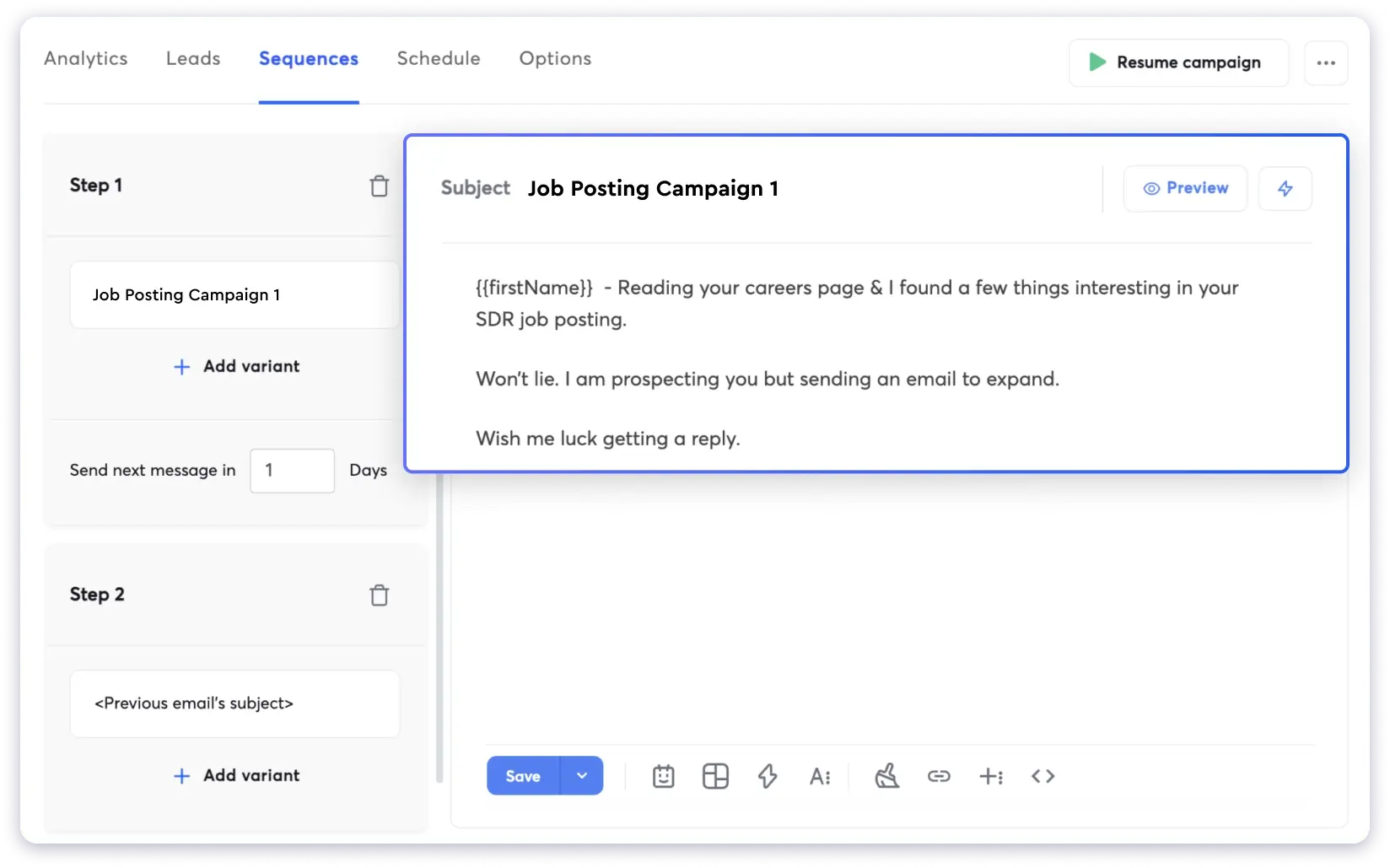
Here are the key features of Instantly:
- Add unlimited email accounts
- Create email sequences with conditions
- Personalization with merge tags
- In-built B2B lead finder with 450M leads, allowing you to find emails only
- Intent signals and visitor identification
I have placed Instantly after Saleshandy as a Lemlist competitor because,
Like Lemlist, it offers access to advanced tools in its higher pricing plans.
However, to add clients, you need to purchase a workspace, which requires being on a higher plan.
Check out our comparison of lemlist vs instantly to find the right outreach tool.
3. Apollo
Apollo is an AI sales platform that helps you automate outreach.
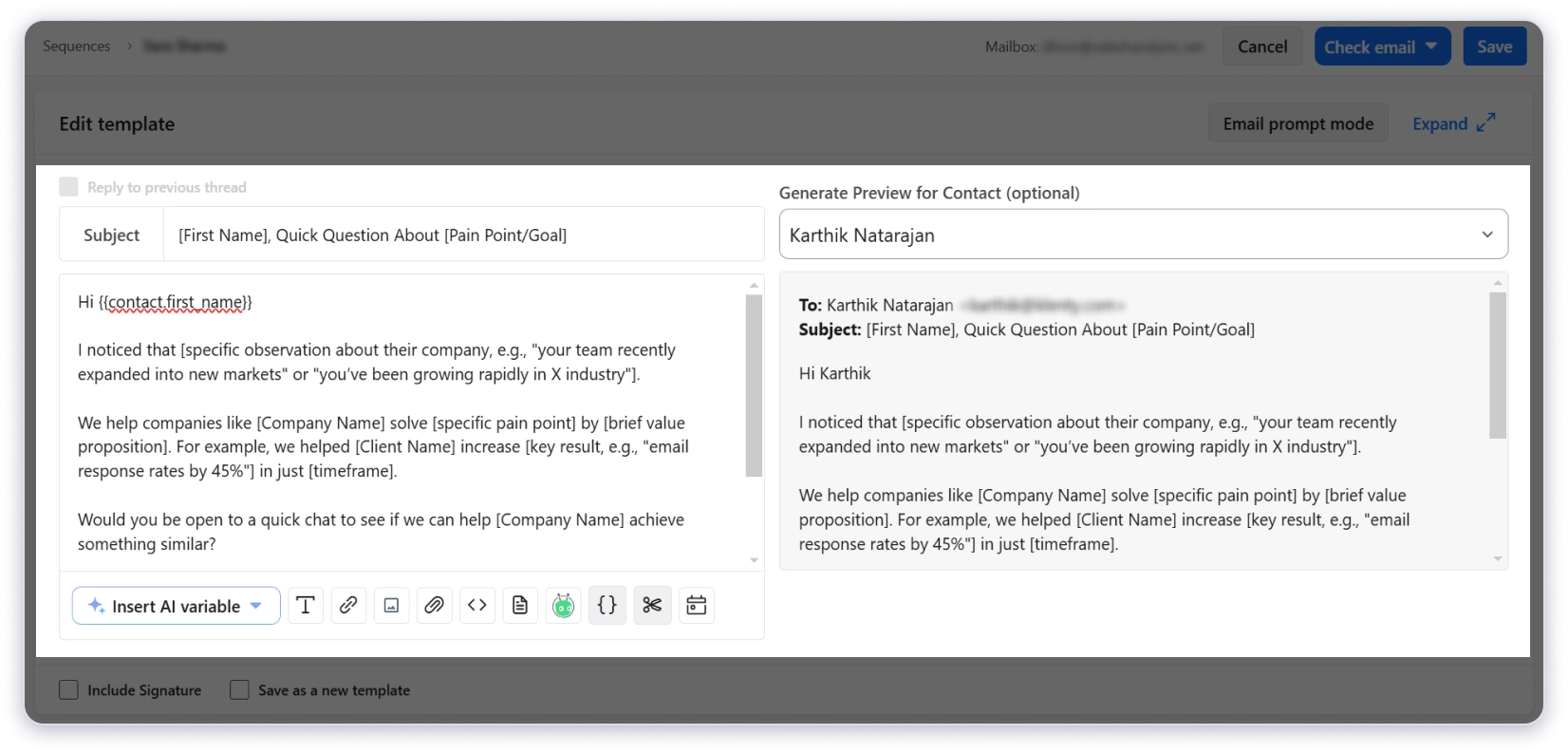
Here are the key features of Apollo:
- AI-powered multichannel campaigns with a click
- B2B database of 210M+ contacts and 30M+ companies
- AI email writer
- Data enrichment
Apollo is a great tool and can certainly compete with Lemlist for multichannel outreach.
However, when it comes to client management, Apollo falls short.
It does not have the client management features that Lemlist or Saleshandy offer.
Another downside is that Apollo lacks built-in email warm-up or deliverability tools, which are essential for cold emailing.
Why Is Saleshandy the Best Alternative to Lemlist?
Saleshandy is the best alternative to Lemlist because it offers
- Advanced cold emailing features that Lemlist offers, but at almost half the cost
- Bigger B2B database, 700M+ verified contacts, compared to Lemlist’s 600M+
- Inbox placement, which Lemlist doesn’t even offer
And the best part?
When it comes to adding email accounts, managing clients, or team members, you don’t need to pay any extra fees.
Unlike with Lemlist or other tools, where you are charged per seat or workspace.
Final Verdict: Should You Choose Lemlist in 2026?
Lemlist is a strong tool for outbound sales teams.
It has great multi-channel automation, hyper-personalization, and a variety of lead generation features.
But is Lemlist right for you?
Well, you should choose Lemlist if you are
- Sales teams and agencies are looking to run automated multichannel campaigns and streamline outreach.
- Cold emailers who want hyper-personalized email campaigns
- Someone who can bear and manage the high costs.
But if you do not fit into any of those categories,
You should definitely look for an alternative like
Saleshandy offers scalable outreach, better deliverability, and unlimited accounts at an affordable price.
FAQs
1. Is Lemlist Good for Cold Emailing Beginners?
Yes, Lemlist can be used by beginners in cold emailing. However, according to many user reviews on G2, there is a learning curve. Plus, you will need to make sure it fits your budget, as the pricing can be a bit high for beginners.
2. What Are Lemlist’s AI Features?
Here are Lemlist’s AI features:
- AI Variables & Personalization
- AI Sequence Generator
- AI-Powered Icebreakers
- AI Voice Messages
3. What Are Cheaper Lemlist Alternatives in 2026?
Saleshandy is the most suitable, affordable alternative to Lemlist, as you can get almost all (and even many more advanced) features like Lemlist, at a better price.
4. How Many Emails Can You Send with Lemlist?
Lemlist has no defined email limits, but it recommends sending 100 emails to maintain deliverability. However, email sending limits are as follows:
However, Lemlist has email sending Limitations for the trial plan
- Free trial: 5 emails per day
- 14-day trial: 50 emails per day