![How to Get Phone Numbers from LinkedIn [3 Quick Ways]](https://www.saleshandy.com/blog/wp-content/uploads/2025/05/How-to-Get-Phone-Numbers-from-LinkedIn-3-Quick-Ways-1200x675.webp)
 Anil Salvi
 Contents
- 1 How to Get Phone Numbers from LinkedIn – TOC
- 2 Quick Overview: 3 Ways to Get Phone Numbers from LinkedIn
- 3 Method 1: Get Phone Numbers Using LinkedIn Chrome Extensions
- 4 Method 2: Manually Check LinkedIn for Contact Info
- 5 Method 3: Find Phone Numbers From B2B Data Providers
- 6 5 Tips to Follow Specifically for Cold Calling
- 7 Choose the Right Approach to Find Legit Phone Numbers
- 8 Frequently Asked Questions
- 8.1 1. Is it legal to find someone’s phone number?
- 8.2 2. What is the fastest way to find a business contact’s phone number?
- 8.3 3. Can I find a prospect’s phone number directly on LinkedIn?
- 8.4 4. Can company websites help in finding phone numbers?
- 8.5 5. Can search engines help find phone numbers?
- 8.6 6. Can social media platforms help find phone numbers?
- 8.7 7. Should I use phone number lookup tools for business contacts?
- 8.8 8. What should I do if I cannot find a prospect’s phone number?
Your competitors are already in your prospects’ inboxes (and probably booking meetings first).
You are still waiting for a reply on LinkedIn (frustrating, right?).
LinkedIn shows you who to talk to, but not how to reach them.
Most profiles look promising, with great companies and clear intent, but no phone numbers.
That missing detail slows your momentum (and costs you potential deals). You rely on InMails, hoping for a response.
The phone numbers exist. They are simply hidden and accessible if you know where to look (yes, legally and safely).
In this post, I will share how to get phone numbers from LinkedIn: manual research, Chrome extensions, and B2B data providers.
So, let’s get started.
How to Get Phone Numbers from LinkedIn – TOC
- Quick Overview: 3 Ways to Get Phone Numbers from LinkedIn
- Method 1: Get Phone Numbers Using LinkedIn Chrome Extensions
- Method 2: Manually Check LinkedIn for Contact Info
- Method 3: Find Phone Numbers From B2B Data Providers
- 5 Tips to Follow Specifically for Cold Calling
- Choose the Right Approach to Find Legit Phone Numbers
- Frequently Asked Questions
Quick Overview: 3 Ways to Get Phone Numbers from LinkedIn
1. Chrome extensions (fastest)
Use Chrome extensions to get phone numbers directly from LinkedIn profiles — Saleshandy Connect, Lemlist.
2. Manual LinkedIn method (limited)
Check the Contact Info section after connecting. This works only if the user has shared their phone number.
3. B2B data providers (best for scale)
Use B2B lead databases to find phone numbers in bulk using LinkedIn data — Saleshandy Lead Finder, Cognism, Clay, and Lusha.
Method 1: Get Phone Numbers Using LinkedIn Chrome Extensions
LinkedIn Chrome extensions let you see contact details directly on profile pages.
1. Saleshandy Connect (Recommended)
Saleshandy Connect is a Chrome extension that helps you get verified email addresses and phone numbers from LinkedIn profiles.
You do not need to switch tools or export data manually.

How it works:
- Open a prospect’s LinkedIn profile
- Click the Saleshandy Connect extension
- View the email address and phone number, and save the contact
You can also find email addresses and phone numbers from LinkedIn lists and company pages.
Why I Use Saleshandy Connect (Recommend It)
- Shows verified email addresses and phone numbers on LinkedIn
- Works inside LinkedIn, without switching tabs
- Supports bulk lead collection from lists and company pages
- Saves contacts for email outreach or calling workflows
Saleshandy Connect is free to start.
You get 5 free lead credits every month, and unused credits carry forward.
PS: Saleshandy Connect is part of Saleshandy’s end-to-end cold emailing platform.
You can use the LinkedIn Chrome extension to find emails for free, and also access the B2B database with 700M+ contacts to find email addresses linked to LinkedIn profiles.
Pricing:
- Saleshandy’s Chrome extension is available for free
- You get five free credits every month
- Paid plans begin from only $29 per month
2. Lemlist
Lemlist helps you find phone numbers and use them directly in calling workflows.
If calling is part of your outreach, Lemlist lets you access phone numbers without switching tools.

How it works:
- Sign up on Lemlist and install the Chrome extension
- Log in to LinkedIn
- Visit a prospect’s LinkedIn profile
- Once the extension is active, Lemlist shows the phone number (if available) directly in the sidebar.
You can also find phone numbers in bulk from LinkedIn or Sales Navigator lists, which helps when working with larger lead lists.
Why I Use Lemlist for Phone Numbers
- Shows phone numbers directly while browsing LinkedIn profiles
- Supports bulk phone number discovery from LinkedIn lists
- Let’s you add contacts straight into calling campaigns
- Displays all lead details in one place, including role, company, and phone number
Lemlist works well if you want phone number discovery and calling inside the same platform.
Pricing:
- Restricted free trial available
- Starts at 55€/month/user
Not sure about Lemlist? Read our Lemlist alternatives to find out the best pick for your requirements.
Method 2: Manually Check LinkedIn for Contact Info
LinkedIn allows you to view phone numbers manually, but only under specific conditions.
To use this method, you must have a LinkedIn account and be connected with the person.
LinkedIn shows contact details based on the user’s privacy settings, not by default.
If the user has added a phone number and allowed connections to see it, it will appear here.

How the Manual LinkedIn Method Works
- Send a LinkedIn connection request to the prospect
- Wait for the request to be accepted
- Visit the prospect’s LinkedIn profile
- Click the Contact info button near the profile header
- A pop-up will appear, showing an email address, website, or social links.
Important Things to Know Before Using This Method
- This method is free, but comes with limitations
- Phone numbers are visible only to accepted connections
- The prospect must have added their phone number to LinkedIn
- Visibility depends on the user’s privacy settings
Limitations of the Manual LinkedIn Method
This method comes with several limitations:
- There is no guarantee you will find a phone number
- Most users do not share phone numbers on their profiles
- The process is slow and manual
- It does not support bulk checks or automation
- There is no CRM or workflow integration
Because of these limits, the manual method works best for one-off checks, not regular outreach.
Method 3: Find Phone Numbers From B2B Data Providers
Let’s now understand how to get phone numbers from B2B data providers and enrichment tools.
1. Saleshandy Lead Finder
Saleshandy Phone Number Finder is a B2B lead platform built to find verified phone numbers and email addresses at scale.
You can search for founders and business professionals using filters like location, industry, company size, role, department, skills, and technologies used.
The platform covers 700M+ business profiles, making it suitable for teams that need consistent and up-to-date contact data.
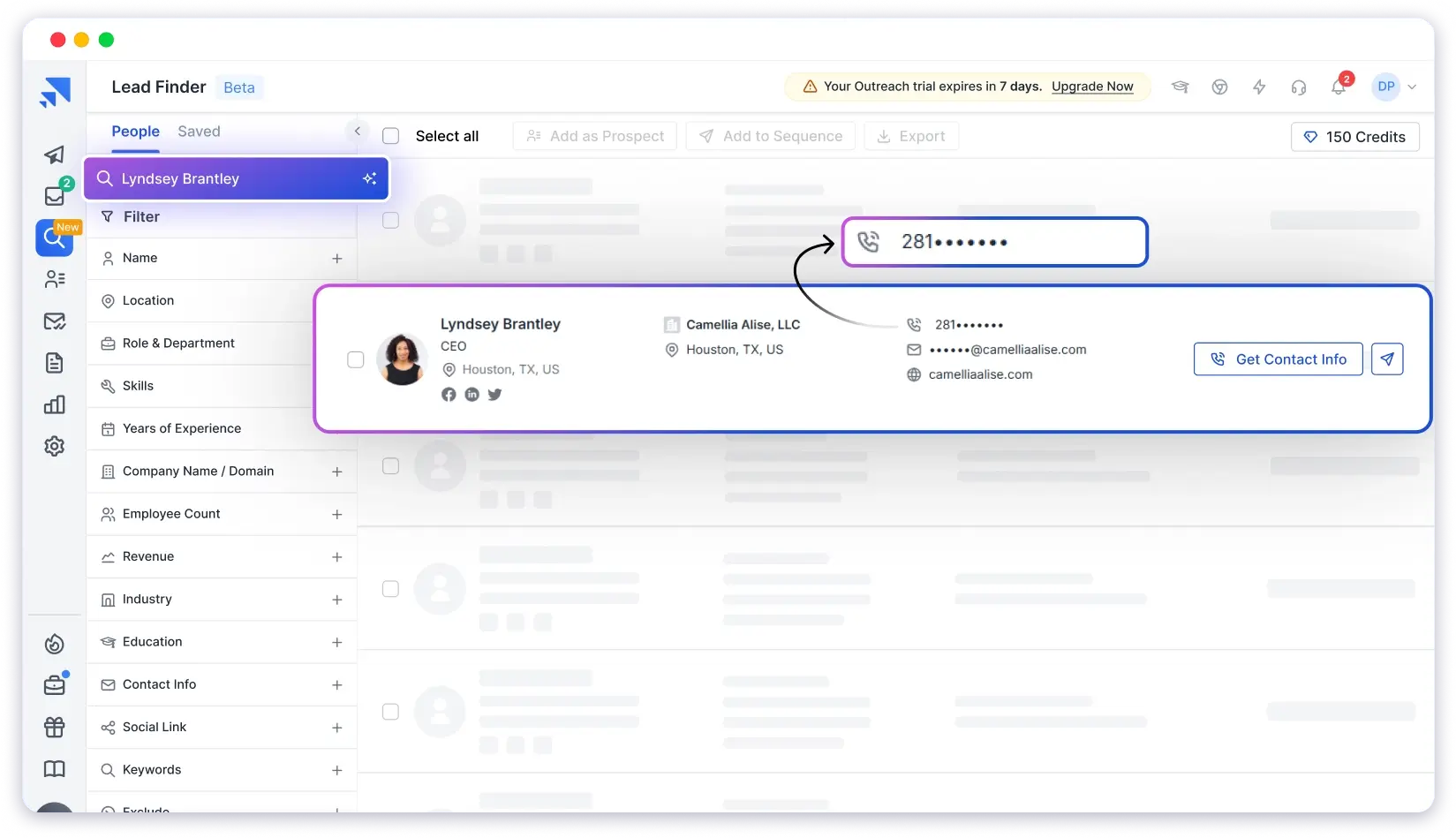
How Saleshandy Lead Finder Works
You can find phone numbers in two main ways:
First, search using filters such as role, department, company size, location (US, Europe, APAC), industry, and skills
Paste up to 100 URLs at once, including:
- LinkedIn profiles
- Company websites
- Social media links
Saleshandy automatically enriches these URLs and returns verified phone numbers and email addresses linked to each profile.
Second, for larger campaigns, you can use bulk search and reveal to extract up to 10,000 leads at once.
If a search fails or contact details are not found, credits are not deducted.
The best part? AI-Based Lead Search
If you do not want to apply filters manually, you can use the AI search option. You can describe your ideal lead in plain language, such as “Sales managers in B2B SaaS companies in the US.”
Saleshandy then finds matching prospects with verified contact details based on that prompt.
This makes it useful when you already know your ICP but want faster list creation.
Key Features of Saleshandy Lead Finder
- Verified phone numbers and email addresses
- Real-time email and mobile number verification
- Prompt-based AI lead search
- Bulk lead export (up to 10,000 contacts)
- Upload up to 100 URLs at once
- LinkedIn Chrome extension support
- CRM integrations (Salesforce, HubSpot, Zoho, Pipedrive)
- ISO 27001, GDPR, and SOC 2 Type II certified
- Export-free cold outreach workflows
Pricing (Billed Annually)
- Lead Starter: $29/month — 6,000 credits
- Lead Pro: $59/month — 12,000 credits
- Lead Scale: $99/month —30,000 credits
- Lead Scale Plus: $199/month — 60,000 credits
Unused credits roll over to the next month.
Saleshandy Lead Finder works well if you want to find phone numbers in bulk, enrich LinkedIn data, and move leads directly into outreach without switching tools.
2. Cognism
Cognism is a well-known B2B data provider, especially in Europe.
What makes it stand out is its verified and updated phone number database.
You get access to more than 70 million mobile numbers and over 200 million professional contacts.

With its trusted commitment to regulatory compliance, Cognism can be a great option for enterprises.
This is especially true for companies that operate in European markets where GDPR compliance is crucial.
In addition to that, what data on phone numbers does it provide?
What Kind of Phone Data Can You Expect?
Mobile numbers that are regularly verified and updated.
Phone verification on demand through Cognism’s “Diamond Data” system (this is a premium feature, but worth it for the accuracy).
This also involves checking their data through multiple sources to ensure the best results.
Key Features
- Intent-based lead filtering
- Verified and accurate contact information
- AI-powered data enrichment
- Fully GDPR and CCPA compliant
- Real-time data updates
- Supports multi-channel outreach
Pricing
- Custom Pricing
3. Clay
Clay is an AI-powered enrichment platform built for teams that want more than a single static database.
Instead of relying on one provider, Clay uses a waterfall enrichment model.
It checks multiple B2B data sources one by one to find the most accurate contact details, especially phone numbers.

How Clay Finds Phone Numbers
You can upload a list of leads using basic details such as:
- Name
- Company
- LinkedIn profile URL
Clay then runs each lead through multiple data providers, including Apollo, Lusha, Dropcontact, Clearbit, and others.
If none of these providers return a phone number, Clay’s AI assistant, Claygent, steps in.
Claygent searches publicly available sources such as speaker bios, press mentions, and social profiles to find phone numbers linked to the same person.
This approach helps fill data gaps and avoids wasting credits on failed lookups.
What Type of Phone Number Data Do You Get with Clay
- Mobile numbers and direct dials (when available).
- Company phone numbers sourced from multiple providers.
- Public phone numbers found by Claygent.
- Source-level tracking for each phone number.
- Waterfall logic to keep data complete and consistent.
Because each result includes source tracking, you can see where the number came from before using it.
Clay works well if you want to enrich LinkedIn leads, reduce missing data, and avoid dependency on a single phone number provider.
Key Features of Clay
- AI-powered waterfall data enrichment
- Automatic use of multiple data providers
- Phone number and email enrichment
- Claygent AI for public data discovery
- Source tracking for every contact
Pricing
- Free plan
- Starter plan at $134 per month
- Explorer plan at $314 per month
- Pro plan at $720 per month
- Enterprise plan with custom pricing
4. Lusha
Lusha is a well-known platform for generating leads, either email addresses or phone numbers.
It is known for its reliable contact data offering and lightweight integrations.
The tool also includes AI prospecting features that make contact search easier.

Its browser extension is known for being particularly user-friendly.
It is designed specifically to gain quick access to contact details on LinkedIn.
While Lusha doesn’t support many advanced features, it is still a great tool for entry-level lead generation.
Key Features
- It has a simple interface for easy access and analysis
- Integrate with popular CRMs like Salesforce & HubSpot
- Shared team dashboard for better collaboration
- Promises 98% email deliverability for outreach
Pricing
- Starts at $22.45/mo.
You can read about the top phone number look-up tools to get started. We have listed these tools to help you find the best ones for your requirements.
5 Tips to Follow Specifically for Cold Calling
Finding numbers from LinkedIn is only half the battle.
You will need to use them in the right way to get actual results from your leads.
Here’s how you can turn your cold calls into actionable results:
- Verify Before You Dial
- Respect Their Time and Privacy
- Keep Your First Calls Under 2 Minutes
- Track Call Outcomes And Improve Your Script
- Use a Multi-Channel Approach (LinkedIn + Call + Email)
1. Verify Before You Dial
Double-checking your numbers may seem like a very simple precaution.
But you will be surprised how often people miss it.
This is because even the best tools carry the risk of hosting outdated data.
Cross-referencing details you extracted from LinkedIn can help your outreach significantly. This will prevent you from wasting your time calling the wrong leads.
It will also help minimise the people you annoy with a sales pitch they are clearly not interested in.
2. Respect Their Time and Privacy
Make sure that you are only placing your calls during the appropriate business hours for the receiver.
This will help develop mutual respect with your leads and result in a more successful outreach campaign.
It will also build professional credibility for your brand and lead to more conversions.
So, stick only to professional timings and ensure you contact your leads the right way.
3. Keep Your First Calls Under 2 Minutes
Your initial calls are not about closing deals.
They are about starting conversations and building new connections.
Make sure you aim to end your calls in two minutes or less.
This approach will help you become more respectful of their time. It will also help you contact more leads in a shorter period of time.
You may use this sample opening script for your first call:
Hi [Name], this is [Your Name] from [Company]. We help businesses like yours [solve specific pain points]. Is now a good time for a quick chat, or should we schedule this for later?
4. Track Call Outcomes And Improve Your Script
After every call, I note what actually happened.
How interested the prospect sounded, what questions they asked, and which parts of my message worked well. It helps me understand what to change next time.
I noticed something important during these reviews. When I started calls by talking about features, people lost interest.
But when I began with their business challenges, the conversation stayed active, and they opened up more.
Learning from actual calls helps you naturally improve your script.
It makes your outreach feel genuine and helps you lead better conversations with prospects.
5. Use a Multi-Channel Approach (LinkedIn + Call + Email)
Reaching prospects through one single channel feels like hoping they notice you.
A mix of LinkedIn, calls, and email works much better.
Here is what I do.
If I cannot reach someone by phone, I send them a LinkedIn request and mention that I tried calling. It keeps things natural. Then I send a short and personalized email that ties everything together.
This small sequence creates recognition.
They see your name on LinkedIn, hear your call, and read your email.
The trust builds faster, and the chances of a reply go up.
A layered approach feels human, not pushy, and helps you start conversations.
Choose the Right Approach to Find Legit Phone Numbers
In concluding notes, finding phone numbers on LinkedIn should not feel like solving a mystery.
Once you know the right ways, the process becomes much faster and a lot less frustrating.
You now have three clear options:
Use a Chrome extension, check profiles manually, or pull numbers in bulk with B2B data tools.
Each works well in different situations, and all of them help you reach the right people faster.
If you want the quickest win, try the Saleshandy Chrome Extension.
It gives you verified phone numbers in seconds and lets you move straight to outreach without the usual back-and-forth.
Frequently Asked Questions
1. Is it legal to find someone’s phone number?
Yes, it is legal if you use publicly available sources or business databases that comply with data privacy laws such as GDPR and CCPA.
Avoid scraping LinkedIn directly or using unethical methods. Always use compliant tools like Saleshandy Connect, Apollo.io, or Seamless.AI.
2. What is the fastest way to find a business contact’s phone number?
The fastest way is to use B2B phone number databases. Tools like Saleshandy Connect and Apollo.io show phone numbers directly while you browse LinkedIn profiles or lists.
3. Can I find a prospect’s phone number directly on LinkedIn?
It depends on the prospect’s privacy settings. If the prospect has added a phone number to their Contact Info section and you are connected, you may see it.
In most cases, LinkedIn does not show phone numbers openly, which is why Chrome extensions and enrichment tools are commonly used.
4. Can company websites help in finding phone numbers?
In some cases, company websites may list phone numbers on team pages, contact pages, or press sections. However, most sites only show general company numbers, not direct employee lines.
5. Can search engines help find phone numbers?
Search engines can help occasionally.
You can try searches like:
“Name” + “phone number” + site:companywebsite.com
This method is inconsistent and works only when numbers are publicly listed.
Sometimes, some professionals share contact details on platforms like Twitter (X), Facebook, or Instagram. You can also check business pages linked from their LinkedIn profiles.
7. Should I use phone number lookup tools for business contacts?
General lookup tools like Whitepages or Anywho primarily target personal phone numbers.
For business outreach, B2B tools such as Saleshandy Connect, Apollo.io, and Seamless.AI work better.
8. What should I do if I cannot find a prospect’s phone number?
If a phone number is unavailable:
- Start with an email
- Send a LinkedIn message
- Ask for a short call after initial contact
This keeps outreach moving without forcing access to unavailable data.